


 OpenHarmony如何切换横竖屏?

开源项目 OpenHarmony是每个人的 OpenHarmony

徐建国(坚果)
江苏润开鸿数字科技有限公司 生态技术专家
前言
在日常开发中,大多APP可能根据实际情况直接将APP的界面方向固定,或竖屏或横屏。但在使用过程中,我们还是会遇到横竖屏切换的功能需求,可能是通过物理重力感应触发,也有可能是用户手动触发。所以本文主要带大家了解在OpenAtom OpenHarmony(以下简称“OpenHarmony”)应用开发的过程中,如何在Stage模型和FA模型下使用对应的接口去完成横竖屏的切换。 本文中OpenHarmony版本为3.2 Beta4,API版本为9。开发板为DAYU200。FA模型
FA模型下,setDisplayOrientation和setDisplayOrientation是切换横竖屏的接口。文档:
https://gitee.com/openharmony/docs/blob/master/zh-cn/application-dev/reference/apis/js-apis-inner-app-context.md#contextsetdisplayorientation7
context.setDisplayOrientation setDisplayOrientation(orientation: bundle.DisplayOrientation, callback: AsyncCallback): void 设置当前能力的显示方向(callback形式)。 系统能力: SystemCapability.Ability.AbilityRuntime.Core 参数: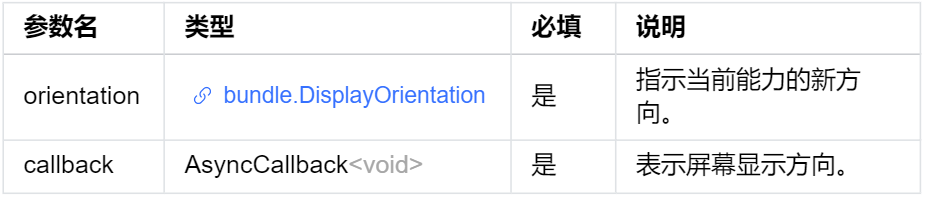 示例:
示例:
import featureAbility from '@ohos.ability.featureAbility';
import bundle from '@ohos.bundle';
//FA模型下获取context
var context = featureAbility.getContext();
var orientation = bundle.DisplayOrientation.UNSPECIFIED;
context.setDisplayOrientation(orientation, (err) => {
    console.info("setDisplayOrientation err: " + JSON.stringify(err));
});
完整代码
import bundle from '@ohos.bundle';
import featureAbility from '@ohos.ability.featureAbility';
struct Index {
message: string = '横竖屏切换 '
portrait: boolean = true
build() {
Row() {
Column() {
Text(this.message)
.fontSize(30)
.fontWeight(FontWeight.Bold).onClick(() => {
var context = featureAbility.getContext();
if (this.portrait) {
// 横屏
var orientation = bundle.DisplayOrientation.LANDSCAPE;
context.setDisplayOrientation(orientation, (err) => {
this.portrait = !this.portrait
console.info("setDisplayOrientation err: " + JSON.stringify(err));
});
} else {
//竖屏
var orientation = bundle.DisplayOrientation.PORTRAIT;
context.setDisplayOrientation(orientation, (err) => {
this.portrait = !this.portrait
console.info("setDisplayOrientation err: " + JSON.stringify(err));
});
}
})
}
.width('100%')
}
.height('100%')
}
}
上面这样写太乱了,我们可以封装一下:
import bundle from '@ohos.bundle';
import featureAbility from '@ohos.ability.featureAbility';
struct Index {
message: string = '横竖屏切换 '
portrait: boolean = true
private changePortrait() {
var context = featureAbility.getContext();
if (this.portrait) {
// 横屏
var orientation = bundle.DisplayOrientation.LANDSCAPE;
context.setDisplayOrientation(orientation, (err) => {
this.portrait = !this.portrait
console.info("setDisplayOrientation err: " + JSON.stringify(err));
});
} else {
//竖屏
var orientation = bundle.DisplayOrientation.PORTRAIT;
context.setDisplayOrientation(orientation, (err) => {
this.portrait = !this.portrait
console.info("setDisplayOrientation err: " + JSON.stringify(err));
});
}
}
build() {
Row() {
Column() {
Text(this.message)
.fontSize(30)
.fontWeight(FontWeight.Bold).onClick(() => {
this.changePortrait()
})
}
.width('100%')
}
.height('100%')
}
}
Stage模型
从API 9开始,可以使用setPreferredOrientation来切换横竖屏。文档:
https://gitee.com/openharmony/docs/blob/master/zh-cn/application-dev/reference/apis/js-apis-window.md#setpreferredorientation9
在Stage模型中,使用到的主要是Window(窗口)。在设置横竖屏切换的时候,需要先使用getLastWindow()、createWindow()、findWindow()中的任一方法获取到Window实例,再通过此实例调用对应的方法,本文使用的是getLastWindow。 Window.getLastWindow getLastWindow(ctx: BaseContext): Promise获取当前应用内最后显示的窗口,使用Promise异步回调。 系统能力: SystemCapability.WindowManager.WindowManager.Core 参数: 返回值:
返回值: 错误码:
以下错误码的详细介绍请参见窗口错误码。
错误码:
以下错误码的详细介绍请参见窗口错误码。
let windowClass = null;
try {
    let promise = window.getLastWindow(this.context);
    promise.then((data)=> {
        windowClass = data;
        console.info('Succeeded in obtaining the top window. Data: ' + JSON.stringify(data));
    }).catch((err)=>{
        console.error('Failed to obtain the top window. Cause: ' + JSON.stringify(err));
    });
} catch (exception) {
    console.error('Failed to obtain the top window. Cause: ' + JSON.stringify(exception));
}
然后就可以使用setPreferredOrientation属性。
setPreferredOrientation
setPreferredOrientation(orientation: Orientation): Promise
设置窗口的显示方向属性,使用Promise异步回调。
系统能力:
SystemCapability.WindowManager.WindowManager.Core
参数: 返回值:
返回值: 错误码:
以下错误码的详细介绍请参见窗口错误码。
错误码:
以下错误码的详细介绍请参见窗口错误码。
let orientation = window.Orientation.AUTO_ROTATION;
try {
    let promise = windowClass.setPreferredOrientation(orientation);
    promise.then(()=> {
        console.info('Succeeded in setting the window orientation.');
    }).catch((err)=>{
        console.error('Failed to set the window orientation. Cause: ' + JSON.stringify(err));
    });
} catch (exception) {
    console.error('Failed to set window orientation. Cause: ' + JSON.stringify(exception));
}
完整代码
importWindowfrom'@ohos.window'
import common from '@ohos.app.ability.common';
struct ArkUIClubTest {
private portrait: boolean = true
build() {
Stack() {
Button("横竖屏切换")
.onClick(() => {
this.changeOrientation()
})
}
.width('100%')
.height('100%')
}
private changeOrientation() {
let windowClass = null;
//获取上下文
//var context = getContext(this) as any
// 获取上下文,使用common模块
var context = getContext(this) as common.UIAbilityContext;
let promise = Window.getLastWindow(context);
promise.then((data) => {
windowClass = data;
if (this.portrait) {
//切换成横屏
let orientation = Window.Orientation.LANDSCAPE;
windowClass.setPreferredOrientation(orientation, (err) => {
});
this.portrait = !this.portrait
console.info('Succeeded in obtaining the top window. Data: ' + JSON.stringify(data));
}
else {
//切换成竖屏
let orientation = Window.Orientation.PORTRAIT;
windowClass.setPreferredOrientation(orientation, (err) => {
});
this.portrait = !this.portrait
console.info('Succeeded in obtaining the top window. Data: ' + JSON.stringify(data));
}
}).catch((err) => {
console.error('Failed to obtain the top window. Cause: ' + JSON.stringify(err));
});
}
}
总结
本文带大家使用对应的接口,在Stage模型和FA模型下完成了横竖屏的切换。其中还涉及到了上下文的获取:Stage模型用(getContext(this) as any),FA模型(featureAbility.getContext()),大家可以在此基础上利用生命周期的回调,在合适的地方完成对应的操作。
原文标题:OpenHarmony如何切换横竖屏?
文章出处:【微信公众号:OpenAtom OpenHarmony】欢迎添加关注!文章转载请注明出处。
声明:本文内容及配图由入驻作者撰写或者入驻合作网站授权转载。文章观点仅代表作者本人,不代表电子发烧友网立场。文章及其配图仅供工程师学习之用,如有内容侵权或者其他违规问题,请联系本站处理。
举报投诉
-
鸿蒙
+关注
关注
60文章
3029浏览量
46181 -
OpenHarmony
+关注
关注
33文章
3976浏览量
21365
原文标题:OpenHarmony如何切换横竖屏?
文章出处:【微信号:gh_e4f28cfa3159,微信公众号:OpenAtom OpenHarmony】欢迎添加关注!文章转载请注明出处。
发布评论请先 登录
相关推荐
热点推荐


【原创】OpenHarmony系统投屏工具软件 - OpenHarmony_OHScrcpy使用推荐
OpenHarmony_OHScrcpy - OpenHarmony投屏工具软件
OpenHarmony_OHScrcpy是一款为OpenHarmo
发表于 01-22 18:34



基于RK3568开发板显示屏调试适配方法(1)-如何在Uboot界面切换显示屏
显示屏作为电子产品不可或缺的一部分,此文档的目的在于帮助用户调试适配其它显示屏。本文档将以调试适配7寸MIPI屏为例。本文档章节安排:第一章:帮助用户如何在Uboot界面切换显示

HarmonyOS折叠屏镜头切换应用实践
在2025华为开发者大会的图片和相机分论坛上,美颜相机分享了如何通过折叠屏镜头适配,打造多端一致的拍摄体验。随着华为折叠屏产品的不断丰富,相机开发在折叠屏上也面临独特技术难题,镜头选错导致黑屏、角度
泰克示波器MSO58B光标横竖切换操作指南与实用技巧
是提升测量效率与精度的关键操作之一。本文将详细介绍MSO58B示波器的光标横竖切换方法、应用场景及实用技巧,帮助用户高效掌握这一核心功能。 一、光标切换的基本操作步骤 泰克MSO58B的光标



评论