


 【ROC-RK3568-PC开发板试用体验】全面性能测试

本文来源电子发烧友社区,作者:李先生, 帖子地址:https://bbs.elecfans.com/jishu_2304985_1_1.html
前言
板子的性能不仅仅和CPU相关,也和存储等相关,是一个综合体现,所以我们从CPU,存储,等几个关键的部分去进行性能测试。
CPU性能:Coremark跑分
git clone [https://github.com/eembc/coremark.git](https://github.com/eembc/coremark.git)
cd coremark/
单线程
打印信息如下
root@firefly:~/coremark# make ITERATIONS=100000

make XCFLAGS=" -DPERFORMANCE_RUN=1" load run1.log

make[1]: Entering directory '/root/coremark'

make port_prebuild

make[2]: Entering directory '/root/coremark'

make[2]: Nothing to be done for 'port_prebuild'.

make[2]: Leaving directory '/root/coremark'

make link

make[2]: Entering directory '/root/coremark'

cc -O2 -Ilinux -Iposix -I. -DFLAGS_STR=""-O2 -DPERFORMANCE_RUN=1  -lrt"" -DITERATIONS=100000 -DPERFORMANCE_RUN=1 core_list_join.c core_main.c core_matrix.c core_state.c core_util.c posix/core_portme.c -o ./coremark.exe -lrt

Link performed along with compile

make[2]: Leaving directory '/root/coremark'

make port_postbuild

make[2]: Entering directory '/root/coremark'

make[2]: Nothing to be done for 'port_postbuild'.

make[2]: Leaving directory '/root/coremark'

make port_preload

make[2]: Entering directory '/root/coremark'

make[2]: Nothing to be done for 'port_preload'.

make[2]: Leaving directory '/root/coremark'

echo Loading done ./coremark.exe

Loading done ./coremark.exe

make port_postload

make[2]: Entering directory '/root/coremark'

make[2]: Nothing to be done for 'port_postload'.

make[2]: Leaving directory '/root/coremark'

make port_prerun

make[2]: Entering directory '/root/coremark'

make[2]: Nothing to be done for 'port_prerun'.

make[2]: Leaving directory '/root/coremark'

./coremark.exe  0x0 0x0 0x66 100000 7 1 2000 > ./run1.log

make port_postrun

make[2]: Entering directory '/root/coremark'

make[2]: Nothing to be done for 'port_postrun'.

make[2]: Leaving directory '/root/coremark'

make[1]: Leaving directory '/root/coremark'

make XCFLAGS=" -DVALIDATION_RUN=1" load run2.log

make[1]: Entering directory '/root/coremark'

make port_preload

make[2]: Entering directory '/root/coremark'

make[2]: Nothing to be done for 'port_preload'.

make[2]: Leaving directory '/root/coremark'

echo Loading done ./coremark.exe

Loading done ./coremark.exe

make port_postload

make[2]: Entering directory '/root/coremark'

make[2]: Nothing to be done for 'port_postload'.

make[2]: Leaving directory '/root/coremark'

make port_prerun

make[2]: Entering directory '/root/coremark'

make[2]: Nothing to be done for 'port_prerun'.

make[2]: Leaving directory '/root/coremark'

./coremark.exe  0x3415 0x3415 0x66 100000 7 1 2000  > ./run2.log

make port_postrun

make[2]: Entering directory '/root/coremark'

make[2]: Nothing to be done for 'port_postrun'.

make[2]: Leaving directory '/root/coremark'

make[1]: Leaving directory '/root/coremark'

Check run1.log and run2.log for results.

See README.md for run and reporting rules.
run1.log
root@firefly:~/coremark# vi run1.log

2K performance run parameters for coremark.

CoreMark Size    : 666

Total ticks      : 14036

Total time (secs): 14.036000

Iterations/Sec   : 7124.536905

Iterations       : 100000

Compiler version : GCC9.4.0

Compiler flags   : -O2 -DPERFORMANCE_RUN=1  -lrt

Memory location  : Please put data memory location here

(e.g. code in flash, data on heap etc)

seedcrc          : 0xe9f5

[0]crclist       : 0xe714

[0]crcmatrix     : 0x1fd7

[0]crcstate      : 0x8e3a

[0]crcfinal      : 0xd340

Correct operation validated. See README.md for run and reporting rules.

CoreMark 1.0 : 7124.536905 / GCC9.4.0 -O2 -DPERFORMANCE_RUN=1  -lrt / Heap
run2.log
root@firefly:~/coremark# vi run2.log

2K validation run parameters for coremark.

CoreMark Size    : 666

Total ticks      : 14138

Total time (secs): 14.138000

Iterations/Sec   : 7073.136229

Iterations       : 100000

Compiler version : GCC9.4.0

Compiler flags   : -O2 -DPERFORMANCE_RUN=1  -lrt

Memory location  : Please put data memory location here

(e.g. code in flash, data on heap etc)

seedcrc          : 0x18f2

[0]crclist       : 0xe3c1

[0]crcmatrix     : 0x0747

[0]crcstate      : 0x8d84

[0]crcfinal      : 0x5c66

Correct operation validated. See README.md for run and reporting rules.
多线程
make XCFLAGS="-DMULTITHREAD=4 -DUSE_FORK"
打印如下
root@firefly:~/coremark# make XCFLAGS="-DMULTITHREAD=4 -DUSE_FORK"

make XCFLAGS="-DMULTITHREAD=4 -DUSE_FORK -DPERFORMANCE_RUN=1" load run1.log

make[1]: Entering directory '/root/coremark'

make port_preload

make[2]: Entering directory '/root/coremark'

make[2]: Nothing to be done for 'port_preload'.

make[2]: Leaving directory '/root/coremark'

echo Loading done ./coremark.exe

Loading done ./coremark.exe

make port_postload

make[2]: Entering directory '/root/coremark'

make[2]: Nothing to be done for 'port_postload'.

make[2]: Leaving directory '/root/coremark'

make port_prerun

make[2]: Entering directory '/root/coremark'

make[2]: Nothing to be done for 'port_prerun'.

make[2]: Leaving directory '/root/coremark'

./coremark.exe  0x0 0x0 0x66 0 7 1 2000 > ./run1.log

make port_postrun

make[2]: Entering directory '/root/coremark'

make[2]: Nothing to be done for 'port_postrun'.

make[2]: Leaving directory '/root/coremark'

make[1]: Leaving directory '/root/coremark'

make XCFLAGS="-DMULTITHREAD=4 -DUSE_FORK -DVALIDATION_RUN=1" load run2.log

make[1]: Entering directory '/root/coremark'

make port_preload

make[2]: Entering directory '/root/coremark'

make[2]: Nothing to be done for 'port_preload'.

make[2]: Leaving directory '/root/coremark'

echo Loading done ./coremark.exe

Loading done ./coremark.exe

make port_postload

make[2]: Entering directory '/root/coremark'

make[2]: Nothing to be done for 'port_postload'.

make[2]: Leaving directory '/root/coremark'

make port_prerun

make[2]: Entering directory '/root/coremark'

make[2]: Nothing to be done for 'port_prerun'.

make[2]: Leaving directory '/root/coremark'

./coremark.exe  0x3415 0x3415 0x66 0 7 1 2000  > ./run2.log

make port_postrun

make[2]: Entering directory '/root/coremark'

make[2]: Nothing to be done for 'port_postrun'.

make[2]: Leaving directory '/root/coremark'

make[1]: Leaving directory '/root/coremark'

Check run1.log and run2.log for results.

See README.md for run and reporting rules.
run1.log
root@firefly:~/coremark# vi run1.log

2K performance run parameters for coremark.

CoreMark Size    : 666

Total ticks      : 15471

Total time (secs): 15.471000

Iterations/Sec   : 28440.307672

Iterations       : 440000

Compiler version : GCC9.4.0

Compiler flags   : -O2 -DMULTITHREAD=4 -DUSE_FORK -DPERFORMANCE_RUN=1  -lrt

Parallel Fork : 4

Memory location  : Please put data memory location here

(e.g. code in flash, data on heap etc)

seedcrc          : 0xe9f5

[0]crclist       : 0xe714

[1]crclist       : 0xe714

[2]crclist       : 0xe714

[3]crclist       : 0xe714

[0]crcmatrix     : 0x1fd7

[1]crcmatrix     : 0x1fd7

[2]crcmatrix     : 0x1fd7

[3]crcmatrix     : 0x1fd7

[0]crcstate      : 0x8e3a

[1]crcstate      : 0x8e3a

[2]crcstate      : 0x8e3a

[3]crcstate      : 0x8e3a

[0]crcfinal      : 0x33ff

[1]crcfinal      : 0x33ff

[2]crcfinal      : 0x33ff

[3]crcfinal      : 0x33ff

Correct operation validated. See README.md for run and reporting rules.

CoreMark 1.0 : 28440.307672 / GCC9.4.0 -O2 -DMULTITHREAD=4 -DUSE_FORK -DPERFORMANCE_RUN=1  -lrt / Heap / 4:Fork

~
run2.log
root@firefly:~/coremark# vi run2.log

2K validation run parameters for coremark.

CoreMark Size    : 666

Total ticks      : 15582

Total time (secs): 15.582000

Iterations/Sec   : 28237.710178

Iterations       : 440000

Compiler version : GCC9.4.0

Compiler flags   : -O2 -DMULTITHREAD=4 -DUSE_FORK -DPERFORMANCE_RUN=1  -lrt

Parallel Fork : 4

Memory location  : Please put data memory location here

(e.g. code in flash, data on heap etc)

seedcrc          : 0x18f2

[0]crclist       : 0xe3c1

[1]crclist       : 0xe3c1

[2]crclist       : 0xe3c1

[3]crclist       : 0xe3c1

[0]crcmatrix     : 0x0747

[1]crcmatrix     : 0x0747

[2]crcmatrix     : 0x0747

[3]crcmatrix     : 0x0747

[0]crcstate      : 0x8d84

[1]crcstate      : 0x8d84

[2]crcstate      : 0x8d84

[3]crcstate      : 0x8d84

[0]crcfinal      : 0x0956

[1]crcfinal      : 0x0956

[2]crcfinal      : 0x0956

[3]crcfinal      : 0x0956

Correct operation validated. See README.md for run and reporting rules.
对比
https://www.eembc.org/coremark/scores.php
下搜索A55没有对应的芯片的跑分,
可以和A53对比下,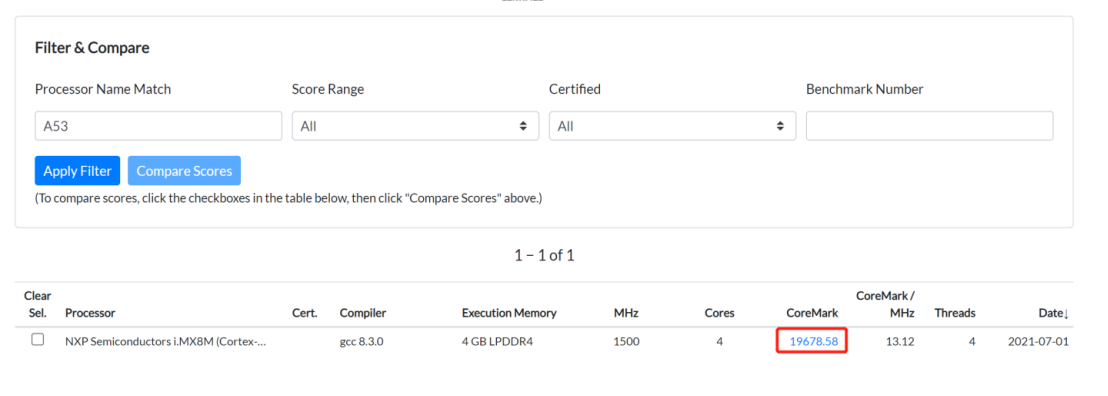
我们这里的得分28440比A53的19678还是高很多的,并且还仅是-O2优化。
计算圆周率
time echo "[scale](https://so.csdn.net/so/search?q=scale&spm=1001.2101.3001.7020)=5000; 4*a(1)" | bc -l -q
执行时间如下
real    0m47.623s

user    0m47.596s

sys     0m0.012s
RAM
带宽
参考https://www.cs.virginia.edu/stream/ref.html
git clone [https://github.com/qinyunti/STREAM.git](https://github.com/qinyunti/STREAM.git)
cd STREAM/
gcc -O3 stream.c -o stream
打印如下
root@firefly:~/coremark/STREAM# ./stream

---

STREAM version $Revision: 5.10 $

---

This system uses 8 bytes per array element.

---

Array size = 10000000 (elements), Offset = 0 (elements)

Memory per array = 76.3 MiB (= 0.1 GiB).

Total memory required = 228.9 MiB (= 0.2 GiB).

Each kernel will be executed 10 times.

The *best* time for each kernel (excluding the first iteration)

will be used to compute the reported bandwidth.

---

Your clock granularity/precision appears to be 1 microseconds.

Each test below will take on the order of 43055 microseconds.

(= 43055 clock ticks)

Increase the size of the arrays if this shows that

you are not getting at least 20 clock ticks per test.

---

WARNING -- The above is only a rough guideline.

For best results, please be sure you know the

precision of your system timer.

---

Function    Best Rate MB/s  Avg time     Min time     Max time

Copy:            6306.2     0.025627     0.025372     0.025743

Scale:           5647.5     0.028464     0.028331     0.028618

Add:             5446.5     0.044271     0.044065     0.044582

Triad:           5169.9     0.046605     0.046423     0.046989

---

Solution Validates: avg error less than 1.000000e-13 on all three arrays
压力测试
参考https://pyropus.ca./software/memtester/
wget [https://pyropus.ca./software/memtester/old-versions/memtester-4.5.1.tar.gz](https://pyropus.ca./software/memtester/old-versions/memtester-4.5.1.tar.gz)
tar -xvf memtester-4.5.1.tar.gz
cd memtester-4.5.1/
gcc -O3 memtester.c tests.c -o memtester
./memtester 512M 1
512M表示测试RAM大小
1表示测试一次
打印如下
root@firefly:~/memtester-4.5.1# ./memtester 512M 1

memtester version 4.5.1 (64-bit)

Copyright (C) 2001-2020 Charles Cazabon.

Licensed under the GNU General Public License version 2 (only).

pagesize is 4096

pagesizemask is 0xfffffffffffff000

want 512MB (536870912 bytes)

got  512MB (536870912 bytes), trying mlock ...locked.

Loop 1/1:

Stuck Address       : ok

Random Value        : ok

Compare XOR         : ok

Compare SUB         : ok

Compare MUL         : ok

Compare DIV         : ok

Compare OR          : ok

Compare AND         : ok

Sequential Increment: ok

Solid Bits          : ok

Block Sequential    : ok

Checkerboard        : ok

Bit Spread          : ok

Bit Flip            : ok

Walking Ones        : ok

Walking Zeroes      : ok

Done.
EMMC
dmesg | grep mmc
可以看到打印
1.975460] mmc3: new ultra high speed SDR104 SDIO card at address 0001

[    2.312867] mmc3:mmc host rescan start!
其中high speed SDR104表示emmc 设备支持的时钟模式:
| Speed Mode | clock (MHz) |
|---|---|
| Default Speed | 26 |
| Hight Speed SDR | 52 |
| Hight Speed DDR | 52 |
| HS200 | 200 |
| HS400 | 200 |
SDR : 单边沿采样
DDR : 双边沿采样
所以我们这里x8-bit理论最大吞吐量应该是52MB/S。
输入df回车
我们看到EMMC的/dev/mmcblk0p7挂在了目录/userdata
我们就在该目录下读写文件测试
root@firefly:~/memtester-4.5.1# df

Filesystem     1K-blocks    Used Available Use% Mounted on

udev             1984744       8   1984736   1% /dev

tmpfs             399616    1168    398448   1% /run

/dev/mmcblk0p6   2666944 2599912         0 100% /root-ro

/dev/mmcblk0p7  26999224 6355668  20627172  24% /userdata

overlayroot     26999224 6355668  20627172  24% /

tmpfs            1998060       0   1998060   0% /dev/shm

tmpfs               5120       4      5116   1% /run/lock

tmpfs            1998060       0   1998060   0% /sys/fs/cgroup

tmpfs             399612       0    399612   0% /run/user/0

tmpfs             399612       8    399604   1% /run/user/1000

root@firefly:~/memtester-4.5.1#
读
dd if=/userdata/test.bin of=/dev/null bs=块大小 count=块数量
写
dd if=/dev/zero of=/userdata/test.bin bs=块大小 count=块数量
测试记录如下
| bs/count 1GB | bs/count 1GB | 指令 | 结果 |
|---|---|---|---|
| 读 | 16k/65536 | dd if=/userdata/test.bin of=/dev/null bs=16k count=65536 iflag=direct | 36.5 MB/s |
| 4k/262144 | dd if=/userdata/test.bin of=/dev/null bs=4k count=262144 iflag=direct | 14.7 MB/s | |
| 1k/1048576 | dd if=/userdata/test.bin of=/dev/null bs=1k count=10485764 iflag=direct | 2.2 MB/s | |
| 写 | 16k/65536 | dd if=/dev/zero of=/userdata/test.bin bs=16k count=65536 conv=fdatasync | 118 MB/s |
| 4k/262144 | dd if=/dev/zero of=/userdata/test.bin bs=4k count=262144 conv=fdatasync | 112 MB/s | |
| 1k/1048576 | dd if=/dev/zero of=/userdata/test.bin bs=1k count=1048576 conv=fdatasync | 64.6 MB/s |
QT
sudo apt-get install qt5-default qtcreator
直接板上使用qtcreator开发,操作也比较流畅
GPU
sudo apt install glmark2
运行
输入glmark2回车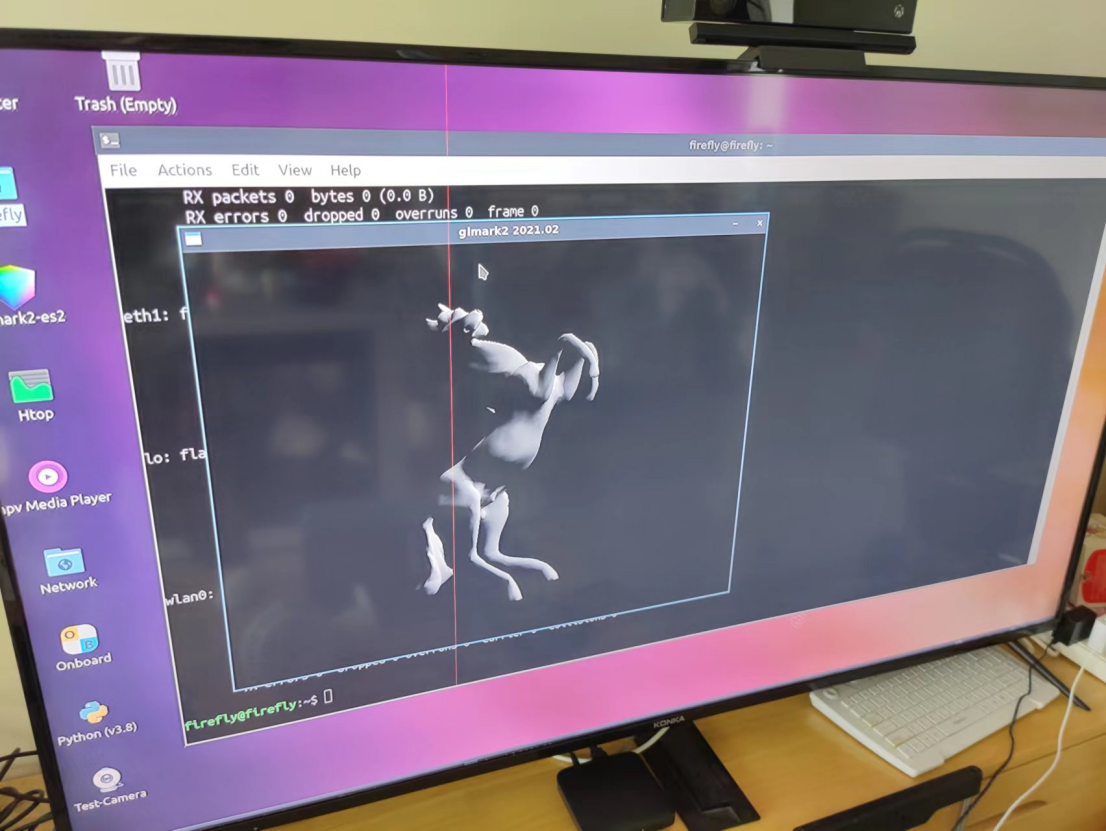
最终得分
=======================================================


glmark2 Score: 49

=======================================================
视频硬件编解码
/usr/local/test.mp4
1080P, 24Fps, H264
播放流畅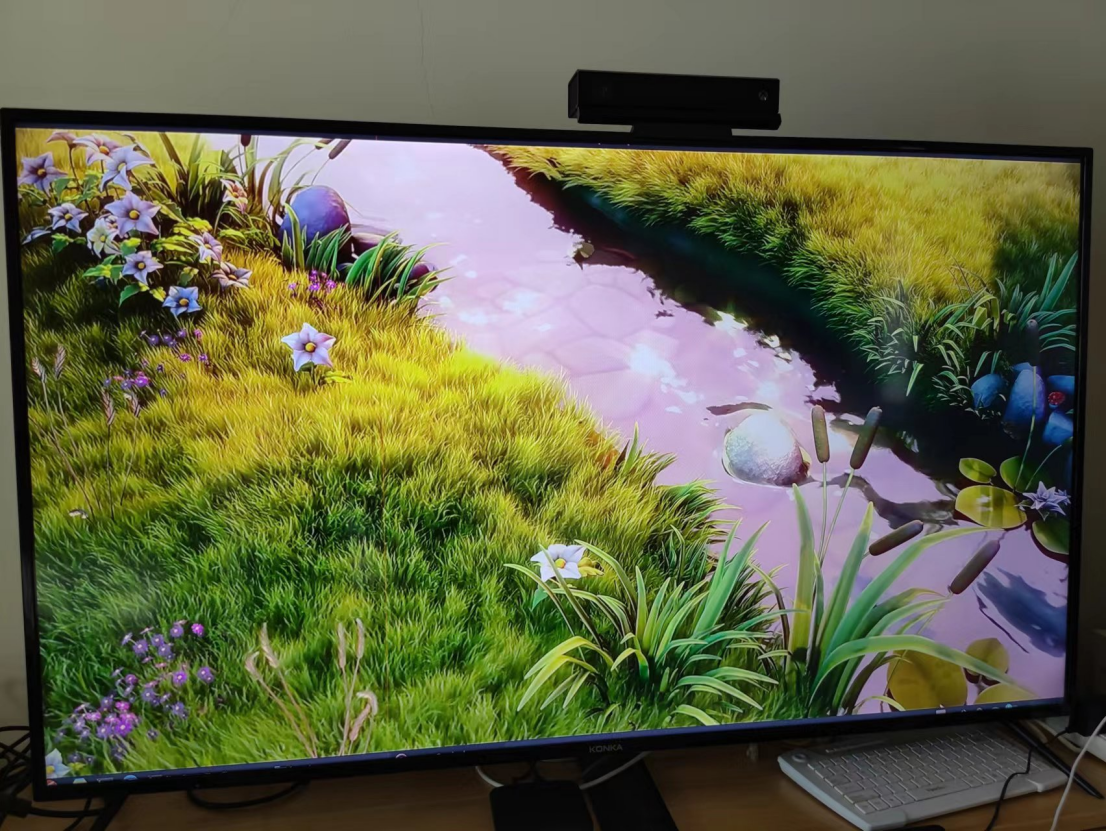
总结
综合各方面,该开发板性能都非常不错,特别适合人机交互,AI,边缘计算等高性能要求的场景。
-
RK3568
+关注
关注
5文章
657浏览量
8196 -
开发板试用
+关注
关注
3文章
303浏览量
2805
发布评论请先 登录
迅为电子RK3568+RK3588开发板资料焕新升级!多维度优化助力开发者效率提升
【迅为工业RK3568稳定可靠】itop-3568开发板Linux驱动开发实战:RK3568内核模块符号导出详解

飞凌嵌入式RK3568开发板的TFTP烧写文件系统指南

【迅为工业RK3568稳定可靠】itop-3568开发板驱动开发第4章驱动模块传参实验

【HZ-RK3568开发板免费体验】1、开发板资源、SDK使用和镜像烧写
RK3568开发板暗藏32位兼容开关?飞凌嵌入式带你一键解锁!

【HZ-RK3568开发板免费体验】合众HZ-RK3568开发板测评
【HZ-RK3568开发板免费体验】HZ-RK3568开发板初步接触
迅为RK3568开发板驱动指南GPIO子系统GPIO子系统API函数的引入



评论