


 怎样在Finder文件夹中创建一个快速文本文件

步骤1:将AppleScript图标添加到OSX菜单栏
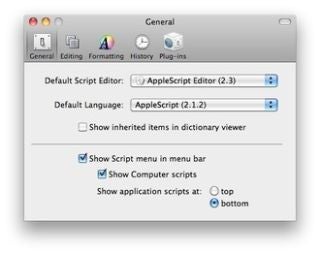
在AppleScript编辑器内部(在OSX应用程序-实用工具中)转到首选项-常规,然后选中
[x]菜单栏中的显示脚本菜单
步骤2:将此脚本添加到用户脚本中
-- H.Zimmerman, AppleScript.
-- Create text file in current Finder folder with a dialog.
tell application “Finder”
try
display dialog “name of doc please (without the .txt thing)” default answer “”
set fileName to the text returned of result
if length of fileName = 0 then
return 0
end if
set fileExt to “.txt”
set thisFolder to the target of the front window as alias
set newFile to fileName & fileExt
make new file at thisFolder with properties {name:newFile, file type:“TEXT”, creator type:“ttxt”}
on error errMsg
display dialog (errMsg)
end try
end tell
步骤3:创建文本文件
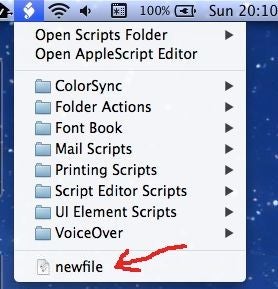
在相应的 Finder 文件夹中,只需选择刚添加的菜单项,输入名称,文件即已存在。双击它将打开熟悉的文本编辑。
责任编辑:wv
-
编辑器
+关注
关注
1文章
829浏览量
33061
发布评论请先 登录
飞凌嵌入式ElfBoard-Linux系统中的文件分类
VS Code 中`xiaozhi-esp32` 项目文件夹 修改 I2C 设备地址为 `0x78`
飞凌嵌入式ElfBoard-标准IO接口之读文件
QEMU快速上手(Win),源码文件夹对不上是为什么?
请问bsp文件夹中各芯片厂商的外设drv文件都是由芯片厂商自己开发的吗?
在对庐山派K230的SD卡data文件夹进行删除和新件文件夹时无法操作,且训练时线程异常,怎么解决?
迅为RK3588开发板Android13系统挂载samba共享文件夹-怎么开启Windows共享目
KT142A 语音芯片插播功能使用指南及文件存储命名规则



评论