


 Arduino Nano 和 NodeMCU ESP8266 读取 DHT11 环境温湿度数据及 OLED显示

Arduino Nano 开发板
引脚定义
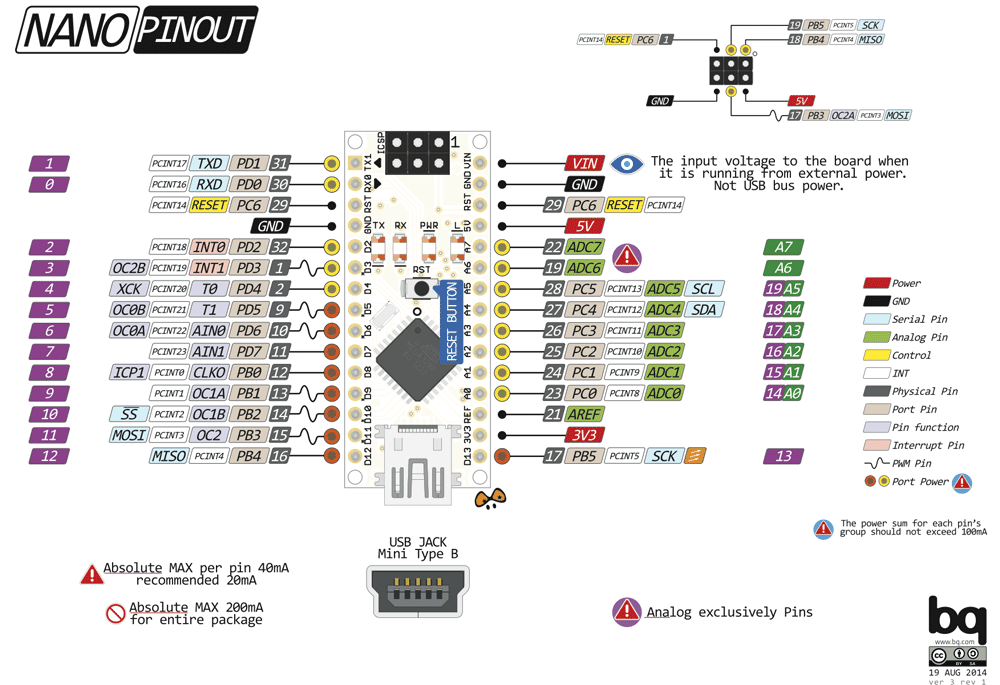
实物展示

代码
/*
https://breakrow.com/miliohm/temperature-and-humidity-sensor-dht11-with-arduino-tutorial-make-oled-termometer/
10 - DHT11 pin
OLED:
SDA - SDA
SCL - SCL
*/
#include < SPI.h >
#include < Wire.h >
#include < Adafruit_GFX.h >
#include < Adafruit_SSD1306.h >
#include < Fonts/FreeMonoBold18pt7b.h >
#include "DHT.h"
#define DHTPIN 10 // data connection pin of DHT11
#define DHTTYPE DHT11 // DHT 11
DHT dht(DHTPIN, DHTTYPE);
int h;
int t;
#define SCREEN_WIDTH 128 // OLED display width, in pixels
#define SCREEN_HEIGHT 64 // OLED display height, in pixels
// Declaration for an SSD1306 display connected to I2C (SDA, SCL pins)
#define OLED_RESET 4 // Reset pin # (or -1 if sharing Arduino reset pin)
Adafruit_SSD1306 display(SCREEN_WIDTH, SCREEN_HEIGHT, &Wire, OLED_RESET);
#define bitmap_height 128
#define bitmap_width 64
static const unsigned char PROGMEM logo_bmp[] =
{ 0x00, 0x00, 0x00, 0x00, 0xFF, 0x80, 0x00, 0x00, 0x00, 0x00, 0x00, 0x00, 0x00, 0x00, 0x00, 0x00,
0x00, 0x00, 0x00, 0x00, 0x3F, 0x80, 0x00, 0x00, 0x00, 0x00, 0x00, 0x00, 0x00, 0x00, 0x00, 0x00,
0x00, 0x00, 0x00, 0x00, 0x1F, 0xC0, 0x00, 0x00, 0x00, 0x00, 0x00, 0x00, 0x00, 0x00, 0x00, 0x00,
0x00, 0x00, 0x00, 0x0F, 0x8F, 0xC0, 0x00, 0x00, 0x00, 0x00, 0x00, 0x00, 0x00, 0x00, 0x00, 0x00,
0x00, 0x00, 0x00, 0x08, 0x0F, 0xC0, 0x00, 0x00, 0x00, 0x00, 0x00, 0x00, 0x00, 0x00, 0x00, 0x00,
0x00, 0x00, 0x00, 0x08, 0x0F, 0xC0, 0x00, 0x00, 0x00, 0x00, 0x00, 0x00, 0x00, 0x00, 0x00, 0x00,
0x00, 0x00, 0x00, 0x08, 0x0F, 0xC0, 0x00, 0x00, 0x00, 0x00, 0x00, 0x00, 0x00, 0x00, 0x00, 0x00,
0x00, 0x00, 0x00, 0x78, 0x0F, 0xC0, 0x00, 0x00, 0x00, 0x00, 0x00, 0x00, 0x00, 0x00, 0x00, 0x00,
0x00, 0x00, 0x00, 0x08, 0x0F, 0xC0, 0x00, 0x00, 0x00, 0x00, 0x00, 0x00, 0x00, 0x00, 0x00, 0x00,
0x00, 0x00, 0x80, 0x08, 0x00, 0x40, 0x00, 0x00, 0x00, 0x00, 0x00, 0x00, 0x00, 0x00, 0x00, 0x00,
0x00, 0x01, 0x80, 0x78, 0x00, 0x40, 0x00, 0x00, 0x00, 0x00, 0x00, 0x00, 0x00, 0x00, 0x00, 0x00,
0x00, 0x01, 0x80, 0x08, 0x03, 0xC0, 0x00, 0x00, 0x00, 0x00, 0x00, 0x00, 0x00, 0x00, 0x00, 0x00,
0x00, 0x01, 0xC0, 0x08, 0x0F, 0xC0, 0x00, 0x00, 0x00, 0x00, 0x00, 0x00, 0x00, 0x00, 0x00, 0x00,
0x00, 0x01, 0xC0, 0x78, 0x03, 0xC0, 0x00, 0x00, 0x00, 0x00, 0x00, 0x00, 0x00, 0x00, 0x00, 0x00,
0x00, 0x01, 0xC0, 0x78, 0x07, 0xC0, 0x00, 0x00, 0x00, 0x00, 0x00, 0x00, 0x00, 0x00, 0x00, 0x00,
0x00, 0x03, 0xC0, 0x08, 0x0F, 0xC0, 0x00, 0x00, 0x00, 0x00, 0x00, 0x00, 0x00, 0x00, 0x00, 0x00,
0x00, 0x03, 0xE0, 0x08, 0x03, 0xC0, 0x00, 0x00, 0x00, 0x00, 0x00, 0x00, 0x00, 0x00, 0x00, 0x00,
0x00, 0x07, 0xE0, 0x78, 0x0F, 0xC0, 0x00, 0x00, 0x00, 0x00, 0x00, 0x00, 0x00, 0x00, 0x00, 0x00,
0x00, 0x07, 0xF0, 0x08, 0x03, 0xC0, 0x00, 0x00, 0x00, 0x00, 0x00, 0x00, 0x00, 0x00, 0x00, 0x00,
0x00, 0x0F, 0xF0, 0x08, 0x00, 0x40, 0x00, 0x00, 0x00, 0x00, 0x00, 0x00, 0x00, 0x00, 0x00, 0x00,
0x00, 0x0F, 0xF8, 0x78, 0x00, 0x40, 0x00, 0x00, 0x00, 0x00, 0x00, 0x00, 0x00, 0x00, 0x00, 0x00,
0x00, 0x1F, 0xF8, 0x08, 0x03, 0xC0, 0x00, 0x00, 0x00, 0x00, 0x00, 0x00, 0x00, 0x00, 0x00, 0x00,
0x00, 0x1F, 0xF8, 0x08, 0x0F, 0xC0, 0x00, 0x00, 0x00, 0x00, 0x00, 0x00, 0x00, 0x00, 0x00, 0x00,
0x00, 0x3F, 0xFC, 0x78, 0x03, 0xC0, 0x00, 0x00, 0x00, 0x00, 0x00, 0x00, 0x00, 0x00, 0x00, 0x00,
0x00, 0x3F, 0xFE, 0x08, 0x03, 0xC0, 0x00, 0x00, 0x00, 0x00, 0x00, 0x00, 0x00, 0x00, 0x00, 0x00,
0x00, 0x7F, 0xFE, 0x0F, 0x8F, 0xC0, 0x00, 0x00, 0x00, 0x00, 0x00, 0x00, 0x00, 0x00, 0x00, 0x00,
0x00, 0x7F, 0xFF, 0x7F, 0x83, 0xC0, 0x00, 0x00, 0x00, 0x00, 0x00, 0x00, 0x00, 0x00, 0x00, 0x00,
0x00, 0xFF, 0xFF, 0x0F, 0x83, 0xC0, 0x00, 0x00, 0x00, 0x00, 0x00, 0x00, 0x00, 0x00, 0x00, 0x00,
0x00, 0xFF, 0xFF, 0x0F, 0x83, 0xC0, 0x00, 0x00, 0x00, 0x00, 0x00, 0x00, 0x00, 0x00, 0x00, 0x00,
0x01, 0xFF, 0xFF, 0x7F, 0x80, 0x40, 0x00, 0x00, 0x00, 0x00, 0x00, 0x00, 0x00, 0x00, 0x00, 0x00,
0x03, 0xFF, 0xFF, 0x0F, 0x8F, 0xC0, 0x00, 0x00, 0x00, 0x00, 0x00, 0x00, 0x00, 0x00, 0x00, 0x00,
0x03, 0xFF, 0xFF, 0x0F, 0x87, 0xC0, 0x00, 0x00, 0x00, 0x00, 0x00, 0x00, 0x00, 0x00, 0x00, 0x00,
0x03, 0xFF, 0xFF, 0x1F, 0x8F, 0xC0, 0x00, 0x00, 0x00, 0x00, 0x00, 0x00, 0x00, 0x00, 0x00, 0x00,
0x07, 0xFF, 0xFF, 0x7F, 0x83, 0xC0, 0x00, 0x00, 0x00, 0x00, 0x00, 0x00, 0x00, 0x00, 0x00, 0x00,
0x0F, 0xFF, 0xFF, 0x0F, 0x83, 0xC0, 0x00, 0x00, 0x00, 0x00, 0x00, 0x00, 0x00, 0x00, 0x00, 0x00,
0x0F, 0xFF, 0xFF, 0x0F, 0x8F, 0xC0, 0x00, 0x00, 0x00, 0x00, 0x00, 0x00, 0x00, 0x00, 0x00, 0x00,
0x1F, 0xFF, 0xFF, 0x7F, 0x83, 0xC0, 0x00, 0x00, 0x00, 0x00, 0x00, 0x00, 0x00, 0x00, 0x00, 0x00,
0x1F, 0xFF, 0xFF, 0x0F, 0x8F, 0xC0, 0x00, 0x00, 0x00, 0x00, 0x00, 0x00, 0x00, 0x00, 0x00, 0x00,
0x1F, 0x0F, 0xF3, 0xEF, 0x83, 0xC0, 0x00, 0x00, 0x00, 0x00, 0x00, 0x00, 0x00, 0x00, 0x00, 0x00,
0x3E, 0x03, 0xE7, 0xCF, 0xC0, 0x40, 0x00, 0x00, 0x00, 0x00, 0x00, 0x00, 0x00, 0x00, 0x00, 0x00,
0x3C, 0x61, 0xC7, 0x9F, 0xE0, 0x40, 0x00, 0x00, 0x00, 0x00, 0x00, 0x00, 0x00, 0x00, 0x00, 0x00,
0x7C, 0x71, 0xCF, 0xBF, 0xE3, 0xC0, 0x00, 0x00, 0x00, 0x00, 0x00, 0x00, 0x00, 0x00, 0x00, 0x00,
0x7C, 0x71, 0xCF, 0xBF, 0xF3, 0xC0, 0x00, 0x00, 0x00, 0x00, 0x00, 0x00, 0x00, 0x00, 0x00, 0x00,
0x7C, 0x71, 0x9F, 0xBF, 0xE3, 0xC0, 0x00, 0x00, 0x00, 0x00, 0x00, 0x00, 0x00, 0x00, 0x00, 0x00,
0xFC, 0x71, 0x3F, 0xBF, 0xE3, 0xC0, 0x00, 0x00, 0x00, 0x00, 0x00, 0x00, 0x00, 0x00, 0x00, 0x00,
0xFC, 0x71, 0x38, 0x1F, 0xE7, 0xC0, 0x00, 0x00, 0x00, 0x00, 0x00, 0x00, 0x00, 0x00, 0x00, 0x00,
0xFC, 0x02, 0x20, 0x0F, 0x87, 0xC0, 0x00, 0x00, 0x00, 0x00, 0x00, 0x00, 0x00, 0x00, 0x00, 0x00,
0xFE, 0x06, 0x46, 0x03, 0x0F, 0xC0, 0x00, 0x00, 0x00, 0x00, 0x00, 0x00, 0x00, 0x00, 0x00, 0x00,
0xFF, 0x8C, 0xC7, 0x18, 0x1F, 0xC0, 0x00, 0x00, 0x00, 0x00, 0x00, 0x00, 0x00, 0x00, 0x00, 0x00,
0xFF, 0xFC, 0xC7, 0x1C, 0x7F, 0x80, 0x00, 0x00, 0x00, 0x00, 0x00, 0x00, 0x00, 0x00, 0x00, 0x00,
0xFF, 0xF9, 0xC7, 0x1C, 0x7F, 0x00, 0x00, 0x00, 0x00, 0x00, 0x00, 0x00, 0x00, 0x00, 0x00, 0x00,
0xFF, 0xF9, 0xC7, 0x1E, 0x00, 0x00, 0x00, 0x00, 0x00, 0x00, 0x00, 0x00, 0x00, 0x00, 0x00, 0x00,
0x7F, 0xF3, 0xC6, 0x1F, 0x00, 0x00, 0x00, 0x00, 0x00, 0x00, 0x00, 0x00, 0x00, 0x00, 0x00, 0x00,
0x7F, 0xE3, 0xC0, 0x3E, 0x00, 0x00, 0x00, 0x00, 0x00, 0x00, 0x00, 0x00, 0x00, 0x00, 0x00, 0x00,
0x7F, 0xE7, 0xE0, 0x7E, 0x00, 0x00, 0x00, 0x00, 0x00, 0x00, 0x00, 0x00, 0x00, 0x00, 0x00, 0x00,
0x3F, 0xFF, 0xFF, 0xFC, 0x00, 0x00, 0x00, 0x00, 0x00, 0x00, 0x00, 0x00, 0x00, 0x00, 0x00, 0x00,
0x1F, 0xFF, 0xFF, 0xFC, 0x00, 0x00, 0x00, 0x00, 0x00, 0x00, 0x00, 0x00, 0x00, 0x00, 0x00, 0x00,
0x1F, 0xFF, 0xFF, 0xF8, 0x00, 0x00, 0x00, 0x00, 0x00, 0x00, 0x00, 0x00, 0x00, 0x00, 0x00, 0x00,
0x0F, 0xFF, 0xFF, 0xF0, 0x00, 0x00, 0x00, 0x00, 0x00, 0x00, 0x00, 0x00, 0x00, 0x00, 0x00, 0x00,
0x07, 0xFF, 0xFF, 0xE0, 0x00, 0x00, 0x00, 0x00, 0x00, 0x00, 0x00, 0x00, 0x00, 0x00, 0x00, 0x00,
0x03, 0xFF, 0xFF, 0xC0, 0x00, 0x00, 0x00, 0x00, 0x00, 0x00, 0x00, 0x00, 0x00, 0x00, 0x00, 0x00,
0x00, 0x7F, 0xFF, 0x00, 0x00, 0x00, 0x00, 0x00, 0x00, 0x00, 0x00, 0x00, 0x00, 0x00, 0x00, 0x00,
0x00, 0x1F, 0xFC, 0x00, 0x00, 0x00, 0x00, 0x00, 0x00, 0x00, 0x00, 0x00, 0x00, 0x00, 0x00, 0x00,
0x00, 0x03, 0xE0, 0x00, 0x00, 0x00, 0x00, 0x00, 0x00, 0x00, 0x00, 0x00, 0x00, 0x00, 0x00, 0x00
};
void setup() {
Serial.begin(9600);
dht.begin();
// SSD1306_SWITCHCAPVCC = generate display voltage from 3.3V internally
if (!display.begin(SSD1306_SWITCHCAPVCC, 0x3C)) { // Address 0x3D for 128x64
Serial.println(F("SSD1306 allocation failed"));
for (;;); // Don't proceed, loop forever
}
// Clear the buffer
display.clearDisplay();
printText();
delay(1500);
}
void loop() {
h = dht.readHumidity();
t = dht.readTemperature();
if (isnan(h) || isnan(t)) {
Serial.println("Failed to read from DHT sensor!");
return;
}
showBitmap();
printText();
display.display();
delay(500);
display.clearDisplay();
}
void printText() {
display.setFont(&FreeMonoBold18pt7b);
display.setTextColor(WHITE); // Draw white text
display.setCursor(45, 28); // Start at top-left corner
display.print(t);
display.drawCircle(92, 8, 3, WHITE);
display.setCursor(100, 27);
display.print("C");
display.setCursor(45, 62);
display.print(h);
display.print("%");
}
void showBitmap(void) {
display.drawBitmap(0, 0, logo_bmp, bitmap_height, bitmap_width, WHITE);
//display.display();
}
视频效果
NodeMCU ESP8266 开发板
引脚定义

实物展示

代码
/*
https://cloud.tencent.com/developer/article/1688146
GPIO0 (D3) - DHT11 pin
GPIO4 (D2) - SDA
GPIO5 (D1) - SCL
*/
#include < Wire.h >
#include < Adafruit_GFX.h >
#include < Adafruit_SSD1306.h >
#include < Adafruit_Sensor.h >
#include < DHT.h >
#define SCREEN_WIDTH 128 // OLED display width, in pixels
#define SCREEN_HEIGHT 64 // OLED display height, in pixels
// Declaration for an SSD1306 display connected to I2C (SDA, SCL pins)
Adafruit_SSD1306 display(SCREEN_WIDTH, SCREEN_HEIGHT, &Wire, -1);
#define DHTPIN 0 // Digital pin connected to the DHT sensor : GPIO0 - D3
// Uncomment the type of sensor in use:
#define DHTTYPE DHT11 // DHT 11
//#define DHTTYPE DHT22 // DHT 22 (AM2302)
//#define DHTTYPE DHT21 // DHT 21 (AM2301)
DHT dht(DHTPIN, DHTTYPE);
void setup() {
Serial.begin(9600);
dht.begin();
if(!display.begin(SSD1306_SWITCHCAPVCC, 0x3C)) {
Serial.println(F("SSD1306 allocation failed"));
for(;;);
}
delay(2000);
display.clearDisplay();
display.setTextColor(WHITE);
}
void loop() {
delay(2000);
//read temperature and humidity
float t = dht.readTemperature();
float h = dht.readHumidity();
if (isnan(h) || isnan(t)) {
Serial.println("Failed to read from DHT sensor!");
}
// clear display
display.clearDisplay();
// display temperature
display.setTextSize(1);
display.setCursor(0,0);
display.print("Temperature: ");
display.setTextSize(2);
display.setCursor(0,17);
display.print(t);
display.print(" ");
display.setTextSize(1);
display.cp437(true);
display.write(167);
display.setTextSize(2);
display.print("C");
// display humidity
display.setTextSize(1);
display.setCursor(0, 35);
display.print("Humidity: ");
display.setTextSize(2);
display.setCursor(0, 45);
display.print(h);
display.print(" %");
display.display();
}
审核编辑 黄宇
声明:本文内容及配图由入驻作者撰写或者入驻合作网站授权转载。文章观点仅代表作者本人,不代表电子发烧友网立场。文章及其配图仅供工程师学习之用,如有内容侵权或者其他违规问题,请联系本站处理。
举报投诉
-
OLED
+关注
关注
121文章
6370浏览量
234261 -
开发板
+关注
关注
26文章
6413浏览量
120711 -
Arduino
+关注
关注
190文章
6527浏览量
197441 -
DHT11
+关注
关注
19文章
278浏览量
59977
发布评论请先 登录
相关推荐
热点推荐
【RA-Eco-RA4M2开发板评测】+ OLED显示DHT11数据
按键、2个触摸按键、3个高亮 LED。
之前完成了OLED显示的测评现在进行DHT11传感器数据采集,然后显示,
发表于 03-29 19:49
使用STM32F103ZET6采集DHT11温湿度串口显示
DHT11是一款数字温湿度传感器,DHT11是一款含有已校准数字信号输出的温湿度复合传感器。它应用专用的数字模块采集技术和温湿度传感技术,确
【CW32F030CxTx StartKit测评】驱动OLED和DHT11
?
已经实现了OLED的驱动,这里测试一下如何读取温湿度传感器DHT11。具体怎么读取温湿度
发表于 01-30 07:55
【瑞萨FPB-RA6E2试用】【瑞萨FPB-RA6E2】Zephyr-驱动-DHT11-温湿度传感器及设备树理解
DHT11、DHT22)周期性地读取环境温度和相对湿度数据。该示例采用轮询(polling)方式获取传感器
发表于 01-13 14:54
【瑞萨RA6E2地奇星开发板试用】串口通信+DHT11测量温湿度
实现效果如上视频。
首先先要了解DHT11温湿度传感器的原理。
DHT11温湿度传感器DHT11包括一个电阻式感湿元件和一个NTC测温元件。
发表于 12-26 18:23
【瑞萨RA6E2地奇星开发板试用】DHT11 测量温湿度
使用瑞萨 RA6E2 微控制器,实现 DHT11 温湿度传感器的数据采集,并通过 I2C 接口的 OLED12864 显示屏实时
发表于 12-19 18:50
【瑞萨RA6E2地奇星开发板试用】串口打印DHT11温湿度数据
【瑞萨RA6E2地奇星开发板试用】串口打印DHT11温湿度数据
本文介绍了 RA6E2 地奇星开发板驱动 DHT11 传感器实现串口打印环境温湿度数
发表于 12-07 16:20
RA-Eco-RA6M4部分功能测评2
与多端显示
在完成RA-Eco-RA6M4开发板的串口通信与OLED显示功能调试后,本次实践将进一步集成DHT11温湿度传感器,通过单总线通
发表于 09-05 20:42
【RA-Eco-RA6M4开发板评测】DHT11温湿度传感器获取+OLED 屏幕显示
【简介】
本项目使用瑞萨的RA6M4开发板作为控制和数据处理的单元,使用温湿度传感器去监测周围的环境参数,在OLED 屏幕上完成传感器数据和
发表于 08-26 00:10
【RA-Eco-RA6M4开发板评测】uart+OLED+DHT11
连接好环境,DHT11的DAT引脚与GPIO301相连接,在e2studio上配置相关信息,将获取到的温湿度信息通过OLED和串口显示出来
发表于 07-27 17:21
STM32+esp8266连接机智云,上传温湿度数据并控制继电器开关(平台配置、代码生成、代码移植)
本教程将详细介绍如何将STM32微控制器与ESP8266Wi-Fi模块连接到机智云平台,实现温湿度数据的上传与继电器的远程控制。通过此过程,您将学会如何配置机智云平台,烧录ESP8266固件,移植

常见的温湿度传感器类型?
),温度精度为±0.2℃(典型)。湿度和温度数据可以通过MCU、蓝牙芯片或SoC芯片通过数字接口直接读取。它与SMBus、I2C接口兼容。非常适合用于暖通空调、环境监测等。
在选择
发表于 06-24 09:24
【RA4L1-SENSOR】DHT11测温湿度OLED显示
为I2C接口,开漏输出
P107 设置为 DHT11 单总线接口
OLED 驱动代码如下:
void OLED_SSD1306_Init(void)
{
u8 i
发表于 06-12 11:02
用树莓派RP2350 DIY 桌面动态温湿度计
桌面动态温湿度计本文介绍了DFrobotBeetleRP2350开发板结合DHT11模块、锂电池模块、随机眨眼动画,实现OLED显示的桌面动态温湿度

【RA-Eco-RA4M2开发板评测】DHT11测温湿度OLED显示
为 DHT11 单总线接口
OLED 驱动代码如下:
void OLED_SSD1306_Init(void)
{
u8 i;
OLED_SSD1306_IIC_Init();
发表于 05-11 13:53



评论