


 NanoBeacon™ BLE扫描器教程(第二部分)

在本系列的上一篇教程中,我们介绍了最近发布的NanoBeacon BLE扫描器移动应用程序,包括移动应用程序的概述、从哪里安装、如何使用它从NanoBeacon 配置工具桌面应用程序导入IN100配置等。
In this tutorial, we will cover the following:
在本教程中,我们将介绍以下内容:
A detailed look into device filters
对设备过滤器的详细了解
Differences between the iOS and Android versions of the app
该应用程序的iOS和Android版本之间的差异
Let’s get started!
让我们开始吧!
Device Filters 设备过滤器
Here’s a look at the various filters available within the app for filtering for specific devices:
下面我们来看看应用程序中可用于过滤特定设备的各种过滤器:
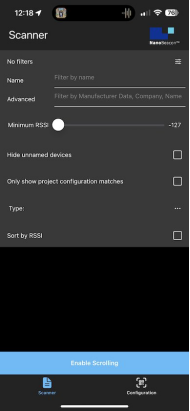
To recap, the available filters are:
简而言之,可用的过滤器是:
Name: this allows you to filter by device name.
名称:这允许你按设备名称过滤。
Advanced: allows you to filter by raw data included in the advertising data, company name, etc.
高级:允许你按广播数据中包含的原始数据、公司名称等进行过滤。
On Android, filtering by Bluetooth Address is possible (iOS does not expose the device’s Bluetooth address).
在安卓系统上,可以通过蓝牙地址进行过滤(iOS系统不暴露设备的蓝牙地址)。
Minimum RSSI: this allows you to filter out devices that are discovered with an RSSI lower than the set value.
最小RSSI:这允许你过滤掉那些发现的RSSI低于设定值的设备。
Hide unnamed devices: this allows you to hide devices that donotadvertise a device name.
隐藏未命名的设备:这允许你隐藏那些没有公布设备名称的设备。
Only show project configuration matches:this allows you to show only devices that match the imported IN100 configuration (via scanning the QR code from the NanoBeacon Config Tool app).
只显示项目配置匹配:这允许你只显示与导入的IN100配置匹配的设备(通过扫描NanoBeacon配置工具应用程序的QR码)。
Sort by RSSI: this allows you to sort the list of devices by detected RSSI (starting with the device with the strongest signal).
按RSSI排序: 这允许你按检测到的RSSI对设备列表进行排序(从信号最强的设备开始)。
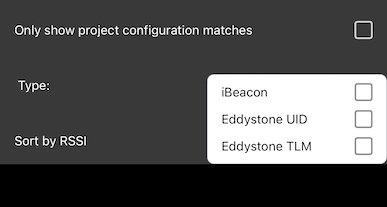
Type:allows you to show any combination of iBeacon, Eddystone UID, and Eddystone TLM advertising devices (while excluding other non-selected devices), as shown below:
类型:允许你显示iBeacon、Eddystone UID和Eddystone TLM广播设备的任何组合(同时排除其他未选择的设备),如下所示:
Let’s dig into each of these in more detail.
让我们更详细地挖掘其中的每一点。
Device Name and Unnamed Devices
设备名称和未命名的设备
When scanning for advertising BLE devices, you will typically see dozens of devices being discovered. This can make it challenging to find the device of interest. To address this (and if you know the device name), you can type in a portion of the device name (case-sensitive), and the scanner will only display the devices that match the entered device name.
在扫描广播BLE设备时,你通常会看到有几十个设备被发现。这可能会使找到感兴趣的设备成为一种挑战。为了解决这个问题(如果您知道设备名称),您可以输入设备名称的一部分(区分大小写),扫描器将只显示与输入的设备名称相符的设备。
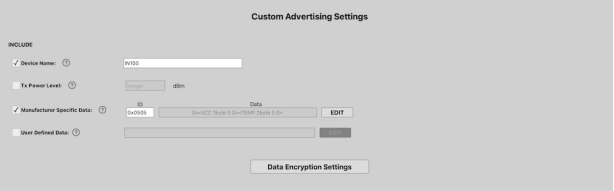
For example, here I’ve set up an IN100 with one advertising set (custom data type), and I’ve set the device name to be “IN100”:
例如,在这里我设置了一个IN100的广播集(自定义数据类型),我将设备名称设置为 "IN100":
In the scanner view, the device will show up but among tens of other devices, making it challenging to find. Let’s add a device name filter to make it easier to find:
在扫描器视图中,该设备将显示出来,但在几十个其他设备中,使其难以找到。让我们添加一个设备名称过滤器,使其更容易找到:
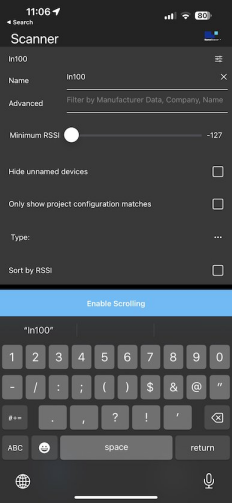
Once we enter the device name filter, we can click to the filter icon to go back to the scanner view. In the scanner view, we should be able to see the device now without all the other devices:
一旦我们输入了设备名称过滤器,我们就可以点击过滤器图标回到扫描仪视图。在扫描器视图中,我们现在应该能够看到这个设备,而没有其他所有的设备:
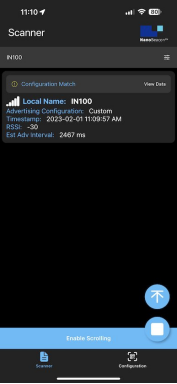
This also works by entering partial strings, for example “IN”.
这也可以通过输入部分字符串来实现,例如 "IN"。
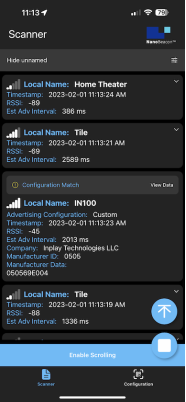
Another useful filter is the “Hide unnamed devices” checkbox. Once that’s checked, the scanner will only display devices that have included a device name in the advertising data:
另一个有用的过滤器是 "隐藏未命名的设备 "复选框。一旦选中,扫描器将只显示在广播数据中包含设备名称的设备:
Sorting by RSSI and Min RSSI
按RSSI和最小RSSI排序
Two other useful filters are the “Sort by RSSI” and “Minimum RSSI” filters.
另外两个有用的过滤器是 "按RSSI排序 "和 "最小RSSI "过滤器。
“Minimum RSSI” is helpful for filtering out devices that are too far and that typically add clutter to the scan results. For relatively nearby devices, we recommend discovering devices with an RSSI of -70 or greater. This will ensure you are only looking at devices that are in proximity to your smartphone.
"最小RSSI "有助于过滤掉太远的设备,这些设备通常会给扫描结果带来混乱。对于相对较近的设备,我们建议发现RSSI为-70或更高的设备。这将确保你只看到与你的智能手机相近的设备。
Once you’ve set the minimum RSSI, it is also helpful to utilize the “Sort by RSSI” filter, which allows you to see a sorted list of discovered devices starting with the highest RSSI.
一旦你设置了最低RSSI,利用 "按RSSI排序 "过滤器也是很有帮助的,它可以让你看到一个从最高RSSI开始的已发现设备的排序列表。
Here’s an example screenshot showing the results:
下面是一个显示结果的屏幕截图示例:
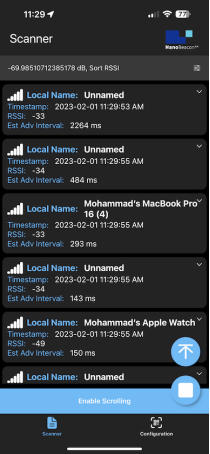
As you can see, the devices are sorted by RSSI in descending order.
你可以看到,设备是按RSSI降序排序的。
Type Filter 类型过滤器
With the “Type” filter, you can ensure that only specific devices (iBeacon, Eddystone TLM, and Eddystone UID) are being listed in scanner view. You can select one or more of these types to show matching devices. The selected type is the only one that will be matched in the list. For example, selecting “Eddystone TLM” will only show Eddystone TLM advertising devices.
通过 "类型 "过滤器,你可以确保只有特定的设备(iBeacon、Eddystone TLM和Eddystone UID)被列在扫描仪视图中。你可以选择这些类型中的一个或多个来显示匹配的设备。所选的类型是列表中唯一会被匹配的类型。例如,选择 "Eddystone TLM "将只显示Eddystone TLM广播设备。
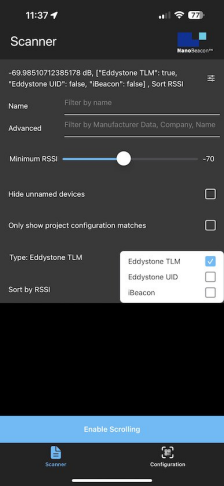
Note that all configured filters will be applied to the scan results. Also, there are certain restrictions on discovered iBeacon devices in the iOS version of the app. We’ll cover more on that in a later section within the tutorial.
请注意,所有配置的过滤器都将应用于扫描结果。另外,在iOS版本的应用程序中,对发现的iBeacon设备有一定的限制。我们将在本教程的后面一节中详细介绍。
“Only show project configuration matches” Filter
"仅显示项目配置匹配 "过滤器
The “Only show project configuration matches” filter is a unique feature of our NanoBeacon BLE Scanner mobile app. It allows you to only show devices that match the imported configuration from the NanoBeacon Config Tool.
"仅显示项目配置匹配 "过滤器是我们的NanoBeacon BLE扫描器移动应用程序的一个独特功能。它允许你只显示与从NanoBeacon配置工具导入的配置相匹配的设备。
This is a very powerful filter that will not only let you focus on analyzing your IN100 device’s advertising data but also view it in a human-readable format, which no other mobile app on the market can do!
这是一个非常强大的过滤器,不仅可以让你专注于分析IN100设备的广播数据,还可以以人类可读的格式查看,这是市场上其他移动应用程序所不能做到的!
We covered how to import configurations via the QR code scan functionality in theprevious tutorial in this series.
我们在本系列的上一篇教程中介绍了如何通过二维码扫描功能导入配置。
After importing the configuration and selecting this filter, the scanner will only show your device:
导入配置并选择该过滤器后,扫描仪将只显示你的设备:
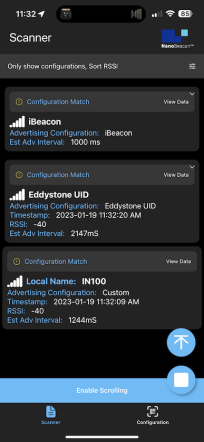
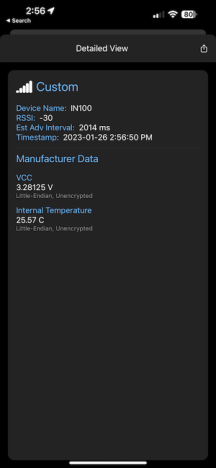
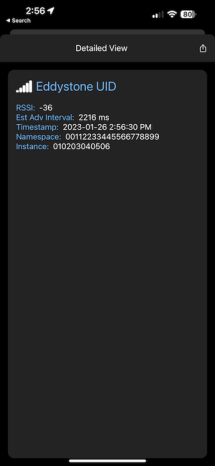
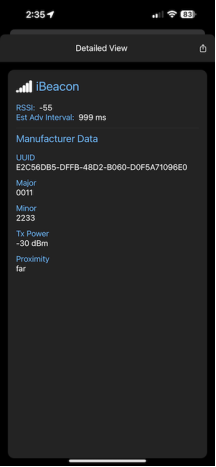
And to make things even more user-friendly, you can navigate into each of the discovered advertising sets to view the detailed parsed advertising data:
为了使事情变得更加方便,你可以导航到每一个被发现的广播集,以查看详细的解析广播数据:
Advanced Filters 高级过滤器
The last filter we want to cover is the “Advanced” entry field. This allows us to filter by:
我们要介绍的最后一个过滤器是 "高级 "条目栏。这使我们可以通过以下方式进行过滤:
Raw bytes in the advertising data (hex values)
广播数据中的原始字节(十六进制值)
Company ID (hex values)
公司ID (十六进制值)
Company Name (string values)
公司名称(字符串值)
Device Name as well (string values)
设备名称也是(字符串值)
Let’s take a look at an example of a discovered device and which parts can be matched using the Advanced Filter:
让我们来看看一个被发现的设备的例子,以及哪些部分可以用高级过滤器来匹配:
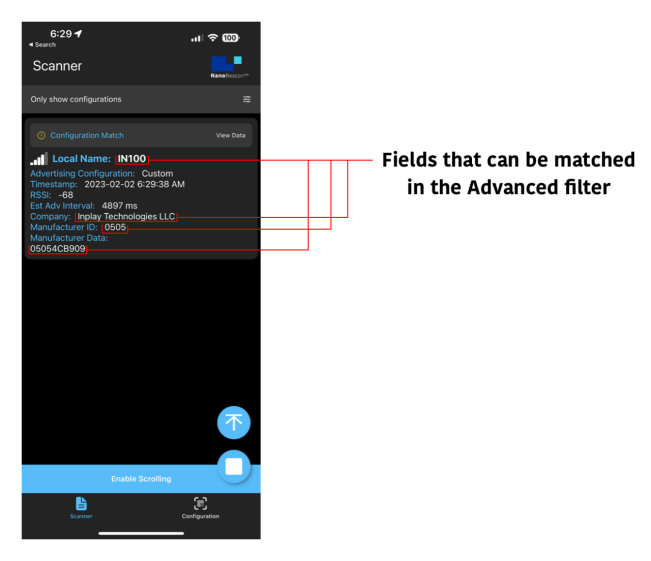
As you can see, there are various types of filters that can help you match only the devices you’re interested in discovering and having show up in the list.
正如你所看到的,有各种类型的过滤器,可以帮助你只匹配你有兴趣发现并显示在列表中的设备。
Differences Between iOS and Android Versions of the App
应用程序的iOS和Android版本之间的差异
There are quite a few differences between iOS and Android when it comes to UI, the functionality and APIs available to apps, BLE behavior, etc.
在用户界面、应用程序可用的功能和API、BLE行为等方面,iOS和Android之间有相当多的差异。
It’s essential to be aware of these differences not just as a developer but also as a user of our mobile app. This will help you better understand how things work on each platform and are aware of any differences in behavior between the two that could affect your development and testing activities when working with BLE devices, specifically our NanoBeacon IN100.
不仅仅是作为一个开发者,而且作为我们的移动应用的用户,意识到这些差异是非常重要的。这将有助于你更好地了解每个平台上的工作方式,并意识到两者之间的任何行为差异,这可能会影响你在使用BLE设备时的开发和测试活动,特别是我们的NanoBeacon IN100。
Here’s a summary of the differences between the two platforms as it pertains to Bluetooth Low Energy functionality and the functionality of our NanoBeacon BLE Scanner mobile app:
以下是两个平台之间的差异总结,它涉及到蓝牙低能量功能和我们的NanoBeacon BLE扫描器移动应用程序的功能:
Advertisement Data 广播数据
iOS does not give apps visibility of the Bluetooth address, so it’s not possible to search by or view the Bluetooth address of the discovered device(s).
iOS不给应用程序提供蓝牙地址的可见性,所以不可能通过搜索或查看所发现设备的蓝牙地址。
iBeacons come through the Core Location framework on iOS and are reported once per second, so the adv interval cannot be estimated.
iBeacons通过iOS上的核心定位框架,每秒报告一次,所以无法估计广播时间间隔。
iOS does not provide access to the raw advertisement data, so user-defined data types are not supported.
iOS不提供对原始广播数据的访问,所以不支持用户定义的数据类型。
On iOS, it’s not possible to scan for unspecified iBeacons, and they will not show up in scan results unless you have scanned in a configuration that contains an iBeacon. The app registers the iBeacon when you load the configuration.
在iOS上,不可能扫描未指定的iBeacon,除非你在包含iBeacon的配置中进行了扫描,否则它们不会在扫描结果中显示出来。当你加载配置时,应用程序会注册iBeacon。
iOS will report iBeacons RSSI as 0 if iOS cannot determine the iBeacons proximity based on the TX power included in the iBeacon payload. The algorithm used by iOS is not public.
如果iOS无法根据iBeacon有效载荷中包含的发射功率确定iBeacon的距离,那么iOS将把iBeacons的RSSI报告为0。iOS使用的算法并不公开。
iOS will continue to report an iBeacon for up to 30 seconds after it has been powered down (or goes out of range).
在iBeacon断电(或超出范围)后,iOS将继续报告该iBeacon长达30秒。
General Scanning 一般扫描
iOS will miss more advertisement packets than Android when using a larger advertisement interval (greater than 1000 ms).
当使用较大的广播间隔(大于1000毫秒)时,iOS将比Android错过更多的广播数据包。
Background Scanning 背景扫描
iOS does not allow continuous background scanning for advertisement data, with the exception of iBeacons.
除了iBeacons之外,iOS不允许对广播数据进行连续的后台扫描。
Android will allow continuous background scanning for all BLE advertisements.
Android将允许对所有BLE广播进行连续的后台扫描。
Notifications 通知
Android supports background notifications for all types of Triggered advertisements.
Android支持所有类型的Triggered广播的后台通知。
iOS only supports background notifications for Triggered iBeacon advertisements.
iOS只支持Triggered iBeacon广播的后台通知。
Conclusion 总结
And that’s it for this tutorial. We covered a lot of topics, including:
本教程到此结束。我们涵盖了很多主题,包括:
Device Filters:
设备过滤器:
Device Name
设备名称
Minimum RSSI
最小RSSI
Sort by RSSI
按RSSI排序
Hide Unnamed Devices
隐藏未命名的设备
Advanced Filters (raw data/bytes, text/strings, etc.)
高级过滤器(原始数据/字节、文本/字符串等)
Only Show Configuration Matches
只显示配置匹配的设备
Filter by Type (Eddystone TLM, Eddystone UID, and iBeacon)
按类型过滤(Eddystone TLM,Eddystone UID,和iBeacon)
The differences between the iOS and Android versions of the mobile app.
移动应用程序的iOS和Android版本之间的差异。
In the upcoming tutorials in the series, we will cover:
在接下来的系列教程中,我们将介绍:
How to export logging data for captured advertising sets and analyze them
如何为捕获的广播集导出记录数据并进行分析
App notifications for Triggered Advertising Mode advertising sets
触发式广播模式广播集的应用程序通知
The new NanoBeaconLib mobile app library (allows you to develop a custom IN100-interfacing mobile app in no time!)
新的NanoBeaconLib移动应用程序库(允许你在短时间内开发一个自定义的IN100界面的移动应用程序!)。
and more!
以及更多!
-
BLE
+关注
关注
13文章
828浏览量
66759 -
扫描器
+关注
关注
0文章
202浏览量
12843
发布评论请先 登录
想提升读码效率?工业固定式扫描器该这么选
深入了解TCA8424:低电压8x16键盘扫描器的技术剖析
远景达LV4500R嵌入式二维码扫描器:智能终端的高效解码利器
远景达LV3000H工业固定式扫描器:工业自动化的高效数据采集利器
固态断路器采用SiC JFET的四个理由
新大陆NLS FM430EX扫描器:多场景智能解码的实力之选
汽车声学测量趋势洞察(二)

PDA条码扫描器选购指南:仓储物流老板亲测5G手持终端推荐
雷卯针对香橙派Orange Pi 5 Pro开发板防雷防静电方案
NLS-Soldier100固定式工业条码扫描器读码器用于产线上扫码
如何更好选择二维码识别扫描器厂家?
固定式条码扫描器能在条码移动情况下扫描吗?



评论