


 LWIP实现千兆TCP/IP网络传输方案介绍

一、前言
之前ZYNQ与PC之间的网络连接依赖于外接硬件协议栈芯片,虽然C驱动非常简单,但网络带宽受限。现采用LWIP+PS端MAC控制器+PHY芯片的通用架构。关于LWIP库,已经有很多现成的资料和书籍。其有两套API,一个是SOCKET,另一个是本例中要用到的RAW。RAW API理解起来较为复杂,整个程序基于中断机制运行,通过函数指针完成多层回调函数的执行。SOCKET API需要支持多线程操作系统的支持,也牺牲了效率,但理解和编程都较为容易。实际上SOCKET API是对RAW API的进一步封装。
二、LWIP Echo Server demo解读
首先打开Xilinx SDK自带的LwIP Echo Server demo.
/******************************************************************************
*
* Copyright (C) 2009 - 2014 Xilinx, Inc. All rights reserved.
*
* Permission is hereby granted, free of charge, to any person obtaining a copy
* of this software and associated documentation files (the "Software"), to deal
* in the Software without restriction, including without limitation the rights
* to use, copy, modify, merge, publish, distribute, sublicense, and/or sell
* copies of the Software, and to permit persons to whom the Software is
* furnished to do so, subject to the following conditions:
*
* The above copyright notice and this permission notice shall be included in
* all copies or substantial portions of the Software.
*
* Use of the Software is limited solely to applications:
* (a) running on a Xilinx device, or
* (b) that interact with a Xilinx device through a bus or interconnect.
*
* THE SOFTWARE IS PROVIDED "AS IS", WITHOUT WARRANTY OF ANY KIND, EXPRESS OR
* IMPLIED, INCLUDING BUT NOT LIMITED TO THE WARRANTIES OF MERCHANTABILITY,
* FITNESS FOR A PARTICULAR PURPOSE AND NONINFRINGEMENT. IN NO EVENT SHALL
* XILINX BE LIABLE FOR ANY CLAIM, DAMAGES OR OTHER LIABILITY,
* WHETHER IN AN ACTION OF CONTRACT, TORT OR OTHERWISE, ARISING FROM, OUT OF
* OR IN CONNECTION WITH THE SOFTWARE OR THE USE OR OTHER DEALINGS IN THE
* SOFTWARE.
*
* Except as contained in this notice, the name of the Xilinx shall not be used
* in advertising or otherwise to promote the sale, use or other dealings in
* this Software without prior written authorization from Xilinx.
*
******************************************************************************/
#include
#include "xparameters.h"
#include "netif/xadapter.h"
#include "platform.h"
#include "platform_config.h"
#if defined (__arm__) || defined(__aarch64__)
#include "xil_printf.h"
#endif
#include "lwip/tcp.h"
#include "xil_cache.h"
#if LWIP_DHCP==1
#include "lwip/dhcp.h"
#endif
/* defined by each RAW mode application */
void print_app_header();
int start_application();
int transfer_data();
void tcp_fasttmr(void);
void tcp_slowtmr(void);
/* missing declaration in lwIP */
void lwip_init();
#if LWIP_DHCP==1
extern volatile int dhcp_timoutcntr;
err_t dhcp_start(struct netif *netif);
#endif
extern volatile int TcpFastTmrFlag;
extern volatile int TcpSlowTmrFlag;
static struct netif server_netif;
struct netif *echo_netif;
void
print_ip(char *msg, struct ip_addr *ip)
{
print(msg);
xil_printf("%d.%d.%d.%d/n/r", ip4_addr1(ip), ip4_addr2(ip),
ip4_addr3(ip), ip4_addr4(ip));
}
void
print_ip_settings(struct ip_addr *ip, struct ip_addr *mask, struct ip_addr *gw)
{
print_ip("Board IP: ", ip);
print_ip("Netmask : ", mask);
print_ip("Gateway : ", gw);
}
#if defined (__arm__) && !defined (ARMR5)
#if XPAR_GIGE_PCS_PMA_SGMII_CORE_PRESENT == 1 || XPAR_GIGE_PCS_PMA_1000BASEX_CORE_PRESENT == 1
int ProgramSi5324(void);
int ProgramSfpPhy(void);
#endif
#endif
#ifdef XPS_BOARD_ZCU102
#ifdef XPAR_XIICPS_0_DEVICE_ID
int IicPhyReset(void);
#endif
#endif
int main()
{
struct ip_addr ipaddr, netmask, gw;
/* the mac address of the board. this should be unique per board */
unsigned char mac_ethernet_address[] =
{ 0x00, 0x0a, 0x35, 0x00, 0x01, 0x02 };
echo_netif = &server_netif;
#if defined (__arm__) && !defined (ARMR5)
#if XPAR_GIGE_PCS_PMA_SGMII_CORE_PRESENT == 1 || XPAR_GIGE_PCS_PMA_1000BASEX_CORE_PRESENT == 1
ProgramSi5324();
ProgramSfpPhy();
#endif
#endif
/* Define this board specific macro in order perform PHY reset on ZCU102 */
#ifdef XPS_BOARD_ZCU102
IicPhyReset();
#endif
init_platform();
#if LWIP_DHCP==1
ipaddr.addr = 0;
gw.addr = 0;
netmask.addr = 0;
#else
/* initliaze IP addresses to be used */
IP4_ADDR(&ipaddr, 192, 168, 1, 10);
IP4_ADDR(&netmask, 255, 255, 255, 0);
IP4_ADDR(&gw, 192, 168, 1, 1);
#endif
print_app_header();
lwip_init();//网络参数初始化
/* Add network interface to the netif_list, and set it as default */
if (!xemac_add(echo_netif, &ipaddr, &netmask,
&gw, mac_ethernet_address,
PLATFORM_EMAC_BASEADDR)) {
xil_printf("Error adding N/W interface/n/r");
return -1;
}
netif_set_default(echo_netif);
/* now enable interrupts */
platform_enable_interrupts();
/* specify that the network if is up */
netif_set_up(echo_netif);
#if (LWIP_DHCP==1)
/* Create a new DHCP client for this interface.
* Note: you must call dhcp_fine_tmr() and dhcp_coarse_tmr() at
* the predefined regular intervals after starting the client.
*/
dhcp_start(echo_netif);
dhcp_timoutcntr = 24;
while(((echo_netif->ip_addr.addr) == 0) && (dhcp_timoutcntr > 0))
xemacif_input(echo_netif);
if (dhcp_timoutcntr if ((echo_netif->ip_addr.addr) == 0) {
xil_printf("DHCP Timeout/r/n");
xil_printf("Configuring default IP of 192.168.1.10/r/n");
IP4_ADDR(&(echo_netif->ip_addr), 192, 168, 1, 10);
IP4_ADDR(&(echo_netif->netmask), 255, 255, 255, 0);
IP4_ADDR(&(echo_netif->gw), 192, 168, 1, 1);
}
}
ipaddr.addr = echo_netif->ip_addr.addr;
gw.addr = echo_netif->gw.addr;
netmask.addr = echo_netif->netmask.addr;
#endif
print_ip_settings(&ipaddr, &netmask, &gw);//打印关键网络参数
/* start the application (web server, rxtest, txtest, etc..) */
start_application();//设置回调函数,这些函数在特定事件发生时以函数指针的方式被调用
/* receive and process packets */
while (1) {
if (TcpFastTmrFlag) {//发送处理,如差错重传,通过定时器置位标志位
tcp_fasttmr();
TcpFastTmrFlag = 0;
}
if (TcpSlowTmrFlag) {
tcp_slowtmr();
TcpSlowTmrFlag = 0;
}
xemacif_input(echo_netif);//连续接收数据包,并将数据包存入LWIP
transfer_data();//空函数
}
/* never reached */
cleanup_platform();
return 0;
}
echo
整体流程为:初始化LWIP、添加网络接口(MAC)、使能中断、设置回调函数。最终进入主循环,内部不断检测定时器中断标志位,当标志位TcpFastTmrFlag或TcpSlowTmrFlag为1则调用相应的处理函数,完成超时重传等任务。接下来查看回调函数的设置:
int start_application()
{
struct tcp_pcb *pcb;//protocol control block 简称PCB
err_t err;
unsigned port = 7;
/* create new TCP PCB structure */
pcb = tcp_new();
if (!pcb) {
xil_printf("Error creating PCB. Out of Memory/n/r");
return -1;
}
/* bind to specified @port */
err = tcp_bind(pcb, IP_ADDR_ANY, port);
if (err != ERR_OK) {
xil_printf("Unable to bind to port %d: err = %d/n/r", port, err);
return -2;
}
/* we do not need any arguments to callback functions */
tcp_arg(pcb, NULL);
/* listen for connections */
pcb = tcp_listen(pcb);
if (!pcb) {
xil_printf("Out of memory while tcp_listen/n/r");
return -3;
}
/* specify callback to use for incoming connections */
tcp_accept(pcb, accept_callback);
xil_printf("TCP echo server started @ port %d/n/r", port);
return 0;
}
start_application
创建PCB(protocol control block)建立连接、绑定IP地址和端口号、监听请求,最后tcp_accept函数用于指定当监听到连接请求时调用的函数accept_callback。进入该函数内部查看:
err_t accept_callback(void *arg, struct tcp_pcb *newpcb, err_t err)
{
static int connection = 1;
/* set the receive callback for this connection */
tcp_recv(newpcb, recv_callback);
/* just use an integer number indicating the connection id as the
callback argument */
tcp_arg(newpcb, (void*)(UINTPTR)connection);
/* increment for subsequent accepted connections */
connection++;
return ERR_OK;
}
accept_callback
内部主要通过tcp_recv函数来指定当收到TCP包后调用的函数recv_callback。我们再次观察其内容:
err_t recv_callback(void *arg, struct tcp_pcb *tpcb,
struct pbuf *p, err_t err)
{
/* do not read the packet if we are not in ESTABLISHED state */
if (!p) {
tcp_close(tpcb);
tcp_recv(tpcb, NULL);
return ERR_OK;
}
/* indicate that the packet has been received */
tcp_recved(tpcb, p->len);
/* echo back the payload */
/* in this case, we assume that the payload is if (tcp_sndbuf(tpcb) > p->len) {
err = tcp_write(tpcb, p->payload, p->len, 1);
} else
xil_printf("no space in tcp_sndbuf/n/r");
/* free the received pbuf */
pbuf_free(p);
return ERR_OK;
}
recv_callback
tcp_recved函数指示用来告知LWIP接收数据量,然后检测发送缓冲区是否足够容纳接收内容,若大于则调用tcp_write函数将接收数据写入发送缓冲区等待发送。综上,整体的调用流程为:tcp_accept -> accept_callback -> tcp_recv -> recv_callback -> tcp_recved和tcp_write。前四个用于接收,后两个用于发送。
函数解析完毕,之后改动上位机网络参数,使PC机IP地址与Board在同一网段内,这里设置为192.168.1.11.打开网络调试助手,设置PC为TCP Client。以下是ZYNQ串口打印及网络调试结果。
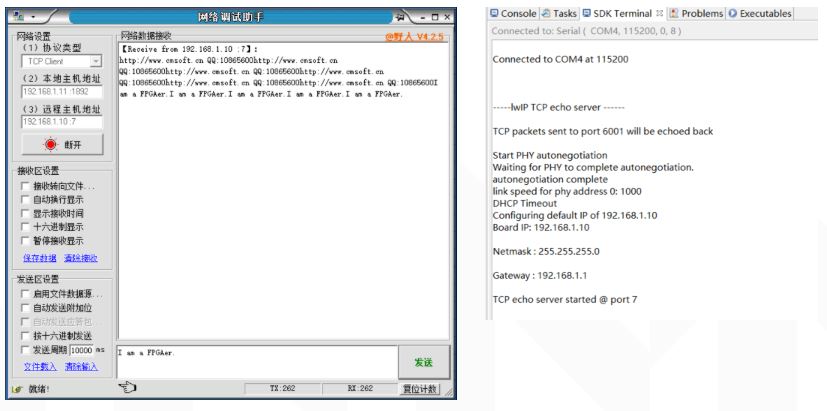
三、TCP Client Send data
现在我们来改动demo,设计一个客户端发送数据包的示例工程,功能是循环发送一个常数数组中数据到远程服务器。该工程参考米联客教程中相关章节内容。代码如下:
/******************************************************************************
*
* Copyright (C) 2009 - 2014 Xilinx, Inc. All rights reserved.
*
* Permission is hereby granted, free of charge, to any person obtaining a copy
* of this software and associated documentation files (the "Software"), to deal
* in the Software without restriction, including without limitation the rights
* to use, copy, modify, merge, publish, distribute, sublicense, and/or sell
* copies of the Software, and to permit persons to whom the Software is
* furnished to do so, subject to the following conditions:
*
* The above copyright notice and this permission notice shall be included in
* all copies or substantial portions of the Software.
*
* Use of the Software is limited solely to applications:
* (a) running on a Xilinx device, or
* (b) that interact with a Xilinx device through a bus or interconnect.
*
* THE SOFTWARE IS PROVIDED "AS IS", WITHOUT WARRANTY OF ANY KIND, EXPRESS OR
* IMPLIED, INCLUDING BUT NOT LIMITED TO THE WARRANTIES OF MERCHANTABILITY,
* FITNESS FOR A PARTICULAR PURPOSE AND NONINFRINGEMENT. IN NO EVENT SHALL
* XILINX BE LIABLE FOR ANY CLAIM, DAMAGES OR OTHER LIABILITY,
* WHETHER IN AN ACTION OF CONTRACT, TORT OR OTHERWISE, ARISING FROM, OUT OF
* OR IN CONNECTION WITH THE SOFTWARE OR THE USE OR OTHER DEALINGS IN THE
* SOFTWARE.
*
* Except as contained in this notice, the name of the Xilinx shall not be used
* in advertising or otherwise to promote the sale, use or other dealings in
* this Software without prior written authorization from Xilinx.
*
******************************************************************************/
#include
#include "xparameters.h"
#include "netif/xadapter.h"
#include "platform.h"
#include "platform_config.h"
#if defined (__arm__) || defined(__aarch64__)
#include "xil_printf.h"
#endif
#include "lwip/tcp.h"
#include "xil_cache.h"
#if LWIP_DHCP==1
#include "lwip/dhcp.h"
#endif
/* defined by each RAW mode application */
void print_app_header();
int client_application();
//int start_application();
//int transfer_data();
int send_data();
void tcp_fasttmr(void);
void tcp_slowtmr(void);
/* missing declaration in lwIP */
void lwip_init();
#if LWIP_DHCP==1
extern volatile int dhcp_timoutcntr;
err_t dhcp_start(struct netif *netif);
#endif
extern volatile int TcpFastTmrFlag;
extern volatile int TcpSlowTmrFlag;
static struct netif server_netif;
struct netif *echo_netif;
void
print_ip(char *msg, struct ip_addr *ip)
{
print(msg);
xil_printf("%d.%d.%d.%d/n/r", ip4_addr1(ip), ip4_addr2(ip),
ip4_addr3(ip), ip4_addr4(ip));
}
void
print_ip_settings(struct ip_addr *ip, struct ip_addr *mask, struct ip_addr *gw)
{
print_ip("Board IP: ", ip);
print_ip("Netmask : ", mask);
print_ip("Gateway : ", gw);
}
int main()
{
uint cycle = 0;
struct ip_addr ipaddr, netmask, gw;
/* the mac address of the board. this should be unique per board */
unsigned char mac_ethernet_address[] =
{ 0x00, 0x0a, 0x35, 0x00, 0x01, 0x02 };
echo_netif = &server_netif;
/* Define this board specific macro in order perform PHY reset on ZCU102 */
init_platform();
/* initliaze IP addresses to be used */
IP4_ADDR(&ipaddr, 192, 168, 1, 10);
IP4_ADDR(&netmask, 255, 255, 255, 0);
IP4_ADDR(&gw, 192, 168, 1, 1);
print_app_header();
lwip_init();
/* Add network interface to the netif_list, and set it as default */
if (!xemac_add(echo_netif, &ipaddr, &netmask,
&gw, mac_ethernet_address,
PLATFORM_EMAC_BASEADDR)) {
xil_printf("Error adding N/W interface/n/r");
return -1;
}
netif_set_default(echo_netif);
/* now enable interrupts */
platform_enable_interrupts();
/* specify that the network if is up */
netif_set_up(echo_netif);
print_ip_settings(&ipaddr, &netmask, &gw);
/* start the application (web server, rxtest, txtest, etc..) */
//start_application();
client_application();
/* receive and process packets */
while (1) {
if (TcpFastTmrFlag) {
tcp_fasttmr();
TcpFastTmrFlag = 0;
}
if (TcpSlowTmrFlag) {
tcp_slowtmr();
TcpSlowTmrFlag = 0;
}
xemacif_input(echo_netif);
//transfer_data();
if(cycle == 9999){
cycle = 0;
send_data();
}
else
cycle++;
}
return 0;
}
main
函数定义:
/*
* tcp_trans.c
*
* Created on: 2018年10月18日
* Author: s
*/
#include
#include
#include "lwip/err.h"
#include "lwip/tcp.h"
#include "lwipopts.h"
#include "xil_cache.h"
#include "xil_printf.h"
#include "sleep.h"
#define TX_SIZE 10
static struct tcp_pcb*connected_pcb = NULL;
unsigned client_connected = 0;
//静态全局函数 外部文件不可见
uint tcp_trans_done = 0;
u_char data[TX_SIZE] = {0,1,2,3,4,5,6,7,8,9};
int send_data()
{
err_t err;
struct tcp_pcb *tpcb = connected_pcb;
if (!tpcb)
return -1;
//判断发送数据长度是否小于发送缓冲区剩余可用长度
if (TX_SIZE //Write data for sending (but does not send it immediately).
err = tcp_write(tpcb, data, TX_SIZE, 1);
if (err != ERR_OK) {
xil_printf("txperf: Error on tcp_write: %d/r/n", err);
connected_pcb = NULL;
return -1;
}
//Find out what we can send and send it
err = tcp_output(tpcb);
if (err != ERR_OK) {
xil_printf("txperf: Error on tcp_output: %d/r/n",err);
return -1;
}
}
else
xil_printf("no space in tcp_sndbuf/n/r");
return 0;
}
static err_t tcp_sent_callback(void *arg, struct tcp_pcb *tpcb,u16_t len)
{
tcp_trans_done ++;
return ERR_OK;
}
//tcp连接回调函数 设置为静态函数,外部文件不可见
static err_t tcp_connected_callback(void *arg, struct tcp_pcb *tpcb, err_t err)
{
/* store state */
connected_pcb = tpcb;
/* set callback values & functions */
tcp_arg(tpcb, NULL);
//发送到远程主机后调用tcp_sent_callback
tcp_sent(tpcb, tcp_sent_callback);
client_connected = 1;
/* initiate data transfer */
return ERR_OK;
}
int client_application()
{
struct tcp_pcb *pcb;
struct ip_addr ipaddr;
err_t err;
unsigned port = 7;
/* create new TCP PCB structure */
pcb = tcp_new();
if (!pcb) {
xil_printf("Error creating PCB. Out of Memory/n/r");
return -1;
}
/* connect to iperf tcp server */
IP4_ADDR(&ipaddr, 192, 168, 1, 209);//设置要连接的主机的地址
//当连接到主机时,调用tcp_connected_callback
err = tcp_connect(pcb, &ipaddr, port, tcp_connected_callback);
if (err != ERR_OK) {
xil_printf("txperf: tcp_connect returned error: %d/r/n", err);
return err;
}
return 0;
}
tcp_trans
可以看出还是一样的套路,在client_application函数中设置回调函数。首先新建PCB,tcp_connect函数设定要连接远程服务器的IP地址和端口号,连接建立时将调用回调函数tcp_connected_callback。tcp_connected_callback内部tcp_sent函数用于指定当发送数据包完成后执行的tcp_sent_callback。tcp_sent_callback内部只利用tcp_trans_done变量计数发送次数。而真正的发送处理任务则交给主循环中的send_data。若处于连接状态,且发送缓冲区容量比带发送数据量大,则调用tcp_write将待发送数据写入发送缓冲区,之后调用tcp_output函数立即传输发送缓冲区内容。如果不调用tcp_output,LWIP会等待数据量达到一定值时一起发送来提高效率,是否调用tcp_output函数可根据具体需求而定。
接下来看下实验结果:
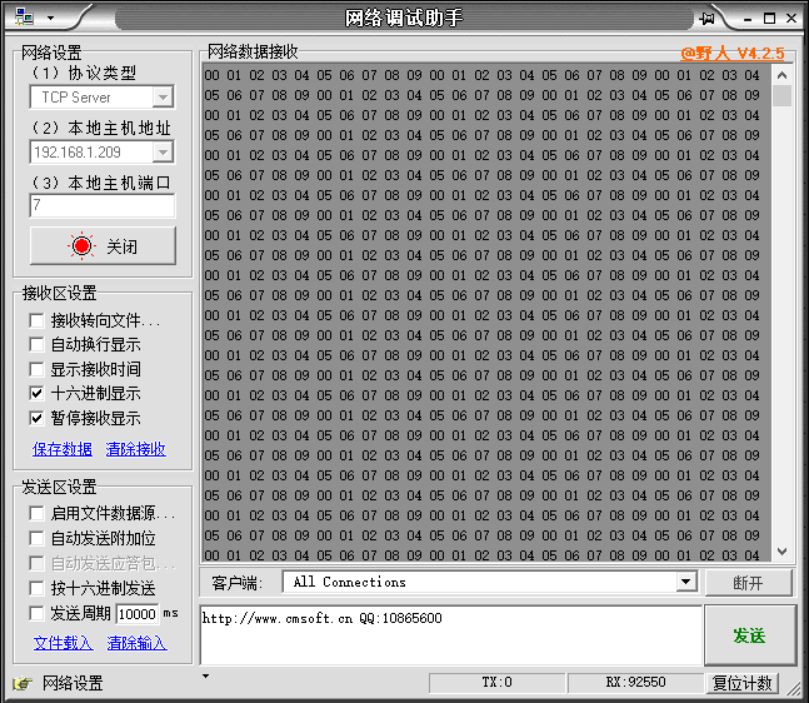
PC端正确接收到常数数组,实验无误。
参考文献:
1 LWIP 无OS RAW-API 函数 - 专注的力量 - CSDN博客 https://blog.csdn.net/liang890319/article/details/8574603
2 解读TCP 四种定时器 - xiaofei0859的专栏 - CSDN博客 https://blog.csdn.net/xiaofei0859/article/details/52794576
3 米联 《ZYNQ SOC修炼秘籍》
编辑:hfy
-
服务器
+关注
关注
14文章
10352浏览量
91742 -
操作系统
+关注
关注
37文章
7435浏览量
129609 -
Socket
+关注
关注
1文章
214浏览量
37021 -
网络传输
+关注
关注
0文章
149浏览量
18663 -
Zynq
+关注
关注
10文章
633浏览量
49569
发布评论请先 登录
EtherCAT 应用示例,将 lwIP 连接到 EoE API
极海APM32F427 MCU在RT-Thread系统上使用LwIP网络功能
疆鸿智能EtherNet/IP和Modbus TCP技术应用,建议点赞收藏!

工业级4G路由器:TCP/IP与UDP协议,解锁工业物联网高效传输新范式
千兆工业图像采集卡 | 稳定网络传输,适配远程工业检测

以太网通讯在FPGA上的实现
快速掌握TCP/IP?LuatOS新手入门指南
lwip如何实现运行中修改ip地址并使新的地址生效?
GD32F470+LWIP TCP偶尔丢包怎么解决?
EtherNet/IP转Modbus TCP网关,让设备对话更简单!
rtthread网络接口设备 轻量级tcp/ip 堆栈 这两个冲突吗?
如何使用 LwIP 在 NuMaker-IoT-M467 上实现 Modbus TCP?
实现EtherNet/IP网络与Modbus TCP网络之间数据互通
GraniStudio : TCP/IP(Socket)协议深度剖析



评论