




 便携式气象站的制作教程

第1步:什么是夜间污染及其测量方法

夜间污染来自灯具,汽车,房屋,城市中的巨大液晶面板和人类制造的每一盏灯。那灯光叫人工。对于观察者来说,人造光是从城市看星星的主要问题,他们必须走出城市。对于人类来说,高光污染是有害的。还有树木,草和动物。
为了检查你所在地的光污染,你可以在这里看到lightpollutionmap
它只是模型,真正的价值观会有所不同。这就是为什么我创建了这个luxmeter。
对于测量光污染,我只测量lux并计算幅度/arsec2。
我可以从lux到candela每suqare米计算:
1 cd/m2 = 1 lux
每平方秒的幅度( mag/arcsec2 )描述夜空背景(它叫表面亮度)。
关于wiki的更多内容:表面亮度
计算cd/m2到mag/arcsec2的公式为:
[mag中的值/arcsec2] = Log10([以cd/m2为单位]/108000)/- 0.4
unihedron.com/projects/darksky/magconv.php
第2步:BOM
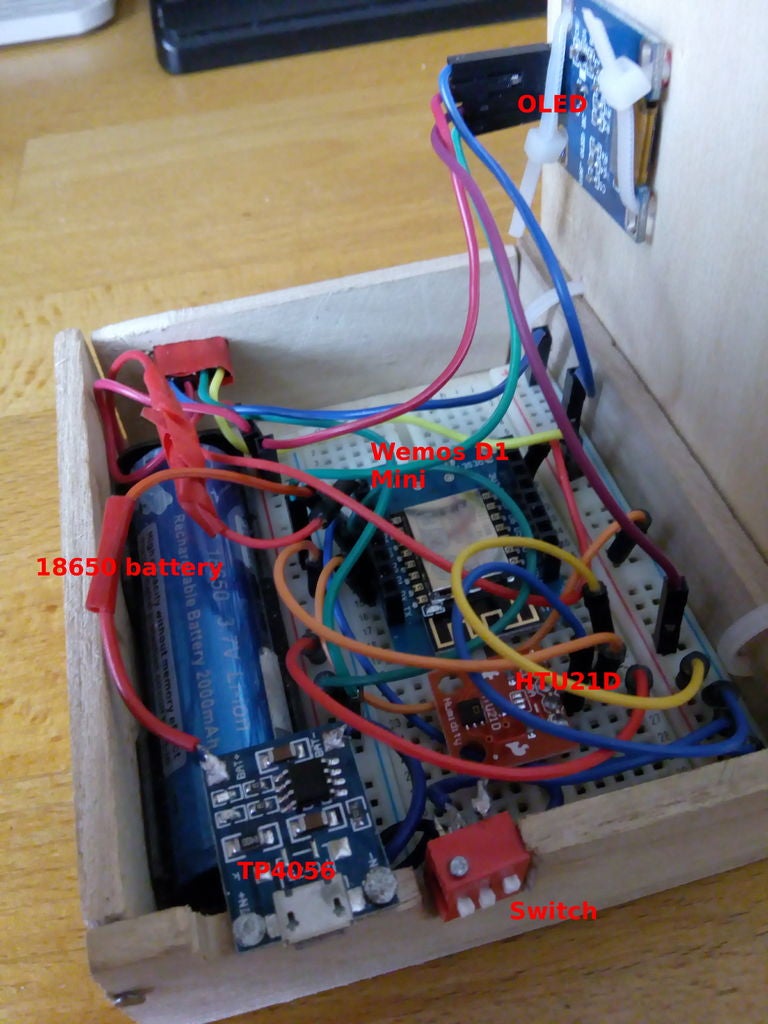
对于这个项目,你需要:
1。 WEMOS D1 Mini或任何微控制器
(我使用wemos,因为它是最小的,有usb端口,你可以尝试Arduino Nano)
WEMOS D1 MINI
WEMOS D1 MINI
WEMOS D1 MINI 10件
用于编程和上传的USB线代码到wemos
2。 TSL2591传感器
TSL2591
TSL2591
TSL2591
3。 HTU21D温湿度传感器
HTU21D
HTU21D
4。 OLED显示屏0.96(128 x 64)
OLED显示屏
OLED显示屏
OLED显示屏
5。 18650电池
18650锂离子电池
18650锂离子电池
电池18650支架
6。 TP4056充电模块
tp4056
tp4056
7。切换按钮或倾角跳线
swtich red dip
swifhers,很多不同的
8。面包板和杜邦电缆
小面包板
面包板套件
9。案例,我用木材+胶带创建
繁文缛节
Prusa 3D打印机,我希望我能用塑料做案例:D
Step 3:电路
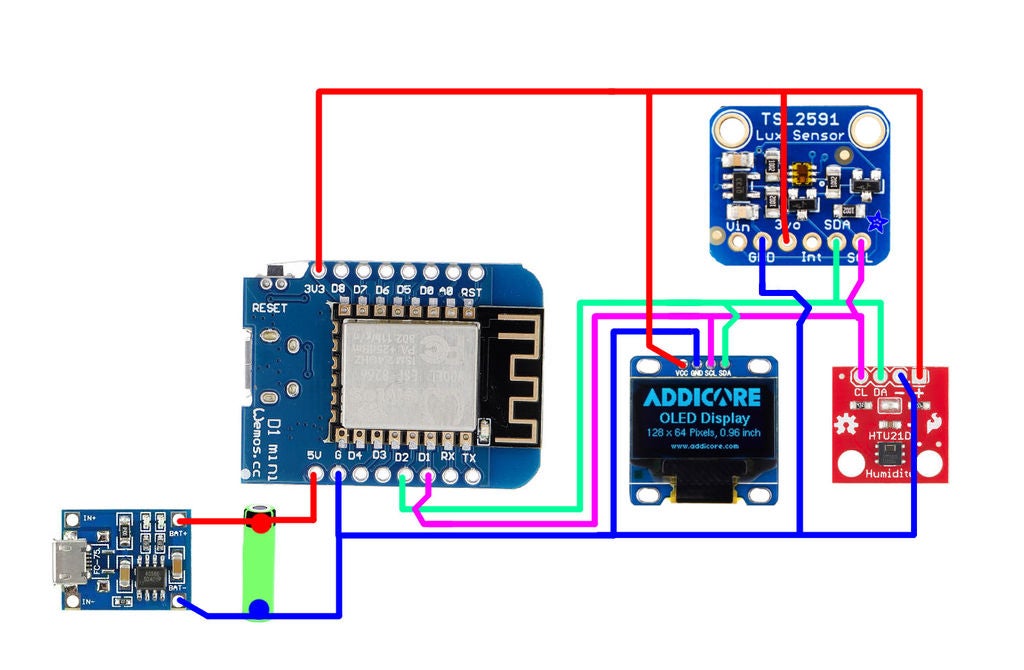
电路非常简单:
将所有i2c模块(TSL2591,OLED,HTU21D)连接到SCL和SDA引脚在wemos上(SDA - 》 D2,SCL - 》 D1)。
用来自wemos的3.3 V电源供电。
将电池的端子连接到wemos上的5V引脚和tp4056充电模块上的电池+引脚连接到电池上的正端子。
将所有接地连接在一起。
步骤4:HTU21D传感器
我购买新的温度传感器,测量精度为0.3°C!
物联网你应该知道这个传感器(来自sparkfun):
使用 I2C 接口
典型湿度精度±2%
典型温度精度±0.3°C
湿度为0到100%,但不推荐使用此传感器恶劣的环境它可能与水接触(如下雨)。
3.3V传感器 - 使用内联逻辑电平转换器或10k电阻来限制5V信号
一次只能有一个HTU21D传感器驻留在I2C总线上
我的总结:这是一个很好的传感器,因为它的测量精度为0.3°C,温度和湿度都是。优点是I2C干扰和3.3V,但在我的情况下无关紧要。
步骤5:TSL2591
该传感器因其灵敏度(188微升lux!)而适用于测量夜空污染。
2。电压调节器从5V到3.3 V
芯片规格(来自adafruit):
近似人眼响应
极宽的动态范围1到600,000,000计数
Lux范围: 188 uLux 灵敏度,最高88,000 Lux输入测量值。
温度范围: -30 至80 * C
电压范围: 3.3-5V 进入板载稳压器
接口: I2C
这板/芯片使用I2C 7位地址0x29 (固定)
尺寸:19mm x 16mm x 1mm/.75“x .63”x .04“重量:1.1g
2个二极管用于测量 - IR和全光谱
摘要:
188 uLux是perferct,也是I2C通信很简单。也许问题可以修复I2C地址(0x29)。板载稳压器也很好,可以在冬天使用传感器(霜冻)。
步骤6:代码
您需要这些库(我将它们添加到一个zip文件中):
Adafruit-GFX-Li brary-master
adafruit_gfx_library_master
Adafruit_HTU21DF_Library-master
Adafruit_Sensor-master
Adafruit_TSL2591_Library-master
《代码:你可以使用我的,或创建自己的。不要忘记为夜空测量设置最大积分时间(600 MS)和增益到最大值(GAIN_MAX)。
如果您尝试使用我的代码,请下载ino文件。当我从instructable我的代码复制时,库有问题。
我使用加载月亮图像只是为了好玩。您可以使用任何,只需使用此页面获取数组:
http://javl.github.io/image2cpp/
//https://lastminuteengineers.com/oled-display-arduino-tutorial/
//http://javl.github.io/image2cpp/
// mcd to magnitude http://unihedron.com/projects/darksky/magconv.php.。.
// The HD44780 is a controller for character-based liquid crystal displays (LCDs)。 http://unihedron.com/projects/darksky/magconv.php.。.
#include
#include
#include
#include
#include “Adafruit_HTU21DF.h”
#include “Adafruit_TSL2591.h”
int counter;
// OLED display TWI address
#define OLED_ADDR 0x3C
Adafruit_SSD1306 display(-1); // - 1 for restart display with restart button on arduino board
Adafruit_HTU21DF htu = Adafruit_HTU21DF();
Adafruit_TSL2591 tsl = Adafruit_TSL2591(2591); // pass in a number for the sensor identifier (for your use later)
uint32_t lum;
uint16_t ir, full;
int ulux;
float lux;
float temp;
float rel_hum;
float mag_arcsec2; // visual mags/arcsecond² [value in mag/arcsec2] = Log10([value in cd/m2]/108000)/-0.4
// symbols
// degree for Celsius
const unsigned char degree [] PROGMEM =
{
0xe,0x11,0x11,0x11,0xe,0x0,0x0,0x0
};
// exponent 2
const unsigned char exponent [] PROGMEM =
{
0xe,0x1b,0x3,0x6,0xc,0x18,0x1f,0x0
};
// ‘moon_logo’, 128x64px
const unsigned char intro [] PROGMEM = {
0xff, 0xff, 0xff, 0xff, 0xff, 0xff, 0xff, 0xfe, 0x3f, 0xff, 0xff, 0xff, 0xff, 0xff, 0xff, 0xff,
0xff, 0xff, 0xff, 0xff, 0xff, 0xff, 0xff, 0xc1, 0xff, 0xff, 0xff, 0xff, 0xff, 0xff, 0xff, 0xff,
0xff, 0xff, 0xff, 0xff, 0xff, 0xff, 0xfe, 0x0f, 0xff, 0xff, 0xff, 0xff, 0xff, 0xff, 0xff, 0xff,
0xff, 0xff, 0xff, 0xff, 0xff, 0xff, 0xf0, 0x3f, 0xff, 0xff, 0xff, 0xff, 0xff, 0xff, 0xff, 0xff,
0xff, 0xff, 0xff, 0xff, 0xff, 0xff, 0xc0, 0xff, 0xfd, 0xff, 0xff, 0xff, 0xff, 0xff, 0xff, 0xff,
0xff, 0xff, 0xff, 0xff, 0xff, 0xff, 0x01, 0xff, 0xfd, 0xff, 0xff, 0xff, 0xff, 0xff, 0xff, 0xff,
0xff, 0xff, 0xff, 0xff, 0xff, 0xfe, 0x03, 0xff, 0xc0, 0x3f, 0xff, 0xff, 0xff, 0xff, 0xff, 0xff,
0xff, 0xff, 0xff, 0xff, 0xff, 0xfc, 0x07, 0xff, 0xe0, 0x7f, 0xff, 0xff, 0xff, 0xff, 0xff, 0xff,
0xff, 0xff, 0xff, 0xff, 0xff, 0xf0, 0x07, 0xff, 0xf8, 0xff, 0xff, 0xff, 0xff, 0xff, 0xff, 0xff,
0xff, 0xff, 0xff, 0xff, 0xff, 0xe0, 0x0f, 0xff, 0xf0, 0xff, 0xff, 0xff, 0xff, 0xff, 0xff, 0xff,
0xff, 0xff, 0xff, 0xff, 0xff, 0xc0, 0x0f, 0xff, 0x77, 0xff, 0xff, 0xff, 0xff, 0xff, 0xff, 0xff,
0xff, 0xff, 0xff, 0xff, 0xff, 0x80, 0x1f, 0xbe, 0x7f, 0xff, 0xff, 0xff, 0xff, 0xff, 0xff, 0xff,
0xff, 0xff, 0xff, 0xff, 0xff, 0x80, 0x1f, 0xcc, 0xff, 0xff, 0x8f, 0xff, 0xff, 0xff, 0xff, 0xff,
0xff, 0xff, 0xff, 0xff, 0xff, 0x00, 0x3f, 0xc0, 0xff, 0xff, 0x1f, 0xff, 0xff, 0xff, 0xff, 0xff,
0xff, 0xff, 0xff, 0xff, 0xfe, 0x00, 0x3f, 0xc0, 0xff, 0xff, 0x8f, 0xff, 0xff, 0xff, 0xff, 0xff,
0xff, 0xff, 0xff, 0xff, 0xfe, 0x00, 0x3f, 0xe0, 0x7f, 0xff, 0xff, 0xff, 0xff, 0xff, 0xff, 0xff,
0xff, 0xff, 0xff, 0xff, 0xfc, 0x00, 0x3f, 0x80, 0x1f, 0xff, 0xff, 0xff, 0xff, 0xff, 0xff, 0xff,
0xff, 0xff, 0xff, 0xff, 0xf8, 0x00, 0x3f, 0x00, 0x0f, 0xff, 0xff, 0xff, 0xff, 0xff, 0xff, 0xff,
0xff, 0xff, 0xff, 0xff, 0xf8, 0x00, 0x3f, 0xf1, 0xff, 0xff, 0xff, 0xff, 0xff, 0xff, 0xff, 0xff,
0xff, 0xff, 0xff, 0xff, 0xf0, 0x00, 0x3f, 0xf9, 0xff, 0xff, 0xff, 0xff, 0xff, 0xff, 0xff, 0xff,
0xff, 0xff, 0xff, 0xff, 0xf0, 0x00, 0x3f, 0xfb, 0xff, 0xff, 0xff, 0xff, 0xff, 0xff, 0xff, 0xff,
0xff, 0xff, 0xff, 0xff, 0xf0, 0x00, 0x3f, 0xff, 0xff, 0xff, 0xff, 0xff, 0xff, 0xff, 0xff, 0xff,
0xff, 0xff, 0xff, 0xff, 0xe0, 0x0f, 0xff, 0xff, 0xff, 0xff, 0xff, 0xff, 0xff, 0xff, 0xff, 0xff,
0xff, 0xff, 0xff, 0xff, 0xe0, 0x18, 0xff, 0xff, 0xff, 0xff, 0xff, 0xff, 0xff, 0xff, 0xff, 0xff,
0xff, 0xff, 0xff, 0xff, 0xe0, 0x60, 0xff, 0xff, 0xff, 0xff, 0xef, 0xff, 0xff, 0xff, 0xff, 0xff,
0xff, 0xff, 0xff, 0xff, 0xe0, 0x00, 0xff, 0xff, 0xff, 0xff, 0xe7, 0xff, 0xff, 0xff, 0xff, 0xff,
0xff, 0xff, 0xff, 0xff, 0xc0, 0x00, 0xff, 0xff, 0xff, 0xff, 0xe1, 0xe7, 0xff, 0xff, 0xff, 0xff,
0xff, 0xff, 0xff, 0xff, 0xc0, 0x00, 0xff, 0xff, 0xff, 0xff, 0xe0, 0x07, 0xff, 0xff, 0xff, 0xff,
0xff, 0xff, 0xff, 0xff, 0xc0, 0x18, 0xff, 0xff, 0xff, 0xff, 0xe0, 0x0f, 0xff, 0xff, 0xff, 0xff,
0xff, 0xff, 0xff, 0xff, 0xc0, 0x38, 0xff, 0xff, 0xff, 0xff, 0xe0, 0x0f, 0xff, 0xff, 0xff, 0xff,
0xff, 0xff, 0xff, 0xff, 0xc0, 0x48, 0x7f, 0xff, 0xff, 0xff, 0xc0, 0x1f, 0xff, 0xff, 0xff, 0xff,
0xff, 0xff, 0xff, 0xff, 0xc0, 0x80, 0x3f, 0xff, 0xff, 0xff, 0x00, 0x1f, 0xff, 0xff, 0xff, 0xff,
0xff, 0xff, 0xff, 0xff, 0xc0, 0xc4, 0x1f, 0xff, 0xff, 0xfc, 0x00, 0x0f, 0xff, 0xff, 0xff, 0xff,
0xff, 0xff, 0xff, 0xff, 0xc0, 0x60, 0x0f, 0xff, 0xff, 0xff, 0x80, 0x0f, 0xff, 0xff, 0xff, 0xff,
0xff, 0xff, 0xff, 0xff, 0xc0, 0xf0, 0x03, 0xff, 0xff, 0xff, 0xf0, 0x07, 0xff, 0xff, 0xff, 0xff,
0xff, 0xff, 0xff, 0xff, 0xc0, 0x00, 0x00, 0xff, 0xff, 0xff, 0xf0, 0xe3, 0xff, 0xff, 0xff, 0xff,
0xff, 0xff, 0xff, 0xff, 0xc0, 0x00, 0x00, 0xff, 0xff, 0xff, 0xf0, 0xff, 0xff, 0xff, 0xff, 0xff,
0xff, 0xff, 0xff, 0xff, 0xc0, 0x00, 0x01, 0xff, 0xff, 0xff, 0xf1, 0xff, 0xff, 0xff, 0xff, 0xff,
0xff, 0xff, 0xff, 0xff, 0xe0, 0x00, 0x43, 0xff, 0xff, 0xff, 0xfb, 0xff, 0xff, 0xff, 0xff, 0xff,
0xff, 0xff, 0xff, 0xff, 0xe0, 0x00, 0x4f, 0xff, 0xff, 0xff, 0xfb, 0xff, 0xff, 0xff, 0xff, 0xff,
0xff, 0xff, 0xff, 0xff, 0xe0, 0x00, 0x5f, 0xff, 0xff, 0x03, 0xff, 0xff, 0xff, 0xff, 0xff, 0xff,
0xff, 0xff, 0xff, 0xff, 0xf0, 0x00, 0x3f, 0xff, 0xff, 0x87, 0xff, 0xff, 0xff, 0xff, 0xff, 0xff,
0xff, 0xff, 0xff, 0xff, 0xf0, 0x00, 0x03, 0xff, 0xff, 0xcf, 0xff, 0xff, 0xff, 0xff, 0xff, 0xff,
0xff, 0xff, 0xff, 0xff, 0xf0, 0x00, 0x01, 0xff, 0xff, 0xb7, 0xff, 0xff, 0xff, 0xff, 0xff, 0xff,
0xff, 0xff, 0xff, 0xff, 0xf8, 0x00, 0x01, 0xff, 0xff, 0xff, 0xff, 0xff, 0xff, 0xff, 0xff, 0xff,
0xff, 0xff, 0xff, 0xff, 0xf8, 0x00, 0x03, 0xff, 0xff, 0xff, 0xff, 0xff, 0xff, 0xff, 0xff, 0xff,
0xff, 0xff, 0xff, 0xff, 0xfc, 0x01, 0x0f, 0x3f, 0xff, 0xff, 0xff, 0xff, 0xff, 0xff, 0xff, 0xff,
0xff, 0xff, 0xff, 0xff, 0xfc, 0x01, 0xfe, 0x3f, 0xff, 0xff, 0xff, 0xff, 0xff, 0xff, 0xff, 0xff,
0xff, 0xff, 0xff, 0xff, 0xfe, 0x00, 0x00, 0x3f, 0xff, 0xff, 0xff, 0xff, 0xff, 0xff, 0xff, 0xff,
0xff, 0xff, 0xff, 0xff, 0xff, 0x00, 0x00, 0x1f, 0xff, 0xff, 0xff, 0xff, 0xff, 0xff, 0xff, 0xff,
0xff, 0xff, 0xff, 0xff, 0xff, 0x80, 0x00, 0x0f, 0xff, 0xff, 0xff, 0xff, 0xff, 0xff, 0xff, 0xff,
0xff, 0xff, 0xff, 0xff, 0xff, 0x80, 0x00, 0x0f, 0xff, 0xff, 0xff, 0xff, 0xff, 0xff, 0xff, 0xff,
0xff, 0xff, 0xff, 0xff, 0xff, 0xc0, 0x00, 0x03, 0xff, 0xff, 0xff, 0xff, 0xff, 0xff, 0xff, 0xff,
0xff, 0xff, 0xff, 0xff, 0xff, 0xe0, 0x00, 0x01, 0xff, 0xff, 0xfd, 0xff, 0xff, 0xff, 0xff, 0xff,
0xff, 0xff, 0xff, 0xff, 0xff, 0xf0, 0x00, 0x00, 0x7f, 0xff, 0xf3, 0xff, 0xff, 0xff, 0xff, 0xff,
0xff, 0xff, 0xff, 0xff, 0xff, 0xf8, 0x00, 0x00, 0x1f, 0xff, 0xc7, 0xff, 0xff, 0xff, 0xff, 0xff,
0xff, 0xff, 0xff, 0xff, 0xff, 0xfc, 0x00, 0x00, 0x00, 0xfc, 0x0f, 0xff, 0xff, 0xff, 0xff, 0xff,
0xff, 0xff, 0xff, 0xff, 0xff, 0xff, 0x00, 0x00, 0x00, 0x00, 0x1f, 0xff, 0xff, 0xff, 0xff, 0xff,
0xff, 0xff, 0xff, 0xff, 0xff, 0xff, 0x80, 0x00, 0x00, 0x00, 0x7f, 0xff, 0xff, 0xff, 0xff, 0xff,
0xff, 0xff, 0xff, 0xff, 0xff, 0xff, 0xe0, 0x00, 0x00, 0x00, 0xff, 0xff, 0xff, 0xff, 0xff, 0xff,
0xff, 0xff, 0xff, 0xff, 0xff, 0xff, 0xf8, 0x00, 0x00, 0x03, 0xff, 0xff, 0xff, 0xff, 0xff, 0xff,
0xff, 0xff, 0xff, 0xff, 0xff, 0xff, 0xfe, 0x00, 0x00, 0x1f, 0xff, 0xff, 0xff, 0xff, 0xff, 0xff,
0xff, 0xff, 0xff, 0xff, 0xff, 0xff, 0xff, 0xe0, 0x01, 0xff, 0xff, 0xff, 0xff, 0xff, 0xff, 0xff,
0xff, 0xff, 0xff, 0xff, 0xff, 0xff, 0xff, 0xff, 0xff, 0xff, 0xff, 0xff, 0xff, 0xff, 0xff, 0xff
};
void setup() {
// htu21d
htu.begin();
// tsl2591
sensor_t sensor;
tsl.getSensor(&sensor);
tsl.setGain(TSL2591_GAIN_MAX); // MAX, HIGH MED,LOW,
tsl.setTiming(TSL2591_INTEGRATIONTIME_600MS); // 100MS, 200 MS, 300MS, 400MS,500MS, 600MS
// setup for oled display
display.begin(SSD1306_SWITCHCAPVCC, OLED_ADDR);
display.clearDisplay();
display.display();
display.drawBitmap(0, 0, intro, 128, 64, WHITE);
display.display();
delay(1000);
display.setTextSize(1);
display.setTextColor(WHITE);
display.setFont(&FreeSerif9pt7b);
display.clearDisplay();
}
void loop() {
lux = 0;
ulux =0;
mag_arcsec2=0;
temp=0;
rel_hum=0;
delay(100);
lum = tsl.getFullLuminosity();
ir = lum 》》 16;
full = lum & 0xFFFF;
delay(100);
lux = tsl.calculateLux(full, ir); // light intensiti in microlux
ulux= lux*1000000;
if (ulux《0)
{
ulux=0;
}
mag_arcsec2 = log10(lux/108000)/-0.4; //(log((ulux/108000) ) /(-0.4)
temp = htu.readTemperature();
rel_hum = htu.readHumidity();
display_values();
}
void display_values()
{
//display.drawPixel(120, 50, WHITE);
display.clearDisplay();
display.setCursor(1, 15);
display.print(temp);
display.drawBitmap(42, 2, degree, 8,5 , WHITE);
display.setCursor(50, 15);
display.print(“C”);
display.setCursor(70, 15);
display.print(rel_hum);
display.setCursor(114, 15);
display.print(“%”);
display.drawLine(1, 20, 127, 20, WHITE);
display.drawLine(67, 1, 67, 20, WHITE);
display.setCursor(1, 35);
display.print(“ulux =”);
display.setCursor(50, 35);
display.print(ulux);
display.setCursor(1, 55);
display.print(“mag/arsec”);
display.drawBitmap(70, 45, exponent, 8,8 , WHITE);
display.setCursor(83, 55);
display.print(mag_arcsec2);
display.display();
}
第7步:内部
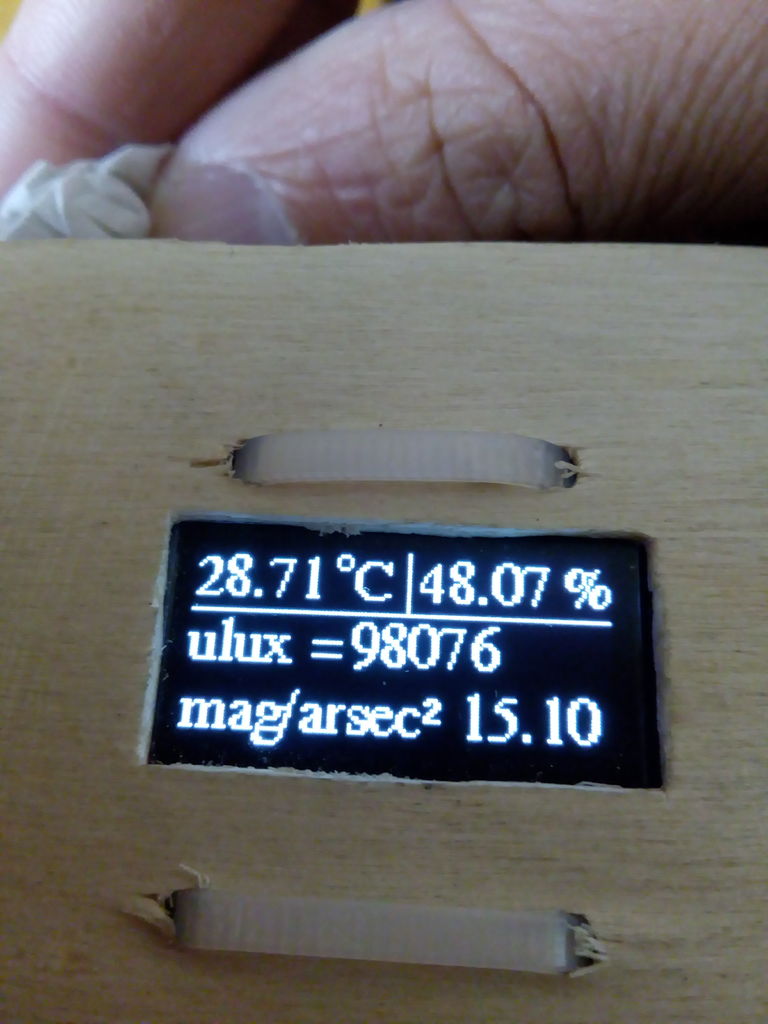
我创建自己的案例,我使用面包板与杜邦电缆你可以看到。
我用 TP4056 用usb线充电(需要swtich dip jumper)。
如果打开/关闭我使用 dip跳线。
对于日光,TSL2591显示0,mag/arcsec2为nan。
对于夜空,TSL2591应显示 0到1000 000 microlux (ulux)和相应的mag/arcsec2
(cca。 14到22 mag/arsec2)。
完整 月亮我测得 50k ulux ,这是0.05 lux。
-
气象站
+关注
关注
1文章
841浏览量
16906
发布评论请先 登录
便携式气象站:移动场景下的气象“感知官”
超声波气象站:精准监测的技术新选择
小型自动气象站:精细化气象监测的技术革新与应用拓展
超声波自动气象站技术方案

北斗自动气象站: 护航无网区的 “气象信使”
数字传感器,如何通过小型气象站赋能农耕、生态与防灾?
防爆工业气象站:工业场景的 “气象监测中枢”
光伏实验气象站的技术架构与应用实践
便携式气象五参数监测仪:气象监测的便捷 “利器”

分布式光伏气象站:光伏电站的 “智慧气象管家”

解密交通气象站:数据驱动的交通气象服务革新










 工商网监
工商网监
评论