


 怎样用声音控制RGBLED的颜色

连接RGB LED的最长脚到Arduino。通过220欧姆电阻将其他支路连接到Arduino的引脚9,10和11,如下面的电路图所示。

如何运行程序
首先,粘贴在Arduino IDE中本文末尾为Arduino提供的代码并上传代码。
然后,您需要从Wekinator的示例页面下载草图。
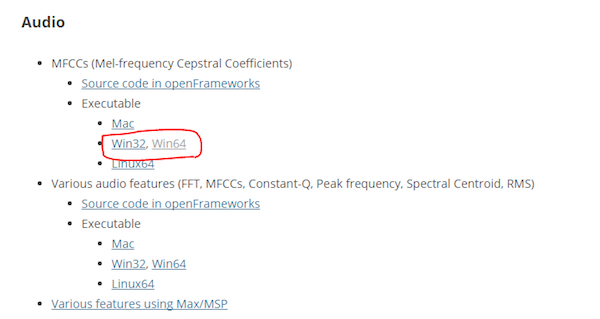
下载MFCC的可执行文件(mel频率倒频谱系数)。我有一个64位操作系统,所以我从那里下载了“win64”。
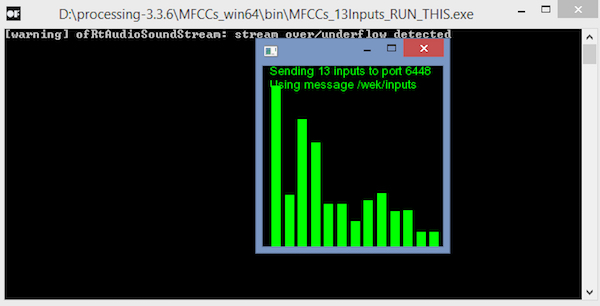
下载后,解压缩并运行“.exe”文件。它将如下所示。现在您需要一个麦克风来为Wekinator提供输入。如果您已连接外接麦克风,请确保在计算机的声音设置中选择它。
您将需要另一个草图(“输出草图”) )从Wekinator获得输出。该草图在本文末尾给出。将其粘贴到新的处理窗口并运行草图。
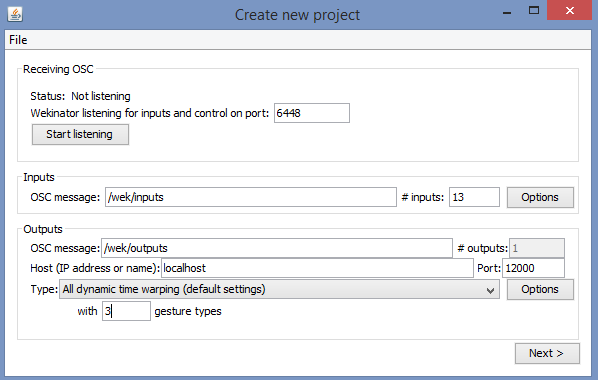
现在打开Wekinator并进行如下图所示的设置。将输入设置为13,将输出设置为1.将类型设置为“所有动态时间扭曲”,使用3种手势类型,然后单击“下一步”。
现在按住output_1前面的“+”按钮并说“红色”。
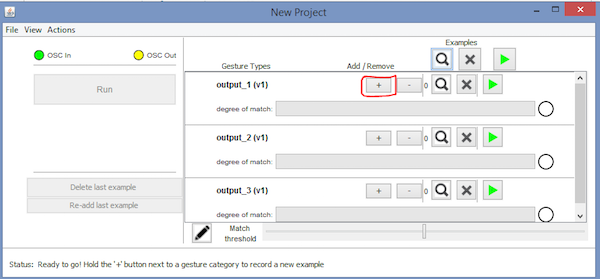
然后按住output_2前面的“+”按钮并说“绿色”。
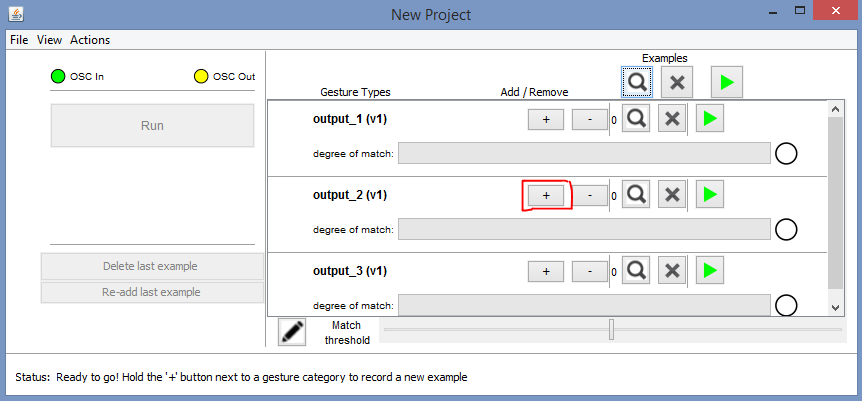
然后按住output_3前面的“+”按钮并说“蓝色”。
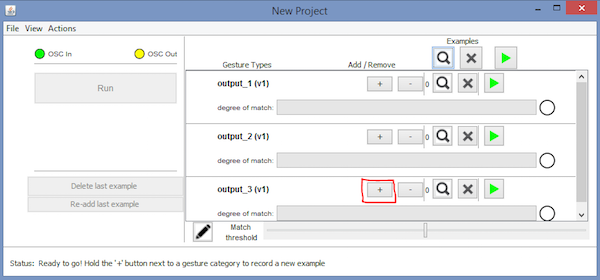
之后,单击“Train”,然后单击“Run”。现在,RGB LED的颜色将根据您说的颜色名称而改变。
Arduino代码
#include //Including the library that will help us in receiving and sending the values from processing
ValueReceiver《1》 receiver; /*Creating the receiver that will receive 1 value.
Put the number of values to synchronize in the brackets */
/* The below variable will be synchronized in the processing
and they should be same on both sides. */
int output;
// Initializing the pins for led‘s
int red_light_pin= 11;
int green_light_pin = 10;
int blue_light_pin = 9;
void setup()
{
/* Starting the serial communication because we are communicating with the
Processing through serial. The baudrate should be same as on the processing side. */
Serial.begin(19200);
pinMode(red_light_pin, OUTPUT);
pinMode(green_light_pin, OUTPUT);
pinMode(blue_light_pin, OUTPUT);
// Synchronizing the variable with the processing. The variable must be int type.
receiver.observe(output);
}
void loop()
{
// Receiving the output from the processing.
receiver.sync();
// Matching the received output to light up the RGB LED
if (output == 1)
{
RGB_color(255, 0, 0); // Red
}
else if (output == 2)
{
RGB_color(0, 255, 0); // Green
}
else if (output ==3)
{
RGB_color(0, 0, 255); // Blue
}
}
void RGB_color(int red_light_value, int green_light_value, int blue_light_value)
{
analogWrite(red_light_pin, red_light_value);
analogWrite(green_light_pin, green_light_value);
analogWrite(blue_light_pin, blue_light_value);
}
处理代码(输出草图)
import vsync.*; // Importing the library that will help us in sending and receiving the values from the Arduino
import processing.serial.*; // Importing the serial library
// Below libraries will connect and send, receive the values from wekinator
import oscP5.*;
import netP5.*;
// Creating the instances
OscP5 oscP5;
NetAddress dest;
ValueSender sender;
// This variable will be syncronized with the Arduino and it should be same on the Arduino side.
public int output;
void setup()
{
// Starting the serial communication, the baudrate and the com port should be same as on the Arduino side.
Serial serial = new Serial(this, “COM10”, 19200);
sender = new ValueSender(this, serial);
// Synchronizing the variable as on the Arduino side.
sender.observe(“output”);
// Starting the communication with wekinator. listen on port 12000, return messages on port 6448
oscP5 = new OscP5(this, 12000);
dest = new NetAddress(“127.0.0.1”, 6448);
}
//This is called automatically when OSC message is received
void oscEvent(OscMessage theOscMessage) {
if (theOscMessage.checkAddrPattern(“/output_1”)==true)
{
output = 1;
}
else if (theOscMessage.checkAddrPattern(“/output_2”)==true)
{
output = 2;
}
else if (theOscMessage.checkAddrPattern(“/output_3”) == true)
{
output = 3;
}
else
{
}
}
void draw()
{
// Nothing to be drawn for this example
}
-
led
+关注
关注
244文章
24724浏览量
692514 -
Arduino
+关注
关注
190文章
6527浏览量
197463
发布评论请先 登录
MAX5486:立体声音量控制芯片的卓越之选
MAX5440:立体声音量控制的理想之选
探索PGA2311立体声音频音量控制器:特性、应用与设计要点
Texas Instruments PGA2320:高性能立体声音频音量控制芯片深度解析
光纤线芯都是按照什么颜色排序的

如何使用 M487 微控制器 (MCU) 通过 DAC 在 SD 卡上播放 WAV 文件声音?
为什么现在的PCB大部分都是绿色?PCB 不同的颜色到底代表什么意思?

声音芯片有哪些类型和型号
新品上市丨阿童木CE系列颜色传感器




评论