


 利用平稳和离散小波变换方式从心电图数据获取心率

导语
在上一篇关于 CWT 的文章里,我们已经展示了连续小波变换(CWT)如何“放大”心电图(ECG)里那一瞬间的 R 波,并获取心率。这一次,我们把平移不变的小波(SWT)和离散小波(DWT)也请来比较一下,三种小波变换,同组数据,最后我们将比较检测结果的差异。
为了避免陈述一些枯燥的公式,先用几句话来概括这三种小波变换各自的特点。
CWT:像拿着一把可变倍数的放大镜,对着信号一寸寸地扫——你可以把放大率(尺度)调得很细很密,也可以把放大镜慢慢移动到任何时刻去比对。但因为你对每个放大率和每个位置都拍张‘快照’,最后会积攒一堆照片(系数很多、很冗余),所以既能看得细致入微,也要付出计算和存储的代价。
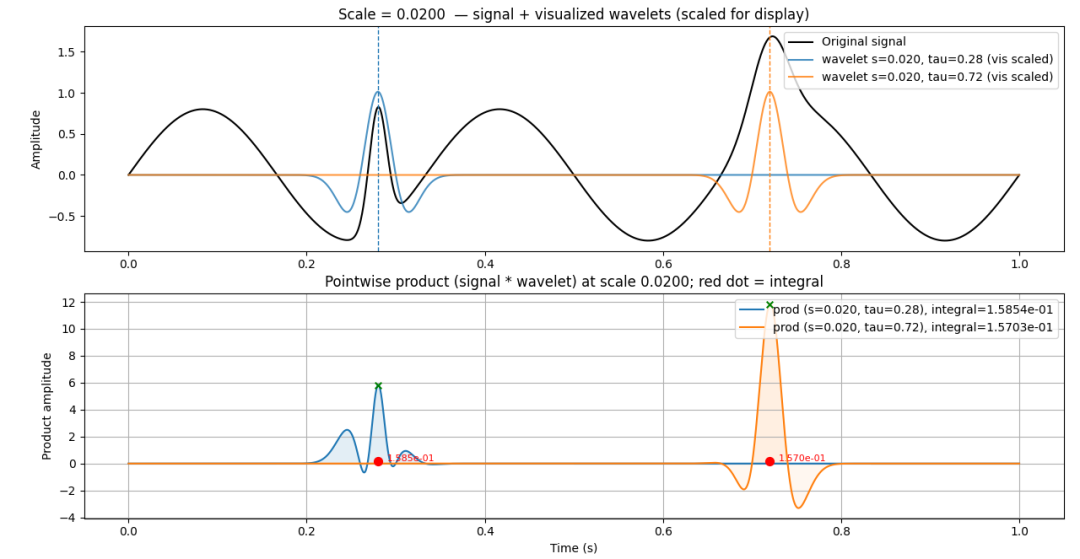
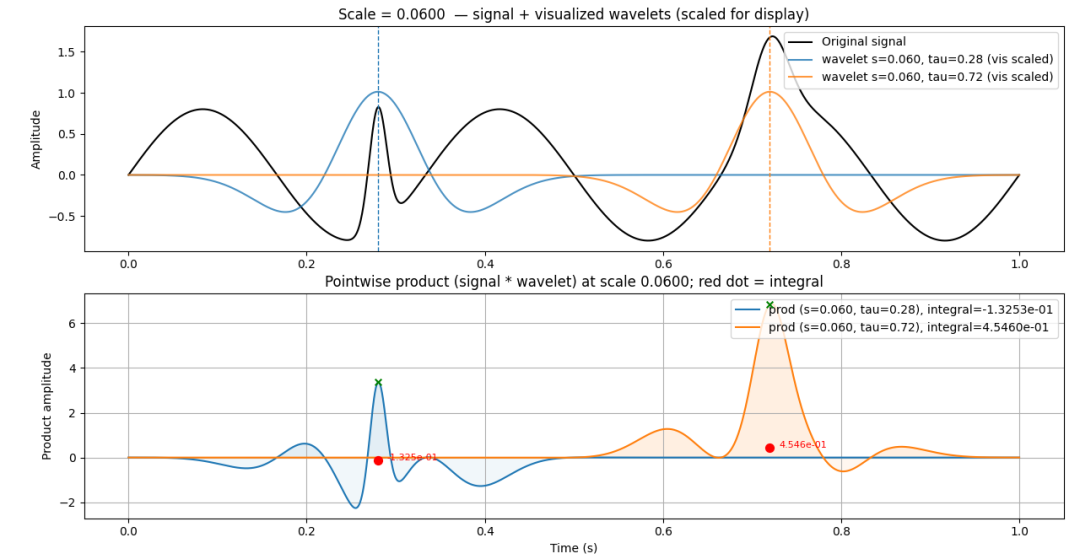
如上面2个图所示CWT示意在2个尺度的小波函数下,每个尺度对应的2个时间点(T1,T2)的平移,小波函数和原信号进行逐点乘积得到曲线,以及对应局部区域乘积和的数值(红点)。
SWT:像把同一幅画用不同倍率的镜头都拍成同样像素大小的照片,这样每张照片的像素都能一一对应地比较——你不会因为放大或缩小而丢掉某个像素的位置,但照片会成堆(冗余),好处是无论把原画轻轻平移多少,照片的亮点都会一起平移,不会乱跳(平移稳定)。每个倍率的镜头包含两个滤镜,一个抓细节(高频),一个抓轮廓(低频)。如下图所示,不过只对应一种滤镜。
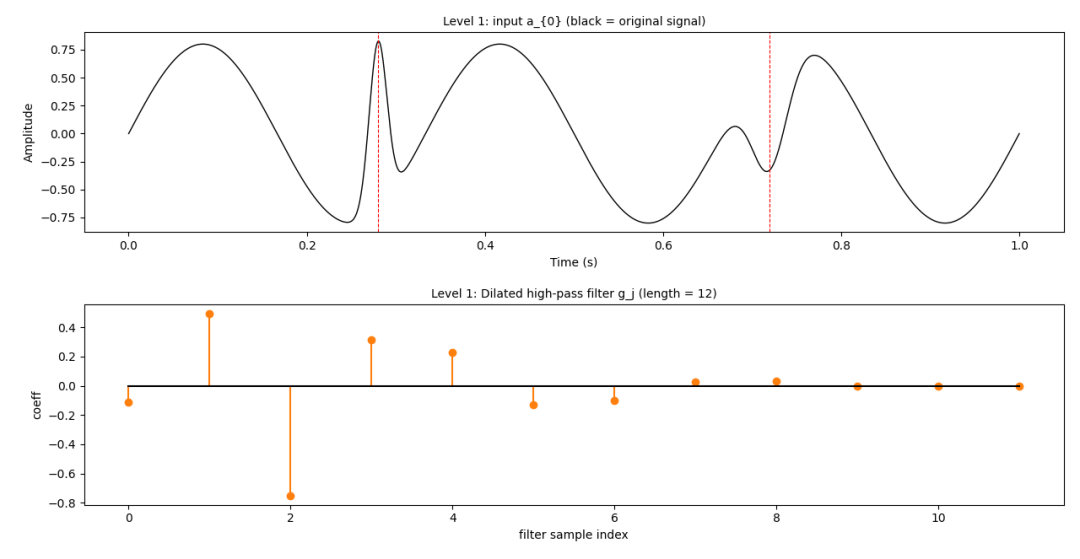
信号和小波最初形态(无插零膨胀)
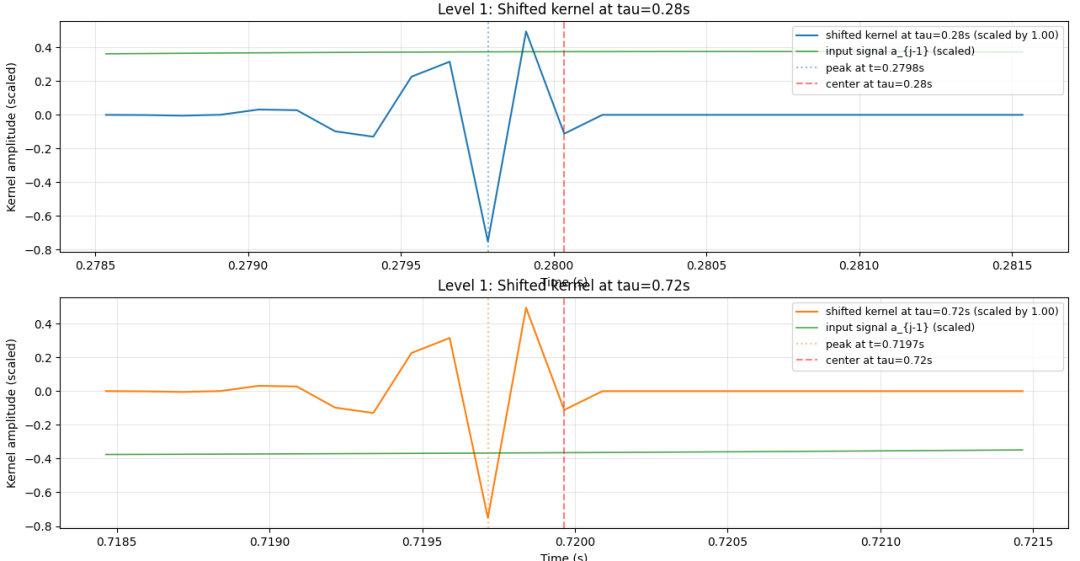
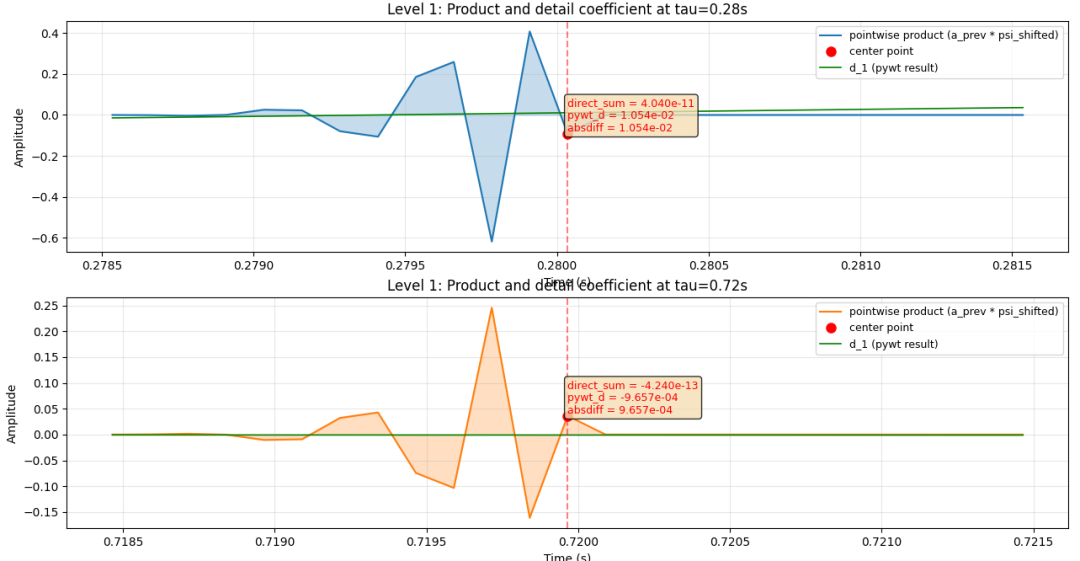
SWT在分解信号第一层的T1和T2处局部小波系数与信号的逐点相乘并求和(红点)
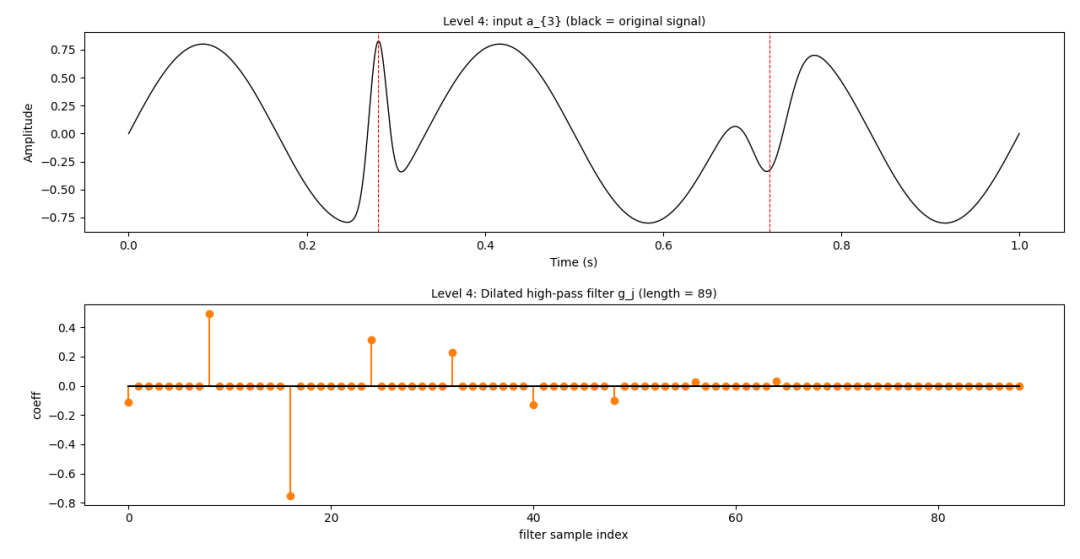
信号和连续插零膨胀4次的小波
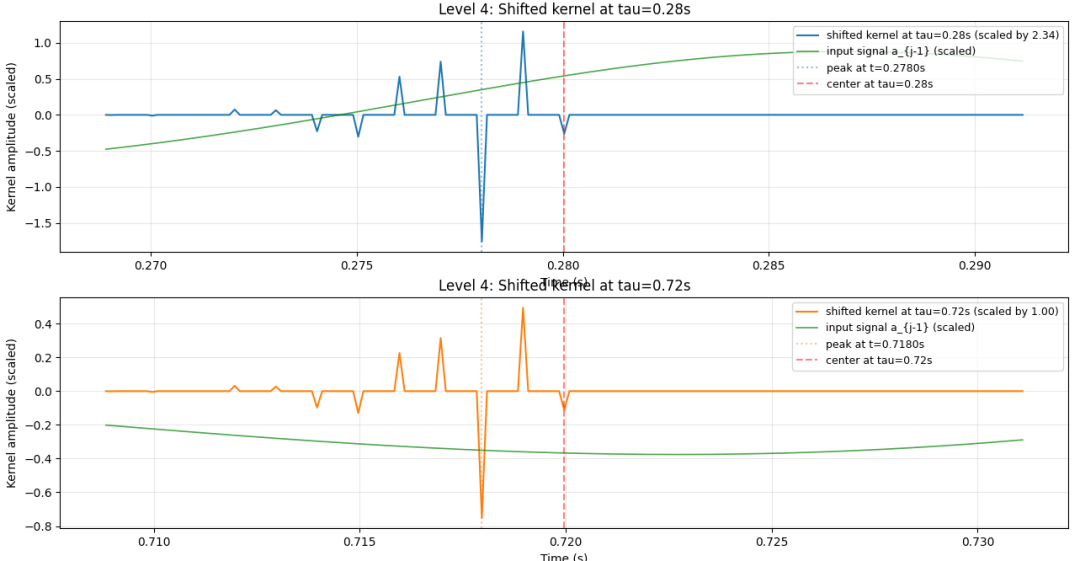
和膨胀后小波系数卷积的不是原信号
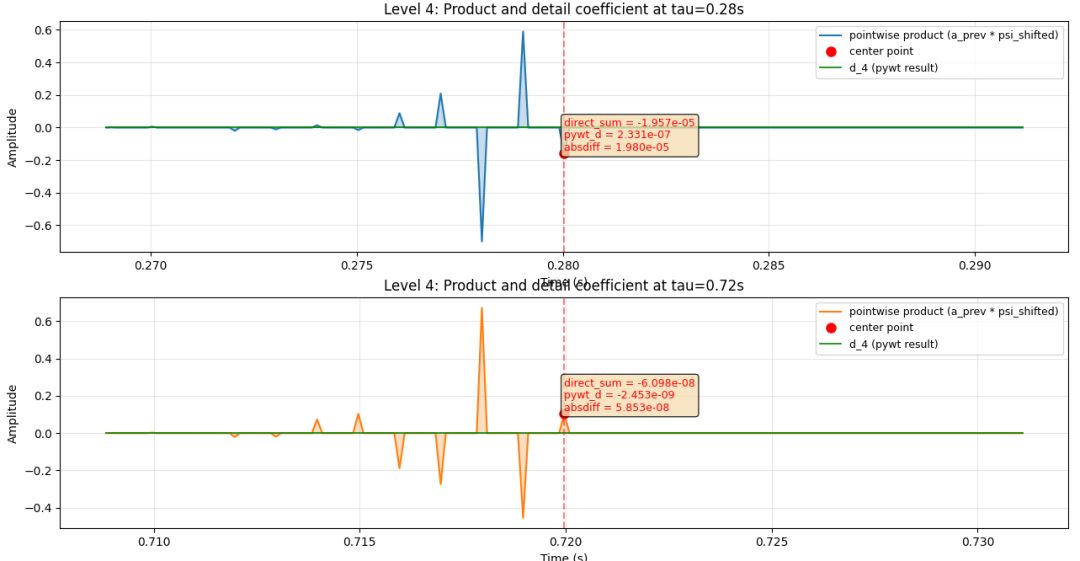
SWT在分解信号第四层(红点是对应时间的乘积和)
DWT:SWT通过上采样滤波器(或等价地不下采样)来实现尺度变化,从而获得平移不变性和冗余系数;DWT通过下采样实现尺度变化,但是对输入信号的平移敏感;你可以把 SWT 看作是“去下采样化并对滤波器进行按层扩展”的 DWT 变体。想象你拿着一台固定变焦的小相机(其实是一对滤波器:一个是写意让画面模糊的 low‑pass 和一个抓细节的 high‑pass)。第一轮你把整张画“拍”成两张:一张是模糊的大块(近似),一张是细碎的纹理(细节)。接着,把那张“模糊的照片”按比例缩小(下采样,只保留每隔一行/列的像素)作为下一轮的新画面,再用同样的相机继续拍——层层下去就成了一个金字塔。注意:细节那一份在每层也会被下采样并保存为该层的细节系数,所以整个过程既紧凑又可重构。但正因为每层都在“丢掉一半像素”,分解结果对原始信号的微小平移会很敏感;要想避免这一点可以考虑不下采样的 SWT(平移不变小波)或冗余变换。
好了,不多说了,这次代码较多。我们就转到心率检测这个话题上吧。
SWT检测心率
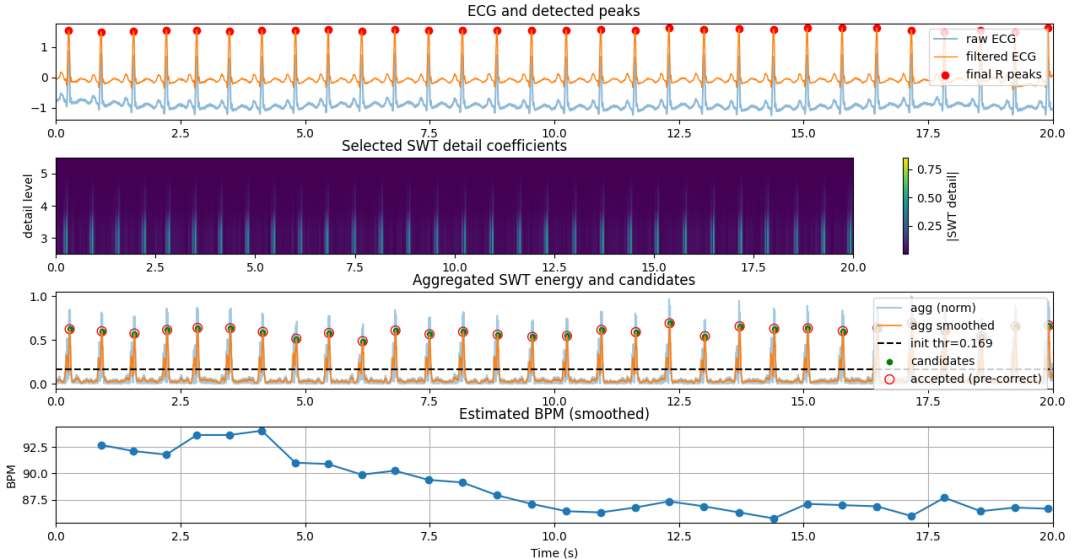
SWT通过db4小波检测到的前20s峰值和心率
大家可以比较一下CWT的心率检测输出(小波变换(3):连续小波变换(CWT)方式从心电图数据获取心率)。SWT检测心率的程序中,除了要找到峰值,还要避免峰值的变化,峰值处的多个相同采样值,以及大峰后的小伪峰。程序的基本步骤如下:
读取/截取 ECG
预处理(bandpass_filter)
SWT 分解(pywt.swt)
level(分解层数):越高能覆盖越低频成分,但计算和存储开销增加
wavelet(母小波):db4、sym4、coif1 常用于 ECG;db4 与 QRS 形状相似通常表现好
经验(针对 fs=360 Hz):细节层 j 对应的近似频带(D_j 约为 fs/(2^(j+1)) 到 fs/(2^j)):
D1: 90–180 Hz, D2: 45–90 Hz, D3: 22.5–45 Hz, D4: 11.25–22.5 Hz, D5: 5.625–11.25 Hz
QRS 能量通常集中在 ~5–40 Hz → 可选 detail_levels = [3,4,5](与你代码一致)
聚合感兴趣尺度(agg)
归一化与平滑(agg -> agg_smooth)
归一化:agg = (agg - min) / ptp 便于阈值基于百分位或绝对值一致性
平滑:moving_average(agg, win_samples),win_samples = smooth_ms/1000 * fs(示例 smooth_ms=30 ms)
初始候选峰检测(较宽松):找出可能的 R 峰位置(候选),但保持一定宽松以便后续二次筛选
候选峰特征计算(height, prominence)
二次筛选(基于幅值 / 突出度 / 相对高度)
计算 BPM(瞬时 + 平滑)
Plot输出
SWT小波变换检测心率程序源码:
"""
基于 SWT 的 ECG R 峰检测与心率 (BPM) 计算示例
适合:离线分析或对检测稳定性有较高要求的场景(例如设备后台或验证)
依赖: pip install numpy scipy matplotlib pywavelets
说明要点:
- 使用 pywt.swt 做平移不变小波分解(每级返回 cA, cD, 长度与输入相同)
- 选取与 QRS 频带对应的 detail 级别(例如 fs=360Hz 时, detail level 3-5 涵盖 ~5-45Hz)
- 聚合所选 detail 的绝对值作为能量包络, 平滑后做峰检测
- 峰在原始带通信号附近做局部最大值校准以确定 R 峰准确位置
"""
importnumpyasnp
importscipy.signalassignal
importmatplotlib.pyplotasplt
importpywt
fromscipy.signal.windowsimportgaussian
importpandasaspd
# ---------- 参数(根据采样率调整) ----------
fs =360.0        # 采样率(Hz), 题目中为 360Hz
wavelet ='db4'     # 常用小波(Daubechies 4 对 ECG 效果不错)
swt_level =5      # SWT 分解层数(越高捕获越低频成分, 但计算增大)
# 推荐 detail levels(基于经验/频带映射), 对 360Hz 可用 3-5 覆盖 QRS 频段 5-40Hz
swt_detail_levels = [3,4,5]
pre_band = (0.5,45.0)  # 可选预带通滤波, 去基线与高频噪声
min_rr_sec =0.20    # 最小 RR(秒), 防止伪峰;200 ms 常见
smooth_ms =30      # 聚合能量的平滑窗口 (毫秒)
threshold_percentile =70# 自适应阈值:聚合能量的百分位
debug_plot =True
# ---------- 辅助函数 ----------
defbandpass_filter(x, fs, lowcut, highcut, order=3):
  nyq =0.5* fs
  b, a = signal.butter(order, [lowcut/nyq, highcut/nyq], btype='band')
 returnsignal.filtfilt(b, a, x)


defmoving_average(x, win_samples):
 ifwin_samples <= 1:
        return x
    kernel = np.ones(win_samples) / win_samples
    return np.convolve(x, kernel, mode='same')


def _compute_bpm_from_peaks(peaks_idx, fs, smooth_N=3):
    """
    从峰索引计算 BPM 序列。
    返回 (bpm_times, bpm_values):
      bpm_times: 对应于每次计算出的 BPM 的时间点(秒), 使用当前峰时间
      bpm_values: 平滑后的 BPM(以最近 smooth_N 个 RR 平均)
    """
    if len(peaks_idx) < 2:
        return np.array([]), np.array([])
    bpm_times = []
    bpm_values = []
    for i in range(1, len(peaks_idx)):
        rr = (peaks_idx[i] - peaks_idx[i-1]) / fs
        if rr <= 0:
            continue
        inst_bpm = 60.0 / rr
        # 平滑:最多用最近 smooth_N 个 RR
        j0 = max(1, i - smooth_N + 1)
        rr_list = [(peaks_idx[k] - peaks_idx[k-1]) / fs for k in range(j0, i+1)]
        if len(rr_list) >0:
      smooth_bpm =60.0/ (np.mean(rr_list))
   else:
      smooth_bpm = inst_bpm
    bpm_times.append(peaks_idx[i] / fs)
    bpm_values.append(smooth_bpm)
 returnnp.array(bpm_times), np.array(bpm_values)


defdetect_beats_swt(ecg, fs,
          wavelet='db4',
          level=6,
          detail_levels=(3,4,5),
          pre_band=(0.5,45.0),
          smooth_ms=30,
          initial_percentile=50,
          amp_factor=0.6,
          prom_factor=0.5,
          prom_min=0.05,
          rel_factor=0.45,
          min_rr_sec=0.20,
          debug_plot=False):
 """
  SWT-based R peak detection.
  返回: peaks_idx, bpm_times, bpm_values
  主要改进:
   - 先用初始阈值找候选峰, 再基于候选峰的中位高度/中位 prominence 做二次筛选
   - 加入相对前峰高度检查以减少大峰后的小伪峰
  """
 # 1) 预处理
 ifpre_bandisnotNone:
    ecg_f = bandpass_filter(ecg, fs, pre_band[0], pre_band[1])
 else:
    ecg_f = ecg.copy()

 # 2) SWT 分解
  swt_coeffs = pywt.swt(ecg_f, wavelet, level=level, start_level=0)

 # 3) 聚合 select detail levels 的绝对值
  L =len(ecg_f)
  agg = np.zeros(L)
 forlvlindetail_levels:
   if1<= lvl <= level:
            cA, cD = swt_coeffs[lvl-1]
            agg += np.abs(cD)
    # 归一化与平滑
    agg = (agg - np.min(agg)) / (np.ptp(agg) + 1e-12)
    win_samples = max(1, int((smooth_ms/1000.0) * fs))
    agg_smooth = moving_average(agg, win_samples)

    # 4) 初始候选峰(较宽松)
    initial_threshold = np.percentile(agg_smooth, initial_percentile)
    min_distance = int(min_rr_sec * fs)
    # 设置一个绝对高度阈值。所有检测到的峰值, 其实际幅值(在 agg_smooth 数组中的值)都必须大于或等于这个 initial_threshold
    peaks0, props0 = signal.find_peaks(agg_smooth, height=initial_threshold, distance=min_distance)
    if peaks0.size == 0:
        # 无候选峰 -> 返回空
   returnnp.array([], dtype=int), np.array([]), np.array([])
  heights = agg_smooth[peaks0]
  prominences = signal.peak_prominences(agg_smooth, peaks0)[0]
  median_h = np.median(heights)
  median_prom = np.median(prominences)

 # 5) 二次筛选:基于 height / prominence / relative-to-prev
  accepted = []
  prev_height =None
 fori, pinenumerate(peaks0):
    h = heights[i]
    prom = prominences[i]ifi < len(prominences) else 0.0
        cond_amp = (h >=max(initial_threshold, median_h * amp_factor))
    cond_prom = (prom >=max(median_prom * prom_factor, prom_min))
   ifnot(cond_amporcond_prom):
     continue
   ifprev_heightisnotNone:
     ifh < prev_height * rel_factor:
                # 允许 prominence 很大时仍保留
                if prom < max(median_prom * 0.5, prom_min):
                    continue
        accepted.append(p)
        prev_height = h
    # 若被过滤空, 则退回用初始阈值的峰作为安全兜底
    if len(accepted) == 0:
        accepted = [int(p) for p,h in zip(peaks0, heights) if h >= initial_threshold]

 # 6) 在带通信号上校正到局部最大(提高定位精度)
  corrected = []
  search_radius =int(0.05* fs)
 forpinaccepted:
    lo =max(0, p - search_radius)
    hi =min(L, p + search_radius +1)
    seg = ecg_f[lo:hi]
   ifseg.size ==0:
     continue
    local_idx = np.argmax(np.abs(seg))
    corr = lo + local_idx
   iflen(corrected) ==0or(corr - corrected[-1]) > (min_distance //2):
      corrected.append(int(corr))
  peaks_idx = np.array(corrected, dtype=int)

 # 7) 计算 BPM
  bpm_times, bpm_values = _compute_bpm_from_peaks(peaks_idx, fs, smooth_N=3)

 # 8) debug 绘图
 ifdebug_plot:
    t = np.arange(L) / fs
    plt.figure(figsize=(12,9))
    ax1 = plt.subplot(4,1,1)
    plt.plot(t, ecg, label='raw ECG', alpha=0.5)
    plt.plot(t, ecg_f, label='filtered ECG', linewidth=1.0)
    plt.scatter(peaks_idx/fs, ecg_f[peaks_idx], color='r', label='final R peaks')
    plt.legend(loc='upper right'); plt.title('ECG and detected peaks')
    ax2 = plt.subplot(4,1,2, sharex=ax1)
   # 展示被选 detail 的系数(堆叠)
    selected_coefs = np.vstack([np.abs(swt_coeffs[l-1][1])forlindetail_levelsif1<=l<=level])
        if selected_coefs.size >0:
      extent = [0, L/fs,min(detail_levels)-0.5,max(detail_levels)+0.5]
      plt.imshow(selected_coefs, aspect='auto', origin='lower', extent=extent)
      plt.colorbar(label='|SWT detail|')
    plt.ylabel('detail level'); plt.title('Selected SWT detail coefficients')
    ax3 = plt.subplot(4,1,3, sharex=ax1)
    plt.plot(t, agg, label='agg (norm)', alpha=0.4)
    plt.plot(t, agg_smooth, label='agg smoothed', linewidth=1.2)
    plt.hlines(initial_threshold, t[0], t[-1], colors='k', linestyles='--', label=f'init thr={initial_threshold:.3f}')
    plt.scatter(peaks0/fs, agg_smooth[peaks0], color='g', s=20, label='candidates')
    plt.scatter(np.array(accepted)/fs, agg_smooth[np.array(accepted)], facecolors='none', edgecolors='r', s=60, label='accepted (pre-correct)')
    plt.legend(loc='upper right'); plt.title('Aggregated SWT energy and candidates')
    ax4 = plt.subplot(4,1,4, sharex=ax1)
   iflen(bpm_times) >0:
      plt.plot(bpm_times, bpm_values,'-o')
      plt.xlabel('Time (s)'); plt.ylabel('BPM'); plt.title('Estimated BPM (smoothed)')
      plt.grid(True)
   else:
      plt.text(0.1,0.5,'No BPM computed (need >=2 peaks)', transform=ax4.transAxes)
    plt.tight_layout()
    plt.show()
 returnpeaks_idx, bpm_times, bpm_values


defread_ecg_from_csv(csv_path, fs=360, duration_sec=20):
 """
  从 CSV 读取 ECG 数据, 并截取前 duration_sec 秒
  参数:
    csv_path: CSV文件路径
    fs: 采样率 (Hz), 默认360
    duration_sec: 需要读取的时长(秒), 默认20
  返回:
    t: 时间轴 (秒)
    ecg_segment: 截取后的 ECG 信号
  """
 # ---------- 读取 CSV 并提取 ECG 列 ----------
  df = pd.read_csv(csv_path)

 if'MLII'indf.columns:
    ecg_full = df['MLII'].values.astype(float)
 elifdf.shape[1] >=2:
    ecg_full = df.iloc[:,1].values.astype(float)
 else:
   raiseValueError("未找到 ECG 列, 请确认 CSV 列名或格式。")

 # 计算需要截取的样本数
  n_samples_needed =int(duration_sec * fs)

 # 截取前 n_samples_needed 个样本
 iflen(ecg_full) >= n_samples_needed:
    ecg_segment = ecg_full[:n_samples_needed]
 else:
   print(f"警告: 原始数据只有{len(ecg_full)}个样本 (< {n_samples_needed}), 将使用全部数据")
        ecg_segment = ecg_full
        n_samples_needed = len(ecg_full)

    # 生成时间轴
    if 'time_s' in df.columns:
        # 如果CSV有时间列, 也相应截取
        times_full = df['time_s'].values
        t = times_full[:n_samples_needed]
    else:
        t = np.arange(n_samples_needed) / fs

    return t, ecg_segment


if __name__ == "__main__":
    csv_path = r"Your_path_to_ECG_data122_60s.csv"
    t, ecg = read_ecg_from_csv(csv_path=csv_path, fs=360, duration_sec= 20)

    peaks_swt, bpm_times_swt, bpm_values_swt = detect_beats_swt(
        ecg, fs,
        wavelet='db4',
        level=5,
        detail_levels=(3,4,5),
        pre_band=(0.5,45.0),
        smooth_ms=30,
        initial_percentile=85,
        amp_factor=0.6,
        prom_factor=0.5,
        prom_min=0.05,
        rel_factor=0.45,
        min_rr_sec=0.20,
        debug_plot=True
    )
    print("SWT 检测:", len(peaks_swt), "peaks; 最后 BPM:", (bpm_values_swt[-1] if len(bpm_values_swt)>0elseNone))
DWT检测心率
DWT检测新的程序流程和SWT类似,也是把原信号通过小波变换(这里采用的仍然是db4)分解信号,然后在信号中把需要的频率范围内的系数相加,重建信号(相对于抓住信号中需要的特征的滤波后的信号),然后在基于这个重建信号对峰值进行检测,平滑处理,再校正,然后计算BPM后,输出处理后的数据到图。
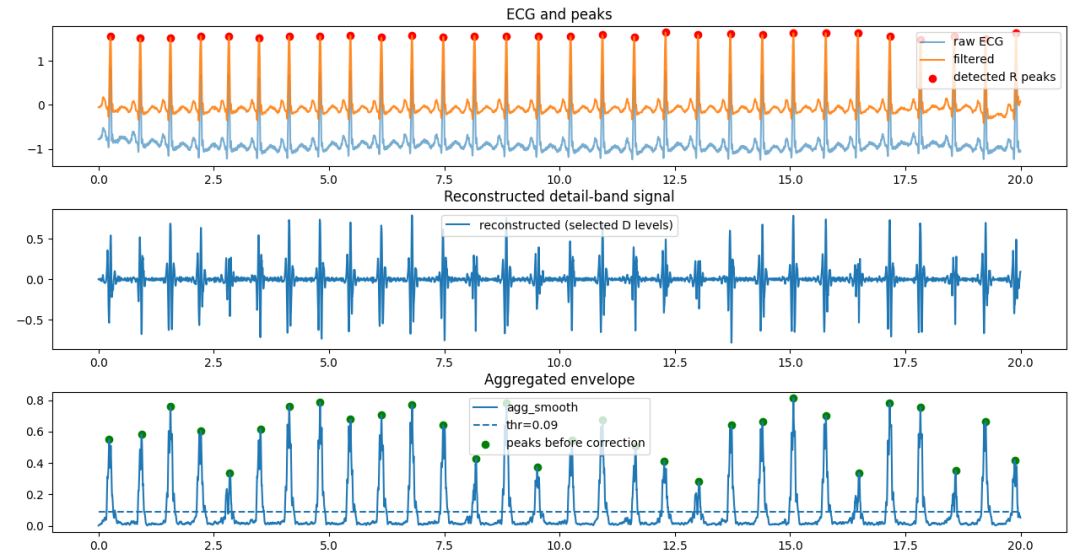
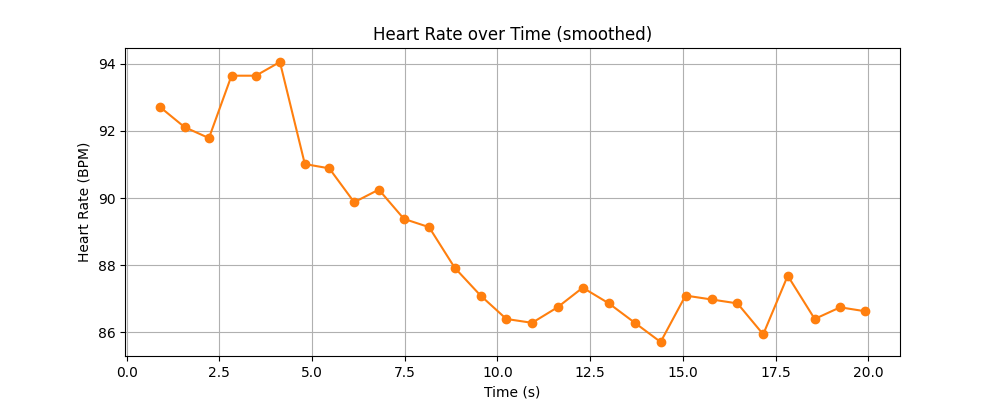
DWT小波变换检测心率
DWT小波变换检测心率程序源码:
"""
基于 DWT 的 ECG R 峰检测(通过重构选定 detail 级别)
适合: 计算资源受限或实时嵌入式场景(优点是计算量低)
缺点: DWT 非平移不变,检测位置对相位/起点敏感;可以通过 cycle spinning(多次平移重构求平均)缓解。
依赖: pip install numpy scipy matplotlib pywavelets
"""
importnumpyasnp
importscipy.signalassignal
importmatplotlib.pyplotasplt
importpywt
fromscipy.signal.windowsimportgaussian
importpandasaspd
# ---------- 参数 ----------
fs =360.0
wavelet ='db4'
dwt_level =4
# 对于 360Hz,QRS 主要在 D3-D5 范围(经验),可选 detail_levels_dwt = [3,4,5]
detail_levels_dwt = [3,4,5]
pre_band = (0.5,45.0)
min_rr_sec =0.20
smooth_ms =30
threshold_percentile =75
debug_plot =True
defbandpass_filter(x, fs, lowcut, highcut, order=3):
  nyq =0.5* fs
  b, a = signal.butter(order, [lowcut/nyq, highcut/nyq], btype='band')
 returnsignal.filtfilt(b, a, x)


defmoving_average(x, win_samples):
 ifwin_samples <= 1:
        return x
    kernel = np.ones(win_samples)/win_samples
    return np.convolve(x, kernel, mode='same')


def detect_beats_dwt(ecg, fs,
                     wavelet='db4',
                     level=6,
                     detail_levels=(3,4,5),
                     pre_band=(0.5,45.0),
                     smooth_ms=30,
                     threshold_percentile=70,
                     min_rr_sec=0.20,
                     debug_plot=False):
    """
    DWT 方法: 对 signal 做 wavedec 分解,然后把不需要的系数置零,再用 waverec 重构出只含 QRS 频带的信号,
    在重构信号上做能量聚合和平滑检测。
    返回: peaks_idx, bpm_times, bpm_values
    """
    # 1) 预处理
    if pre_band is not None:
        ecg_f = bandpass_filter(ecg, fs, pre_band[0], pre_band[1])
    else:
        ecg_f = ecg.copy()

    # 2) DWT 分解
    coeffs = pywt.wavedec(ecg_f, wavelet, level=level)
    # coeffs: [cA_n, cD_n, cD_{n-1}, ..., cD1] 长度 level+1

    # 3) 将不选的 detail 置零,只保留目标 detail 级别
    coeffs_sel = [None] * len(coeffs)
    # cA_n 保留为零(若想也保留可调整),这里置零以强调细节
    coeffs_sel[0] = np.zeros_like(coeffs[0])
    # detail indices in coeffs: coeffs[1] is cD_n, coeffs[-1] is cD1
    # mapping: detail level j (1..n) corresponds to coeffs index = len(coeffs)-j
    for j in range(1, level+1):
        idx = len(coeffs) - j
        if j in detail_levels:
            coeffs_sel[idx] = coeffs[idx]  # 保留
        else:
            coeffs_sel[idx] = np.zeros_like(coeffs[idx])

    # 4) 重构信号(只含所选 detail)
    recon = pywt.waverec(coeffs_sel, wavelet)
    # waverec 可能导致重构长度与原始略有差异,截断或填充
    recon = recon[:len(ecg_f)]

    # 5) 能量聚合、平滑
    agg = np.abs(recon)
    agg = (agg - np.min(agg)) / (np.ptp(agg) + 1e-12)
    win_samples = max(1, int((smooth_ms/1000.0) * fs))
    agg_smooth = moving_average(agg, win_samples)

    # 6) 峰检测
    threshold = np.percentile(agg_smooth, threshold_percentile)
    min_distance = int(min_rr_sec * fs)
    peaks0, props = signal.find_peaks(agg_smooth, height=threshold, distance=min_distance)

    # 7) 在滤波后的原始信号上校正峰位置
    corrected = []
    L = len(ecg_f)
    search_radius = int(0.05 * fs)
    for p in peaks0:
        lo = max(0, p - search_radius)
        hi = min(L, p + search_radius + 1)
        seg = ecg_f[lo:hi]
        if seg.size == 0: continue
        local_idx = np.argmax(np.abs(seg))
        corr = lo + local_idx
        if len(corrected) == 0 or (corr - corrected[-1]) > (min_distance //2):
      corrected.append(int(corr))
  peaks_idx = np.array(corrected, dtype=int)

 # 8) 计算 BPM
  bpm_times = []
  bpm_values = []
 foriinrange(1,len(peaks_idx)):
    rr = (peaks_idx[i] - peaks_idx[i-1]) / fs
   ifrr <= 0: continue
        inst_bpm = 60.0 / rr
        lookback = 3
        j0 = max(1, i - lookback + 1)
        rr_list = [(peaks_idx[k] - peaks_idx[k-1]) / fs for k in range(j0, i+1)]
        smooth_bpm = 60.0 / (np.mean(rr_list)) if len(rr_list)>0elseinst_bpm
    bpm_times.append(peaks_idx[i] / fs)
    bpm_values.append(smooth_bpm)
  bpm_times = np.array(bpm_times)
  bpm_values = np.array(bpm_values)

 # 9) debug 绘图
 ifdebug_plot:
    t = np.arange(len(ecg)) / fs
    plt.figure(figsize=(12,8))
    ax1 = plt.subplot(3,1,1)
    plt.plot(t, ecg, label='raw ECG', alpha=0.6)
    plt.plot(t, ecg_f, label='filtered', alpha=0.9)
    plt.scatter(peaks_idx/fs, ecg_f[peaks_idx], color='r', label='detected R peaks')
    plt.legend(); plt.title('ECG and peaks')
    ax2 = plt.subplot(3,1,2, sharex=ax1)
    plt.plot(t, recon, label='reconstructed (selected D levels)')
    plt.legend(); plt.title('Reconstructed detail-band signal')
    ax3 = plt.subplot(3,1,3, sharex=ax1)
    plt.plot(t, agg_smooth, label='agg_smooth')
    plt.hlines(threshold, t[0], t[-1], linestyles='--', label=f'thr={threshold:.2f}')
    plt.scatter(peaks0/fs, agg_smooth[peaks0], color='g', label='peaks before correction')
    plt.legend(); plt.title('Aggregated envelope')
    plt.tight_layout(); plt.show()

   # 新增: 单独的心率随时间图(独立 figure)
    plt.figure(figsize=(10,4))
   ifbpm_times.size >0:
      plt.plot(bpm_times, bpm_values, marker='o', linestyle='-', color='tab:orange')
      plt.xlabel('Time (s)')
      plt.ylabel('Heart Rate (BPM)')
      plt.title('Heart Rate over Time (smoothed)')
      plt.grid(True)
   else:
     # 若未检测到心搏,给出提示性图形
      plt.text(0.5,0.5,'No heartbeats detected to plot', ha='center', va='center', fontsize=12)
      plt.title('Heart Rate over Time (no detections)')
      plt.axis('off')
    plt.show()
 returnpeaks_idx, bpm_times, bpm_values


defread_ecg_from_csv(csv_path, fs=360, duration_sec=20):
 """
  从 CSV 读取 ECG 数据,并截取前 duration_sec 秒
  参数:
    csv_path: CSV文件路径
    fs: 采样率 (Hz),默认360
    duration_sec: 需要读取的时长(秒),默认20
  返回:
    t: 时间轴 (秒)
    ecg_segment: 截取后的 ECG 信号
  """
 # ---------- 读取 CSV 并提取 ECG 列 ----------
  df = pd.read_csv(csv_path)

 if'MLII'indf.columns:
    ecg_full = df['MLII'].values.astype(float)
 elifdf.shape[1] >=2:
    ecg_full = df.iloc[:,1].values.astype(float)
 else:
   raiseValueError("未找到 ECG 列,请确认 CSV 列名或格式。")

 # 计算需要截取的样本数
  n_samples_needed =int(duration_sec * fs)

 # 截取前 n_samples_needed 个样本
 iflen(ecg_full) >= n_samples_needed:
    ecg_segment = ecg_full[:n_samples_needed]
 else:
   print(f"警告: 原始数据只有{len(ecg_full)}个样本 (< {n_samples_needed}),将使用全部数据")
        ecg_segment = ecg_full
        n_samples_needed = len(ecg_full)

    # 生成时间轴
    if 'time_s' in df.columns:
        # 如果CSV有时间列,也相应截取
        times_full = df['time_s'].values
        t = times_full[:n_samples_needed]
    else:
        t = np.arange(n_samples_needed) / fs

    return t, ecg_segment


if __name__ == "__main__":
    csv_path = r"C:py_TestCodePy_codeswaveletsignal_change_detect122_60s.csv"
    t, ecg = read_ecg_from_csv(csv_path=csv_path, fs=360, duration_sec= 20)

    peaks_idx, bpm_times, bpm_values = detect_beats_dwt(
        ecg, fs,
        wavelet=wavelet,
        level=dwt_level,
        detail_levels=detail_levels_dwt,
        pre_band=pre_band,
        smooth_ms=smooth_ms,
        threshold_percentile=threshold_percentile,
        min_rr_sec=min_rr_sec,
        debug_plot=debug_plot
    )
    print(f"检测到 {len(peaks_idx)} 个 R 峰")
    if len(bpm_values)>0:
   print(f"最后 BPM ={bpm_values[-1]:.1f}bpm (time{bpm_times[-1]:.1f}s)")
比较CWT,SWT和DWT三种小波变换检测心率的结果
小编把三个演示程序的最后输出额外添加了心率BMP的输出,可见检测结果在心电图的前20个心率值完全相同:
| CWT (bpm) | SWT (bpm) | DWT (bpm) |
|---|---|---|
| 92.7 | 92.7 | 92.7 |
| 92.1 | 92.1 | 92.1 |
| 91.8 | 91.8 | 91.8 |
| 93.6 | 93.6 | 93.6 |
| 93.6 | 93.6 | 93.6 |
| 94.0 | 94.0 | 94.0 |
| 91.0 | 91.0 | 91.0 |
| 90.9 | 90.9 | 90.9 |
| 89.9 | 89.9 | 89.9 |
| 90.3 | 90.3 | 90.3 |
| 89.4 | 89.4 | 89.4 |
| 89.1 | 89.1 | 89.1 |
| 87.9 | 87.9 | 87.9 |
| 87.1 | 87.1 | 87.1 |
| 86.4 | 86.4 | 86.4 |
| 86.3 | 86.3 | 86.3 |
| 86.7 | 86.7 | 86.7 |
| 87.3 | 87.3 | 87.3 |
| 86.9 | 86.9 | 86.9 |
| 86.3 | 86.3 | 86.3 |
结语
代码有点冗长,但是也只触及到小波变换的冰山一角。所谓抛砖引玉,如果可以有助于各位理解小波变换和信号处理,那确实是心满意足了。
这里仍然要引用一下ECG的数据来源。[1][2]
[参考]
[1] G. B. Moody and R. G. Mark, “The impact of the MIT-BIH Arrhythmia Database,”IEEE Eng. Med. Biol. Mag., vol. 20, no. 3, pp. 45–50, May 2001, doi: 10.1109/51.932724.
[2] A. L. Goldberger et al., “PhysioBank, PhysioToolkit, and PhysioNet: Components of a new research resource for complex physiologic signals,”Circulation, vol. 101, no. 23, pp. e215–e220, Jun. 2000, doi: 10.1161/01.CIR.101.23.e215.
-
小波变换
+关注
关注
2文章
184浏览量
30534 -
心电图
+关注
关注
1文章
82浏览量
26028
原文标题:小波变换(4):平稳小波变换变换(SWT)和离散小波变换(DWT)方式从心电图数据获取心率
文章出处:【微信号:安费诺传感器学堂,微信公众号:安费诺传感器学堂】欢迎添加关注!文章转载请注明出处。
发布评论请先 登录
#参考设计#可穿戴心电图设计方案
利用深度循环神经网络对心电图降噪
心电图的数据处理和波形显示包括心率,RR值等的参数显示..
AMEYA360设计方案丨基于 NXP 的心电图仪
如何对心电图(ECG)信号进行简单的分析和心率计算
【快速上手手册】疯壳·四合一健康监测模组(心率血压血氧心电)
【快速上手手册】疯壳·四合一健康监测模组(心率血压血氧心电)
苹果设计新的 Apple Watch 测量心电图(ECG)波的算法

心电图仪简介



评论