




 RT-Thread ULOG: 创建多个文件后端并保存不同日志方法 | 技术集结

目录
前言
使用场景
实现功能
具体操作
1 前言
在项目开发中需要使用到日志功能来调试和查看问题。有些问题并不会在我们实时查看的时候发生,而是在你上个厕所的功夫可能就发生了。如果上位机的缓冲区不够大,可能错误日志都看不到。
这时候就很有必要把日志文件保存在文件系统中了。RTT软件包中ULOG_FILE这个包可以实现日志文件的保存,但是它两年没更新了,另一个是会把所有日志保存起来。并不能按不同的标签分开保存。
还好现在的ulog组件自带了文件后端,只需要我们去配置就好了。
2 使用场景
在实际应用中,有些日志信息需要不间断输出并保存。例如AGV的运动信息,电池电量等等。
这些信息如果不作处理,会一并打印在控制台上,影响查看重要信息与输入MSH命令
3 实现功能
所以需要一个文件来实现:
1.日志分开保存在不同文件内。
2.控制台可以按需求显示与不显示某类信息。
4 具体操作
0.前提配置
1.ULOG组件勾选并使用异步模式。
2.使用一个文件系统来保存文件
3.ULOG组件勾选文件后端

4.先确保文件系统能够正常读写,创建,删除
1.新建一个注册表,把目录,文件名,大小,数量写入表内
BUFF_SIZE这个缓冲区代表多少大小再进行一次写入,缓冲区太大,会很久才更改一次。
BUFF_SIZE太小会写入太频繁,导致ULOG异步线程堆栈不够溢出
ROOT_PATH是保存的路径。我选择“/flash/log”是因为我使用了ROM系统保存根目录,根目录是只读的。只有/flash下的文件夹才是可读写的。
上下左右滑动阅览
struct_log_file{constchar*name;constchar*dir_path;rt_size_tmax_num;rt_size_tmax_size;rt_size_tbuf_size;};#defineROOT_PATH"/flash/log"#defineFILE_SIZE 512 * 1024#defineBUFF_SIZE 512staticstruct_log_filetable[] ={{"sys" ,ROOT_PATH,10,FILE_SIZE,BUFF_SIZE},{"motion" ,ROOT_PATH,5,FILE_SIZE,BUFF_SIZE},};
2.进行文件后端初始化
注意init后一定要enbale,不然没有运行
上下左右滑动阅览
staticstructulog_backendsys_log_backend;staticstructulog_file_besys_log_file;voidsys_log_file_backend_init(void){ structulog_file_be *file_be = &sys_log_file; uint8_tid= sys_id; file_be->parent = sys_log_backend; ulog_backend_filter_tfilter= sys_log_file_backend_filter; ulog_file_backend_init( file_be, table[id].name, table[id].dir_path, table[id].max_num, table[id].max_size, table[id].buf_size); ulog_file_backend_enable(file_be);}staticstructulog_backendmotion_log_backend;staticstructulog_file_bemotion_log_file;voidmotion_log_file_backend_init(void){ structulog_file_be *file_be = &motion_log_file; uint8_tid= motion_id; file_be->parent = motion_log_backend; ulog_backend_filter_tfilter= motion_log_file_backend_filter; ulog_file_backend_init( file_be, table[id].name, table[id].dir_path, table[id].max_num, table[id].max_size, table[id].buf_size); ulog_file_backend_enable(file_be);}
3.测试运行
这个时候就可以先测试一下,看看日志有没有都保存在两个文件内
后缀名都是.log
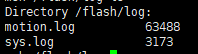
使用cat命令查看一下内容
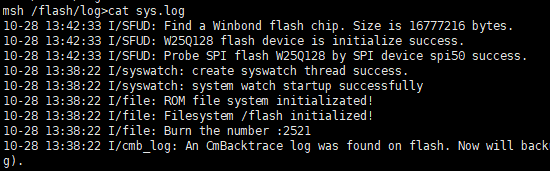
4.分开保存不同日志
上一步只进行了同时保存在两个文件内。还需要保存不同的日志内容。
1.在初始化函数中加入滤波函数设置
上下左右滑动阅览
voidsys_log_file_backend_init(void){ ulog_backend_filter_t filter = sys_log_file_backend_filter; ulog_backend_set_filter(&file_be->parent,filter);}
2.编写滤波函数
这个函数是自己编写的,比如系统日志文件不需要标签带有”MOVE”的
上下左右滑动阅览
#defineMOTION_TAG "MOVE"staticrt_bool_tsys_log_file_backend_filter(structulog_backend *backend,rt_uint32_tlevel, constchar *tag,rt_bool_tis_raw, constchar *log,rt_size_tlen){ if(rt_strncmp(tag,MOTION_TAG,sizeof(MOTION_TAG)) ==0)//排除带有"MOVE"标签输出 returnRT_FALSE; else returnRT_TRUE;}
比如运动日志文件只需要标签带有”MOVE”的
上下左右滑动阅览
staticrt_bool_tmotion_log_file_backend_filter(structulog_backend *backend,rt_uint32_tlevel, constchar *tag,rt_bool_tis_raw, constchar *log,rt_size_tlen){ if(rt_strncmp(tag,MOTION_TAG,sizeof(MOTION_TAG)) ==0)//带有"MOVE"标签输出 returnRT_TRUE; else returnRT_FALSE;}
3.在一个线程中使用带特定标签的日志输出看一下效果
上下左右滑动阅览
#define LOG_MV(...) ulog_i(MOTION_TAG, __VA_ARGS__)while(1){ set_angle +=0.1; get_angle -=0.1; set_speed +=1; get_speed -=1; vaule +=3.14; LOG_MV("%f%f%d%f%f", set_angle,get_angle,set_speed, get_speed,vaule); rt_thread_mdelay(500);}
大小不同的保存文件

一个是系统日志

一个是运动日志

内容也不同,搞定完成
5.实现文件后端输出功能的关闭与打开
像易掉电的嵌入式使用FLASH或者EEPROM,容易在进行文件操作时掉电,导致文件损坏。另一个就是文件打开状态下,是不能删除的。有的时候又需要清除无用的日志文件。这就需要实现可以对文件后端进行控制
1.控制日志是否输出到文件中
上下左右滑动阅览
staticvoidlog_file_backend_control(uint8_t argc, char**argv){ constchar*operator=argv[1]; constchar*flag=argv[2]; if(argc< 3) { rt_kprintf("Usage:\n"); rt_kprintf("control ulog file backend [name] [enable/disable]\n"); return; } elseif(!rt_strcmp(operator,table[sys_id].name)) { if(!rt_strcmp(flag,"disable")) { ulog_file_backend_disable(&sys_log_file); rt_kprintf("The file backend %s is disabled\n",operator); } elseif(!rt_strcmp(flag,"enable")) { ulog_file_backend_enable(&sys_log_file); rt_kprintf("The file backend %s is enable\n",operator); } else { rt_kprintf("Usage:\n"); rt_kprintf("control ulog file backend [name] [enable/disable]\n"); return; } } elseif(!rt_strcmp(operator,table[motion_id].name)) { if(!rt_strcmp(flag,"disable")) { ulog_file_backend_disable(&motion_log_file); rt_kprintf("The file backend %s is disabled\n",operator); } elseif(!rt_strcmp(flag,"enable")) { ulog_file_backend_enable(&motion_log_file); rt_kprintf("The file backend %s is enable\n",operator); } else { rt_kprintf("Usage:\n"); rt_kprintf("control ulog file backend [name] [enable/disable]\n"); return; } } else { rt_kprintf("Failed to find the file backend:%s\n",operator); }}MSH_CMD_EXPORT_ALIAS(log_file_backend_control,ulog_be_ctrl,control ulog file backend [name] [enable:disable]);
2.控制日志文件后端卸载,来删除文件
上下左右滑动阅览
staticvoidlog_file_backend_deinit(uint8_t argc, char**argv){ constchar*operator=argv[1]; if(argc< 2) { rt_kprintf("Usage:\n"); rt_kprintf("Deinit ulog file backend [name]\n"); return; } else { if(!rt_strcmp(operator,"motion")) { ulog_file_backend_deinit(&motion_log_file); ulog_file_backend_disable(&motion_log_file); rt_kprintf("The file backend %s is deinit\n",operator); } elseif(!rt_strcmp(operator,"sys")) { ulog_file_backend_deinit(&sys_log_file); ulog_file_backend_disable(&sys_log_file); rt_kprintf("The file backend %s is deinit\n",operator); } else { rt_kprintf("Usage:\n"); rt_kprintf("Deinit ulog file backend [name]\n"); return; } }}MSH_CMD_EXPORT_ALIAS(log_file_backend_deinit,ulog_be_deinit,Deinit ulog file backend);
6.扩展功能,显示与不显示特定日志到控制台上
按照上面操作下来,基本功能都完成了。还差一个控制台可以按需求显示与不显示某类信息。
不实现这个,会导致控制台信息一直在输出,无法查看重要信息,不好输入命令
1.对console_be.c进行改造
增加ulog_console_backend_filter函数的弱定义,可以在其他地方进行实现
在控制台初始化时,挂钩ulog_console_backend_filter函数
上下左右滑动阅览
RT_WEAKrt_bool_tulog_console_backend_filter(struct ulog_backend *backend, rt_uint32_t level, constchar *tag, rt_bool_t is_raw,constchar *log, rt_size_t len){ returnRT_TRUE;}intulog_console_backend_init(void){ ulog_init(); console.output= ulog_console_backend_output; ulog_backend_register(&console,"console",RT_TRUE); ulog_backend_set_filter(&console,ulog_console_backend_filter); return0;}INIT_PREV_EXPORT(ulog_console_backend_init);
2.实现ulog_console_backend_filter函数,过滤不需要显示信息
上下左右滑动阅览
rt_bool_tulog_console_backend_filter(structulog_backend *backend,rt_uint32_tlevel, constchar *tag,rt_bool_tis_raw, constchar *log,rt_size_tlen){ if(rt_strncmp(tag,MOTION_TAG,sizeof(MOTION_TAG)) ==0)//排除带有"MOVE"标签输出 returnRT_FALSE; else returnRT_TRUE;}
3.增加MSH命令,用来控制控制台需不需要查看信息
有些时候,日志文件输出的不是实时的。打开文件查看也不方便。
能输出到控制台直接显示是最合适不过
上下左右滑动阅览
#ifdefRT_USING_MSHstaticvoidulog_console_backend_filter_set(uint8_targc,char**argv){ if(argc < 2) { rt_kprintf("Usage:\n"); rt_kprintf("console filter [option] optino:enable or disable\n"); return; } else { constchar *operator = argv[1]; if (!rt_strcmp(operator, "enable")) { ulog_backend_set_filter(&console,ulog_console_backend_filter); } elseif (!rt_strcmp(operator, "disable")) { ulog_backend_set_filter(&console,RT_NULL); } else { rt_kprintf("Usage:\n"); rt_kprintf("console filter [option] optino:enable or disable\n"); } }}MSH_CMD_EXPORT_ALIAS(ulog_console_backend_filter_set,console_filter,console filter [option] optino:enable or disable);#endif
7.结束
以上就是全部内容了。
这个应用根据我在github上提出的问题实现的。
https://github.com/RT-Thread/rt-thread/issues/6567
之前也有这种需求,用的是另一种方式。
https://club.rt-thread.org/ask/article/e3ace649aea0ba5c.html
稍微提一句,MSH命令的控制函数没有使用输入文件后端的名称去查找实现。因为ulog_backend_find()函数的返回只有ulog的后端指针,没有file_be的指针,没办法操作。觉得ulog_backend的结构体可以加一个子对象,就像ulog_file_be的结构体加入了parent一样
特此分享^~^
最后附上代码文件
ulog_file_be.c(https://club.rt-thread.org/file_download/d845a228140ec38b)
ulog_file_be.h(https://club.rt-thread.org/file_download/ef9a1b046b884535)
console_be.c(https://club.rt-thread.org/file_download/0b4e0fd7bc8a566e)
【更新]
取消console_be.c的代码
MSH命令改为使用ulog_be_cmd控制
支持控制台操作
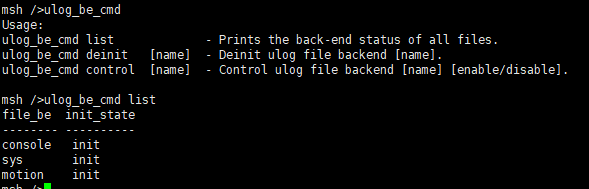
ulog_file_be.c(https://club.rt-thread.org/file_download/db82838a83e98553)
-
ROM
+关注
关注
4文章
579浏览量
88578 -
RT-Thread
+关注
关注
32文章
1546浏览量
44319 -
项目开发
+关注
关注
0文章
9浏览量
7378
发布评论请先 登录
RT-Thread文件系统的基本知识和使用方法
简洁易用的日志系统 ulog 日志
如何使用RT-Thread Studio创建支持HPM6750开发板的RT-Thread项目
ULOG创建多个文件后端并保存不同日志方法
ulog_easyflash存满后去读取日志系统重启咋办
不知道rt-thread的ulog为什么可以在中断中使用?
RT-Thread发布“超轻量级“日志组件ulog
RT-Thread STM32 配置系统时钟(使用外部晶振)

RT-Thread Studio驱动SD卡
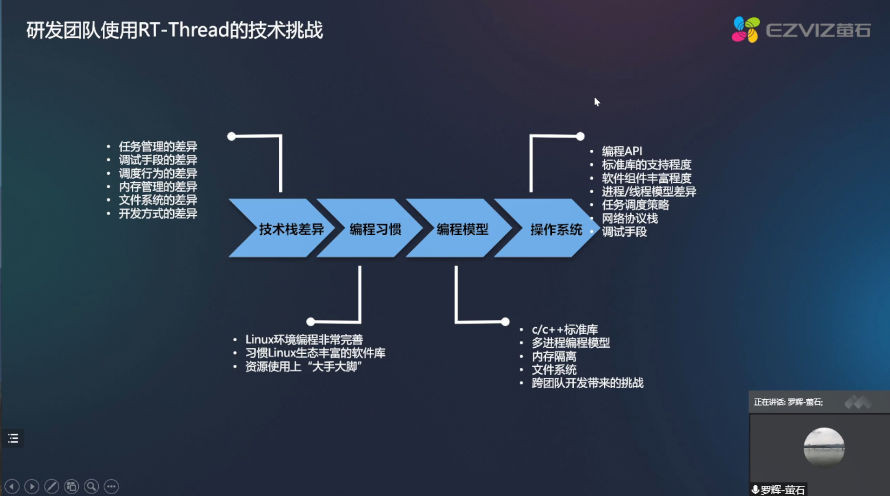
RT-Thread全球技术大会:萤石研发团队使用RT-Thread的技术挑战
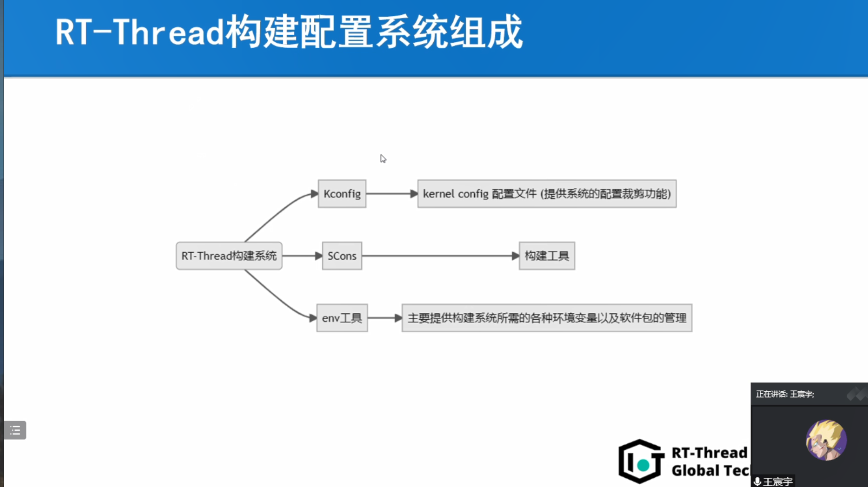
RT-Thread全球技术大会:Kconfig在RT-Thread中的工作机制
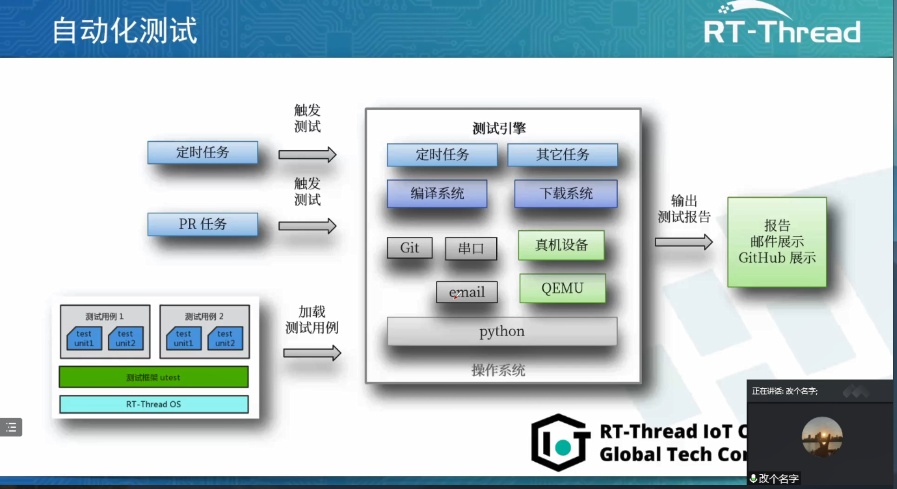
RT-Thread全球技术大会:RT-Thread测试用例集合案例
RT-Thread v5.0.2 发布











 工商网监
工商网监
评论