0
  • 聊天消息
  • 系统消息
  • 评论与回复
登录后你可以
  • 下载海量资料
  • 学习在线课程
  • 观看技术视频
  • 写文章/发帖/加入社区
会员中心
创作中心

完善资料让更多小伙伴认识你,还能领取20积分哦,立即完善>

3天内不再提示

ElfBoard技术贴|如何在【RK3588】ELF 2开发板进行GDB调试

ElfBoard 2025-11-11 13:47 次阅读
加入交流群
微信小助手二维码

扫码添加小助手

加入工程师交流群

GDB(GNU Project Debugger)是在Linux环境下功能全面的调试工具。它提供了一系列强大的调试功能,包括设置断点、单步执行、打印与观察变量、查看寄存器及堆栈信息等。在Linux软件开发的实践中,GDB被视为调试C及C++程序的核心工具,广泛用于帮助开发者定位和解决程序中的问题。

1. 虚拟机中安装GDB工具

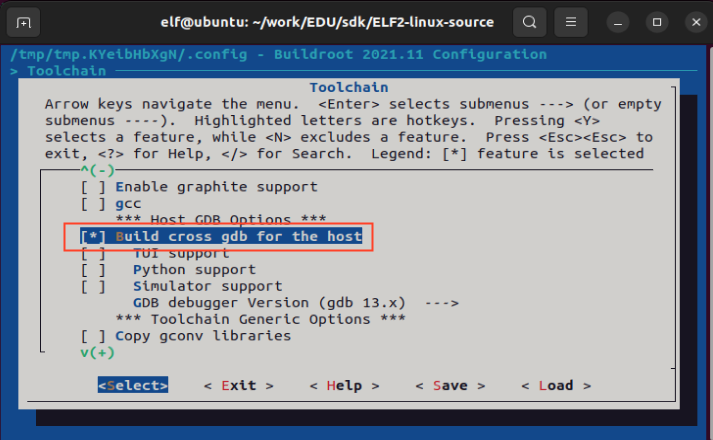
为避免符号解析错误或架构不兼容问题,用于远程调试的GDB应在版本上与开发板的工具链对齐。

elf@ubuntu:~/work/EDU/sdk/ELF2-linux-source$ ./build.sh bconfig

路径:

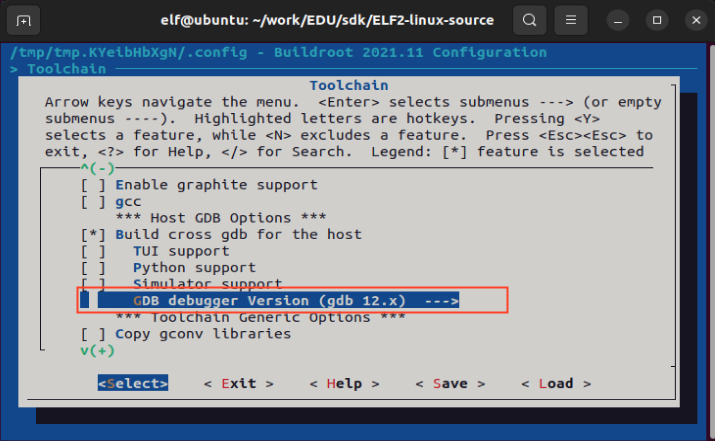
->Toolchain
wKgZPGkSzXKAekthAAGNEZO2Ge8544.png

选择GDB版本,这里选择gdb12.x

wKgZPGkSzWSAPRSCAAGMcQH0Duk276.png

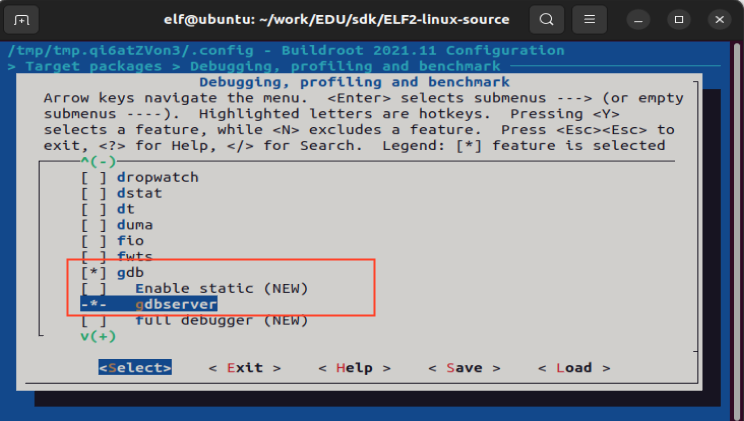
2. 文件系统添加gdbserver功能

elf@ubuntu:~/work/EDU/sdk/ELF2-linux-source$./build.sh bconfig

路径:

-> Target packages -> Debugging, profiling and benchmark
wKgZO2kSzTeAXTZWAAFpV_xjotM823.png

3. 重新编译

elf@ubuntu:~/work/EDU/sdk/ELF2-linux-source$./build.sh buildroot

这样就可以将软件包直接编译到文件系统的镜像中了。

4. 烧写文件系统

5. 应用编译及拷贝

elf@ubuntu:~/work$vi gdbdemo.c

例程代码如下:

#include int main() { int a = 10; int b = 20; int sum = a + b; printf("a = %d, b = %d\n", a, b); printf("sum = %d\n", sum); for (int i = 0; i < 5; i++) { printf("Loop i = %d\n", i); } return 0; }

添加交叉编译器路径,进行交叉编译,编译要调试的应用程序:必须要加-g选项

elf@ubuntu:~/work$ export PATH=/home/elf/aarch64-buildroot-linux-gnu_sdk-buildroot/bin/:$PATH elf@ubuntu:~/work$ aarch64-linux-gcc -g gdbdemo.c -o gdbdemo

将编译生成的gdbdemo通过U盘拷贝到开发板上,比如/home/elf路径下,下述以U盘为例,拷贝到开发板。

root@elf2-buildroot:~#cp/mnt/udisk/gdbdemo /home/elf

6. 设置开发板IP和端口

root@elf2-buildroot:~# gdbserver 172.20.8.7:2345 /home/elf/gdbdemo Process /home/elf/gdbdemo created; pid = 1314 Listening on port 2345

7. 给虚拟机设置同网段的IP并保证可以ping通开发板IP

8. 调试

GDB工具所在路径:

ELF2-linux-source/buildroot/output/elf2_fs/host/bin/aarch64-linux-gdb

elf@ubuntu:~/work$ ./EDU/sdk/ELF2-linux-source/buildroot/output/elf2_fs/host/bin/aarch64-linux-gdb gdbdemo GNU gdb (GDB) 12.1 Copyright (C) 2022 Free Software Foundation, Inc. License GPLv3+: GNU GPL version 3 or later This is free software: you are free to change and redistribute it. There is NO WARRANTY, to the extent permitted by law. Type "show copying" and "show warranty" for details. This GDB was configured as "--host=x86_64-pc-linux-gnu --target=aarch64-buildroot-linux-gnu". Type "show configuration" for configuration details. For bug reporting instructions, please see: . Find the GDB manual and other documentation resources online at: . For help, type "help". Type "apropos word" to search for commands related to "word"... Reading symbols from gdbdemo... (gdb) target remote 172.20.8.7:2345 //连接开发板 Remote debugging using 172.20.8.7:2345 Reading /lib/ld-linux-aarch64.so.1 from remote target... warning: File transfers from remote targets can be slow. Use "set sysroot" to access files locally instead. Reading /lib/ld-linux-aarch64.so.1 from remote target... Reading symbols from target:/lib/ld-linux-aarch64.so.1... (No debugging symbols found in target:/lib/ld-linux-aarch64.so.1) Reading /home/elf/work/EDU/sdk/ELF2-linux-source/buildroot/output/elf2_fs/host/lib/debug/.build-id/01/bd8db25550e790a84285a6377baa031748d93c.debug from remote target... 0x0000007ff7ff1900 in _start () from target:/lib/ld-linux-aarch64.so.1 (gdb)

此时就可以根据需求进行调试了,下面是几个常用的命令

(1)l:列出所有源代码

(2)b:设置断点

(3)c:运行到断点处

(4)s:单步运行执行

(5)n:单步执行,但是step会进入函数里面,但是next不会

(6)p a:打印a这个变量的值

(7)q:退出,输入此命令则开发板上的gdbserver也退出

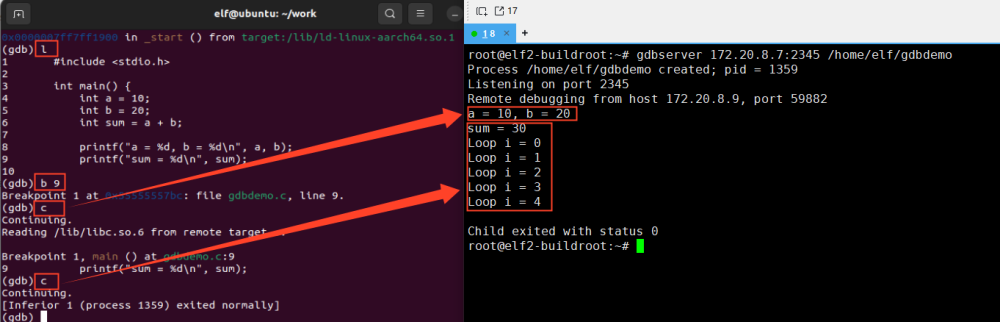
下面以具体示例介绍参数的使用方法。

(gdb) l //列出源代码 1 #include 2 3int main() { 4 int a = 10; 5 int b = 20; 6 int sum = a + b; 7 8 printf("a = %d, b = %d\n", a, b); 9 printf("sum = %d\n", sum); 10 (gdb) b 9 //在第9行设置断点 Breakpoint 1 at 0x55555557d0: file gdbdemo.c, line 9. (gdb) c // 继续执行程序,直到遇到断点,此时终端打印a = 10, b = 20 Continuing. Reading /lib/libc.so.6 from remote target... Breakpoint 1, main () at gdbdemo.c:9 9 printf("sum = %d\n", sum); (gdb) c //从当前断点继续执行到程序结束。 Continuing. [Inferior 1 (process 1367) exited normally] (gdb)
wKgZPGkSzKeAKPbuAAGzSeqwMNI945.png

声明:本文内容及配图由入驻作者撰写或者入驻合作网站授权转载。文章观点仅代表作者本人,不代表电子发烧友网立场。文章及其配图仅供工程师学习之用,如有内容侵权或者其他违规问题,请联系本站处理。 举报投诉
  • 嵌入式
    +关注

    关注

    5210

    文章

    20726

    浏览量

    338081
  • 嵌入式开发板

    关注

    5

    文章

    112

    浏览量

    19875
  • Linux开发
    +关注

    关注

    0

    文章

    47

    浏览量

    7779
  • RK3588
    +关注

    关注

    8

    文章

    600

    浏览量

    7646
收藏 人收藏
加入交流群
微信小助手二维码

扫码添加小助手

加入工程师交流群

    评论

    相关推荐
    热点推荐

    瑞芯微RK3588开发板RK3588 EVB和RK3588S EVB解读

    瑞芯微RK3588开发板RK3588 EVB和RK3588S EVB解读 瑞芯微旗舰芯RK3588系列
    的头像 发表于 09-22 15:54 2.3w次阅读
    瑞芯微<b class='flag-5'>RK3588</b><b class='flag-5'>开发板</b><b class='flag-5'>RK3588</b> EVB和<b class='flag-5'>RK3588</b>S EVB解读

    ElfBoard技术|如何在RK3588ELF 2开发板进行根系统的定制

    ELF 2开发板已经适配了Linux 5.10及Elf2 Desktop 22.04操作系统,其中Elf2 Desktop 22.04系统是
    的头像 发表于 07-02 16:33 3268次阅读
    <b class='flag-5'>ElfBoard</b><b class='flag-5'>技术</b><b class='flag-5'>贴</b>|如<b class='flag-5'>何在</b>【<b class='flag-5'>RK3588</b>】<b class='flag-5'>ELF</b> <b class='flag-5'>2</b><b class='flag-5'>开发板</b>上<b class='flag-5'>进行</b>根系统的定制

    ElfBoard技术|如何在RK3588ELF 2开发板进行UART引脚复用配置

    IOMUX(引脚功能复用)是芯片厂商为高效利用有限硬件引脚资源而设计的关键技术,它允许单个物理引脚通过软件配置为多种不同的功能(如GPIO、UART、I2C等)。不同SoC芯片的配置方式各异,本文将以【RK3588
    的头像 发表于 11-18 16:54 5793次阅读
    <b class='flag-5'>ElfBoard</b><b class='flag-5'>技术</b><b class='flag-5'>贴</b>|如<b class='flag-5'>何在</b>【<b class='flag-5'>RK3588</b>】<b class='flag-5'>ELF</b> <b class='flag-5'>2</b><b class='flag-5'>开发板</b>上<b class='flag-5'>进行</b>UART引脚复用配置

    ElfBoard技术|如何在RK3588ELF 2开发板实现I2C功能复用

    C等。由于此项配置的具体实现因SoC平台而异,本文特以【RK3588ELF 2开发板上的I2C6引脚为例,系统说明从硬件规格查询到软件驱动
    的头像 发表于 12-04 10:10 8511次阅读
    <b class='flag-5'>ElfBoard</b><b class='flag-5'>技术</b><b class='flag-5'>贴</b>|如<b class='flag-5'>何在</b>【<b class='flag-5'>RK3588</b>】<b class='flag-5'>ELF</b> <b class='flag-5'>2</b><b class='flag-5'>开发板</b>实现I<b class='flag-5'>2</b>C功能复用

    技术|如何在RK3588ELF 2开发板上部署小龙虾OpenClaw

    2026全国大学生嵌入式芯片与系统设计竞赛应用赛道报名正在火热进行中,其中瑞芯微&飞凌嵌入式赛题重磅选用基于旗舰芯片RK3588设计的ELF2开发板以及
    的头像 发表于 04-02 09:30 1.3w次阅读
    <b class='flag-5'>技术</b><b class='flag-5'>贴</b>|如<b class='flag-5'>何在</b>【<b class='flag-5'>RK3588</b>】<b class='flag-5'>ELF</b> <b class='flag-5'>2</b><b class='flag-5'>开发板</b>上部署小龙虾OpenClaw

    TB-RK3588开发板Windows上串口调试与Linux主机调试说明

    1、TB-RK3588串口调试说明串口连接使用MicroUSB数据线(需自备)连接TB-RK3588X如下图位置,线缆另一端接至电脑端。说明:开发板
    发表于 05-31 18:04

    【首发开箱】揭开RK3588开发板的神秘面纱!

    教你玩转RK3588开发板硬声入驻企业:瑞芯微教程包含以下内容:1、开箱:EVB开箱接线2、外部接口:EVB硬件接口介绍。3、环境搭建:EVB使用及调试方法。4、系统升级:
    的头像 发表于 03-14 11:24 4956次阅读
    【首发开箱】揭开<b class='flag-5'>RK3588</b><b class='flag-5'>开发板</b>的神秘面纱!

    瑞芯微RK3588开发板评测Ⅱ——DEBUG&amp;amp;接口调试方法

    上期分享了RK3588开发板的固件烧录教程,引起了广大发烧友的关注,本期技术干货内容分享开发板的DEBUG和接口功能调试方法,继续以英码嵌入
    的头像 发表于 11-02 15:46 1w次阅读
    瑞芯微<b class='flag-5'>RK3588</b><b class='flag-5'>开发板</b>评测Ⅱ——DEBUG&amp;amp;接口<b class='flag-5'>调试</b>方法

    迅为RK3588开发板-基于瑞芯微RK3588摄像头方案

    RK3588开发板
    的头像 发表于 06-09 11:09 7756次阅读
    迅为<b class='flag-5'>RK3588</b><b class='flag-5'>开发板</b>-基于瑞芯微<b class='flag-5'>RK3588</b>摄像头方案

    rk3588有哪些开发板

    rk3588有哪些开发板 当前,rk3588开发板有RockPro64、Rock960 Plus、Rockchip Sapphire、Khadas VIM3 Pro和Firefly
    的头像 发表于 08-15 17:04 4142次阅读

    RK3588!黑神话悟空,启动?-迅为电子RK3588开发板

    RK3588!黑神话悟空,启动?-迅为电子RK3588开发板
    的头像 发表于 08-30 14:13 2652次阅读
    <b class='flag-5'>RK3588</b>!黑神话悟空,启动?-迅为电子<b class='flag-5'>RK3588</b><b class='flag-5'>开发板</b>

    技术分享|iTOP-RK3588开发板Ubuntu20系统旋转屏幕方案

    技术分享|iTOP-RK3588开发板Ubuntu20系统旋转屏幕方案
    的头像 发表于 04-18 15:19 1651次阅读
    <b class='flag-5'>技术</b>分享|iTOP-<b class='flag-5'>RK3588</b><b class='flag-5'>开发板</b>Ubuntu20系统旋转屏幕方案

    ElfBoard技术|【RK3588ELF 2开发板开机自启动详解

    在嵌入式系统开发中,合理管理开机自启动项目能够优化系统启动流程,确保关键服务和应用按时加载运行。本文将详细介绍在ELF2开发板Linux5.10.209系统下基于SystemVinit服务管理机制
    的头像 发表于 06-27 16:20 2273次阅读
    <b class='flag-5'>ElfBoard</b><b class='flag-5'>技术</b><b class='flag-5'>贴</b>|【<b class='flag-5'>RK3588</b>】<b class='flag-5'>ELF</b> <b class='flag-5'>2</b><b class='flag-5'>开发板</b>开机自启动详解

    ElfBoard技术|如何在RK3588ELF 2开发板用户空间更换开机Logo

    ,提升了开发调试效率。一、添加Logo分区elf@ubuntu:~/work/ELF2-linux-source$videvice/rockchip/.chip
    的头像 发表于 10-29 11:12 1393次阅读
    <b class='flag-5'>ElfBoard</b><b class='flag-5'>技术</b><b class='flag-5'>贴</b>|如<b class='flag-5'>何在</b>【<b class='flag-5'>RK3588</b>】<b class='flag-5'>ELF</b> <b class='flag-5'>2</b><b class='flag-5'>开发板</b>用户空间更换开机Logo

    ElfBoard技术|如何在RK3588ELF 2开发板实现GPIO功能复用

    RK3588ELF2开发板的GPIO引脚为例,详细阐述从硬件查找到软件配置的完整流程。1.引脚确认在开始配置之前,首先需要了解【RK3588E
    的头像 发表于 12-29 10:37 1632次阅读
    <b class='flag-5'>ElfBoard</b><b class='flag-5'>技术</b><b class='flag-5'>贴</b>|如<b class='flag-5'>何在</b>【<b class='flag-5'>RK3588</b>】<b class='flag-5'>ELF</b> <b class='flag-5'>2</b><b class='flag-5'>开发板</b>实现GPIO功能复用