


 冰点测试!树莓派CM5如何避免“热”战?

在Raspberry Pi CM5发布的那天,我发表了一篇关于Raspberry Pi CM5开发套件的迷你评测,展示了如何组装套件并启动RaspberryPi操作系统,还运行了sbc-bench基准测试来评估其性能。遗憾的是,在测试过程中,Broadcom BCM2712 CPU出现了降频,这意味着当CM5 IO板置于IO盒内且处理器模块5仅靠风扇散热时,散热效果并不理想。因此,今天我将使用其他散热方案重复相同的测试,即官方的Raspberry Pi CM5散热器(仅散热片)和上海晶珩的CM5主动散热器,后者类似于RaspberryPi5的主动散热器,但专为CPU模块设计。
但在那之前,我要做一些“清理工作”。自从上次我从NVMe SSD启动Raspberry Pi 操作系统以来,我发现摄像头无法正常工作。因此,我将报告我在eMMC闪存上安装Raspberry Pi 操作系统并使摄像头正常工作的经历,这两件事都进行得不太顺利。
将Raspberry Pi操作系统安装到CM5的eMMC闪存
理论上,将Raspberry Pi操作系统安装到CM5模块的eMMC闪存上应该很容易,因为已有相关文档说明。
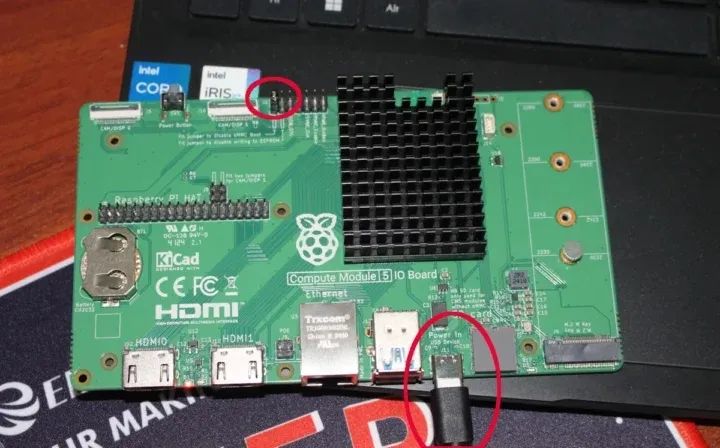
我们需要在J6接头的左侧插入一个跳线,标记为“安装跳线以禁用eMMC启动”,并按照下图所示在IO板和主机之间连接一根USB-C电缆。
然后,我们需要安装并运行rpiboot,以便eMMC闪存作为主机上的USB存储设备出现。
sudo apt install rpibootsudo rpiboot
该实用程序一直卡在等待主板的界面……而且我无法在系统中看到任何表明有新USB设备的信息。
RPIBOOT: build-date Jan 31 2022 version 0~20220315+git6fa2ec0+nowin-0ubuntu1Waiting for BCM2835/6/7/2711...
经过几次尝试后,我认为可能是Ubuntu 22.04存储库中的rpiboot版本太旧了。因此,我将其删除,并从源代码构建了该实用程序:
sudo apt remove rpibootsudo apt install git libusb-1.0-0-dev pkg-config build-essentialgit clone --recurse-submodules --shallow-submodules --depth=1 https://github.com/raspberrypi/usbbootcd usbbootmakesudo make install
该命令的输出现在看起来好多了……
jaufranc@CNX-LAPTOP-5:~/usbboot$ sudo rpibootRPIBOOT: build-date Dec 20 2024 version 20240422~085300 ef721cdaIf the device fails to connect then please see https://rpltd.co/rpibootfordebuggingtips.Waiting for BCM2835/6/7/2711/2712...2712: Directory not specified using default /usr/share/rpiboot/mass-storage-gadget64/Sending bootcode.binSuccessful read 4 bytesWaiting for BCM2835/6/7/2711/2712...Second stage boot serverFile read: mcb.binFile read: memsys00.binFile read: memsys01.binFile read: memsys02.binFile read: memsys03.binFile read: bootmainLoading: /usr/share/rpiboot/mass-storage-gadget64//config.txtFile read: config.txtLoading: /usr/share/rpiboot/mass-storage-gadget64//boot.imgFile read: boot.imgSecond stage boot server done
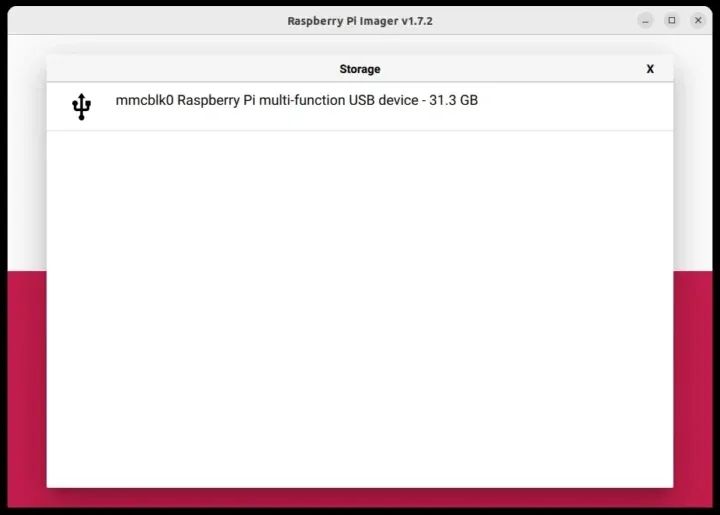
于是我启动了Raspberry Pi镜像,选择了Raspberry Pi OS的64位版本,以及名为“Raspberry Pi多功能USB设备”的存储设备,其容量为31.3GB,这与我模块上的32GBeMMC闪存相对应。
我可以像将镜像写入microSD卡那样,将镜像写入Raspberry Pi CM5。
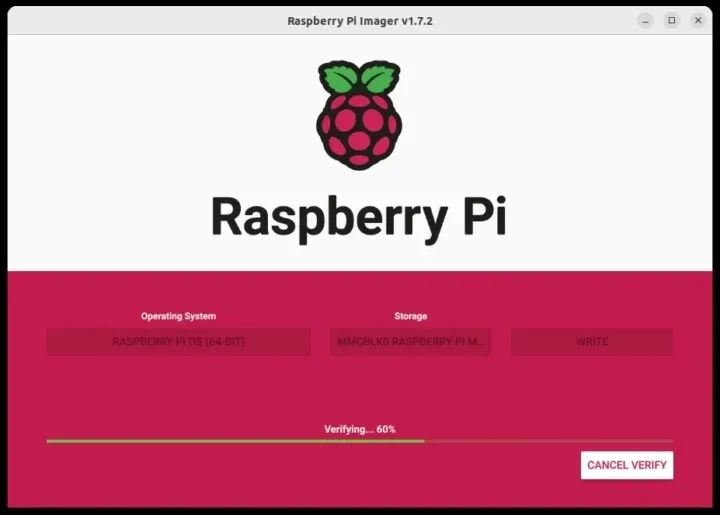
一旦完成,操作系统就会从eMMC闪存中正常启动。
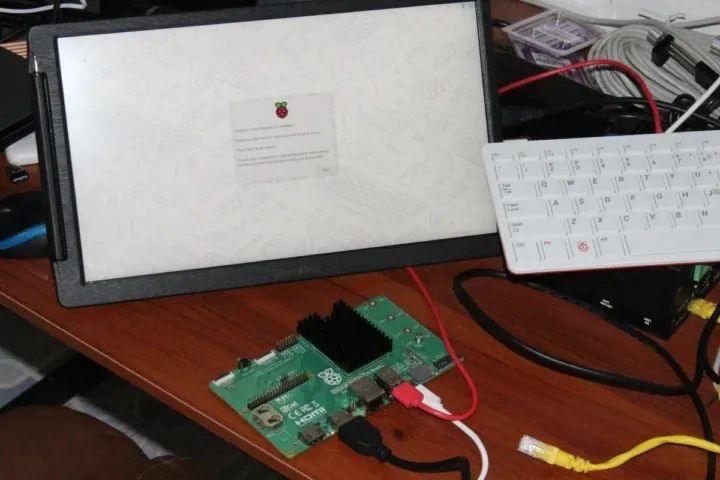
我们还可以使用lsblk命令来检查eMMC闪存的分区:
pi@raspberrypi:~ $ lsblkNAME MAJ:MIN RM SIZE RO TYPE MOUNTPOINTSmmcblk0 179:0 0 29.1G 0 disk├─mmcblk0p1 179:1 0 512M 0 part /boot/firmware└─mmcblk0p2 179:2 0 28.6G 0 part /mmcblk0boot0 179:32 0 4M 1 diskmmcblk0boot1 179:64 0 4M 1 disk
Raspberry Pi CM5 摄像头支持
如引言所述,当将Raspberry Pi 摄像头模块3连接到CAM/DISP 0连接器时,它并不能即插即用。
pi@raspberrypi:~ $ rpicam-hello --listNo cameras available!
虽然有关于如何在CAM/DISP 0和CAM/DISP 1上启用摄像头的文档,但文档有些不完整,且部分内容存在错误。
我按照指示编辑了/boot/firmware/config.txt文件,将camera_auto_detect行注释掉,并为RaspberryPiCameraModule3添加了overlay:
# Automatically load overlays for detected cameras#camera_auto_detect=1dtoverlay=imx708,cam0
重启后,问题解决了。
pi@raspberrypi:~ $ rpicam-hello --listAvailable cameras-----------------0 : imx708 [4608x2592 10-bit RGGB] (/base/axi/pcie@120000/rp1/i2c@88000/imx708@1a)Modes: 'SRGGB10_CSI2P' : 1536x864 [120.13 fps - (768, 432)/3072x1728 crop]2304x1296 [56.03 fps - (0, 0)/4608x2592 crop]4608x2592 [14.35 fps - (0, 0)/4608x2592 crop]
这很简单,没有遇到任何问题。
使用第二个相机的方法类似,但CAM/DISP 1接口要求我们在J6上添加两个跳线。
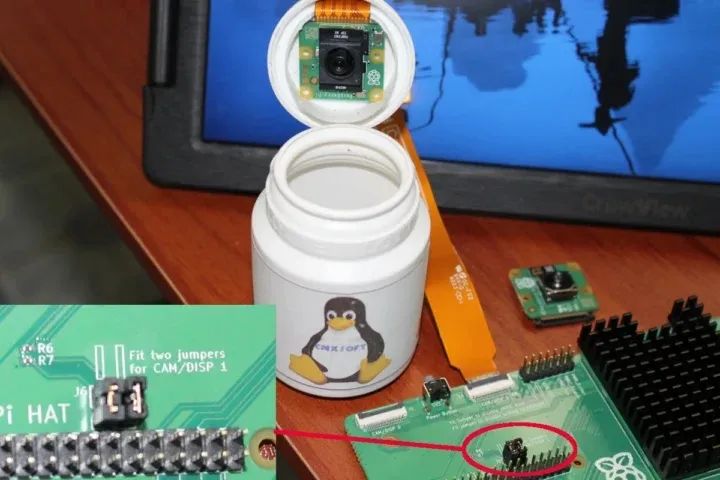
我决定使用Raspberry Pi AI相机进行这次测试。我只有一根Raspberry Pi Zero相机线,因此无法同时测试两个相机。AI相机在计算模块文档中没有列出,但我们在GitHub上可以找到所需的overlay:
# Automatically load overlays for detected cameras#camera_auto_detect=1dtoverlay=imx708,cam0dtoverlay=imx500-pi5,cam1
我还安装了imx500包以防万一,并重启了系统:
sudo apt install imx500-allsudo reboot
但相机没有被检测到,所以我尝试将Raspberry Pi Camera Module 3连接到CAM/DISP 1,并将config.txt文件更改如下:
# Automatically load overlays for detected cameras#camera_auto_detect=1#dtoverlay=imx708,cam0dtoverlay=imx708,cam1
与之前一样:
pi@raspberrypi:~ $ rpicam-hello --listNo cameras available!
最后,我只使用imx500-pi5设备树overlay在CAM/DISP 0上测试了Raspberry Pi AI相机,并且可以检测到它。
pi@raspberrypi:~ $ rpicam-hello --listAvailable cameras-----------------0 : imx500 [4056x3040 10-bit RGGB] (/base/axi/pcie@120000/rp1/i2c@88000/imx500@1a)Modes: 'SRGGB10_CSI2P' : 2028x1520 [30.02 fps - (0, 0)/4056x3040 crop]4056x3040 [10.00 fps - (0, 0)/4056x3040 crop]
所以我无法使用CAM/DISP 1连接器。要么是我遗漏了什么,要么是这个第二个连接器只有在CM5 IO板上连接了两个相机时才会工作,单个相机连接时不会工作。所以,以防万一,我将Raspberry Pi Touch Display 2连接到CAM/DISP 0,将AI相机连接到CAM/DISP 1,并进行了以下配置:
# Automatically load overlays for detected cameras#camera_auto_detect=1#dtoverlay=imx708,cam0dtoverlay=vc4-kms-dsi-ili9881-7inch,dsi0dtoverlay=imx500-pi5,cam1
# Automatically load overlays for detected DSI displays#display_auto_detect=1
显示器工作正常,但AI相机在第二个连接器上仍然无法工作,尽管imx500传感器在内核日志中显示…
pi@raspberrypi:~ $ dmesg | grep csi[ 0.958143] platform 1f00128000.csi: Fixed dependency cycle(s) with /axi/pcie@120000/rp1/i2c@88000/imx500@1a[ 0.964771] platform 1f00128000.csi: bcm2712_iommu_probe_device: MMU 1000005280.iommu[ 0.964774] platform 1f00128000.csi: bcm2712_iommu_device_group: MMU 1000005280.iommu[ 0.964778] platform 1f00128000.csi: Adding to iommu group 2[ 0.964795] platform 1f00128000.csi: bcm2712_iommu_attach_dev: MMU 1000005280.iommu[ 2.484827] rp1-cfe 1f00128000.csi: bcm2712_iommu_of_xlate: MMU 1000005280.iommu[ 2.485163] rp1-cfe 1f00128000.csi: DW dphy Host HW v1.20[ 2.485175] rp1-cfe 1f00128000.csi: PiSP FE HW v0.1[ 2.487088] rp1-cfe 1f00128000.csi: found subdevice /axi/pcie@120000/rp1/i2c@88000/imx500@1api@raspberrypi:~ $ rpicam-hello --listNo cameras available!
我现在先放弃了……
Raspberry Pi散热器和CM5主动散热器安装
让我们回到正题,为Raspberry Pi CM5安装散热器。
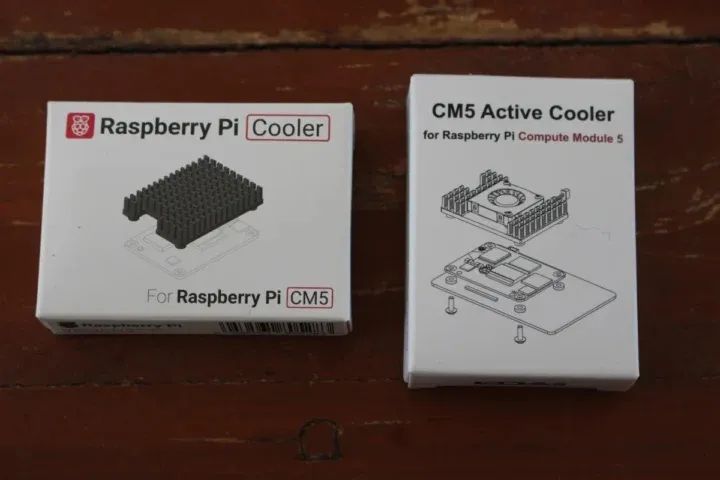
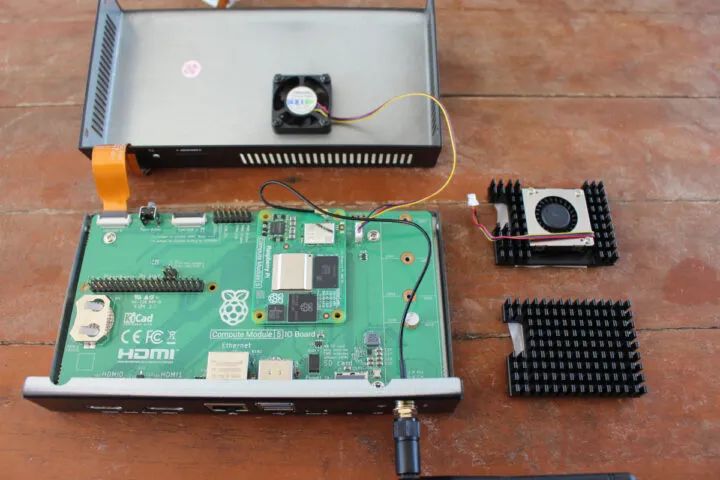
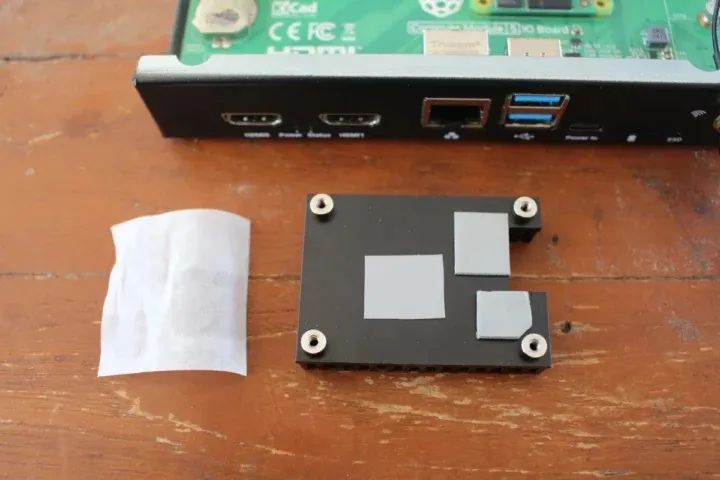
无论是官方的Raspberry Pi散热器还是上海晶珩的CM5主动散热器,它们都采用了类似的包装,并且基本配备了相同的附件,即一些螺丝、厚垫片和三个贴合在散热器底部的导热垫。
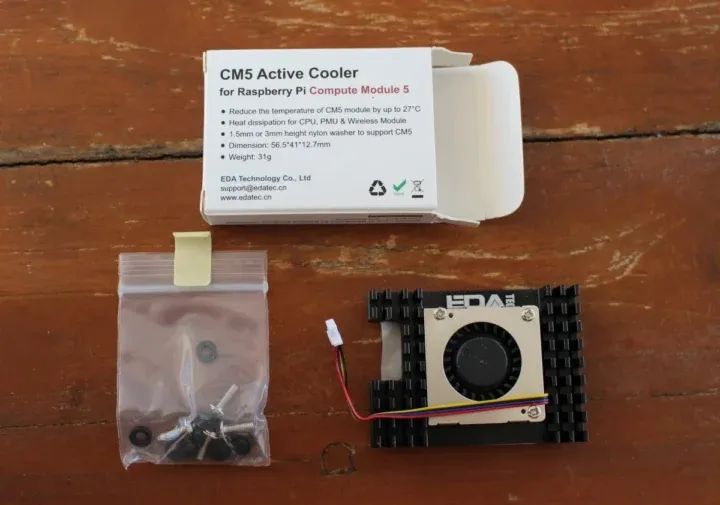
上海晶珩散热器只是额外增加了一个散热风扇。让我们先从官方散热器开始。首先,我需要撕掉保护导热垫的薄膜……
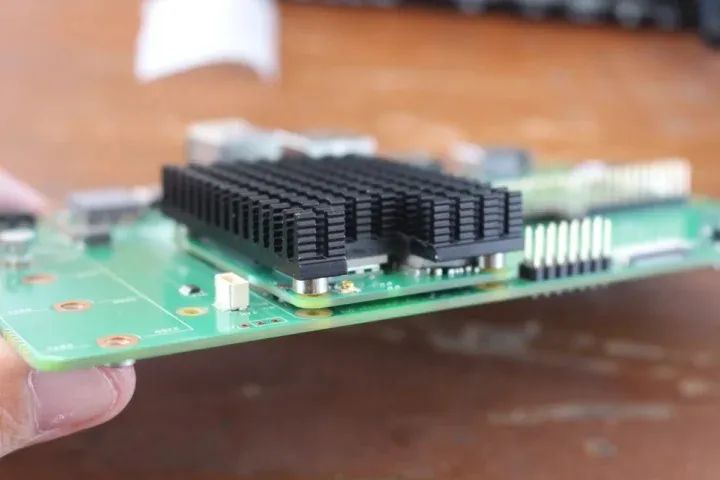
然后再将其放置在CM5模块上,并确保其方向不会干扰CPU模块上的内置天线。
接着,我在IO板和CM5模块之间放置了四个垫片,并用四个螺丝将所有东西固定好。
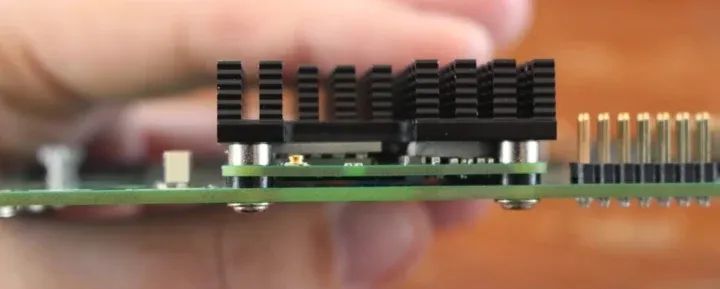
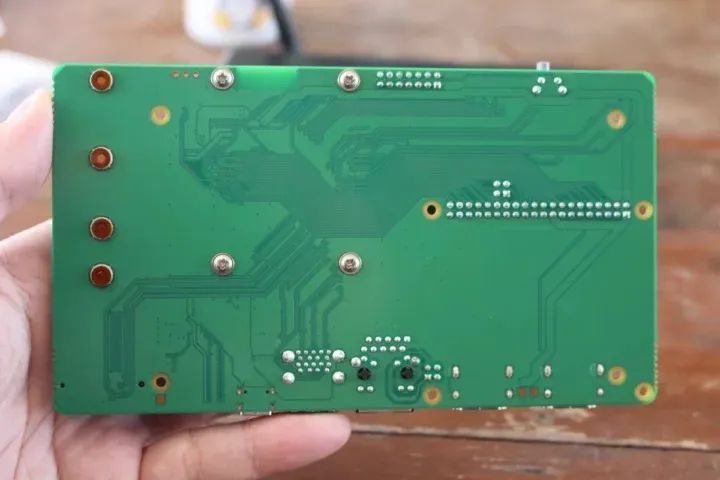
安装上海晶珩主动散热器的步骤完全相同,只不过我们还需要连接风扇的电线。
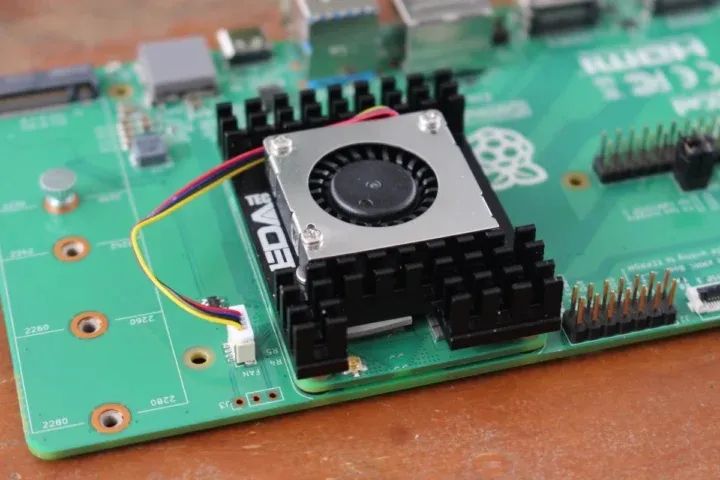
使用 Raspberry Pi CM5 的散热器进行基准测试和CPU温度监测
让我们在无风扇配置下,使用Pi散热器,同时运行sbc-bench.sh基准测试脚本,并用rpi-monitor监测CPU温度。
pi@raspberrypi:~ $ sudo ./sbc-bench.sh -rStarting to examine hardware/software for review purposes...
sbc-bench v0.9.68
Installing needed tools: distro packages already installed, mhz, cpufetch,cpuminer.Done.Checking cpufreq OPP. Done.Executing tinymembench. Done.Executing RAM latency tester. Done.Executing OpenSSL benchmark. Done.Executing 7-zip benchmark. Done.Throttling test: heating up the device, 5 more minutes to wait. Done.Checking cpufreq OPP again. Done (11 minutes elapsed).
Results validation:
* Measured clockspeed not lower than advertised max CPU clockspeed* No swapping* Background activity (%system) OK* No throttling
Full results uploaded to https://0x0.st/XCd-.txt
# Raspberry Pi Compute Module 5 Rev 1.0
Tested with sbc-bench v0.9.68 on Sat, 21 Dec 2024 1420 +0700. Fullinfo:[https://0x0.st/XCd-.txt](http://0x0.st/XCd-.txt)
### General information:
Information courtesy of cpufetch:
SoC: Broadcom BCM2712Technology: 16nmMicroarchitecture: Cortex-A76Max Frequency: 2.400 GHzCores: 4 coresFeatures: NEON,SHA1,SHA2,AES,CRC32
BCM2712, Kernel: aarch64, Userland: arm64
CPU sysfs topology (clusters, cpufreq members, clockspeeds)cpufreq min maxCPU cluster policy speed speed core type0 0 0 1500 2400 Cortex-A76 / r4p11 0 0 1500 2400 Cortex-A76 / r4p12 0 0 1500 2400 Cortex-A76 / r4p13 0 0 1500 2400 Cortex-A76 / r4p1
4041 KB available RAM
### Governors/policies (performance vs. idle consumption):
Original governor settings:
cpufreq-policy0: performance / 2400 MHz (conservative ondemand userspacepowersaveperformanceschedutil/15001600 1700 1800 1900 2000 2100 22002300 2400)
Tuned governor settings:
cpufreq-policy0: performance / 2400 MHz
Status of performance related policies found below /sys:
/sys/module/pcie_aspm/parameters/policy: default [performance] powersavepowersupersave
### Clockspeeds (idle vs. heated up):
Before at 52.9°C:
cpu0 (Cortex-A76): OPP: 2400, ThreadX: 2400, Measured: 2399
After at 79.3°C:
cpu0 (Cortex-A76): OPP: 2400, ThreadX: 2400, Measured: 2399
### Performance baseline
* memcpy: 5607.4 MB/s, memchr: 14150.3 MB/s, memset: 12426.6 MB/s* 16M latency: 117.8 118.8 118.3 118.0 119.6 119.6 141.0 135.3* 128M latency: 133.8 132.8 134.0 144.3 133.9 132.6 133.3 134.4* 7-zip MIPS (3 consecutive runs): 11145, 10906, 11012 (11020 avg), single-threaded:3203* `aes-256-cbc 540078.51k 1003701.74k 1256093.44k 1332879.02k 1365472.60k1367829.16k`* `aes-256-cbc 540615.20k 1003659.80k 1255990.53k 1332837.72k 1365235.03k1368178.69k`
### PCIe and storage devices:
* Raspberry RP1 PCIe 2.0 South Bridge: Speed 5GT/s, Width x4, driver inuse:rp1,* 29.1GB "Samsung BJTD4R" HS400 Enhanced strobe eMMC 5.1 card as /dev/mmcblk0:date07/2024,manfid/oemid:0x000015/0x0100,hw/fwrev: 0x0/0x0300000000000000
### Swap configuration:
* /var/swap on /dev/mmcblk0p2: 512.0M (0K used) on MMC storage
### Software versions:
* Debian GNU/Linux 12 (bookworm)* Build scripts: http://archive.raspberrypi.com/debian/ bookworm main* Compiler: /usr/bin/gcc (Debian 12.2.0-14) 12.2.0 / aarch64-linux-gnu* OpenSSL 3.0.15, built on 3 Sep 2024 (Library: OpenSSL 3.0.15 3 Sep 2024)* ThreadX: 26826259 / 2024/09/23 1456
### Kernel info:
* `/proc/cmdline: reboot=w coherent_pool=1M 8250.nr_uarts=1 pci=pcie_bus_safecgroup_disable=memorynuma_policy=interleavesmsc95xx.macaddr=2C678D:E8vc_mem.mem_base=0x3fc00000vc_mem.mem_size=0x40000000console=ttyAMA10,115200console=tty1root=PARTUUID=4825a0d7-02rootfstype=ext4fsck.repair=yesrootwaitquietsplashplymouth.ignore-serial-consolescfg80211.ieee80211_regdom=TH`* Vulnerability Spec store bypass: Mitigation; Speculative Store Bypassdisabledviaprctl* Vulnerability Spectre v1: Mitigation; __user pointer sanitization* Vulnerability Spectre v2: Mitigation; CSV2, BHB* Kernel 6.6.62+rpt-rpi-2712 / CONFIG_HZ=250
All known settings adjusted for performance. Device now ready for benchmarking.Once finished stop with [ctrl]-[c] to get info about throttling, frequencycapand too high background activity all potentially invalidating benchmarkscores.All changes with storage and PCIe devices as well as suspicious dmesgcontentswill be reported too.
Time fake/real load %cpu %sys %usr %nice %io %irq Temp VCore PMIC DC(V)1421: 2400/2400MHz 3.51 2% 0% 2% 0% 0% 0% 73.8°C 0.8945V 2.9W 5.13V^C
Cleaning up. Done.Checking cpufreq OPP again. Done.
Clockspeeds now at 72.7°C:
cpu0 (Cortex-A76): OPP: 2400, ThreadX: 2400, Measured: 2399
Results validation:
* Measured clockspeed not lower than advertised max CPU clockspeed* No swapping* Background activity (%system) OK* No throttling
测试期间的环境温度约为26°C,未发现降频现象。然而,在使用CPUminer进行运算时,CPU的负载温度仍然相当高,达到了79.3°C。而在使用7-zip进行多核压缩时,CPU温度从未超过68.8°C。
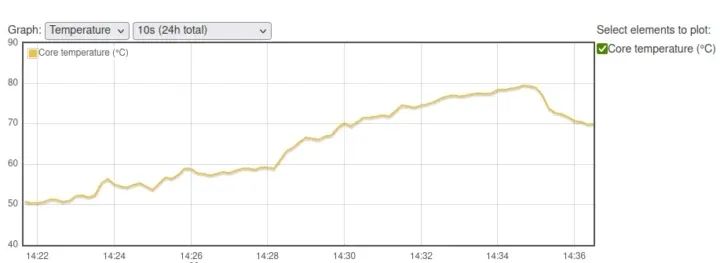
看看它与带有内置风扇但没有散热片的Raspberry Pi CM5 IO外壳(环境温度:32°C)相比如何。
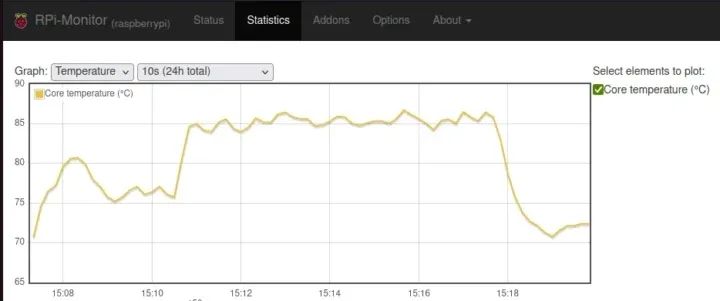
对于大多数人来说,Raspberry Pi CM5散热器应该是一个合适的冷却系统,但如果你打算在高温(35°C以上)环境下或热量积聚的机箱内运行设备,它可能就不够了。
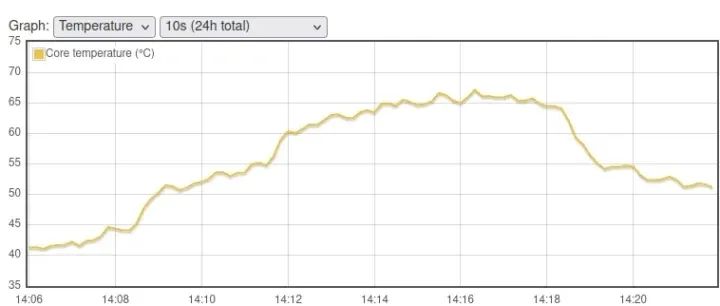
顺便提一下,我让CM5套件运行了一整夜,下面的图表显示了环境温度对CPU空闲温度的影响。
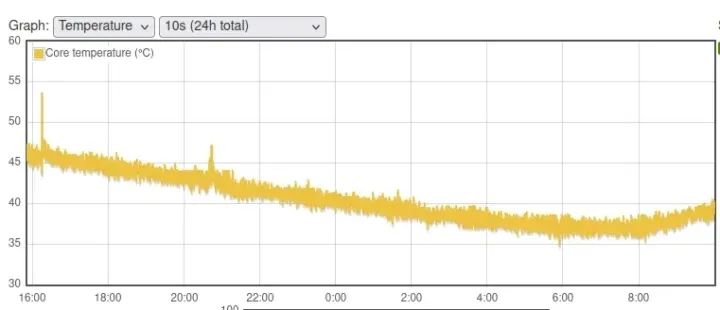
从16:00时的46°C降到6:00时的38°C,同时室内温度从27°C下降到19°C(根据天气预报估计)。
使用上海晶珩 CM5主动散热器 进行基准测试和CPU温度监测
现在,让我们使用主动散热器来运行基准测试:
pi@raspberrypi:~ $ sudo ./sbc-bench.sh -rStarting to examine hardware/software for review purposes...
sbc-bench v0.9.68
Installing needed tools: distro packages already installed. Done.Checking cpufreq OPP. Done.Executing tinymembench. Done.Executing RAM latency tester. Done.Executing OpenSSL benchmark. Done.Executing 7-zip benchmark. Done.Throttling test: heating up the device, 5 more minutes to wait. Done.Checking cpufreq OPP again. Done (11 minutes elapsed).
Results validation:
* Measured clockspeed not lower than advertised max CPU clockspeed* No swapping* Background activity (%system) OK* No throttling
Full results uploaded to https://0x0.st/8rH_.txt
# Raspberry Pi Compute Module 5 Rev 1.0
Tested with sbc-bench v0.9.68 on Sun, 22 Dec 2024 1435 +0700. Fullinfo:[https://0x0.st/8rH_.txt](http://0x0.st/8rH_.txt)
### General information:
Information courtesy of cpufetch:
SoC: Broadcom BCM2712Technology: 16nmMicroarchitecture: Cortex-A76Max Frequency: 2.400 GHzCores: 4 coresFeatures: NEON,SHA1,SHA2,AES,CRC32
BCM2712, Kernel: aarch64, Userland: arm64
CPU sysfs topology (clusters, cpufreq members, clockspeeds)cpufreq min maxCPU cluster policy speed speed core type0 0 0 1500 2400 Cortex-A76 / r4p11 0 0 1500 2400 Cortex-A76 / r4p12 0 0 1500 2400 Cortex-A76 / r4p13 0 0 1500 2400 Cortex-A76 / r4p1
4040 KB available RAM
### Governors/policies (performance vs. idle consumption):
Original governor settings:
cpufreq-policy0: ondemand / 2400 MHz (conservative ondemand userspacepowersaveperformanceschedutil/15001600 1700 1800 1900 2000 2100 22002300 2400)
Tuned governor settings:
cpufreq-policy0: performance / 2400 MHz
Status of performance related policies found below /sys:
/sys/module/pcie_aspm/parameters/policy: default [performance] powersavepowersupersave
### Clockspeeds (idle vs. heated up):
Before at 43.0°C:
cpu0 (Cortex-A76): OPP: 2400, ThreadX: 2400, Measured: 2398
After at 65.5°C:
cpu0 (Cortex-A76): OPP: 2400, ThreadX: 2400, Measured: 2399
### Performance baseline
* memcpy: 5707.8 MB/s, memchr: 14187.6 MB/s, memset: 12935.3 MB/s* 16M latency: 118.9 117.1 119.8 117.9 120.3 118.9 141.0 136.2* 128M latency: 133.6 132.5 133.7 142.7 134.3 132.3 133.1 134.4* 7-zip MIPS (3 consecutive runs): 11154, 11152, 11174 (11160 avg), single-threaded:3209* `aes-256-cbc 540286.17k 1003793.09k 1255994.45k 1332805.63k 1365428.91k1367692.63k`* `aes-256-cbc 540545.85k 1003955.39k 1256114.35k 1332834.30k 1364443.14k1367905.62k`
### PCIe and storage devices:
* Raspberry RP1 PCIe 2.0 South Bridge: Speed 5GT/s, Width x4, driver inuse:rp1,* 29.1GB "Samsung BJTD4R" HS400 Enhanced strobe eMMC 5.1 card as /dev/mmcblk0:date07/2024,manfid/oemid:0x000015/0x0100,hw/fwrev: 0x0/0x0300000000000000
### Swap configuration:
* /var/swap on /dev/mmcblk0p2: 512.0M (0K used) on MMC storage
### Software versions:
* Debian GNU/Linux 12 (bookworm)* Build scripts: http://archive.raspberrypi.com/debian/ bookworm main* Compiler: /usr/bin/gcc (Debian 12.2.0-14) 12.2.0 / aarch64-linux-gnu* OpenSSL 3.0.15, built on 3 Sep 2024 (Library: OpenSSL 3.0.15 3 Sep 2024)* ThreadX: 26826259 / 2024/09/23 1456
### Kernel info:
* `/proc/cmdline: reboot=w coherent_pool=1M 8250.nr_uarts=1 pci=pcie_bus_safecgroup_disable=memorynuma_policy=interleavesmsc95xx.macaddr=2C678D:E8vc_mem.mem_base=0x3fc00000vc_mem.mem_size=0x40000000console=ttyAMA10,115200console=tty1root=PARTUUID=4825a0d7-02rootfstype=ext4fsck.repair=yesrootwaitquietsplashplymouth.ignore-serial-consolescfg80211.ieee80211_regdom=TH`* Vulnerability Spec store bypass: Mitigation; Speculative Store Bypassdisabledviaprctl* Vulnerability Spectre v1: Mitigation; __user pointer sanitization* Vulnerability Spectre v2: Mitigation; CSV2, BHB* Kernel 6.6.62+rpt-rpi-2712 / CONFIG_HZ=250
All known settings adjusted for performance. Device now ready for benchmarking.Once finished stop with [ctrl]-[c] to get info about throttling, frequencycapand too high background activity all potentially invalidating benchmarkscores.All changes with storage and PCIe devices as well as suspicious dmesgcontentswill be reported too.
Time fake/real load %cpu %sys %usr %nice %io %irq Temp VCore PMIC DC(V)1436: 2400/2400MHz 3.78 39% 0% 39% 0% 0% 0% 60.6°C 0.8942V 2.6W 5.13V^C
Cleaning up. Done.Checking cpufreq OPP again. Done.
Clockspeeds now at 58.4°C:
cpu0 (Cortex-A76): OPP: 2400, ThreadX: 2400, Measured: 2399
Results validation:
* Measured clockspeed not lower than advertised max CPU clockspeed* No swapping* Background activity (%system) OK* No throttling* ondemand cpufreq governor used by distro but io_is_busy not set to 1onallcores-
环境温度约为25°C。没有发生降频现象,CPU温度在使用CPUminer时最高达到67.2°C,而在使用7-zip时最高为63.9°C。
它看起来很不错,但有一个问题是,当我关闭系统时,风扇会以全速运转,而且墙上的电源插座会显示有2.3瓦的功耗……
最后的测试是将CM5主动散热器安装在IO外壳内。在用四个螺丝将主板固定在底部后,我连接了外部WiFi天线。我还拆除了外壳顶部的风扇。
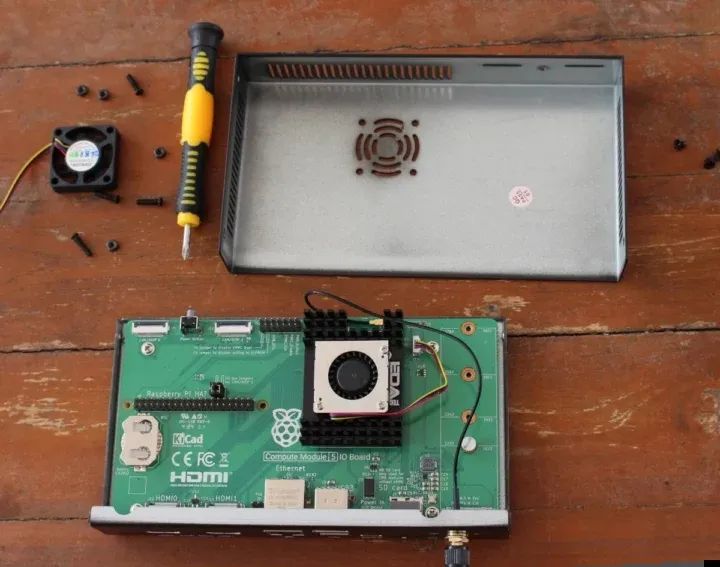
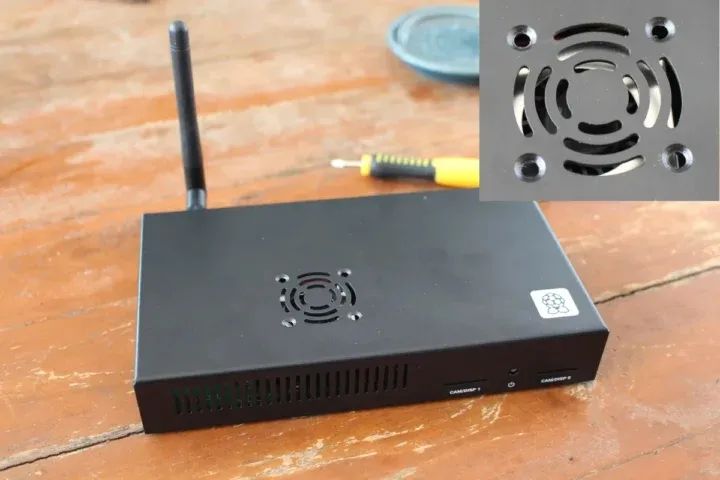
我们最终得到了一个带有外壳的完整系统。风扇并没有完全居中,但对于获取冷却所需的进气口来说已经足够了。
是时候运行sbc-bench.sh的文件测试了:
pi@raspberrypi:~ $ sudo ./sbc-bench.sh -rStarting to examine hardware/software for review purposes...
sbc-bench v0.9.68
Installing needed tools: distro packages already installed. Done.Checking cpufreq OPP. Done.Executing tinymembench. Done.Executing RAM latency tester. Done.Executing OpenSSL benchmark. Done.Executing 7-zip benchmark. Done.Throttling test: heating up the device, 5 more minutes to wait. Done.Checking cpufreq OPP again. Done (11 minutes elapsed).
Results validation:
* Measured clockspeed not lower than advertised max CPU clockspeed* No swapping* Background activity (%system) OK* No throttling
Full results uploaded to https://0x0.st/8rHy.txt
# Raspberry Pi Compute Module 5 Rev 1.0
Tested with sbc-bench v0.9.68 on Sun, 22 Dec 2024 1429 +0700. Fullinfo:[https://0x0.st/8rHy.txt](http://0x0.st/8rHy.txt)
### General information:
Information courtesy of cpufetch:
SoC: Broadcom BCM2712Technology: 16nmMicroarchitecture: Cortex-A76Max Frequency: 2.400 GHzCores: 4 coresFeatures: NEON,SHA1,SHA2,AES,CRC32
BCM2712, Kernel: aarch64, Userland: arm64
CPU sysfs topology (clusters, cpufreq members, clockspeeds)cpufreq min maxCPU cluster policy speed speed core type0 0 0 1500 2400 Cortex-A76 / r4p11 0 0 1500 2400 Cortex-A76 / r4p12 0 0 1500 2400 Cortex-A76 / r4p13 0 0 1500 2400 Cortex-A76 / r4p1
4044 KB available RAM
### Governors/policies (performance vs. idle consumption):
Original governor settings:
cpufreq-policy0: ondemand / 2400 MHz (conservative ondemand userspacepowersaveperformanceschedutil/15001600 1700 1800 1900 2000 2100 22002300 2400)
Tuned governor settings:
cpufreq-policy0: performance / 2400 MHz
Status of performance related policies found below /sys:
/sys/module/pcie_aspm/parameters/policy: default [performance] powersavepowersupersave
### Clockspeeds (idle vs. heated up):
Before at 44.1°C:
cpu0 (Cortex-A76): OPP: 2400, ThreadX: 2400, Measured: 2399
After at 68.8°C:
cpu0 (Cortex-A76): OPP: 2400, ThreadX: 2400, Measured: 2399
### Performance baseline
* memcpy: 5704.2 MB/s, memchr: 14175.1 MB/s, memset: 12902.3 MB/s* 16M latency: 117.0 116.9 120.3 123.1 120.1 118.7 140.4 133.6* 128M latency: 133.6 132.6 133.9 143.8 133.9 132.2 132.9 134.0* 7-zip MIPS (3 consecutive runs): 11056, 10937, 11060 (11020 avg), single-threaded:3201* `aes-256-cbc 540240.68k 1003708.86k 1256076.37k 1332945.24k 1365475.33k1367780.01k`* `aes-256-cbc 540632.86k 1003822.31k 1256136.02k 1332974.93k 1365194.07k1368216.92k`
### PCIe and storage devices:
* Raspberry RP1 PCIe 2.0 South Bridge: Speed 5GT/s, Width x4, driver inuse:rp1,* 29.1GB "Samsung BJTD4R" HS400 Enhanced strobe eMMC 5.1 card as /dev/mmcblk0:date07/2024,manfid/oemid:0x000015/0x0100,hw/fwrev: 0x0/0x0300000000000000
### Swap configuration:
* /var/swap on /dev/mmcblk0p2: 512.0M (0K used) on MMC storage
### Software versions:
* Debian GNU/Linux 12 (bookworm)* Build scripts: http://archive.raspberrypi.com/debian/ bookworm main* Compiler: /usr/bin/gcc (Debian 12.2.0-14) 12.2.0 / aarch64-linux-gnu* OpenSSL 3.0.15, built on 3 Sep 2024 (Library: OpenSSL 3.0.15 3 Sep 2024)* ThreadX: 26826259 / 2024/09/23 1456
### Kernel info:
* `/proc/cmdline: reboot=w coherent_pool=1M 8250.nr_uarts=1 pci=pcie_bus_safecgroup_disable=memorynuma_policy=interleavesmsc95xx.macaddr=2C678D:E8vc_mem.mem_base=0x3fc00000vc_mem.mem_size=0x40000000console=ttyAMA10,115200console=tty1root=PARTUUID=4825a0d7-02rootfstype=ext4fsck.repair=yesrootwaitquietsplashplymouth.ignore-serial-consolescfg80211.ieee80211_regdom=TH`* Vulnerability Spec store bypass: Mitigation; Speculative Store Bypassdisabledviaprctl* Vulnerability Spectre v1: Mitigation; __user pointer sanitization* Vulnerability Spectre v2: Mitigation; CSV2, BHB* Kernel 6.6.62+rpt-rpi-2712 / CONFIG_HZ=250
All known settings adjusted for performance. Device now ready for benchmarking.Once finished stop with [ctrl]-[c] to get info about throttling, frequencycapand too high background activity all potentially invalidating benchmarkscores.All changes with storage and PCIe devices as well as suspicious dmesgcontentswill be reported too.
Time fake/real load %cpu %sys %usr %nice %io %irq Temp VCore PMIC DC(V)1429: 2400/2400MHz 3.60 49% 0% 49% 0% 0% 0% 63.4°C 0.8948V 2.8W 5.13V1429: 2400/2400MHz 1.32 0% 0% 0% 0% 0% 0% 60.0°C 0.8948V 2.3W 5.13V1429: 2400/2400MHz 0.48 0% 0% 0% 0% 0% 0% 59.5°C 0.8953V 2.7W 5.13V^C
Cleaning up. Done.Checking cpufreq OPP again. Done.
Clockspeeds now at 60.0°C:
cpu0 (Cortex-A76): OPP: 2400, ThreadX: 2400, Measured: 2399
Results validation:
* Measured clockspeed not lower than advertised max CPU clockspeed* No swapping* Background activity (%system) OK* No throttling* ondemand cpufreq governor used by distro but io_is_busy not set to 1onallcores-
环境温度仍然保持在25°C左右。CPU温度在使用CPUminer时上升到68.3°C,而在使用7-zip时上升到65.5°C,只比主板不在外壳内时高了几度。
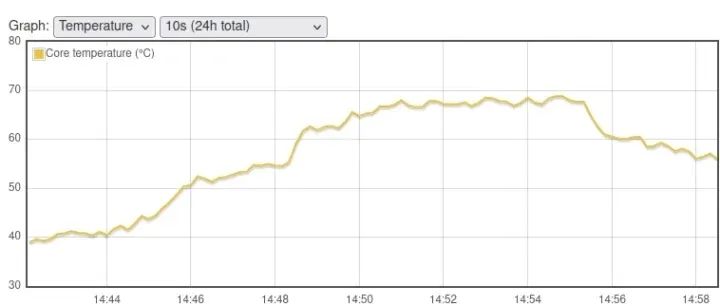
Raspberry Pi CM5 散热方案比较
让我们来比较一下我们为Raspberry Pi CM5测试过的四种散热方案。
| IO外壳带风扇 | 树莓派散热器 | 上海晶珩主动散热器 | IO外壳内上海晶珩主动散热器 | |
| 7-zip 基准测试(MIPS) | 9300 | 11020 | 11160 | 11020 |
| CPU 最高温度(7-zip) | 85.9°C | 68.8°C | 63.9°C | 65.5°C |
| CPU 最高温度(CPUminer) | 86.5°C | 79.3°C | 67.2°C | 68.3°C |
| CPU降频 | Yes | No | No | No |
| 关机功耗 | 2.5W | 1.6W | 2.3W | 2.3W |
| 空闲功耗 | 2.3W | 2.3W | 2.4W | 2.4W |
只有IO外壳带风扇(没有散热片)的方案出现了CPU降频,而在环境温度为25-26°C时,无论是Raspberry Pi CM5散热器还是上海晶珩 CM5主动散热器都没有出现降频。对于大多数人来说,被动散热就足够了,但如果你的系统设计在高温(35°C以上)环境下运行,或者你希望超频你的CM5,那么主动散热器可能会带来一些好处。
在CM5 IO板关闭时关闭风扇
你还会注意到,主动冷却系统的关机功耗高得惊人,这是因为系统关闭时风扇会以全速旋转。Raspberry Pi 最初解释说,“将EEPROM的‘POWER_OFF_ON_HALT=0’设置应该可以固定风扇,但会牺牲一些功耗”。我正准备尝试,但在阅读了该线程的更多内容后,发现这并不起作用。Raspberry Pi于12月19日发布了一个修复程序。新的pieeprom固件尚未通过apt提供,因此我们需要从Github下载并按照以下步骤进行安装:
wget https://github.com/timg236/rpi-eeprom/raw/927596fc312b6c2ddcf33f7b7608938241403586/firmware-2712/latest/pieeprom-2024-12-19.binsudo rpi-eeprom-update -d -f ./pieeprom-2024-12-19.bin
以下是该命令的输出结果:
*** CREATED UPDATE ./pieeprom-2024-12-19.bin ***
CURRENT: Sun Dec 15 1250 AM UTC 2024 (1734221810)UPDATE: Thu Dec 19 1113 AM UTC 2024 (1734609433)BOOTFS: /boot/firmware'/tmp/tmp.4SKLxJWPj1' -> '/boot/firmware/pieeprom.upd'
UPDATING bootloader. This could take up to a minute. Please wait
*** Do not disconnect the power until the update is complete ***
If a problem occurs then the Raspberry Pi Imager may be used to createa bootloader rescue SD card image which restores the default bootloaderimage.
flashrom -p linux_spi:dev=/dev/spidev10.0,spispeed=16000 -w /boot/firmware/pieeprom.updVerifying updateVERIFY: SUCCESSUPDATE SUCCESSFUL
我本来也打算更改EEPROM配置,但没必要了,因为POWER_OFF_ON_HALT已经被设置为零:
pi@raspberrypi:~ $ sudo rpi-eeprom-config[all]BOOT_UART=1POWER_OFF_ON_HALT=0
# Default BOOT_ORDER for provisioning# SD -> NVMe -> USB -> NetworkBOOT_ORDER=0xf2461
这不起作用。虽然使用了新的固件版本,但事实证明,这是因为我用来刷写固件的命令使用了固件中的配置……
pi@raspberrypi:~ $ sudo rpi-eeprom-updateBOOTLOADER: up to dateCURRENT: Thu Dec 19 1113 AM UTC 2024 (1734609433)LATEST: Sun Dec 15 1250 AM UTC 2024 (1734221810)RELEASE: latest (/lib/firmware/raspberrypi/bootloader-2712/latest)Use raspi-config to change the release.pi@raspberrypi:~ $ sudo rpi-eeprom-config[all]BOOT_UART=1BOOT_ORDER=0xf461NET_INSTALL_AT_POWER_ON=1
因此,我不得不使用以下命令行更改配置,并添加‘POWER_OFF_ON_HALT=0’:
sudo rpi-eeprom-config --edit
我们还需要再重启一次。让我们最后一次检查引导加载程序版本和配置文件:
pi@raspberrypi:~ $ sudo rpi-eeprom-config[all]BOOT_UART=1BOOT_ORDER=0xf461NET_INSTALL_AT_POWER_ON=1POWER_OFF_ON_HALT=0pi@raspberrypi:~ $ sudo rpi-eeprom-updateBOOTLOADER: up to dateCURRENT: Sun Dec 15 1250 AM UTC 2024 (1734221810)LATEST: Sun Dec 15 1250 AM UTC 2024 (1734221810)RELEASE: latest (/lib/firmware/raspberrypi/bootloader-2712/latest)Use raspi-config to change the release.
这是怎么回事?看起来固件又恢复到了旧版本。这通常是因为新的引导加载程序有问题,所以它正在使用恢复映像,但这里看起来是随机的……所以我再次刷写了映像(不使用其配置),并重启了设备。这次一切都恢复正常了,所以我们现在可以准备关机了:
pi@raspberrypi:~ $ sudo rpi-eeprom-updateBOOTLOADER: up to dateCURRENT: Thu Dec 19 1113 AM UTC 2024 (1734609433)LATEST: Sun Dec 15 1250 AM UTC 2024 (1734221810)RELEASE: latest (/lib/firmware/raspberrypi/bootloader-2712/latest)Use raspi-config to change the release.pi@raspberrypi:~ $ sudo rpi-eeprom-config[all]BOOT_UART=1BOOT_ORDER=0xf461NET_INSTALL_AT_POWER_ON=1POWER_OFF_ON_HALT=0pi@raspberrypi:~ $ sudo shutdown now
风扇确实关闭了,系统关闭时的功耗为1.6瓦。如果你想进一步降低关机时的功耗,你需要将WAKE_ON_GPIO设置为0,就像我在Raspberry Pi 5 2GB上所做的那样。一些HAT可能与此更改不兼容……
我要感谢Raspberry Pi提供了Raspberry Pi CM5开发套件以供评测,还要感谢上海晶珩提供了CM5主动散热器,为我们提供了更好的散热解决方案。
-
测试
+关注
关注
9文章
6409浏览量
131679 -
Raspberry Pi
+关注
关注
2文章
622浏览量
24092 -
树莓派
+关注
关注
122文章
2082浏览量
110767
发布评论请先 登录
成都本地工业级树莓派CM5板卡定制厂商求推荐
开发者自制载板令树莓派 5“变身”CM5 计算模块
ArmSoM CM5 RK3576计算模组——树莓派CM4的理想替代品
超频必备!树莓派 CM5 主动散热器评测!

假如你有一块树莓派CM5,你会用它来干什么?来看看这些异想天开的树莓派项目!
树莓派CM5 的基准测试:性能飙升,直击你的需求核心!
性能与效率的较量:树莓派CM5和CM4的温度对比测试!
搭载树莓派CM5:Sfera Labs 工业控制器!
2025年树莓派最值得关注的事,树莓派CM5工业级进化!
把树莓派CM5塞进IP65相机?树莓派硬核工业相机形态曝光!
树莓派官方都没告诉你的散热黑科技!
一块树莓派CM5抗下整条产线?工业计算机主板全面解析!
树莓派CM5高性能扩展板开源项目介绍



评论