


 IT自动化工具Ansible基础入门

一、基础入门
未来主体是传统行业利用互联网技术,以云端用人工智能的方式处理大数据。从早期的All In One(所有应用部署在一台机器上)的简单应用,到后期集群、高可用、缓存、消息队列、配置中心、主从分离、负载均衡、大数据存储等尖端技术的复杂应用,对运维的技术专业度和综合度技能要求越来越高,运维交付的标准不再是以天为单位,而是以分钟为单位。我们需要一套自动化管理工具来帮助运维更高质量、更有效的完成手头工作,以证明运维能创造的价值不止于此,生活不止眼前的苟且,还有诗和远方。
1.1 定义
运维自动化目标:将日常重复性的工作通过规则设定使其遵循预先既定规则,在指定的范围时间内自动化运行。但整个过程无需人工参与。
Ansible是帮助运维人员实现自动化的最重要的工具之一。
Ansible名字来源于其作者喜欢的一本书《安德的游戏》,该书中Ansible是一种能跨越时空的即时通信工具,使用Ansible可以在相距数光年的距离远程实时控制前线的舰队战斗。
Ansible是越来越火的一款运维自动化工具,其主要功能是帮助运维实现IT工作的自动化、降低人为操作失误、提高业务自动化率、提升运维工作效率,常用于软件部署自动化、配置自动化、管理自动化、系统化开发任务、持续集成、零宕机平滑升级等。
Ansible是一款极其简单的IT自动化工具。Ansible操作极其简单,功能却非常丰富,其自身内置的模块数量达五百多个,主要包括:
系统层:支持Linux、Windows等
虚拟化:VMWare、Docker、Openstack等
商业化硬件:F5、ASA等
系统应用层:Apache、Zabbix、Rabbitmq、SVN、GIT
1.2 为什么选择Ansible
Ansible基于python开发,运维人员开发门槛低
Ansible内置模块丰富,还有专门为商业平台开发的功能模块
去中心化,一个简单的操作即可完成管理配置中心的迁移
AgentLess,客户端无需任何配置,由管理端配置好后即可使用
1.3 工作原理
Ansible没有客户端,底层通信依赖于系统软件,Linux系统基于OpenSSH通信,Windows系统基于Powershell,管理端必须是Linux系统,使用者认证通过后在管理节点通过Ansible工具调用各应用模块将指令推送至管理端执行,并在执行完毕后自动删除产生的临时文件。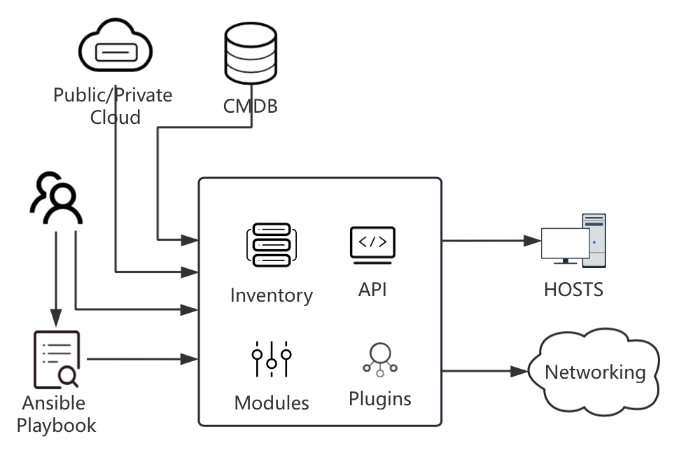
Ansible整个工作流程中大致有三类角色:
使用者:Ansible的使用者来源于多个维度,第一种方式,CMDB(Configuration Management Database,配置管理数据库)运维人员可以结合CMDB和Ansible,通过CMDB直接下发指令调用Ansible工具集完成操作者所希望达到的目标;第二种方式是API接口,运维人员可以使用通用开发语言以API接口调用形式完成相应的操作;第三种方式是开发人员以Ad-Hoc临时命令方式完成相应操作;第四种是运维人员使用提前写好的playbook完成相应的操作。
Ansible工具集:ansible命令是Ansible的核心,ansible命令通过协调Inventory(命令执行的目标对象配置文件)、API(供第三方应用程序调用的API接口)、M
作用对象:Ansible的作用对象,不仅仅是Linux和非Linux操作系统的主机,同样也可以作用于公有云和私有云的各个网络设施
再从Ansible工具集来讲,Ansible主要有以下几部分组成:
Ansible Playbook:任务集,编排定义Ansible任务集的配置文件,顺序依次执行,一般为yaml或json文件
Inventory:主机清单
Modules:Ansible执行命令的功能模块,多数为内置的核心模块
Plugins:模块功能的补充,如连接类型插件、循环插件、变量插件
API:供第三方应用程序调用的应用程序接口
Ansible执行时,这些组件的调用关系如下: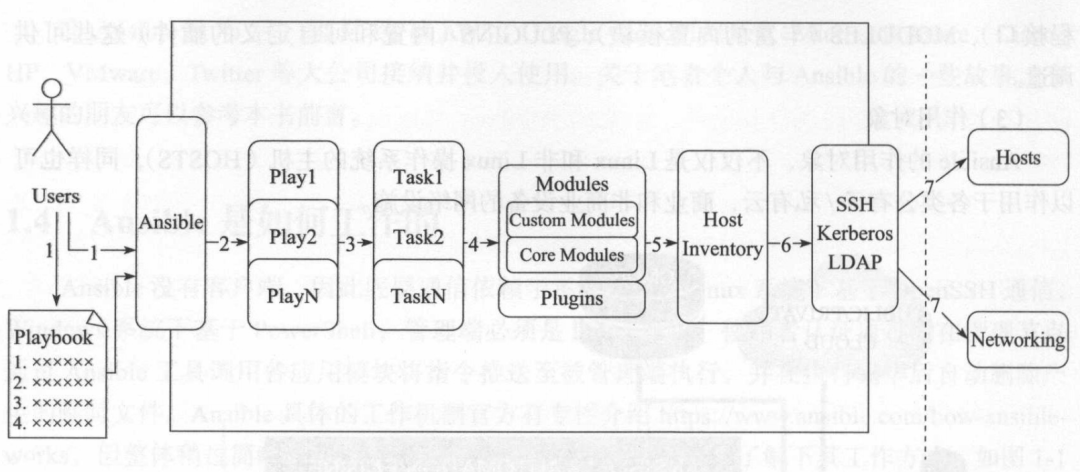
1.4 通信方式
从Ansible 1.3版本开始,默认使用OpenSSH通信方式(底层基于SSH协议,window基于Powershell协议),支持密码和SSH认证
1.5 安装
pip安装方式:
| // 安装python | |
| yum install python-pip python-devel -y | |
| // 安装gcc glibc开发环境 | |
| yum install gcc glibc-devel zlib-devel rpm-build openssl-devel -y | |
| // 升级pip | |
| pip install --upgrade pip | |
| // 安装ansible | |
| pip install ansible -upgrade |
yum安装方式
| rpm | |
| yum install ansible -y |
安装完后,查看ansible版本号,如果有正确返回,则表示安装成功
| [root@192-168-158-100-RedHat-7 ansible]# ansible --version | |
| ansible 2.9.27 | |
| config file = /etc/ansible/ansible.cfg | |
| configured module search path = [u'/root/.ansible/plugins/modules', u'/usr/share/ansible/plugins/modules'] | |
| ansible python module location = /usr/lib/python2.7/site-packages/ansible | |
| executable location = /usr/bin/ansible | |
| python version = 2.7.5 (default, Nov 14 2023, 1606) [GCC 4.8.5 20150623 (Red Hat 4.8.5-44)] |
1.6 目录结构
使用命令rpm -ql ansible可以查看Ansible的安装目录,该输出较多,但大致可以分为以下几个目录:
配置文件目录:/etc/ansible/ 用于存放Ansible主机清单,工具功能配置等。
执行文件目录:/usr/bin/ansible-xxx 用于存放Ansible所有可执行文件
库依赖文件目录:/usr/lib/PythonX.X/sitepackage/ansible/
help文档目录:/usr/share/doc/ansible-xxxx/
1.7 配置文件详解
Ansible自身配置文件只有一个,默认存放于/etc/ansible/ansible.cfg路径,Ansible命令执行时,会依次从当前命令执行路径、当前用户家目录、默认安装路径寻找ansible.cfg配置文件,找到哪个就用哪个
default 基础设置项,保持默认即可
| [defaults] | |
| # some basic default values... | |
| #inventory = /etc/ansible/hosts # 主机清单 | |
| #library = /usr/share/my_modules/ # 库文件地址 | |
| #module_utils = /usr/share/my_module_utils/ | |
| #remote_tmp = ~/.ansible/tmp # 远程主机临时文件存放目录 | |
| #local_tmp = ~/.ansible/tmp # 本地临时文件存放目录 | |
| #plugin_filters_cfg = /etc/ansible/plugin_filters.yml | |
| #forks = 5 # 并发数 | |
| #poll_interval = 15 | |
| #sudo_user = root | |
| #ask_sudo_pass = True | |
| #ask_pass = True | |
| #transport = smart | |
| #remote_port = 22 | |
| #module_lang = C | |
| #module_set_locale = False | |
| # plays will gather facts by default, which contain information about | |
| # the remote system. | |
| # | |
| # smart - gather by default, but don't regather if already gathered | |
| # implicit - gather by default, turn off with gather_facts: False | |
| # explicit - do not gather by default, must say gather_facts: True | |
| #gathering = implicit | |
| # This only affects the gathering done by a play's gather_facts directive, | |
| # by default gathering retrieves all facts subsets | |
| # all - gather all subsets | |
| # network - gather min and network facts | |
| # hardware - gather hardware facts (longest facts to retrieve) | |
| # virtual - gather min and virtual facts | |
| # facter - import facts from facter | |
| # ohai - import facts from ohai | |
| # You can combine them using comma (ex: network,virtual) | |
| # You can negate them using ! (ex: !hardware,!facter,!ohai) | |
| # A minimal set of facts is always gathered. | |
| #gather_subset = all | |
| # some hardware related facts are collected | |
| # with a maximum timeout of 10 seconds. This | |
| # option lets you increase or decrease that | |
| # timeout to something more suitable for the | |
| # environment. | |
| # gather_timeout = 10 | |
| # Ansible facts are available inside the ansible_facts.* dictionary | |
| # namespace. This setting maintains the behaviour which was the default prior | |
| # to 2.5, duplicating these variables into the main namespace, each with a | |
| # prefix of 'ansible_'. | |
| # This variable is set to True by default for backwards compatibility. It | |
| # will be changed to a default of 'False' in a future release. | |
| # ansible_facts. | |
| # inject_facts_as_vars = True | |
| # additional paths to search for roles in, colon separated | |
| #roles_path = /etc/ansible/roles | |
| # uncomment this to disable SSH key host checking | |
| #host_key_checking = False | |
| # change the default callback, you can only have one 'stdout' type enabled at a time. | |
| #stdout_callback = skippy | |
| ## Ansible ships with some plugins that require whitelisting, | |
| ## this is done to avoid running all of a type by default. | |
| ## These setting lists those that you want enabled for your system. | |
| ## Custom plugins should not need this unless plugin author specifies it. | |
| # enable callback plugins, they can output to stdout but cannot be 'stdout' type. | |
| #callback_whitelist = timer, mail | |
| # Determine whether includes in tasks and handlers are "static" by | |
| # default. As of 2.0, includes are dynamic by default. Setting these | |
| # values to True will make includes behave more like they did in the | |
| # 1.x versions. | |
| #task_includes_static = False | |
| #handler_includes_static = False | |
| # Controls if a missing handler for a notification event is an error or a warning | |
| #error_on_missing_handler = True | |
| # change this for alternative sudo implementations | |
| #sudo_exe = sudo | |
| # What flags to pass to sudo | |
| # WARNING: leaving out the defaults might create unexpected behaviours | |
| #sudo_flags = -H -S -n | |
| # SSH timeout | |
| #timeout = 10 | |
| # default user to use for playbooks if user is not specified | |
| # (/usr/bin/ansible will use current user as default) | |
| #remote_user = root | |
| # logging is off by default unless this path is defined | |
| # if so defined, consider logrotate | |
| #log_path = /var/log/ansible.log | |
| # default module name for /usr/bin/ansible | |
| #module_name = command | |
| # use this shell for commands executed under sudo | |
| # you may need to change this to bin/bash in rare instances | |
| # if sudo is constrained | |
| #executable = /bin/sh | |
| # if inventory variables overlap, does the higher precedence one win | |
| # or are hash values merged together? The default is 'replace' but | |
| # this can also be set to 'merge'. | |
| #hash_behaviour = replace | |
| # by default, variables from roles will be visible in the global variable | |
| # scope. To prevent this, the following option can be enabled, and only | |
| # tasks and handlers within the role will see the variables there | |
| #private_role_vars = yes | |
| # list any Jinja2 extensions to enable here: | |
| #jinja2_extensions = jinja2.ext.do,jinja2.ext.i18n | |
| # if set, always use this private key file for authentication, same as | |
| # if passing --private-key to ansible or ansible-playbook | |
| #private_key_file = /path/to/file | |
| # If set, configures the path to the Vault password file as an alternative to | |
| # specifying --vault-password-file on the command line. | |
| #vault_password_file = /path/to/vault_password_file | |
| # format of string {{ ansible_managed }} available within Jinja2 | |
| # templates indicates to users editing templates files will be replaced. | |
| # replacing {file}, {host} and {uid} and strftime codes with proper values. | |
| #ansible_managed = Ansible managed: {file} modified on %Y-%m-%d %H:%M:%S by {uid} on {host} | |
| # {file}, {host}, {uid}, and the timestamp can all interfere with idempotence | |
| # in some situations so the default is a static string: | |
| #ansible_managed = Ansible managed | |
| # by default, ansible-playbook will display "Skipping [host]" if it determines a task | |
| # should not be run on a host. Set this to "False" if you don't want to see these "Skipping" | |
| # messages. NOTE: the task header will still be shown regardless of whether or not the | |
| # task is skipped. | |
| #display_skipped_hosts = True | |
| # by default, if a task in a playbook does not include a name: field then | |
| # ansible-playbook will construct a header that includes the task's action but | |
| # not the task's args. This is a security feature because ansible cannot know | |
| # if the *module* considers an argument to be no_log at the time that the | |
| # header is printed. If your environment doesn't have a problem securing | |
| # stdout from ansible-playbook (or you have manually specified no_log in your | |
| # playbook on all of the tasks where you have secret information) then you can | |
| # safely set this to True to get more informative messages. | |
| #display_args_to_stdout = False | |
| # by default (as of 1.3), Ansible will raise errors when attempting to dereference | |
| # Jinja2 variables that are not set in templates or action lines. Uncomment this line | |
| # to revert the behavior to pre-1.3. | |
| #error_on_undefined_vars = False | |
| # by default (as of 1.6), Ansible may display warnings based on the configuration of the | |
| # system running ansible itself. This may include warnings about 3rd party packages or | |
| # other conditions that should be resolved if possible. | |
| # to disable these warnings, set the following value to False: | |
| #system_warnings = True | |
| # by default (as of 1.4), Ansible may display deprecation warnings for language | |
| # features that should no longer be used and will be removed in future versions. | |
| # to disable these warnings, set the following value to False: | |
| #deprecation_warnings = True | |
| # (as of 1.8), Ansible can optionally warn when usage of the shell and | |
| # command module appear to be simplified by using a default Ansible module | |
| # instead. These warnings can be silenced by adjusting the following | |
| # setting or adding warn=yes or warn=no to the end of the command line | |
| # parameter string. This will for example suggest using the git module | |
| # instead of shelling out to the git command. | |
| # command_warnings = False | |
| # set plugin path directories here, separate with colons | |
| #action_plugins = /usr/share/ansible/plugins/action | |
| #become_plugins = /usr/share/ansible/plugins/become | |
| #cache_plugins = /usr/share/ansible/plugins/cache | |
| #callback_plugins = /usr/share/ansible/plugins/callback | |
| #connection_plugins = /usr/share/ansible/plugins/connection | |
| #lookup_plugins = /usr/share/ansible/plugins/lookup | |
| #inventory_plugins = /usr/share/ansible/plugins/inventory | |
| #vars_plugins = /usr/share/ansible/plugins/vars | |
| #filter_plugins = /usr/share/ansible/plugins/filter | |
| #test_plugins = /usr/share/ansible/plugins/test | |
| #terminal_plugins = /usr/share/ansible/plugins/terminal | |
| #strategy_plugins = /usr/share/ansible/plugins/strategy | |
| # by default, ansible will use the 'linear' strategy but you may want to try | |
| # another one | |
| #strategy = free | |
| # by default callbacks are not loaded for /bin/ansible, enable this if you | |
| # want, for example, a notification or logging callback to also apply to | |
| # /bin/ansible runs | |
| #bin_ansible_callbacks = False | |
| # don't like cows? that's unfortunate. | |
| # set to 1 if you don't want cowsay support or export ANSIBLE_NOCOWS=1 | |
| #nocows = 1 | |
| # set which cowsay stencil you'd like to use by default. When set to 'random', | |
| # a random stencil will be selected for each task. The selection will be filtered | |
| # against the `cow_whitelist` option below. | |
| #cow_selection = default | |
| #cow_selection = random | |
| # when using the 'random' option for cowsay, stencils will be restricted to this list. | |
| # it should be formatted as a comma-separated list with no spaces between names. | |
| # NOTE: line continuations here are for formatting purposes only, as the INI parser | |
| # in python does not support them. | |
| #cow_whitelist=bud-frogs,bunny,cheese,daemon,default,dragon,elephant-in-snake,elephant,eyes, | |
| # hellokitty,kitty,luke-koala,meow,milk,moofasa,moose,ren,sheep,small,stegosaurus, | |
| # stimpy,supermilker,three-eyes,turkey,turtle,tux,udder,vader-koala,vader,www | |
| # don't like colors either? | |
| # set to 1 if you don't want colors, or export ANSIBLE_NOCOLOR=1 | |
| #nocolor = 1 | |
| # if set to a persistent type (not 'memory', for example 'redis') fact values | |
| # from previous runs in Ansible will be stored. This may be useful when | |
| # wanting to use, for example, IP information from one group of servers | |
| # without having to talk to them in the same playbook run to get their | |
| # current IP information. | |
| #fact_caching = memory | |
| #This option tells Ansible where to cache facts. The value is plugin dependent. | |
| #For the jsonfile plugin, it should be a path to a local directory. | |
| #For the redis plugin, the value is a hostdatabase triplet: fact_caching_connection = localhost0 | |
| #fact_caching_connection=/tmp | |
| # retry files | |
| # When a playbook fails a .retry file can be created that will be placed in ~/ | |
| # You can enable this feature by setting retry_files_enabled to True | |
| # and you can change the location of the files by setting retry_files_save_path | |
| #retry_files_enabled = False | |
| #retry_files_save_path = ~/.ansible-retry | |
| # squash actions | |
| # Ansible can optimise actions that call modules with list parameters | |
| # when looping. Instead of calling the module once per with_ item, the | |
| # module is called once with all items at once. Currently this only works | |
| # under limited circumstances, and only with parameters named 'name'. | |
| #squash_actions = apk,apt,dnf,homebrew,pacman,pkgng,yum,zypper | |
| # prevents logging of task data, off by default | |
| #no_log = False | |
| # prevents logging of tasks, but only on the targets, data is still logged on the master/controller | |
| #no_target_syslog = False | |
| # controls whether Ansible will raise an error or warning if a task has no | |
| # choice but to create world readable temporary files to execute a module on | |
| # the remote machine. This option is False by default for security. Users may | |
| # turn this on to have behaviour more like Ansible prior to 2.1.x. See | |
| # https://docs.ansible.com/ansible/become.html#becoming-an-unprivileged-user | |
| # for more secure ways to fix this than enabling this option. | |
| #allow_world_readable_tmpfiles = False | |
| # controls the compression level of variables sent to | |
| # worker processes. At the default of 0, no compression | |
| # is used. This value must be an integer from 0 to 9. | |
| #var_compression_level = 9 | |
| # controls what compression method is used for new-style ansible modules when | |
| # they are sent to the remote system. The compression types depend on having | |
| # support compiled into both the controller's python and the client's python. | |
| # The names should match with the python Zipfile compression types: | |
| # * ZIP_STORED (no compression. available everywhere) | |
| # * ZIP_DEFLATED (uses zlib, the default) | |
| # These values may be set per host via the ansible_module_compression inventory | |
| # variable | |
| #module_compression = 'ZIP_DEFLATED' | |
| # This controls the cutoff point (in bytes) on --diff for files | |
| # set to 0 for unlimited (RAM may suffer!). | |
| #max_diff_size = 1048576 | |
| # This controls how ansible handles multiple --tags and --skip-tags arguments | |
| # on the CLI. If this is True then multiple arguments are merged together. If | |
| # it is False, then the last specified argument is used and the others are ignored. | |
| # This option will be removed in 2.8. | |
| #merge_multiple_cli_flags = True | |
| # Controls showing custom stats at the end, off by default | |
| #show_custom_stats = True | |
| # Controls which files to ignore when using a directory as inventory with | |
| # possibly multiple sources (both static and dynamic) | |
| #inventory_ignore_extensions = ~, .orig, .bak, .ini, .cfg, .retry, .pyc, .pyo | |
| # This family of modules use an alternative execution path optimized for network appliances | |
| # only update this setting if you know how this works, otherwise it can break module execution | |
| #network_group_modules=eos, nxos, ios, iosxr, junos, vyos | |
| # When enabled, this option allows lookups (via variables like {{lookup('foo')}} or when used as | |
| # a loop with `with_foo`) to return data that is not marked "unsafe". This means the data may contain | |
| # jinja2 templating language which will be run through the templating engine. | |
| # ENABLING THIS COULD BE A SECURITY RISK | |
| #allow_unsafe_lookups = False | |
| # set default errors for all plays | |
| #any_errors_fatal = False |
privilege_escalation 部分公司不希望直接以Root最高管理员权限直接部署应用,往往会开通普通用户并授权sudo权限来进行相关操作,该部分是sudo提升权限的配置
| [privilege_escalation] | |
| #become=True | |
| #become_method=sudo | |
| #become_user=root | |
| #become_ask_pass=False |
ssh_connection Ansible默认使用SSH协议连接,保持默认即可
| [ssh_connection] | |
| # ssh arguments to use | |
| # Leaving off ControlPersist will result in poor performance, so use | |
| # paramiko on older platforms rather than removing it, -C controls compression use | |
| #ssh_args = -C -o ControlMaster=auto -o ControlPersist=60s | |
| # The base directory for the ControlPath sockets. | |
| # This is the "%(directory)s" in the control_path option | |
| # | |
| # Example: | |
| # control_path_dir = /tmp/.ansible/cp | |
| #control_path_dir = ~/.ansible/cp | |
| # The path to use for the ControlPath sockets. This defaults to a hashed string of the hostname, | |
| # port and username (empty string in the config). The hash mitigates a common problem users | |
| # found with long hostnames and the conventional %(directory)s/ansible-ssh-%%h-%%p-%%r format. | |
| # In those cases, a "too long for Unix domain socket" ssh error would occur. | |
| # | |
| # Example: | |
| # control_path = %(directory)s/%%h-%%r | |
| #control_path = | |
| # Enabling pipelining reduces the number of SSH operations required to | |
| # execute a module on the remote server. This can result in a significant | |
| # performance improvement when enabled, however when using "sudo:" you must | |
| # first disable 'requiretty' in /etc/sudoers | |
| # | |
| # By default, this option is disabled to preserve compatibility with | |
| # sudoers configurations that have requiretty (the default on many distros). | |
| # | |
| #pipelining = False | |
| # Control the mechanism for transferring files (old) | |
| # * smart = try sftp and then try scp [default] | |
| # * True = use scp only | |
| # * False = use sftp only | |
| #scp_if_ssh = smart | |
| # Control the mechanism for transferring files (new) | |
| # If set, this will override the scp_if_ssh option | |
| # * sftp = use sftp to transfer files | |
| # * scp = use scp to transfer files | |
| # * piped = use 'dd' over SSH to transfer files | |
| # * smart = try sftp, scp, and piped, in that order [default] | |
| #transfer_method = smart | |
| # if False, sftp will not use batch mode to transfer files. This may cause some | |
| # types of file transfer failures impossible to catch however, and should | |
| # only be disabled if your sftp version has problems with batch mode | |
| #sftp_batch_mode = False | |
| # The -tt argument is passed to ssh when pipelining is not enabled because sudo | |
| # requires a tty by default. | |
| #usetty = True | |
| # Number of times to retry an SSH connection to a host, in case of UNREACHABLE. | |
| # For each retry attempt, there is an exponential backoff, | |
| # so after the first attempt there is 1s wait, then 2s, 4s etc. up to 30s (max). | |
| #retries = 3 |
accelerate 加速配置相关
| [accelerate] | |
| #accelerate_port = 5099 | |
| #accelerate_timeout = 30 | |
| #accelerate_connect_timeout = 5.0 | |
| # The daemon timeout is measured in minutes. This time is measured | |
| # from the last activity to the accelerate daemon. | |
| #accelerate_daemon_timeout = 30 | |
| # If set to yes, accelerate_multi_key will allow multiple | |
| # private keys to be uploaded to it, though each user must | |
| # have access to the system via SSH to add a new key. The default | |
| # is "no". | |
| #accelerate_multi_key = yes |
color 输出颜色相关配置
| [colors] | |
| #highlight = white | |
| #verbose = blue | |
| #warn = bright purple | |
| #error = red | |
| #debug = dark gray | |
| #deprecate = purple | |
| #skip = cyan | |
| #unreachable = red | |
| #ok = green | |
| #changed = yellow | |
| #diff_add = green | |
| #diff_remove = red | |
| #diff_lines = cyan |
1.8 系列命令和使用场景
前面提到了,ansible相关命令的可执行文件均放在/usr/bin/目录下,如下:
| [root@192-168-158-100-RedHat-7 ansible-2.9.27]# ll /usr/bin/ | grep 'ansible' | |
| lrwxrwxrwx 1 root root 20 Jul 26 2023 ansible -> /usr/bin/ansible-2.7 | |
| lrwxrwxrwx 1 root root 20 Jul 26 2023 ansible-2 -> /usr/bin/ansible-2.7 | |
| -rwxr-xr-x 1 root root 5933 Jan 16 2022 ansible-2.7 | |
| lrwxrwxrwx 1 root root 7 Jul 26 2023 ansible-config -> ansible | |
| -rwxr-xr-x 1 root root 13432 Jan 16 2022 ansible-connection | |
| lrwxrwxrwx 1 root root 28 Jul 26 2023 ansible-console -> /usr/bin/ansible-console-2.7 | |
| lrwxrwxrwx 1 root root 28 Jul 26 2023 ansible-console-2 -> /usr/bin/ansible-console-2.7 | |
| lrwxrwxrwx 1 root root 7 Jul 26 2023 ansible-console-2.7 -> ansible | |
| lrwxrwxrwx 1 root root 24 Jul 26 2023 ansible-doc -> /usr/bin/ansible-doc-2.7 | |
| lrwxrwxrwx 1 root root 24 Jul 26 2023 ansible-doc-2 -> /usr/bin/ansible-doc-2.7 | |
| lrwxrwxrwx 1 root root 7 Jul 26 2023 ansible-doc-2.7 -> ansible | |
| lrwxrwxrwx 1 root root 27 Jul 26 2023 ansible-galaxy -> /usr/bin/ansible-galaxy-2.7 | |
| lrwxrwxrwx 1 root root 27 Jul 26 2023 ansible-galaxy-2 -> /usr/bin/ansible-galaxy-2.7 | |
| lrwxrwxrwx 1 root root 7 Jul 26 2023 ansible-galaxy-2.7 -> ansible | |
| lrwxrwxrwx 1 root root 7 Jul 26 2023 ansible-inventory -> ansible | |
| lrwxrwxrwx 1 root root 29 Jul 26 2023 ansible-playbook -> /usr/bin/ansible-playbook-2.7 | |
| lrwxrwxrwx 1 root root 29 Jul 26 2023 ansible-playbook-2 -> /usr/bin/ansible-playbook-2.7 | |
| lrwxrwxrwx 1 root root 7 Jul 26 2023 ansible-playbook-2.7 -> ansible | |
| lrwxrwxrwx 1 root root 25 Jul 26 2023 ansible-pull -> /usr/bin/ansible-pull-2.7 | |
| lrwxrwxrwx 1 root root 25 Jul 26 2023 ansible-pull-2 -> /usr/bin/ansible-pull-2.7 | |
| lrwxrwxrwx 1 root root 7 Jul 26 2023 ansible-pull-2.7 -> ansible | |
| lrwxrwxrwx 1 root root 26 Jul 26 2023 ansible-vault -> /usr/bin/ansible-vault-2.7 | |
| lrwxrwxrwx 1 root root 26 Jul 26 2023 ansible-vault-2 -> /usr/bin/ansible-vault-2.7 | |
| lrwxrwxrwx 1 root root 7 Jul 26 2023 ansible-vault-2.7 -> ansible |
大致分为以下几类: 1) ansible命令 日常工作中使用率非常高的命令之一,主要在非固化需求、临时一次性操作、二次开发接口调用场景下使用。命令格式如下: ansible
| [root@192-168-158-100-RedHat-7 ansible-2.9.27]# ansible all -m win_ping | |
| 192.168.158.104 | SUCCESS => { | |
| "changed": false, | |
| "ping": "pong" | |
| } |
ansible命令输出用红绿黄来区分执行结果成功与失败 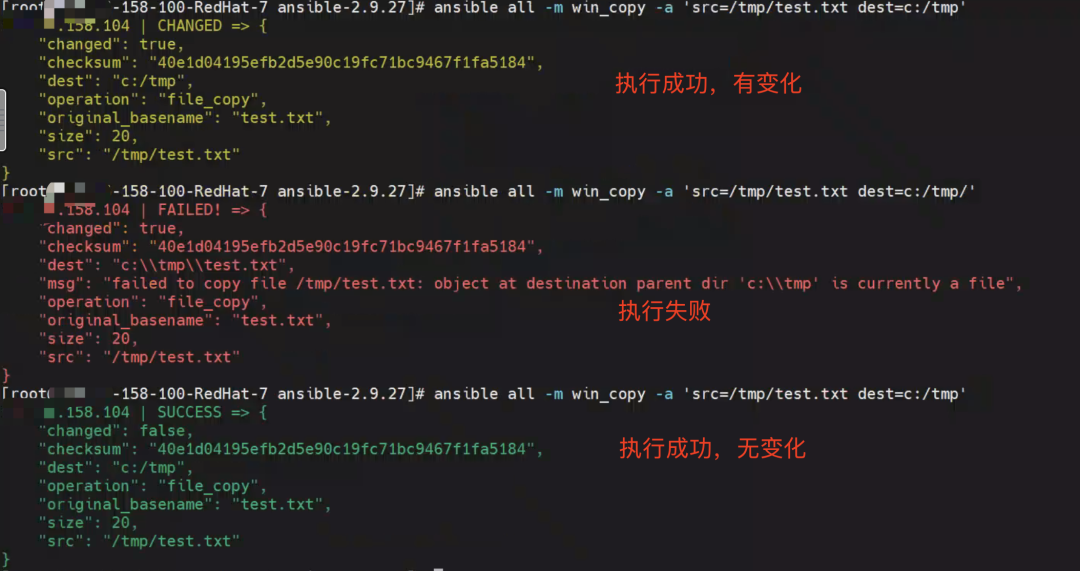
2) ansible-doc命令 ansible-doc可以查看ansible各个模块的文档说明,功能类似于man命令 ansible支持的window模块大多以“win_”开头
| //查看ansible各个模块,可以看到ansible支持的windows模块大多以"win_"开头,例如,linux中使用的ping模块,windows中为win_ping | |
| ansible-doc -l | |
| //查看某个具体的模块 | |
| ansible-doc win_ping |
3) ansible-galaxy命令 模块管理器,类似python中的pip,可以根据安装量和下载量等信息,查找和安装相应的roles
| ansible-galaxy [init|info|list|install|remove] [options].... |
4) ansible-playbook命令 通过预先编写好的playbook文件实现批量管理,要实现的功能与命令ansible一样,可以理解为按一定条件组成的ansible任务集 5) ansible-pull命令 ansible的另外一种工作模式,默认为push模式 6) ansible-vault命令 用于配置文件加密,如果编写的playbook文件中有敏感信息,可以使用ansible-valut进行加密解密,防止他人随意查看
| [root@192-168-158-100-RedHat-7 ansible-2.9.27]# ansible-vault encrypt test.yaml | |
| New Vault password: | |
| Confirm New Vault password: | |
| Encryption successful | |
| [root@192-168-158-100-RedHat-7 ansible-2.9.27]# cat test.yaml | |
| $ANSIBLE_VAULT;1.1;AES256 | |
| 36353131383762396361623833653734356261666435633335636338333834393535353839383962 | |
| 6237316263616662336161353433643435663737323431350a626338393561623639653961656238 | |
| 66663031626464343661393732633264366265653734363139343330396430386364343232366138 | |
| 3430326166326336630a343062623461633862366266363963376231343732623861666336326533 | |
| 65346363386338636161613833646137306562636566633434373037313630636161 | |
| [root@192-168-158-100-RedHat-7 ansible-2.9.27]# ansible-vault decrypt test.yaml | |
| Vault password: | |
| Decryption successful |
1.9 Inventory配置文件详解
Inventory是ansible管理主机信息的配置文件,默认存放于/etc/ansible/hosts。Ansible在使用时通过-i或者--inventory-file来制定文件读取,如ansible -i /etc/ansible/hosts webs -m ping,如果只有一个Inventory时可以不用指定路径,默认读取/etc/ansible/hosts。inventory可以同时存在多个,而且支持动态生成。
1)主机和组
Inventory配置文件遵循ini文件风格,中括号里的字符为组名,并且支持将同一个主机同时归并到多个不同的组中。若主机使用了非默认的ssh端口,还可以在主机名称之后使用冒号加端口号来标明
| #“#”开头的行表示该行为注释行,即当时行的配置不生效 | |
| # Inventory 可以直接为 IP 地址 | |
| 192.168.37.149# Inventory 同样支持 Hostname 的方式,后跟冒号加数字表示端口号,默认 22 号端口ntp.magedu.com:2222 | |
| nfs .magedu.com | |
| # 中括号内的内容表示一个分组的开始,紧随其后的主机均属于该组成员,空行后的主机亦属于该组,即web2.magedu.com这台主机也属于[websevers]组 | |
| [websevers] | |
| web1 .magedu.com | |
| web[10:20].magedu.com #[10:20]表示10~20 之间的所有数字(包括10和20),即表示 web10.magedu.com、web11.magedu.com……web20.magedu.com 的所有主机 | |
| web2 .magedu.com[dbservers] | |
| db-a.magedu.com | |
| db-[b:f].magedu.com #[b:f]表示b到f之间的所有数字(包括b和f),即表示 db-b.magedu.com、db-e.magedu.com…db-f.magedu.com的所有主机 |
2) 定义主机变量
| [webservers] | |
| web1.magedu.com http_port=808 maxRequestsPerchild=801 #自定义http_port 的端口号为808,配置maxRequestsPerchild为801 | |
3) 定义组变量
| [groupservers] | |
| webl .magedu.com | |
| web2 .magedu.com | |
| [groupservers:vars] | |
| ntp_server=ntp.magedu.com #定义groupservers 组中所有主机ntp_server 值为 ntp.magedu.com | |
| nfs_server=nfs.magedu.com #定义groupservers 组中所有主机nfs_server 值为 nfs.magedu.com | |
4) 定义组嵌套及变量
| [apache] | |
| httpdl.magedu.com | |
| httpd2.magedu.com | |
| [nginx] | |
| ngx1.magedu.com | |
| ngx2.magedu.com | |
| [webservers:children] | |
| apache | |
| nginx | |
| [webservers:vars] | |
| ntp_server=ntp.magedu.com |
二、两大常用命令
介绍了Ansible的各项元素、系列命令、Inventory基础,这些是掌握Ansible的基础,本篇接着介绍Ansible两大神器Ad-Hoc命令集和playbook,通过模拟真实的案例和应用场景更深入地了解Ansible。
2.1 Ad-Hoc命令集
1)使用场景
Ad-Hoc源自拉丁语“ad hoc”,意思是“为了这个目的”或“特定目的”。我们可以理解为解决一些简单或者平时工作中临时遇到的任务所做的“临时操作”。比如:临时向某一集群中各个服务器推送一个文件等
2)命令集介绍
Ad-Hoc命令集由/usr/bin/ansible实现,其命令语法如下:
|
ansible |
可用[options]有:
-i PATH,指定inventory信息,默认/etc/ansible/hosts
-f NUM, 并发线程数,默认5个线程
--private-key=PRIVATE_KEY_FILE:指定密钥文件
-m NAME,指定使用的模块
-M DIRECTORY,指定模块存放路径
-a 'ARGUMENTS',模块参数
-k,认证密码
-o,标准输出至一行
-s,相当于Linux系统下的sudo命令
-t DIRECTORY,输出信息至DIRECTORY目录下,结果文件为远程主机名
-T SECONDS,指定连接远程主机的最大超时时间,单位是秒
-B NUM,后台执行命令,超Num秒后中止正在执行的任务
-P NUM,定期返回后台任务进度
-u USERNAME,指定远程主机以USERNAME运行命令
--list-hosts,列出符合条件的主机列表,不执行任何命令 命令执行流程: 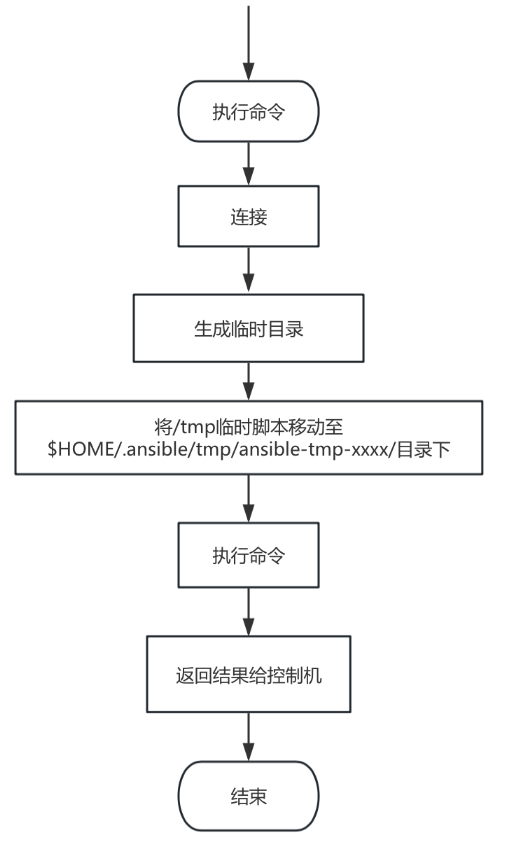
场景1:检查主机是否存活 执行命令: ansible linux -m ping 返回结果:
| [root@192-168-158-100-RedHat-7 .ssh]# ansible linux -m ping | |
| 192.168.158.16 | SUCCESS => { | |
| "ansible_facts": { | |
| "discovered_interpreter_python": "/usr/bin/python" | |
| }, | |
| "changed": false, | |
| "ping": "pong" | |
| } | |
| 192.168.158.23 | SUCCESS => { | |
| "ansible_facts": { | |
| "discovered_interpreter_python": "/usr/bin/python" | |
| }, | |
| "changed": false, | |
| "ping": "pong" | |
| } | |
| 192.168.158.176 | SUCCESS => { | |
| "ansible_facts": { | |
| "discovered_interpreter_python": "/usr/bin/python" | |
| }, | |
| "changed": false, | |
| "ping": "pong" | |
| } | |
“linux”组下有三台linux机器,看下第一台机器的输出 “172.168.158.16”是命令执行的主机; “Success”表示命令执行成功; “=>{}”表示详细返回结果如下; ““changed”:false”表示没有对主机做变更;““ping”:"pong"”表示执行ping命令返回了pong
场景2:返回Linux组所有主机的hostname 执行命令: ansible linux -m command -a 'hostname' 返回结果:
| [root@192-168-158-100-RedHat-7 .ssh]# ansible linux -m command -a 'hostname' | |
| 192.168.158.16 | CHANGED | rc=0 >> | |
| k8sworker | |
| 192.168.158.23 | CHANGED | rc=0 >> | |
| k8smaster | |
| 192.168.158.176 | CHANGED | rc=0 >> | |
| 192-168-158-176-RedHat-7 | |
场景3:返回Linux组所有机器 执行命令 ansible linux --list-hosts 返回结果
| [root@192-168-158-100-RedHat-7 .ssh]# ansible linux --list-hosts | |
| hosts (3): | |
| 192.168.158.23 | |
| 192.168.158.16 | |
| 192.168.158.176 |
链接:https://www.cnblogs.com/wenha/p/18690986
-
互联网
+关注
关注
55文章
11350浏览量
110462 -
IT
+关注
关注
2文章
1007浏览量
65844 -
自动化
+关注
关注
31文章
5984浏览量
90663
原文标题:二、两大常用命令
文章出处:【微信号:magedu-Linux,微信公众号:马哥Linux运维】欢迎添加关注!文章转载请注明出处。
发布评论请先 登录
诚聘高级运维自动化工程师
CasePlayer2--单元测试自动化工具
模拟EDA自动化工具如今已经登场
利用Ansible实现OpenStack自动化
利用Ansible实现OpenStack自动化
一文详解Ansible的自动化运维

使用Ansible的OpenStack自动化


网络设备自动化运维工具—ansible入门笔记介绍




评论