 电子发烧友App






3、平均成绩
“平均成绩”主要目的还是在重温经典“WordCount”例子,可以说是在基础上的微变化版,该实例主要就是实现一个计算学生平均成绩的例子。
3.1 实例描述
对输入文件中数据进行就算学生平均成绩。输入文件中的每行内容均为一个学生的姓名和他相应的成绩,如果有多门学科,则每门学科为一个文件。要求在输出中每行有两个间隔的数据,其中,第一个代表学生的姓名,第二个代表其平均成绩。
样本输入:
1)math:
张三 88
李四 99
王五 66
赵六 77
2)china:
张三 78
李四 89
王五 96
赵六 67
3)english:
张三 80
李四 82
王五 84
赵六 86
样本输出:
张三 82
李四 90
王五 82
赵六 76
3.2 设计思路
计算学生平均成绩是一个仿“WordCount”例子,用来重温一下开发MapReduce程序的流程。程序包括两部分的内容:Map部分和Reduce部分,分别实现了map和reduce的功能。
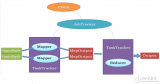
Map处理的是一个纯文本文件, 文件中存放的数据时每一行表示一个学生的姓名和他相应一科成绩。Mapper处理的数据是由InputFormat分解过的数据集,其中 InputFormat的作用是将数据集切割成小数据集InputSplit,每一个InputSlit将由一个Mapper负责处理。此 外,InputFormat中还提供了一个RecordReader的实现,并将一个InputSplit解析成《key,value》对提 供给了map函数。InputFormat的默认值是TextInputFormat,它针对文本文件,按行将文本切割成InputSlit,并用 LineRecordReader将InputSplit解析成《key,value》对,key是行在文本中的位置,value是文件中的 一行。
Map的结果会通过partion分发到Reducer,Reducer做完Reduce操作后,将通过以格式OutputFormat输出。
Mapper最终处理的结果对《key,value》,会送到Reducer中进行合并,合并的时候,有相同key的键/值对则送到同一个 Reducer上。Reducer是所有用户定制Reducer类地基础,它的输入是key和这个key对应的所有value的一个迭代器,同时还有 Reducer的上下文。Reduce的结果由Reducer.Context的write方法输出到文件中。
3.3 程序代码
程序代码如下所示:
package com.hebut.mr;
import java.io.IOException;
import java.util.Iterator;
import java.util.StringTokenizer;
import org.apache.hadoop.conf.Configuration;
import org.apache.hadoop.fs.Path;
import org.apache.hadoop.io.IntWritable;
import org.apache.hadoop.io.LongWritable;
import org.apache.hadoop.io.Text;
import org.apache.hadoop.mapreduce.Job;
import org.apache.hadoop.mapreduce.Mapper;
import org.apache.hadoop.mapreduce.Reducer;
import org.apache.hadoop.mapreduce.lib.input.FileInputFormat;
import org.apache.hadoop.mapreduce.lib.input.TextInputFormat;
import org.apache.hadoop.mapreduce.lib.output.FileOutputFormat;
import org.apache.hadoop.mapreduce.lib.output.TextOutputFormat;
import org.apache.hadoop.util.GenericOptionsParser;
public class Score {
public static class Map extends
Mapper《LongWritable, Text, Text, IntWritable》 {
// 实现map函数
public void map(LongWritable key, Text value, Context context)
throws IOException, InterruptedException {
// 将输入的纯文本文件的数据转化成String
String line = value.toString();
// 将输入的数据首先按行进行分割
StringTokenizer tokenizerArticle = new StringTokenizer(line, “\n”);
// 分别对每一行进行处理
while (tokenizerArticle.hasMoreElements()) {
// 每行按空格划分
StringTokenizer tokenizerLine = newStringTokenizer(tokenizerArticle.nextToken());
String strName = tokenizerLine.nextToken();// 学生姓名部分
String strScore = tokenizerLine.nextToken();// 成绩部分
Text name = new Text(strName);
int scoreInt = Integer.parseInt(strScore);
// 输出姓名和成绩
context.write(name, new IntWritable(scoreInt));
}
}
}
public static class Reduce extends
Reducer《Text, IntWritable, Text, IntWritable》 {
// 实现reduce函数
public void reduce(Text key, Iterable《IntWritable》 values,
Context context) throws IOException, InterruptedException {
int sum = 0;
int count = 0;
Iterator《IntWritable》 iterator = values.iterator();
while (iterator.hasNext()) {
sum += iterator.next().get();// 计算总分
count++;// 统计总的科目数
}
int average = (int) sum / count;// 计算平均成绩
context.write(key, new IntWritable(average));
}
}
public static void main(String[] args) throws Exception {
Configuration conf = new Configuration();
// 这句话很关键
conf.set(“mapred.job.tracker”, “192.168.1.2:9001”);
String[] ioArgs = new String[] { “score_in”, “score_out” };
String[] otherArgs = new GenericOptionsParser(conf, ioArgs).getRemainingArgs();
if (otherArgs.length != 2) {
System.err.println(“Usage: Score Average 《in》 《out》”);
System.exit(2);
}
Job job = new Job(conf, “Score Average”);
job.setJarByClass(Score.class);
// 设置Map、Combine和Reduce处理类
job.setMapperClass(Map.class);
job.setCombinerClass(Reduce.class);
job.setReducerClass(Reduce.class);
// 设置输出类型
job.setOutputKeyClass(Text.class);
job.setOutputValueClass(IntWritable.class);
// 将输入的数据集分割成小数据块splites,提供一个RecordReder的实现
job.setInputFormatClass(TextInputFormat.class);
// 提供一个RecordWriter的实现,负责数据输出
job.setOutputFormatClass(TextOutputFormat.class);
// 设置输入和输出目录
FileInputFormat.addInputPath(job, new Path(otherArgs[0]));
FileOutputFormat.setOutputPath(job, new Path(otherArgs[1]));
System.exit(job.waitForCompletion(true) ? 0 : 1);
}
}
3.4 代码结果
1)准备测试数据
通过Eclipse下面的“DFS Locations”在“/user/hadoop”目录下创建输入文件“score_in”文件夹(备注:“score_out”不需要创建。)如图3.4-1所示,已经成功创建。
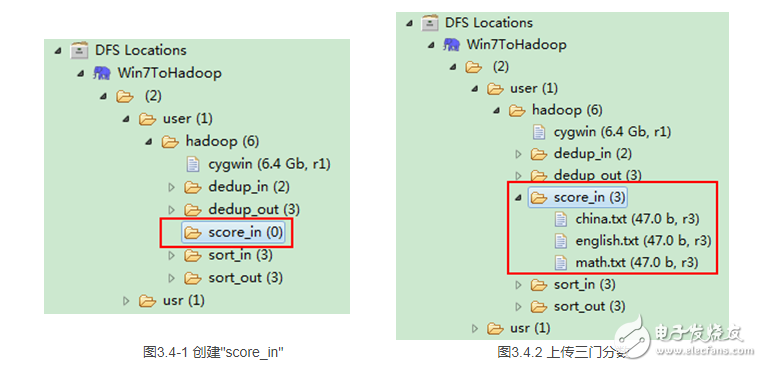
然后在本地建立三个txt文件,通过Eclipse上传到“/user/hadoop/score_in”文件夹中,三个txt文件的内容如“实例描述”那三个文件一样。如图3.4-2所示,成功上传之后。
备注:文本文件的编码为“UTF-8”,默认为“ANSI”,可以另存为时选择,不然中文会出现乱码。
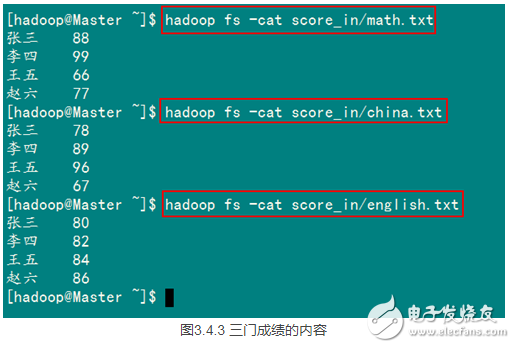
从SecureCRT远处查看“Master.Hadoop”的也能证实我们上传的三个文件。

查看三个文件的内容如图3.4-3所示:
2)查看运行结果
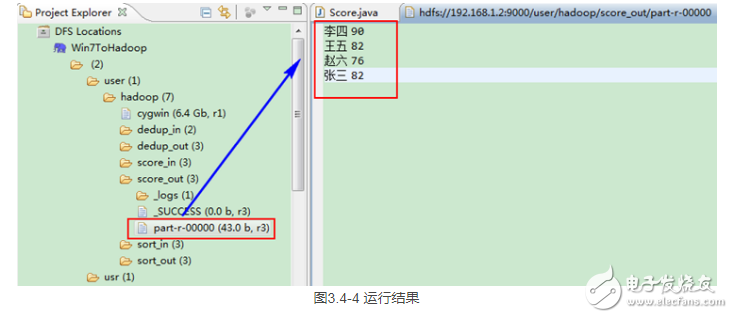
这时我们右击Eclipse 的“DFS Locations”中“/user/hadoop”文件夹进行刷新,这时会发现多出一个“score_out”文件夹,且里面有3个文件,然后打开双 其“part-r-00000”文件,会在Eclipse中间把内容显示出来。如图3.4-4所示。







 工商网监
工商网监
评论