


 如何手撸一个自有知识库的RAG系统

RAG通常指的是"Retrieval-Augmented Generation",即“检索增强的生成”。这是一种结合了检索(Retrieval)和生成(Generation)的机器学习模型,通常用于自然语言处理任务,如文本生成、问答系统等。
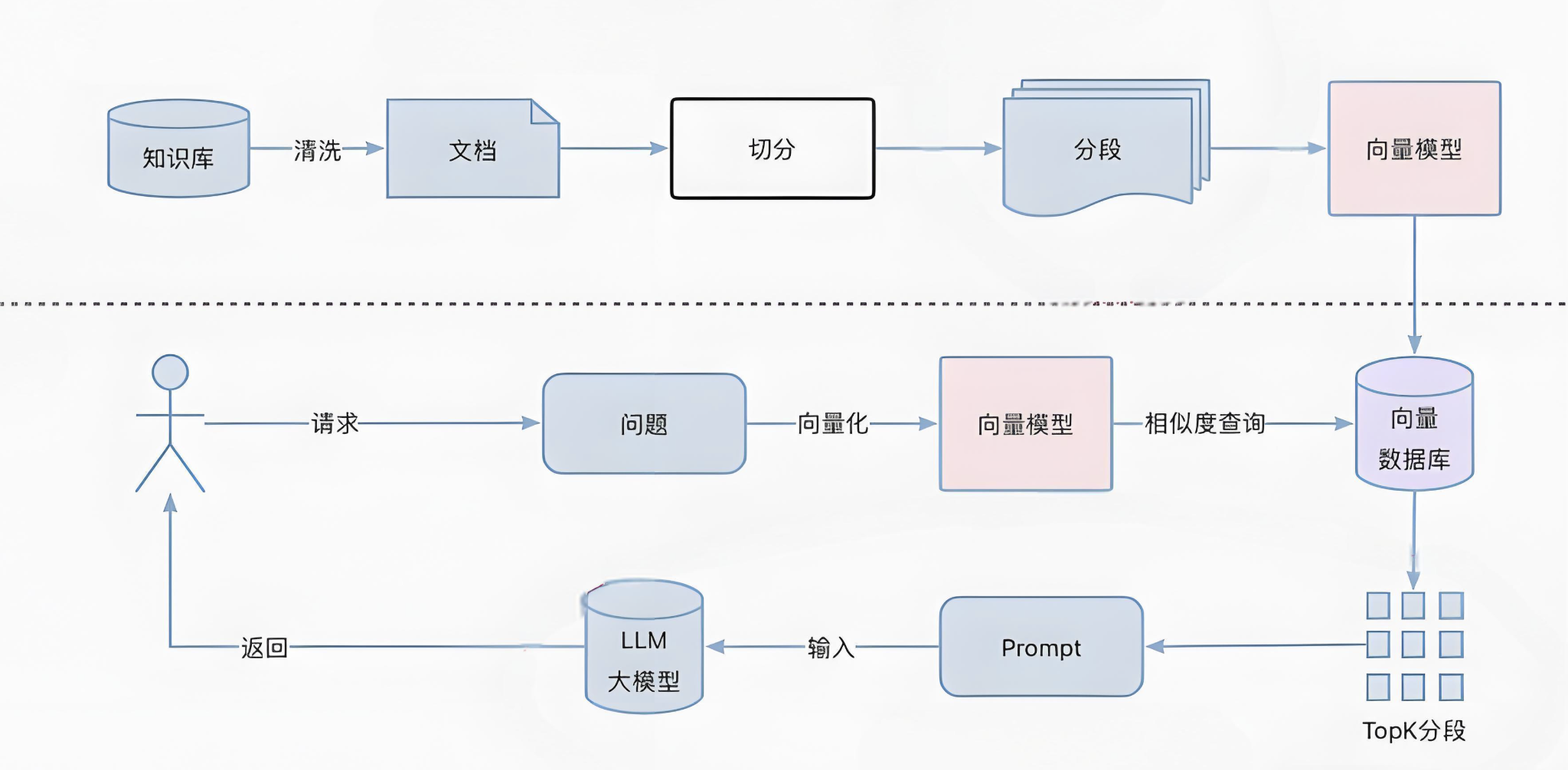
我们通过一下几个步骤来完成一个基于京东云官网文档的RAG系统
数据收集
建立知识库
向量检索
提示词与模型
数据收集
数据的收集再整个RAG实施过程中无疑是最耗人工的,涉及到收集、清洗、格式化、切分等过程。这里我们使用京东云的官方文档作为知识库的基础。文档格式大概这样:
{
"content": "DDoS IP高防结合Web应用防火墙方案说明n=======================nnnDDoS IP高防+Web应用防火墙提供三层到七层安全防护体系,应用场景包括游戏、金融、电商、互联网、政企等京东云内和云外的各类型用户。nnn部署架构n====nnn[]("https://jdcloud-portal.oss.cn-north-1.jcloudcs.com/cn/image/Advanced%20Anti-DDoS/Best-Practice02.png") nnDDoS IP高防+Web应用防火墙的最佳部署架构如下:nnn* 京东云的安全调度中心,通过DNS解析,将用户域名解析到DDoS IP高防CNAME。n* 用户正常访问流量和DDoS攻击流量经过DDoS IP高防清洗,回源至Web应用防火墙。n* 攻击者恶意请求被Web应用防火墙过滤后返回用户源站。n* Web应用防火墙可以保护任何公网的服务器,包括但不限于京东云,其他厂商的云,IDC等nnn方案优势n====nnn1. 用户源站在DDoS IP高防和Web应用防火墙之后,起到隐藏源站IP的作用。n2. CNAME接入,配置简单,减少运维人员工作。nnn",
"title": "DDoS IP高防结合Web应用防火墙方案说明",
"product": "DDoS IP高防",
"url": "https://docs.jdcloud.com/cn/anti-ddos-pro/anti-ddos-pro-and-waf"
}
每条数据是一个包含四个字段的json,这四个字段分别是"content":文档内容;"title":文档标题;"product":相关产品;"url":文档在线地址
向量数据库的选择与Retriever实现
向量数据库是RAG系统的记忆中心。目前市面上开源的向量数据库很多,那个向量库比较好也是见仁见智。本项目中笔者选择则了clickhouse作为向量数据库。选择ck主要有一下几个方面的考虑:
ck再langchain社区的集成实现比较好,入库比较平滑
向量查询支持sql,学习成本较低,上手容易
京东云有相关产品且有专业团队支持,用着放心
文档向量化及入库过程
为了简化文档向量化和检索过程,我们使用了longchain的Retriever工具集
首先将文档向量化,代码如下:
from libs.jd_doc_json_loader import JD_DOC_Loader
from langchain_community.document_loaders import DirectoryLoader

root_dir = "/root/jd_docs"
loader = DirectoryLoader(
    '/root/jd_docs', glob="**/*.json", loader_cls=JD_DOC_Loader)
docs = loader.load()
langchain 社区里并没有提供针对特定格式的装载器,为此,我们自定义了JD_DOC_Loader来实现加载过程
import json
import logging
from pathlib import Path
from typing import Iterator, Optional, Union

from langchain_core.documents import Document

from langchain_community.document_loaders.base import BaseLoader
from langchain_community.document_loaders.helpers import detect_file_encodings

logger = logging.getLogger(__name__)


class JD_DOC_Loader(BaseLoader):
    """Load text file.


    Args:
        file_path: Path to the file to load.

        encoding: File encoding to use. If `None`, the file will be loaded
        with the default system encoding.

        autodetect_encoding: Whether to try to autodetect the file encoding
            if the specified encoding fails.
    """

    def __init__(
        self,
        file_path: Union[str, Path],
        encoding: Optional[str] = None,
        autodetect_encoding: bool = False,
    ):
        """Initialize with file path."""
        self.file_path = file_path
        self.encoding = encoding
        self.autodetect_encoding = autodetect_encoding

    def lazy_load(self) -> Iterator[Document]:
        """Load from file path."""
        text = ""
        from_url = ""
        try:
            with open(self.file_path, encoding=self.encoding) as f:
                doc_data = json.load(f)
                text = doc_data["content"]
                title = doc_data["title"]
                product = doc_data["product"]
                from_url = doc_data["url"]

                # text = f.read()
        except UnicodeDecodeError as e:
            if self.autodetect_encoding:
                detected_encodings = detect_file_encodings(self.file_path)
                for encoding in detected_encodings:
                    logger.debug(f"Trying encoding: {encoding.encoding}")
                    try:
                        with open(self.file_path, encoding=encoding.encoding) as f:
                            text = f.read()
                        break
                    except UnicodeDecodeError:
                        continue
            else:
                raise RuntimeError(f"Error loading {self.file_path}") from e
        except Exception as e:
            raise RuntimeError(f"Error loading {self.file_path}") from e
        # metadata = {"source": str(self.file_path)}
        metadata = {"source": from_url, "title": title, "product": product}
        yield Document(page_content=text, metadata=metadata)
以上代码功能主要是解析json文件,填充Document的page_content字段和metadata字段。
接下来使用langchain 的 clickhouse 向量工具集进行文档入库
import langchain_community.vectorstores.clickhouse as clickhouse
from langchain.embeddings import HuggingFaceEmbeddings

model_kwargs = {"device": "cuda"}
embeddings = HuggingFaceEmbeddings(
    model_name="/root/models/moka-ai-m3e-large", model_kwargs=model_kwargs)

settings = clickhouse.ClickhouseSettings(
    table="jd_docs_m3e_with_url", username="default", password="xxxxxx", host="10.0.1.94")

docsearch = clickhouse.Clickhouse.from_documents(
    docs, embeddings, config=settings)
入库成功后,进行一下检验
import langchain_community.vectorstores.clickhouse as clickhouse
from langchain.embeddings import HuggingFaceEmbeddings

model_kwargs = {"device": "cuda"}~~~~
embeddings = HuggingFaceEmbeddings(
    model_name="/root/models/moka-ai-m3e-large", model_kwargs=model_kwargs)

settings = clickhouse.ClickhouseSettings(
    table="jd_docs_m3e_with_url_splited", username="default", password="xxxx", host="10.0.1.94")
ck_db = clickhouse.Clickhouse(embeddings, config=settings)
ck_retriever = ck_db.as_retriever(
    search_type="similarity_score_threshold", search_kwargs={'score_threshold': 0.9})
ck_retriever.get_relevant_documents("如何创建mysql rds")
有了知识库以后,可以构建一个简单的restful 服务,我们这里使用fastapi做这个事儿
from fastapi import FastAPI
from pydantic import BaseModel
from singleton_decorator import singleton
from langchain_community.embeddings import HuggingFaceEmbeddings
import langchain_community.vectorstores.clickhouse as clickhouse
import uvicorn
import json

app = FastAPI()
app = FastAPI(docs_url=None)
app.host = "0.0.0.0"

model_kwargs = {"device": "cuda"}
embeddings = HuggingFaceEmbeddings(
    model_name="/root/models/moka-ai-m3e-large", model_kwargs=model_kwargs)
settings = clickhouse.ClickhouseSettings(
    table="jd_docs_m3e_with_url_splited", username="default", password="xxxx", host="10.0.1.94")
ck_db = clickhouse.Clickhouse(embeddings, config=settings)
ck_retriever = ck_db.as_retriever(
    search_type="similarity", search_kwargs={"k": 3})


class question(BaseModel):
    content: str


@app.get("/")
async def root():
    return {"ok"}


@app.post("/retriever")
async def retriver(question: question):
    global ck_retriever
    result = ck_retriever.invoke(question.content)
    return result


if __name__ == '__main__':
    uvicorn.run(app='retriever_api:app', host="0.0.0.0",
                port=8000, reload=True)
返回结构大概这样:
[
  {
    "page_content": "云缓存 Redis--Redis迁移解决方案n###RedisSyncer 操作步骤n####数据校验n```nwget   https://github.com/TraceNature/rediscompare/releases/download/v1.0.0/rediscompare-1.0.0-linux-amd64.tar.gznrediscompare compare single2single --saddr "10.0.1.101:6479" --spassword "redistest0102" --taddr "10.0.1.102:6479" --tpassword  "redistest0102" --comparetimes 3nn```  n**Github 地址:** [https://github.com/TraceNature/redissyncer-server]("https://github.com/TraceNature/redissyncer-server")",
    "metadata": {
      "product": "云缓存 Redis",
      "source": "https://docs.jdcloud.com/cn/jcs-for-redis/doc-2",
      "title": "Redis迁移解决方案"
    },
    "type": "Document"
  },
  {
    "page_content": "云缓存 Redis--Redis迁移解决方案n###RedisSyncer 操作步骤n####数据校验n```nwget   https://github.com/TraceNature/rediscompare/releases/download/v1.0.0/rediscompare-1.0.0-linux-amd64.tar.gznrediscompare compare single2single --saddr "10.0.1.101:6479" --spassword "redistest0102" --taddr "10.0.1.102:6479" --tpassword  "redistest0102" --comparetimes 3nn```  n**Github 地址:** [https://github.com/TraceNature/redissyncer-server]("https://github.com/TraceNature/redissyncer-server")",
    "metadata": {
      "product": "云缓存 Redis",
      "source": "https://docs.jdcloud.com/cn/jcs-for-redis/doc-2",
      "title": "Redis迁移解决方案"
    },
    "type": "Document"
  },
  {
    "page_content": "云缓存 Redis--Redis迁移解决方案n###RedisSyncer 操作步骤n####数据校验n```nwget   https://github.com/TraceNature/rediscompare/releases/download/v1.0.0/rediscompare-1.0.0-linux-amd64.tar.gznrediscompare compare single2single --saddr "10.0.1.101:6479" --spassword "redistest0102" --taddr "10.0.1.102:6479" --tpassword  "redistest0102" --comparetimes 3nn```  n**Github 地址:** [https://github.com/TraceNature/redissyncer-server]("https://github.com/TraceNature/redissyncer-server")",
    "metadata": {
      "product": "云缓存 Redis",
      "source": "https://docs.jdcloud.com/cn/jcs-for-redis/doc-2",
      "title": "Redis迁移解决方案"
    },
    "type": "Document"
  }
]
返回一个向量距离最小的list
结合模型和prompt,回答问题
为了节约算力资源,我们选择qwen 1.8B模型,一张v100卡刚好可以容纳一个qwen模型和一个m3e-large embedding 模型
answer 服务
from fastapi import FastAPI
from pydantic import BaseModel
from langchain_community.llms import VLLM
from transformers import AutoTokenizer
from langchain.prompts import PromptTemplate
import requests
import uvicorn
import json
import logging

app = FastAPI()
app = FastAPI(docs_url=None)
app.host = "0.0.0.0"

logger = logging.getLogger()
logger.setLevel(logging.INFO)
to_console = logging.StreamHandler()
logger.addHandler(to_console)


# load model
# model_name = "/root/models/Llama3-Chinese-8B-Instruct"
model_name = "/root/models/Qwen1.5-1.8B-Chat"
tokenizer = AutoTokenizer.from_pretrained(model_name)
llm_llama3 = VLLM(
    model=model_name,
    tokenizer=tokenizer,
    task="text-generation",
    temperature=0.2,
    do_sample=True,
    repetition_penalty=1.1,
    return_full_text=False,
    max_new_tokens=900,
)

# prompt
prompt_template = """
你是一个云技术专家
使用以下检索到的Context回答问题。
如果不知道答案,就说不知道。
用中文回答问题。
Question: {question}
Context: {context}
Answer:
"""

prompt = PromptTemplate(
    input_variables=["context", "question"],
    template=prompt_template,
)


def get_context_list(q: str):
    url = "http://10.0.0.7:8000/retriever"
    payload = {"content": q}
    res = requests.post(url, json=payload)
    return res.text


class question(BaseModel):
    content: str


@app.get("/")
async def root():
    return {"ok"}


@app.post("/answer")
async def answer(q: question):
    logger.info("invoke!!!")
    global prompt
    global llm_llama3
    context_list_str = get_context_list(q.content)

    context_list = json.loads(context_list_str)
    context = ""
    source_list = []

    for context_json in context_list:
        context = context+context_json["page_content"]
        source_list.append(context_json["metadata"]["source"])
    p = prompt.format(context=context, question=q.content)
    answer = llm_llama3(p)
    result = {
        "answer": answer,
        "sources": source_list
    }
    return result


if __name__ == '__main__':
    uvicorn.run(app='retriever_api:app', host="0.0.0.0",
                port=8888, reload=True)
代码通过使用Retriever接口查找与问题相似的文档,作为context组合prompt推送给模型生成答案。
主要服务就绪后可以开始画一张脸了,使用gradio做个简易对话界面
gradio 服务
import json
import gradio as gr
import requests


def greet(name, intensity):
    return "Hello, " + name + "!" * int(intensity)


def answer(question):
    url = "http://127.0.0.1:8888/answer"
    payload = {"content": question}
    res = requests.post(url, json=payload)
    res_json = json.loads(res.text)
    return [res_json["answer"], res_json["sources"]]


demo = gr.Interface(
    fn=answer,
    # inputs=["text", "slider"],
    inputs=[gr.Textbox(label="question", lines=5)],
    # outputs=[gr.TextArea(label="answer", lines=5),
    #          gr.JSON(label="urls", value=list)]
    outputs=[gr.Markdown(label="answer"),
             gr.JSON(label="urls", value=list)]
)


demo.launch(server_name="0.0.0.0")


审核编辑 黄宇
-
SQL
+关注
关注
1文章
809浏览量
47059 -
数据库
+关注
关注
7文章
4095浏览量
68722
发布评论请先 登录
HPM知识库 | 先楫半导体电机库简介

国产化DevOps工具链实践:知识库与需求/任务/版本如何打通?
RAG效果不佳的常见问题与优化思路
高质量RAG系统的五个核心设计要点
RAG、MCP与智能体:大模型落地的三道关
HPM知识库 | [EtherCAT] 从站运行过程中报错(错误码:0x1A\\0x1B\\0x2C)的代码分析
鸿蒙智能体开发知识库---创建知识库
HPM知识库 | 力位混合控制库使用指南
RAG(检索增强生成)原理与实践
设备维修总踩坑?故障知识库 + AI 诊断,新手也能修复杂机

经纬恒润亮相AICC人工智能计算大会,以智能体技术助推汽车电子研发创新

RAG实践:一文掌握大模型RAG过程
零基础在智能硬件上克隆原神可莉实现桌面陪伴(提供人设提示词、知识库、固件下载)




评论