 电子发烧友App






作者:Lianne & Justin
在拟合机器学习或统计模型之前,我们通常需要清洗数据。用杂乱数据训练出的模型无法输出有意义的结果。
数据清洗:从记录集、表或数据库中检测和修正(或删除)受损或不准确记录的过程。它识别出数据中不完善、不准确或不相关的部分,并替换、修改或删除这些脏乱的数据。
「数据清洗」光定义就这么长,执行过程肯定既枯燥又耗时。 为了将数据清洗简单化,本文介绍了一种新型完备分步指南,支持在 Python 中执行数据清洗流程。读者可以学习找出并清洗以下数据的方法:
缺失数据;
不规则数据(异常值);
不必要数据:重复数据(repetitive data)、复制数据(duplicate data)等;
不一致数据:大写、地址等;
该指南使用的数据集是 Kaggle 竞赛 Sberbank 俄罗斯房地产价值预测竞赛数据(该项目的目标是预测俄罗斯的房价波动)。本文并未使用全部数据,仅选取了其中的一部分样本。 在进入数据清洗流程之前,我们先来看一下数据概况。
# import packages
import pandas as pd
import numpy as np
import seaborn as sns


import matplotlib.pyplot as plt
import matplotlib.mlab as mlab
import matplotlib
plt.style.use('ggplot')
from matplotlib.pyplot import figure


%matplotlib inline
matplotlib.rcParams['figure.figsize'] = (12,8)

pd.options.mode.chained_assignment = None

# read the data
df = pd.read_csv('sberbank.csv')


# shape and data types of the data
print(df.shape)
print(df.dtypes)


# select numeric columns
df_numeric = df.select_dtypes(include=[np.number])
numeric_cols = df_numeric.columns.values
print(numeric_cols)


# select non numeric columns
df_non_numeric = df.select_dtypes(exclude=[np.number])
non_numeric_cols = df_non_numeric.columns.values
print(non_numeric_cols)
从以上结果中,我们可以看到该数据集共有 30,471 行、292 列,还可以辨别特征属于数值变量还是分类变量。这些都是有用的信息。 现在,我们可以浏览「脏」数据类型检查清单,并一一攻破。 开始吧! 缺失数据 处理缺失数据/缺失值是数据清洗中最棘手也最常见的部分。很多模型可以与其他数据问题和平共处,但大多数模型无法接受缺失数据问题。
如何找出缺失数据?
本文将介绍三种方法,帮助大家更多地了解数据集中的缺失数据。 方法 1:缺失数据热图 当特征数量较少时,我们可以通过热图对缺失数据进行可视化。
cols = df.columns[:30] # first 30 columns
colours = ['#000099', '#ffff00'] # specify the colours - yellow is missing. blue is not missing.
sns.heatmap(df[cols].isnull(), cmap=sns.color_palette(colours))
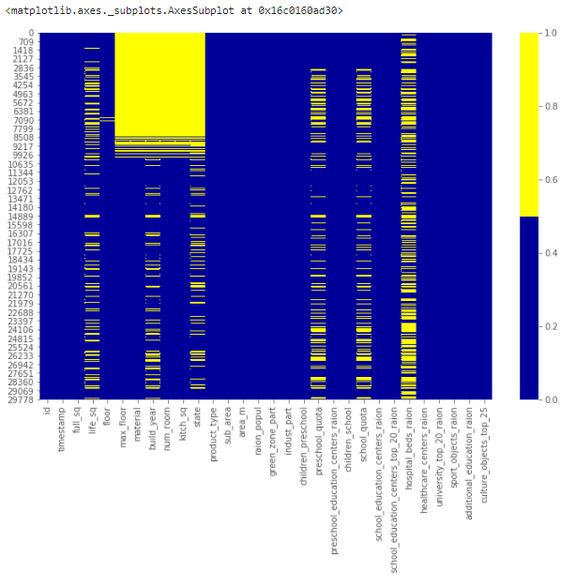
下表展示了前 30 个特征的缺失数据模式。横轴表示特征名,纵轴表示观察值/行数,黄色表示缺失数据,蓝色表示非缺失数据。 例如,下图中特征 life_sq 在多个行中存在缺失值。而特征 floor 只在第 7000 行左右出现零星缺失值。
# if it's a larger dataset and the visualization takes too long can do this.
# % of missing.
for col in df.columns:
    pct_missing = np.mean(df[col].isnull())
    print('{} - {}%'.format(col, round(pct_missing*100)))
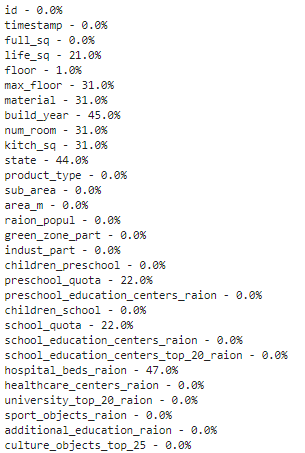
得到如下列表,该表展示了每个特征的缺失值百分比。 具体而言,我们可以从下表中看到特征 life_sq 有 21% 的缺失数据,而特征 floor 仅有 1% 的缺失数据。该列表有效地总结了每个特征的缺失数据百分比情况,是对热图可视化的补充。
# first create missing indicator for features with missing data
for col in df.columns:
    missing = df[col].isnull()
    num_missing = np.sum(missing)


    if num_missing > 0:
        print('created missing indicator for: {}'.format(col))
        df['{}_ismissing'.format(col)] = missing


# then based on the indicator, plot the histogram of missing values
ismissing_cols = [col for col in df.columns if 'ismissing' in col]
df['num_missing'] = df[ismissing_cols].sum(axis=1)


df['num_missing'].value_counts().reset_index().sort_values(by='index').plot.bar(x='index', y='num_missing')
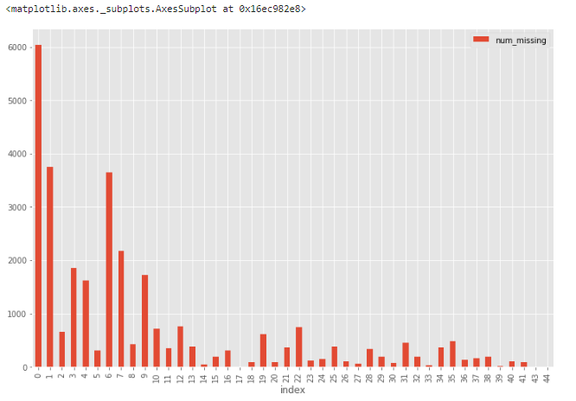
直方图可以帮助在 30,471 个观察值中识别缺失值状况。 例如,从下图中可以看到,超过 6000 个观察值不存在缺失值,接近 4000 个观察值具备一个缺失值。
# drop rows with a lot of missing values.
ind_missing = df[df['num_missing'] > 35].index
df_less_missing_rows = df.drop(ind_missing, axis=0)
解决方案 2:丢弃特征 与解决方案 1 类似,我们只在确定某个特征无法提供有用信息时才丢弃它。 例如,从缺失数据百分比列表中,我们可以看到 hospital_beds_raion 具备较高的缺失值百分比——47%,因此我们丢弃这一整个特征。
# hospital_beds_raion has a lot of missing.
# If we want to drop.
cols_to_drop = ['hospital_beds_raion']
df_less_hos_beds_raion = df.drop(cols_to_drop, axis=1)
解决方案 3:填充缺失数据 当特征是数值变量时,执行缺失数据填充。对同一特征的其他非缺失数据取平均值或中位数,用这个值来替换缺失值。 当特征是分类变量时,用众数(最频值)来填充缺失值。 以特征 life_sq 为例,我们可以用特征中位数来替换缺失值。
# replace missing values with the median.
med = df['life_sq'].median()
print(med)
df['life_sq'] = df['life_sq'].fillna(med)
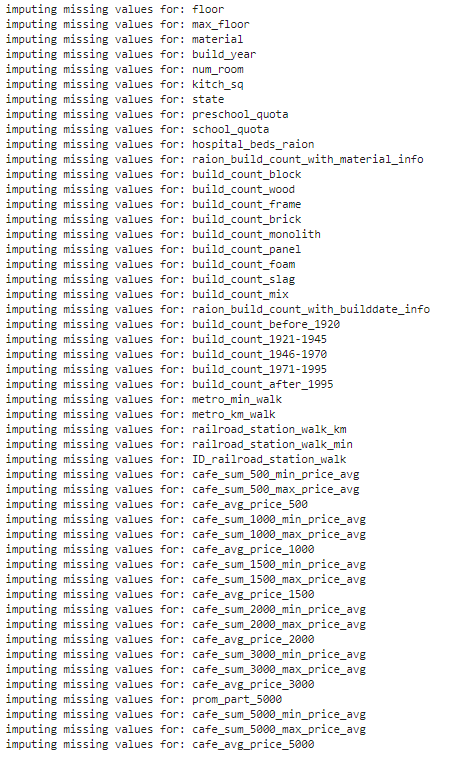
此外,我们还可以对所有数值特征一次性应用同样的填充策略。
# impute the missing values and create the missing value indicator variables for each numeric column.
df_numeric = df.select_dtypes(include=[np.number])
numeric_cols = df_numeric.columns.values


for col in numeric_cols:
    missing = df[col].isnull()
    num_missing = np.sum(missing)


    if num_missing > 0:  # only do the imputation for the columns that have missing values.
        print('imputing missing values for: {}'.format(col))
        df['{}_ismissing'.format(col)] = missing
        med = df[col].median()
        df[col] = df[col].fillna(med)
# impute the missing values and create the missing value indicator variables for each non-numeric column.
df_non_numeric = df.select_dtypes(exclude=[np.number])
non_numeric_cols = df_non_numeric.columns.values


for col in non_numeric_cols:
    missing = df[col].isnull()
    num_missing = np.sum(missing)


    if num_missing > 0:  # only do the imputation for the columns that have missing values.
        print('imputing missing values for: {}'.format(col))
        df['{}_ismissing'.format(col)] = missing


        top = df[col].describe()['top'] # impute with the most frequent value.
        df[col] = df[col].fillna(top)
解决方案 4:替换缺失值 对于分类特征,我们可以添加新的带值类别,如 _MISSING_。对于数值特征,我们可以用特定值(如-999)来替换缺失值。 这样,我们就可以保留缺失值,使之提供有价值的信息。
# categorical
df['sub_area'] = df['sub_area'].fillna('_MISSING_')


# numeric
df['life_sq'] = df['life_sq'].fillna(-999)
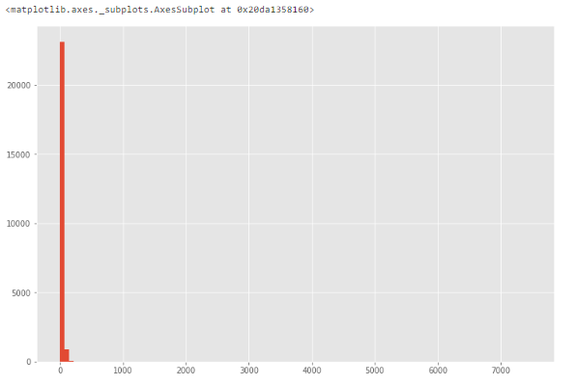
不规则数据(异常值) 异常值指与其他观察值具备显著差异的数据,它们可能是真的异常值也可能是错误。 如何找出异常值? 根据特征的属性(数值或分类),使用不同的方法来研究其分布,进而检测异常值。 方法 1:直方图/箱形图 当特征是数值变量时,使用直方图和箱形图来检测异常值。 下图展示了特征 life_sq 的直方图。
# histogram of life_sq.
df['life_sq'].hist(bins=100)
由于数据中可能存在异常值,因此下图中数据高度偏斜。
# box plot.
df.boxplot(column=['life_sq'])
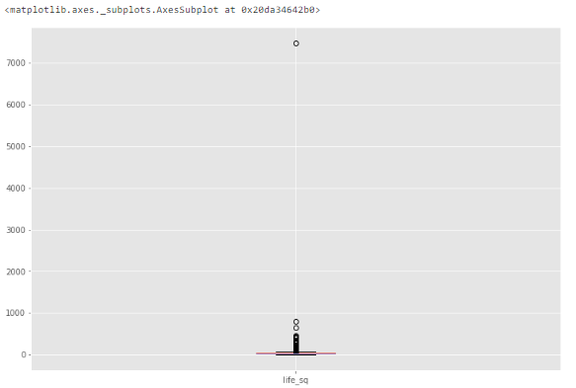
从下图中我们可以看到,异常值是一个大于 7000 的数值。
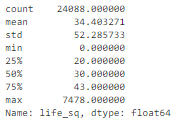
df['life_sq'].describe()
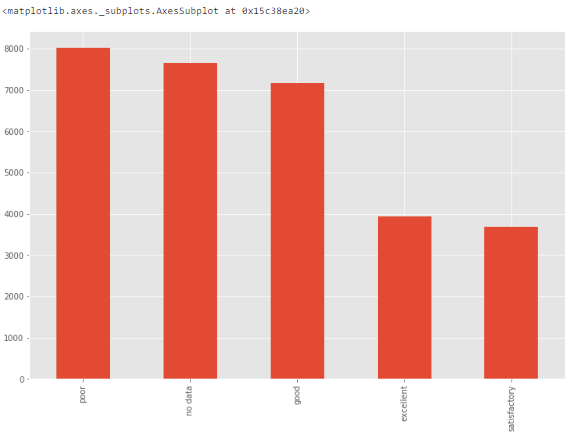
 方法 3:条形图 当特征是分类变量时,我们可以使用条形图来了解其类别和分布。 例如,特征 ecology 具备合理的分布。但如果某个类别「other」仅有一个值,则它就是异常值。
# bar chart -  distribution of a categorical variable
df['ecology'].value_counts().plot.bar()
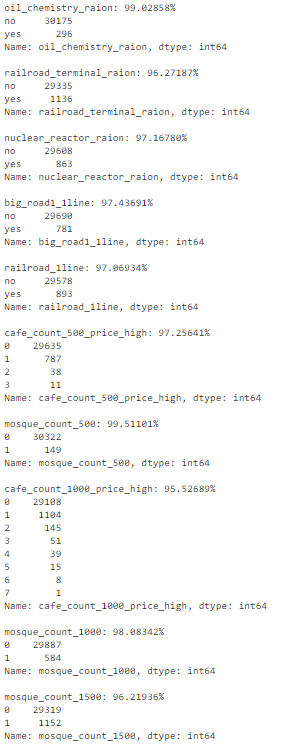
num_rows = len(df.index)
low_information_cols = [] #


for col in df.columns:
    cnts = df[col].value_counts(dropna=False)
    top_pct = (cnts/num_rows).iloc[0]


    if top_pct > 0.95:
        low_information_cols.append(col)
        print('{0}: {1:.5f}%'.format(col, top_pct*100))
        print(cnts)
        print()
我们可以逐一查看这些变量,确认它们是否提供有用信息。(此处不再详述。)
# we know that column 'id' is unique, but what if we drop it?
df_dedupped = df.drop('id', axis=1).drop_duplicates()


# there were duplicate rows
print(df.shape)
print(df_dedupped.shape)
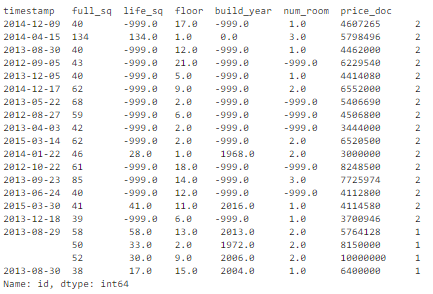
我们发现,有 10 行是完全复制的观察值。  如何处理基于所有特征的复制数据? 删除这些复制数据。 复制数据类型 2:基于关键特征 如何找出基于关键特征的复制数据? 有时候,最好的方法是删除基于一组唯一标识符的复制数据。 例如,相同使用面积、相同价格、相同建造年限的两次房产交易同时发生的概率接近零。 我们可以设置一组关键特征作为唯一标识符,比如 timestamp、full_sq、life_sq、floor、build_year、num_room、price_doc。然后基于这些特征检查是否存在复制数据。
key = ['timestamp', 'full_sq', 'life_sq', 'floor', 'build_year', 'num_room', 'price_doc']


df.fillna(-999).groupby(key)['id'].count().sort_values(ascending=False).head(20)
基于这组关键特征,我们找到了 16 条复制数据。
# drop duplicates based on an subset of variables.


key = ['timestamp', 'full_sq', 'life_sq', 'floor', 'build_year', 'num_room', 'price_doc']
df_dedupped2 = df.drop_duplicates(subset=key)


print(df.shape)
print(df_dedupped2.shape)
删除 16 条复制数据,得到新数据集 df_dedupped2。
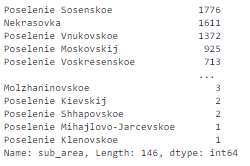
 不一致数据 在拟合模型时,数据集遵循特定标准也是很重要的一点。我们需要使用不同方式来探索数据,找出不一致数据。大部分情况下,这取决于观察和经验。不存在运行和修复不一致数据的既定代码。 下文介绍了四种不一致数据类型。 不一致数据类型 1:大写 在类别值中混用大小写是一种常见的错误。这可能带来一些问题,因为 Python 分析对大小写很敏感。 如何找出大小写不一致的数据? 我们来看特征 sub_area。
df['sub_area'].value_counts(dropna=False)它存储了不同地区的名称,看起来非常标准化。
# make everything lower case.
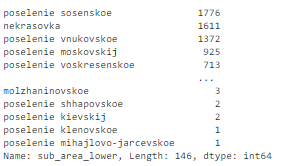
df['sub_area_lower'] = df['sub_area'].str.lower()
df['sub_area_lower'].value_counts(dropna=False)
df

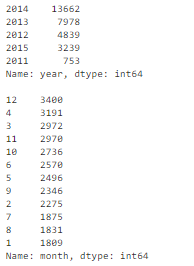
df['timestamp_dt'] = pd.to_datetime(df['timestamp'], format='%Y-%m-%d')
df['year'] = df['timestamp_dt'].dt.year
df['month'] = df['timestamp_dt'].dt.month
df['weekday'] = df['timestamp_dt'].dt.weekday


print(df['year'].value_counts(dropna=False))
print()
print(df['month'].value_counts(dropna=False))
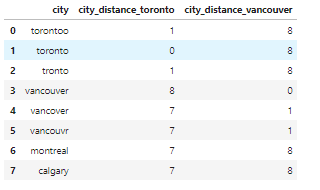
 相关文章:https://towardsdatascience.com/how-to-manipulate-date-and-time-in-python-like-a-boss-ddea677c6a4d 不一致数据类型 3:类别值 分类特征的值数量有限。有时由于拼写错误等原因可能出现其他值。 如何找出类别值不一致的数据? 我们需要观察特征来找出类别值不一致的情况。举例来说: 由于本文使用的房地产数据集不存在这类问题,因此我们创建了一个新的数据集。例如,city 的值被错误输入为「torontoo」和「tronto」,其实二者均表示「toronto」(正确值)。 识别它们的一种简单方式是模糊逻辑(或编辑距离)。该方法可以衡量使一个值匹配另一个值需要更改的字母数量(距离)。 已知这些类别应仅有四个值:「toronto」、「vancouver」、「montreal」和「calgary」。计算所有值与单词「toronto」(和「vancouver」)之间的距离,我们可以看到疑似拼写错误的值与正确值之间的距离较小,因为它们只有几个字母不同。
from nltk.metrics import edit_distance

df_city_ex = pd.DataFrame(data={'city': ['torontoo', 'toronto', 'tronto', 'vancouver', 'vancover', 'vancouvr', 'montreal', 'calgary']})

df_city_ex['city_distance_toronto'] = df_city_ex['city'].map(lambda x: edit_distance(x, 'toronto'))
df_city_ex['city_distance_vancouver'] = df_city_ex['city'].map(lambda x: edit_distance(x, 'vancouver'))
df_city_ex
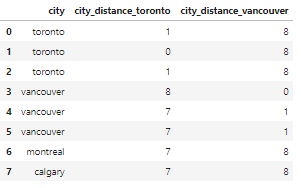
msk = df_city_ex['city_distance_toronto'] <= 2
df_city_ex.loc[msk, 'city'] = 'toronto'

msk = df_city_ex['city_distance_vancouver'] <= 2
df_city_ex.loc[msk, 'city'] = 'vancouver'


df_city_ex
# no address column in the housing dataset. So create one to show the code.
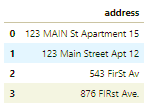
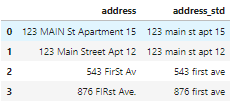
df_add_ex = pd.DataFrame(['123 MAIN St Apartment 15', '123 Main Street Apt 12   ', '543 FirSt Av', '  876 FIRst Ave.'], columns=['address'])
df_add_ex
我们可以看到,地址特征非常混乱。
 如何处理地址不一致的数据? 运行以下代码将所有字母转为小写,删除空格,删除句号,并将措辞标准化。
df_add_ex['address_std'] = df_add_ex['address'].str.lower()
df_add_ex['address_std'] = df_add_ex['address_std'].str.strip() # remove leading and trailing whitespace.
df_add_ex['address_std'] = df_add_ex['address_std'].str.replace('\.', '') # remove period.
df_add_ex['address_std'] = df_add_ex['address_std'].str.replace('\bstreet\b', 'st') # replace street with st.
df_add_ex['address_std'] = df_add_ex['address_std'].str.replace('\bapartment\b', 'apt') # replace apartment with apt.
df_add_ex['address_std'] = df_add_ex['address_std'].str.replace('\bav\b', 'ave') # replace apartment with apt.


df_add_ex
现在看起来好多了:
编辑:黄飞










 工商网监
工商网监
评论