 电子发烧友App






busybox版本:1.35.0
ash程序入口分析
ash程序是linux内核启动后期进入busybox后,在busybox中启动的默认shell,用于响应和执行命令输入。ash的操作入口由ash_main()函数代表,定义在/shell/ash.c文件中。
贴上ash_main函数的完整代码(出自/shell/ash.c):
int ash_main(int argc, char **argv) MAIN_EXTERNALLY_VISIBLE;
#if NUM_SCRIPTS > 0
int ash_main(int argc, char **argv)
#else
int ash_main(int argc UNUSED_PARAM, char **argv)
#endif
/* note: 'argc' is used only if embedded scripts are enabled */
{
 volatile smallint state;
 struct jmploc jmploc;
 struct stackmark smark;
 int login_sh;

 /* Initialize global data */
 INIT_G_misc();
 INIT_G_memstack();
 INIT_G_var();
#if ENABLE_ASH_ALIAS
 INIT_G_alias();
#endif
 INIT_G_cmdtable();

#if PROFILE
 monitor(4, etext, profile_buf, sizeof(profile_buf), 50);
#endif

 state = 0;
 if (setjmp(jmploc.loc)) {
  smallint e;
  smallint s;

  exitreset();

  e = exception_type;
  s = state;
  if (e == EXEND || e == EXEXIT || s == 0 || iflag == 0 || shlvl) {
   exitshell();
  }

  reset();

  if (e == EXINT) {
   newline_and_flush(stderr);
  }

  popstackmark(&smark);
  FORCE_INT_ON; /* enable interrupts */
  if (s == 1)
   goto state1;
  if (s == 2)
   goto state2;
  if (s == 3)
   goto state3;
  goto state4;
 }
 exception_handler = &jmploc;
 rootpid = getpid();

 init();
 setstackmark(&smark);

#if NUM_SCRIPTS > 0
 if (argc < 0)
  /* Non-NULL minusc tells procargs that an embedded script is being run */
  minusc = get_script_content(-argc - 1);
#endif
 login_sh = procargs(argv);
#if DEBUG
 TRACE(("Shell args: "));
 trace_puts_args(argv);
#endif

 if (login_sh) {
  const char *hp;

  state = 1;
  read_profile("/etc/profile");
 state1:
  state = 2;
  hp = lookupvar("HOME");
  if (hp)
   read_profile("$HOME/.profile");
 }
 state2:
 state = 3;
 if (iflag
#ifndef linux
  && getuid() == geteuid() && getgid() == getegid()
#endif
 ) {
  const char *shinit = lookupvar("ENV");
  if (shinit != NULL && *shinit != '')
   read_profile(shinit);
 }
 popstackmark(&smark);
 state3:
 state = 4;
 if (minusc) {
  /* evalstring pushes parsefile stack.
   * Ensure we don't falsely claim that 0 (stdin)
   * is one of stacked source fds.
   * Testcase: ash -c 'exec 1>&0' must not complain. */

  // if (!sflag) g_parsefile->pf_fd = -1;
  // ^^ not necessary since now we special-case fd 0
  // in save_fd_on_redirect()

  lineno = 0; // bash compat
  // dash: evalstring(minusc, sflag ? 0 : EV_EXIT);
  // The above makes
  //  ash -sc 'echo $-'
  // continue reading input from stdin after running 'echo'.
  // bash does not do this: it prints "hBcs" and exits.
  evalstring(minusc, EV_EXIT);
 }

 if (sflag || minusc == NULL) {
#if MAX_HISTORY > 0 && ENABLE_FEATURE_EDITING_SAVEHISTORY
  if (line_input_state) {
   const char *hp = lookupvar("HISTFILE");
   if (!hp) {
    hp = lookupvar("HOME");
    if (hp) {
     INT_OFF;
     hp = concat_path_file(hp, ".ash_history");
     setvar0("HISTFILE", hp);
     free((char*)hp);
     INT_ON;
     hp = lookupvar("HISTFILE");
    }
   }
   if (hp)
    line_input_state->hist_file = xstrdup(hp);
# if ENABLE_FEATURE_SH_HISTFILESIZE
   hp = lookupvar("HISTFILESIZE");
   line_input_state->max_history = size_from_HISTFILESIZE(hp);
# endif
  }
#endif
 state4: /* XXX ??? - why isn't this before the "if" statement */
  cmdloop(1);
 }
#if PROFILE
 monitor(0);
#endif
#ifdef GPROF
 {
  extern void _mcleanup(void);
  _mcleanup();
 }
#endif
 TRACE(("End of main reached
"));
 exitshell();
 /* NOTREACHED */
}
下文将分段描述该函数。
首先是调用几个INIT_G_XXX命名的宏定义:
 INIT_G_misc();
 INIT_G_memstack();
 INIT_G_var();
#if ENABLE_ASH_ALIAS
 INIT_G_alias();
#endif
 INIT_G_cmdtable();
用于初始化全局变量。
然后将state变量值设置为0:
state = 0;
接着是调用一个C语言标准库中的setjmp()函数实现异常处理机制:
 if (setjmp(jmploc.loc)) {
  smallint e;
  smallint s;

  exitreset();

  e = exception_type;
  s = state;
  if (e == EXEND || e == EXEXIT || s == 0 || iflag == 0 || shlvl) {
   exitshell();
  }

  reset();

  if (e == EXINT) {
   newline_and_flush(stderr);
  }

  popstackmark(&smark);
  FORCE_INT_ON; /* enable interrupts */

  printf("s : %d
",s);
  if (s == 1)
   goto state1;
  if (s == 2)
   goto state2;
  if (s == 3)
   goto state3;
  goto state4;
 }
 exception_handler = &jmploc;
在接下来的代码中,会调用procargs(argv)处理命令行参数;调用read_profile("/etc/profile")读取配置文件,这个文件正是在busybox中需要我们自己添加的用于配置shell的描述文件。
在最后,则会调用cmdloop(1)函数用于执行命令行循环操作。该函数用于读取执行命令。
ash_main总结
ash_main()函数用于初始化和解析参数,读取/etc/profile配置文件,然后调用cmdloop()来执行命令。setjmp()函数是一个C语言库函数,用于设置当事件发生时跳转到的位置。在异常发生时,变量"state"可用于计算跳转的位置。
login进程
在busybox运行后,在命令行下输入login命令则可以运行login程序,默认busybox配置下,在启动busybox后,会执行ash程序而不是login程序。在实际应用需求中,我们可以将login设置为busybox启动后的运行程序。方法如下:
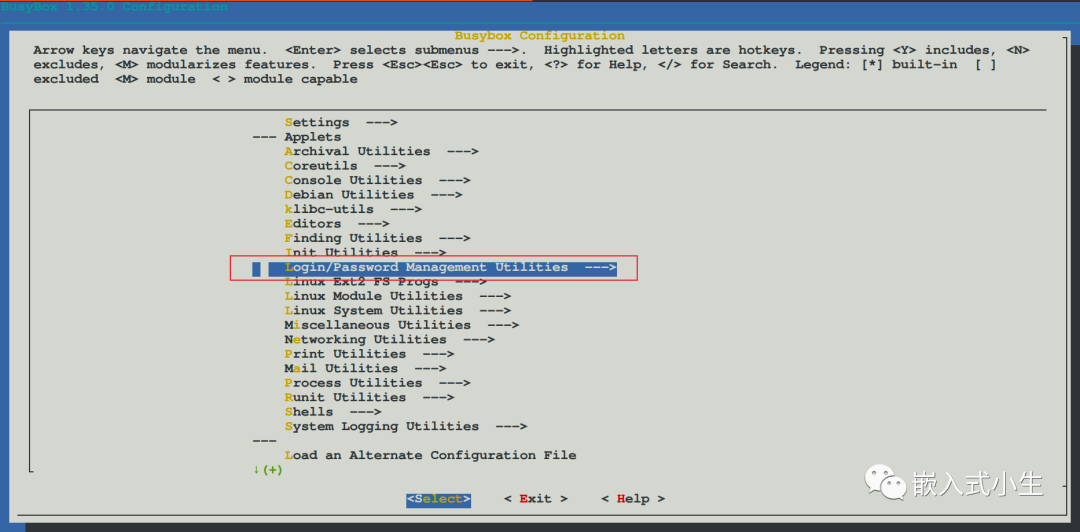
(1)使用make menuconfig编译构建出busybox的图形配置界面,选择下列选项:
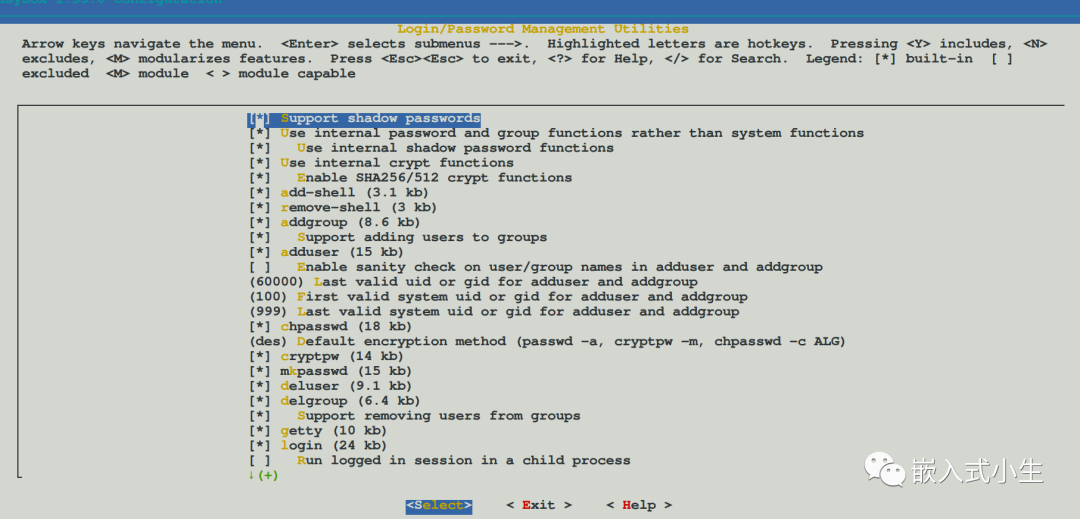
(2)进入Login/Password Management Utilities选项,将该配置下的所有项目都配置上:
(3)使用make -j12编译构建busybox。
(4)安装busybox
通过以上步骤,这时候的busybox是支持login程序的,接下来,在/etc/inittab文件中设置启动项:
:-/bin/login
或者
:/sbin/getty 115200 console
注:上述配置任选一种
配置/etc/group,/etc/passwd,/etc/shadow三个文件(如果在busybox中没有,则需要自己创建)
在/etc/group文件中,添加如下配置:
root0:root
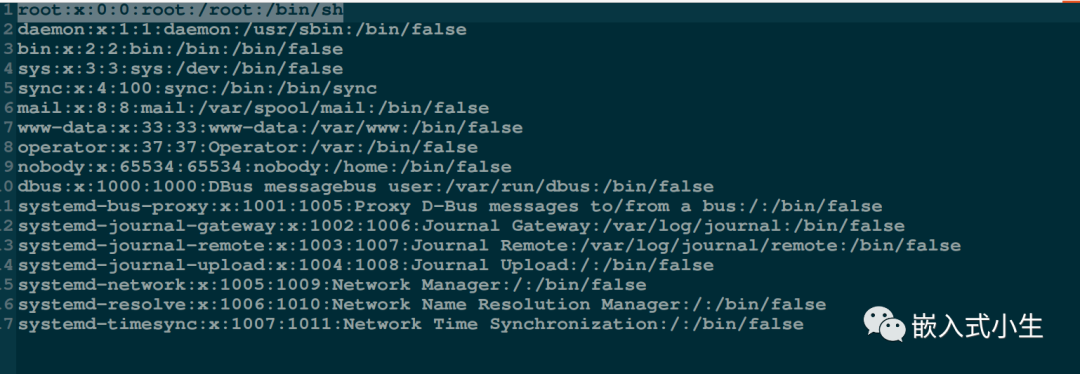
在/etc/passwd文件中添加root用户的密钥信息:
root0root:/root:/bin/sh
小生这里/etc/passed文件中内容如下:
在/etc/shadow文件中配置用户(这里是root用户)密码:
root199999::
DH9Ade75qXIdI表示设置的密码
该串密文可使用mkpasswd命令生成,在命令行终端输入mkpasswd后会提示输入密码,这时候输入我们想要设置的明文密码,完成后按下回车键即可生成crypt格式的字符串:

上述操作就将login登录的密码设置为iriczhao,用户名为root。
至此,通过上述步骤,就完成了login的配置,运行busybox后,即可进入login程序,如下图所示:
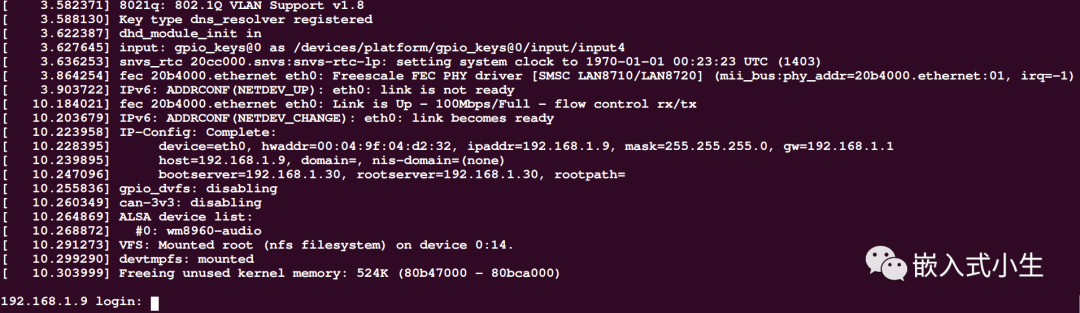
键入root和密码(本文是iriczhao)后,即可进入shell。
login程序入口分析
根据busybox的工具特征,知道login程序对应的入口则是login_main(),本小节将分析该函数:
当在busybox中运行login程序后,会提示输入登录名,然后会提示输入密码,按下Enter键后,将会去验证登录密码是否正确,这一系列的操作是由login_main函数中的while(1){}结构完成的,代码如下(出自/loginutils/login.c):
while (1) {
  /* flush away any type-ahead (as getty does) */
  tcflush(0, TCIFLUSH);

  if (!username[0])
   get_username_or_die(username, sizeof(username));

#if ENABLE_PAM
  pamret = pam_start("login", username, &conv, &pamh);
  if (pamret != PAM_SUCCESS) {
   failed_msg = "start";
   goto pam_auth_failed;
  }
  /* set TTY (so things like securetty work) */
  pamret = pam_set_item(pamh, PAM_TTY, short_tty);
  if (pamret != PAM_SUCCESS) {
   failed_msg = "set_item(TTY)";
   goto pam_auth_failed;
  }
  /* set RHOST */
  if (opt_host) {
   pamret = pam_set_item(pamh, PAM_RHOST, opt_host);
   if (pamret != PAM_SUCCESS) {
    failed_msg = "set_item(RHOST)";
    goto pam_auth_failed;
   }
  }
  if (!(opt & LOGIN_OPT_f)) {
   pamret = pam_authenticate(pamh, 0);
   if (pamret != PAM_SUCCESS) {
    failed_msg = "authenticate";
    goto pam_auth_failed;
    /* TODO: or just "goto auth_failed"
     * since user seems to enter wrong password
     * (in this case pamret == 7)
     */
   }
  }
  /* check that the account is healthy */
  pamret = pam_acct_mgmt(pamh, 0);
  if (pamret == PAM_NEW_AUTHTOK_REQD) {
   pamret = pam_chauthtok(pamh, PAM_CHANGE_EXPIRED_AUTHTOK);
  }
  if (pamret != PAM_SUCCESS) {
   failed_msg = "acct_mgmt";
   goto pam_auth_failed;
  }
  /* read user back */
  pamuser = NULL;
  /* gcc: "dereferencing type-punned pointer breaks aliasing rules..."
   * thus we cast to (void*) */
  if (pam_get_item(pamh, PAM_USER, (void*)&pamuser) != PAM_SUCCESS) {
   failed_msg = "get_item(USER)";
   goto pam_auth_failed;
  }
  if (!pamuser || !pamuser[0])
   goto auth_failed;
  safe_strncpy(username, pamuser, sizeof(username));
  /* Don't use "pw = getpwnam(username);",
   * PAM is said to be capable of destroying static storage
   * used by getpwnam(). We are using safe(r) function */
  pw = NULL;
  getpwnam_r(username, &pwdstruct, pwdbuf, sizeof(pwdbuf), &pw);
  if (!pw)
   goto auth_failed;
  pamret = pam_open_session(pamh, 0);
  if (pamret != PAM_SUCCESS) {
   failed_msg = "open_session";
   goto pam_auth_failed;
  }
  pamret = pam_setcred(pamh, PAM_ESTABLISH_CRED);
  if (pamret != PAM_SUCCESS) {
   failed_msg = "setcred";
   goto pam_auth_failed;
  }
  break; /* success, continue login process */

 pam_auth_failed:
  /* syslog, because we don't want potential attacker
   * to know _why_ login failed */
  syslog(LOG_WARNING, "pam_%s call failed: %s (%d)", failed_msg,
     pam_strerror(pamh, pamret), pamret);
  login_pam_end(pamh);
  safe_strncpy(username, "UNKNOWN", sizeof(username));
#else /* not PAM */
  pw = getpwnam(username);
  if (!pw) {
   strcpy(username, "UNKNOWN");
   goto fake_it;
  }

  if (pw->pw_passwd[0] == '!' || pw->pw_passwd[0] == '*')
   goto auth_failed;

  if (opt & LOGIN_OPT_f)
   break; /* -f USER: success without asking passwd */

  if (pw->pw_uid == 0 && !is_tty_secure(short_tty))
   goto auth_failed;

  /* Don't check the password if password entry is empty (!) */
  if (!pw->pw_passwd[0])
   break;
 fake_it:
  /* Password reading and authorization takes place here.
   * Note that reads (in no-echo mode) trash tty attributes.
   * If we get interrupted by SIGALRM, we need to restore attrs.
   */
  if (ask_and_check_password(pw) > 0)
   break;
#endif /* ENABLE_PAM */
 auth_failed:
  opt &= ~LOGIN_OPT_f;
  pause_after_failed_login();
  /* TODO: doesn't sound like correct English phrase to me */
  puts("Login incorrect");
  syslog(LOG_WARNING, "invalid password for '%s'%s",
     username, fromhost);
  if (++count == 3) {
   if (ENABLE_FEATURE_CLEAN_UP)
    free(fromhost);
   return EXIT_FAILURE;
  }
  username[0] = '';
 } /* while (1) */
在login_main函数中所操作的一个重要数据结构是pw,pw是一个指向struct passwd的结构指针,结构定义如下:
#include#include struct passwd { char *pw_name; /* 用户登录名 */ char *pw_passwd; /* 密码(加密后) */ __uid_t pw_uid; /* 用户ID */ __gid_t pw_gid; /* 组ID */ char *pw_gecos; /* 详细用户名 */ char *pw_dir; /* 用户目录 */ char *pw_shell; /* Shell程序名 */ };
在login_main()函数中使用:
pw = getpwnam(username);
可根据用户名获取用户口令信息pw。
如果密码验证成功,将会在while(1)中使用break跳出循环,继续执行后续代码;如果密码验证失败,则会跳转到auth_failed标签处,返回EXIT_FAILURE。
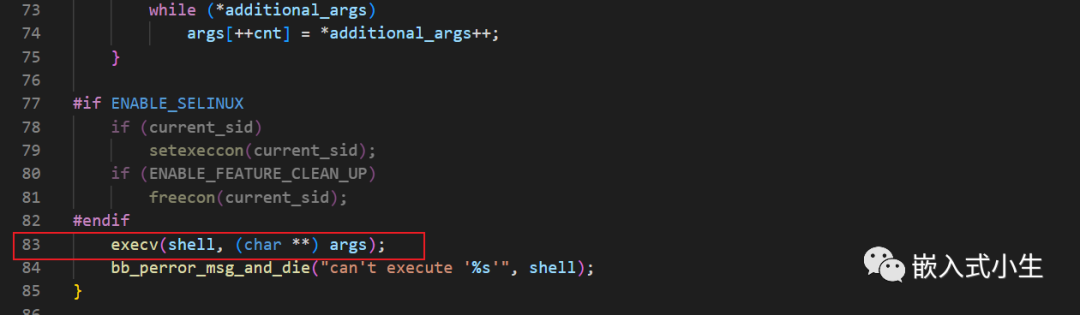
在login_main函数的最后,会调用exec_login_shell(pw->pw_shell);登录shell。本质上则是execv()系统调用:
login_main总结
在命令行输入login命令后,则会执行login程序;我们也可以将login程序设置为busybox启动后执行的程序,实现带用户名和密码的登录方式。在buildroot构建工具中则自动实现了login机制(基于busybox方式),只需要在图形配置界面中开启并配置密码即可。
审核编辑:汤梓红








 工商网监
工商网监
评论