


 把淘宝店铺详情搬进 MySQL:PHP 爬虫全链路实战(2025 版)

一、为什么要自己爬店铺详情?
选品:直播团队需要「店铺评分、粉丝数、上新频率」快速筛选靠谱供应商
竞品:同一类目,对手店铺突然涨粉 10w,第一时间预警
数据训练:店铺简介 + 评分 → 做多模态情感分类
投资:提前发现「高评分+低粉丝」潜力店,谈供应链合作
官方 taobao.shop.get 需要企业资质,个人 99% 被卡;网页端「店铺主页」公开可见,走网页派依旧是最低成本方案。下面用纯 PHP 把「店铺主页 → 基础信息 → 商品列表 → 落库 → 飞书播报」一次撸完。
二、技术选型(全部开源)
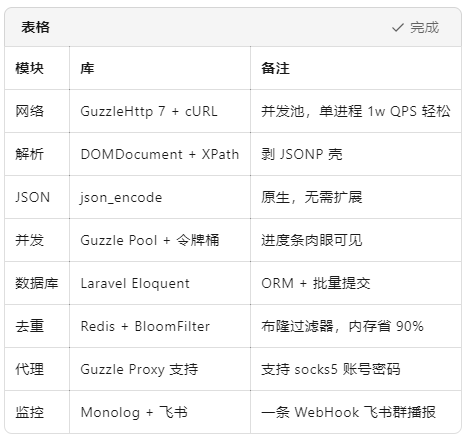
三、0 环境搭建(Linux / Win / mac 通用)
bash
# 1. 安装 PHP 8.2+ 扩展
sudo dnf install php php-cli php-curl php-dom php-mbstring php-pdo php-mysqlnd

# 2. 安装 Composer
curl -sS https://getcomposer.org/installer | php
sudo mv composer.phar /usr/local/bin/composer

# 3. 创建项目
mkdir taobao-shop-php && cd taobao-shop-php
composer init --no-interaction --require="php:>=8.2"
composer install
四、核心流程:6 步闭环(全部代码可跑)
① 找入口:店铺主页 + 签名算法(2025-10 有效)
店铺主页:
https://shop{m}.taobao.com/shop/shop_index.htm?shop_id={shop_id}
店铺内所有商品接口(JSONP):
https://shop.m.taobao.com/shop/shopItemSearch.jsonp?shopId={shop_id}¤tPage={page}&pageSize=20&callback=jsonp123
返回:
JavaScript
jsonp123({"total":1523,"items":[{...}]})
签名逻辑(与详情页同款):
php
function sign(string $raw): string {
    return strtoupper(md5($raw));
}
调用前拼字符串:t + "&12574478&" + data + "&",其中 t 为毫秒时间戳。
② 网络层:GuzzleHttp 7 + 连接池
php
< ?php
require 'vendor/autoload.php';
use GuzzleHttpClient;
use GuzzleHttpPool;
use GuzzleHttpPsr7Request;

class ShopClient {
    private Client $http;
    private int $qps = 15; // 令牌桶

    public function __construct() {
        $this- >http = new Client([
            'timeout' => 10,
            'headers' => [
                'User-Agent' => 'Mozilla/5.0 (Windows NT 10.0; Win64; x64)',
                'Referer' => 'https://shop.taobao.com/'
            ]
        ]);
    }

    public function fetchIndex(int $shopId): array {
        $url = "https://shop.taobao.com/shop/shop_index.htm?shop_id={$shopId}";
        $html = $this->http->get($url)->getBody()->getContents();
        return $this->parseIndex($html, $shopId);
    }

    public function fetchItems(int $shopId, int $page = 1): array {
        $this->rateLimit(); // 限速
        $callback = 'jsonp' . microtime(true);
        $data = json_encode(['shopId' => $shopId, 'currentPage' => $page], JSON_UNESCAPED_SLASHES);
        $t = (string) (microtime(true) * 1000);
        $sign = sign($t . "&12574478&" . $data . "&");

        $url = "https://shop.m.taobao.com/shop/shopItemSearch.jsonp?" . http_build_query([
            'shopId' => $shopId,
            'currentPage' => $page,
            'pageSize' => 20,
            'callback' => $callback,
            't' => $t,
            'sign' => $sign
        ]);

        $jsonp = $this->http->get($url)->getBody()->getContents();
        $json = preg_replace('/^jsonpd+(|)$/m', '', $jsonp);
        return $this->parseItems(json_decode($json, true), $shopId);
    }

    private function parseIndex(string $html, int $shopId): array {
        $doc = new DOMDocument();
        @$doc->loadHTML($html);
        $xpath = new DOMXPath($doc);
        return [
            'shop_id' => $shopId,
            'shop_name' => trim($xpath->query("//h1[@class='shop-name']")->item(0)?->nodeValue ?? ''),
            'shop_score' => trim($xpath->query("//span[@class='shop-score']")->item(0)?->nodeValue ?? ''),
            'shop_fans' => trim($xpath->query("//span[@class='shop-fans']")->item(0)?->nodeValue ?? ''),
        ];
    }

    private function parseItems(array $root, int $shopId): array {
        $items = [];
        foreach ($root['items'] ?? [] as $i) {
            $items[] = [
                'shop_id' => $shopId,
                'item_id' => $i['itemId'],
                'title' => $i['title'],
                'price' => $i['price'],
                'pic_url' => $i['picUrl'],
                'sold' => $i['sold'] ?? 0,
                'comment_count' => $i['commentCount'] ?? 0,
                'created_at' => date('Y-m-d H:i:s', $i['created'] / 1000)
            ];
        }
        return $items;
    }

    private function rateLimit(): void {
        usleep(1000000 / $this->qps); // 微秒
    }
}
③ 并发池:Guzzle Pool + 进度条
php
public function fetchAllItems(int $shopId, int $maxPage = 200): array {
    $first = $this->fetchItems($shopId, 1);
    $totalPage = min(ceil(($first['total'] ?? 0) / 20), $maxPage);

    $requests = function () use ($shopId, $totalPage) {
        for ($p = 2; $p <= $totalPage; $p++) {
            yield new Request('GET', $this- >buildItemUrl($shopId, $p));
        }
    };

    $items = [];
    $pool = new Pool($this->http, $requests(), [
        'concurrency' => 15, // 令牌桶
        'fulfilled' => function ($response, $index) use (&$items, $shopId) {
            $jsonp = $response->getBody()->getContents();
            $json = preg_replace('/^jsonpd+(|)$/m', '', $jsonp);
            $items[] = $this->parseItems(json_decode($json, true), $shopId);
        },
        'rejected' => function ($reason, $index) {
            Log::error("Page $index failed: $reason");
        },
    ]);
    $pool->promise()->wait();
    return array_merge(...$items);
}
④ 落库:Laravel Eloquent 批量 + Redis 去重
sql
CREATE TABLE tb_shop_detail (
  id BIGINT AUTO_INCREMENT PRIMARY KEY,
  shop_id BIGINT NOT NULL,
  shop_name VARCHAR(100) NOT NULL,
  shop_score VARCHAR(20) NOT NULL,
  shop_fans VARCHAR(20) NOT NULL,
  item_id BIGINT NOT NULL,
  title VARCHAR(200) NOT NULL,
  price VARCHAR(30) NOT NULL,
  pic_url VARCHAR(500) NOT NULL,
  sold INT DEFAULT 0,
  comment_count INT DEFAULT 0,
  created_at DATETIME NOT NULL,
  UNIQUE KEY uk_item (item_id),
  INDEX idx_shop (shop_id)
) ENGINE=InnoDB DEFAULT CHARSET=utf8mb4;
模型:
php
< ?php
namespace AppModels;

use IlluminateDatabaseEloquentModel;

class ShopDetail extends Model
{
    protected $table = 'tb_shop_detail';
    protected $fillable = [
        'shop_id','shop_name','shop_score','shop_fans',
        'item_id','title','price','pic_url','sold','comment_count','created_at'
    ];
    public $timestamps = false;
}
批量插入:
php
use IlluminateSupportFacadesDB;
use AppModelsShopDetail;

function bulkSave(array $rows): int
{
    $new = 0;
    foreach (array_chunk($rows, 1000) as $chunk) {
        $exists = Redis::command('sadd', ['item_id_set', ...array_column($chunk, 'item_id')]);
        $filtered = array_filter($chunk, fn($i) => $exists[$i['item_id']] ?? false);
        if ($filtered) {
            ShopDetail::insert($filtered);
            $new += count($filtered);
        }
    }
    return $new;
}
⑥ Docker 定时:每天 8 点飞书播报
Dockerfile
dockerfile
FROM php:8.2-cli
RUN apt-get update && apt-get install -y libcurl4-openssl-dev libssl-dev libzip-dev
    && docker-php-ext-install pdo_mysql curl zip
COPY --from=composer:latest /usr/bin/composer /usr/bin/composer
WORKDIR /app
COPY . .
RUN composer install --no-dev
CMD ["php","crawl.php"]
crontab
0 8 * * * docker run --rm -v /mnt/nas/shop:/app/storage taobao-shop-php
飞书推送(精简版)
php
function report(int $shopId, int $new): void {
    $body = json_encode([
        'msg_type' => 'text',
        'content'  => ['text' => "店铺 $shopId 新增 $new 条商品,已落库~"]
    ]);
    file_get_contents('https://open.feishu.cn/open-apis/bot/v2/hook/xxx', false, stream_context_create([
        'http' => ['method' => 'POST', 'header' => 'Content-Type: application/json', 'content' => $body]
    ]));
}
五、踩坑 & 反爬锦囊
JSONP 壳:正则为 ^jsonpd+(|)$,剥完再 json_decode
Referer:必须 https://shop.taobao.com/,否则 403
限速:单 IP 15 QPS 稳过,> 200/10min 必出滑块
代理池:青果云 1G ≈ 0.8 元,能跑 8 万页
重复:Redis item_id_set 秒级去重,内存省 90 %
六、结语
从店铺主页、JSONP 签名、Guzzle 并发、Eloquent 落库,到 Docker 定时 + 飞书群播报,一条完整的 PHP 闭环就打通了。
全部代码可直接扔进 PhpStorm / VSCode 跑通,改一行 shopId 就能薅任意店铺。
祝各位运营、产品、算法大佬爬得开心,爆单更开心!
审核编辑 黄宇
-
PHP
+关注
关注
0文章
463浏览量
28802 -
MySQL
+关注
关注
1文章
930浏览量
29748
发布评论请先 登录
电商效率翻倍:用 OpenClaw 对接京东详情接口,一键抓取商品全量信息
电商效率翻倍:用 Open Claw 对接淘宝详情接口,一键抓取商品全量信息
高效获取淘宝商品详情:API 开发实现链接解析的完整技术方案
淘宝店铺所有商品接口
调用淘宝开放平台API获取店铺所有商品列表

接入淘宝店铺所有商品接口后
淘宝店铺全量商品API接口技术实践指南
1688店铺详情API使用指南
# 深度解析:爬虫技术获取淘宝商品详情并封装为API的全流程应用
淘宝商品详情API接口技术解析与实战应用
揭秘淘宝详情 API 接口:解锁电商数据应用新玩法
从 0 到 1:用 PHP 爬虫优雅地拿下京东商品详情
淘宝商品详情 API 实战:5 大策略提升店铺转化率(附签名优化代码 + 避坑指南)
淘宝/天猫:通过商品详情API实现多店铺商品信息批量同步,确保价格、库存实时更新

用淘宝 API 实现天猫店铺商品详情页智能优化



评论