


 基于 IAR Embedded Workbench 的自研 MCU 芯片软件函数与变量内存布局优化精控方法

在嵌入式软件开发领域,MCU芯片软件的架构设计与内存布局的精细规划对系统性能和稳定性起着关键作用。本文档聚焦于IAR Embedded Workbench环境下,为自研MCU芯片软件提供了一套详尽的函数和变量指定section放置方法与操作流程,兼具过程记录与详细说明,旨在打造一份实用的参考指南,助力开发者精准掌控程序的内存分布与执行逻辑。文档涵盖从默认section表的介绍,到多种放置手段的阐释,以及实际配置示例的展示,为后续的开发工作奠定坚实基础。
IAR Embedded Workbench作为一款广受认可的嵌入式开发工具,具备丰富的功能与灵活的配置选项。在该环境下,软件开发者可巧妙运用多种方法,将函数和变量精准放置于指定的section中。这一操作对于优化程序的内存使用效率、提升系统响应速度以及增强代码的可维护性具有重要意义。例如,通过将特定的代码或数据放置在合适的内存区域,可以充分利用MCU芯片的硬件特性,实现更高效的缓存利用、减少内存访问延迟等效果。
文档深入浅出地讲解了多种放置方式,包括使用@操作符、#pragma location命令、GCC风格的attribute属性以及#pragma default_variable_attributes和#pragma default_function_attributes命令等,开发者可根据实际需求灵活选择。同时,还提供了诸如as32x601_rom.icf、Port_MemMap.h和Port.c等实际配置示例,涵盖了从内存区域定义、section分配到函数与变量属性设置的完整流程,为开发者提供了直观且易于实践的参考。
默认section表
IAR Embedded Workbench中有很多默认的section用于放置对应的变量和函数:
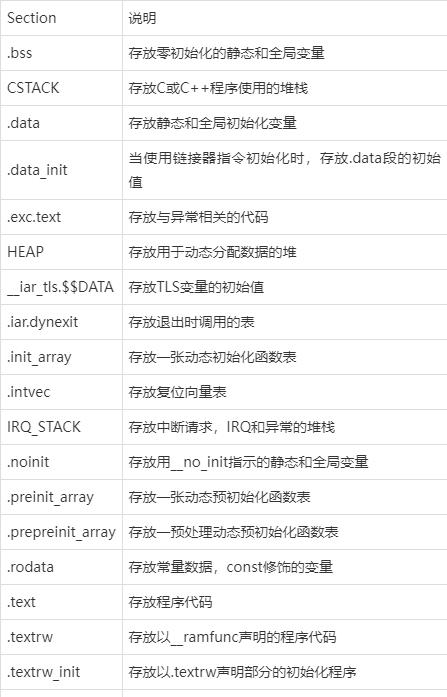
除了用于您的应用程序的ELF部分之外,这些工具还出于多种目的使用许多其他ELF段:
- 以.debug开头的段通常包含DWARF格式的调试信息。
- 以.iar.debug开头的段包含IAR格式的补充调试信息
- 以.comment开头的段包含用于构建文件的工具和命令行
- 以.rel或.rela开头的段包含ELF重定位信息
- 以.symtab开头的段包含文件的符号表
- 以.strtab开头的段包含符号表中符号的名称
- 以.shstrtab开头的段包含各段的名称。
将变量放到指定的section
使用@操作符
可以使用 @ 将变量放到指定的section:
staticuint32_t TaskCounter @".mcal_const_cfg" = 1;
使用 #pragma location 命令
可以使用 #pragma location命令将变量放到指定的section:
#pragma location = ".mcal_const_cfg"staticuint32_t TaskCounter = 1;
使用 GCC 风格的属性 attribute ((section ))
可以使用 GCC 风格的属性 attribute ((section ))将变量放到指定的section:
staticuint32_t TaskCounter attribute ((section (".mcal_const_cfg"))) = 1;
使用 #pragma default_variable_attributes 命令
上面的方法可以将单个变量放到指定的section,如果需要将多个变量放到指定的section,上面的方法会显得有点繁琐。可以使用 #pragma default_variable_attributes 命令将多个变量放到指定的section:
#pragma default_variable_attributes = @ ".mcal_const_cfg"staticuint32_t TaskCounter = 1; staticuint32_t TaskLedRedCounter = 2; #pragma default_variable_attributes =
将函数放到指定的section
使用@操作符
可以使用 @ 将函数放到指定的section:
voidStartTaskLedRed(void *argument) @ ".mcal_text";
使用 #pragma location 命令
可以使用 #pragma location命令将函数放到指定的section:
#pragma location = ".mcal_text"voidStartTaskLedRed(void *argument);
使用 GCC 风格的属性 attribute ((section ))
可以使用 GCC 风格的属性 attribute ((section ))将函数放到指定的section:
voidStartTaskLedRed(void *argument) attribute ((section (".mcal_text")));
使用 #pragma default_variable_attributes 命令
上面的方法可以将单个函数放到指定的section,如果需要将多个函数放到指定的section,上面的方法会显得有点繁琐。可以使用 #pragma default_function_attributes命令将多个函数放到指定的section:
#pragma default_function_attributes = @ ".mcal_text"voidStartTaskLedRed(void *argument); voidStartTaskLedGreen(void *argument); voidStartTaskLedBlue(void *argument); #pragma default_function_attributes =
使用示例
as32x601_rom.icf
/****************************************************************************** * FILE VERSION / define exported symbol _link_file_version_2 = 1; / * SPECIALS // * * MEMORY REGIONS / define symbol ICFEDIT_region_FLASH_start = 0x10000000; define symbol ICFEDIT_region_FLASH_end = 0x11FFFFFF; define symbol ICFEDIT_region_SRAM0_start = 0x20000000; define symbol ICFEDIT_region_SRAM0_end = 0x2001FFFF; define symbol ICFEDIT_region_SRAM1_start = 0x20020000; define symbol ICFEDIT_region_SRAM1_end = 0x2003FFFF; define symbol ICFEDIT_region_SRAM2_start = 0x20040000; define symbol ICFEDIT_region_SRAM2_end = 0x2005FFFF; define symbol ICFEDIT_region_SRAM3_start = 0x20060000; define symbol ICFEDIT_region_SRAM3_end = 0x2007FFFF; / * * SIZES / define symbol ICFEDIT_size_cstack = 0x2000; define symbol ICFEDIT_size_proc_stack = 0x0; define symbol ICFEDIT_size_heap = 0x2000; / * * BUILD FOR ROM *****************************************************************************/ keep symbol __iar_cstart_init_gp; define memory mem with size = 4G; define region ROM_region = mem:[from ICFEDIT_region_FLASH_start to ICFEDIT_region_FLASH_end ]; define region RAMCODE_region = mem:[from ICFEDIT_region_SRAM0_start to ICFEDIT_region_SRAM0_end ]; define region RAM_region = mem:[from ICFEDIT_region_SRAM1_start to ICFEDIT_region_SRAM1_end ] | mem:[from ICFEDIT_region_SRAM2_start to ICFEDIT_region_SRAM2_end ]; initialize by copy { readwrite }; do not initialize { section .noinit }; define block CSTACK with alignment = 16, size = CSTACK_SIZE { }; define block HEAP with alignment = 16, size = HEAP_SIZE { }; define block RW_DATA { rw section .data}; define block RW_DATA_INIT { ro section .data_init}; define block RW_BSS {rw section .bss}; define block RW_DATA_ALL with static base GPREL { block RW_DATA, block RW_BSS }; "STARTUP" : place at start of ROM_region { readonly section .init }; place in ROM_region { readonly, block RW_DATA_INIT }; place in ROM_region { readonly section .text, section .mcal_text, section .access_code_rom}; place in ROM_region { readonly section .rodata, section .mcal_const_cfg, section .mcal_const, section .mcal_const_no_cacheable}; place in RAMCODE_region { readwrite section .text, section .ramcode, block RW_DATA_ALL }; place in RAM_region { readwrite, block CSTACK, block HEAP }; place in RAM_region { section .mcal_data, section .dma_dest_buffer, section .mcal_shared_data }; place in RAM_region { section .mcal_bss, section .mcal_bss_no_cacheable, section .dma_dest_buffer_bss, section .mcal_shared_bss };
第13、14行:定义FLASH,起始地址和结束地址。 第41行:定义了ROM_region区域,起始地址和结束地址。 第63行:定义一个名为 ROM_region 的内存区域,并将三个只读代码段 .text、.mcal_text 和 .access_code_rom 放置在这个区域内。。
Port_MemMap.h
#define MEMMAP_MISSMATCH_CHECKER#if defined (_IAR_C_AS32x601_)#ifdef PORT_START_SEC_CODE#undef PORT_START_SEC_CODE#undef MEMMAP_MISSMATCH_CHECKER#pragma default_function_attributes = @ ".mcal_text"#endif#ifdef PORT_STOP_SEC_CODE#undef PORT_STOP_SEC_CODE#undef MEMMAP_MISSMATCH_CHECKER#pragma default_function_attributes =#endif#endif#ifdef MEMMAP_MISSMATCH_CHECKER#error"MemMap.h, No valid section define found."#endif
第1行:定义了一个宏 MEMMAP_MISSMATCH_CHECKER,用于检查包含的正确的符号。 第3行:定义了一个ifdef,当定义了 IAR_C_AS32x601 时,会执行下面的代码。 第5行:定义了一个ifdef,当定义了 PORT_START_SEC_CODE 时,会执行下面的代码。 第11行:定义了一个ifdef,当定义了 PORT_STOP_SEC_CODE 时,会执行下面的代码。 第19行:定义了一个ifdef,当定义了 MEMMAP_MISSMATCH_CHECKER 时,说明输入定义错误,将会抛出一个错误。
Port.c
#define PORT_START_SEC_CODE#include"Port_MemMap.h" FUNC(void, PORT_CODE) Port_Init(P2CONST(Port_ConfigType, AUTOMATIC, PORT_APPL_CONST) ConfigPtr) { #if (PORT_ENABLE_DEV_ERROR_DETECT == STD_ON)/* When PostBuild is used and #(Variants) > 1, the input parameter 'ConfigPtr' is mandatory to be different than NULL_PTR. * In case of error, return immediately and report DET errors. */#if (PORT_PRECOMPILE_SUPPORT == STD_ON)if (NULL_PTR != ConfigPtr) { #elseif (NULL_PTR == ConfigPtr) { #endif/* (PORT_PRECOMPILE_SUPPORT == STD_ON) *//* If development error detection for the Port module is enabled: * The function shall raise the error PORT_E_INIT_FAILED if the parameter ConfigPtr is Null Pointer.*/ (void)Det_ReportError((uint16)PORT_MODULE_ID, PORT_INSTANCE_ID, PORT_INIT_ID, PORT_E_INIT_FAILED); } else { #endif/* (PORT_ENABLE_DEV_ERROR_DETECT == STD_ON) */#if (PORT_PRECOMPILE_SUPPORT == STD_ON) l_PortConfig_ptr = &Port_PreCompileConfig_st; /* Avoid compiler warning */ (void)ConfigPtr; #else/* (PORT_PRECOMPILE_SUPPORT == STD_OFF) */ l_PortConfig_ptr = ConfigPtr; #endif/* (PORT_PRECOMPILE_SUPPORT == STD_ON) *//* Initializes the Port driver with the given configuration */ Port_LLDriver_Init(l_PortConfig_ptr); #if (PORT_ENABLE_DEV_ERROR_DETECT == STD_ON) } #endif/* (PORT_ENABLE_DEV_ERROR_DETECT == STD_ON) */ } #define PORT_STOP_SEC_CODE#include"Port_MemMap.h"
第1行:定义了一个宏 PORT_START_SEC_CODE,将会执行#pragma default_function_attributes = @ ".mcal_text",会将函数放置在.mcal_text区域。 第32行:定义了一个宏 PORT_STOP_SEC_CODE,会结束函数的默认属性设置。
效果示例

审核编辑 黄宇
-
mcu
+关注
关注
147文章
19164浏览量
404879 -
IAR
+关注
关注
5文章
415浏览量
38692
发布评论请先 登录
成功点亮并上车!对标Orin X,Momenta自研芯片来了

嵌入式软件开发工具市场新动向:订阅制趋势下的中国开发者选择

瑞萨RL78F2x系列MCU在三种开发环境下的选项字节与安全ID设置方法
CW32L011开发支持
通过优化代码来提高MCU运行效率
CW32 MCU用什么IDE开发?
如何在IAR Embedded Workbench for Arm中开发和调试Infineon MOTIX MCU

如何在 IAR Embedded Workbench for ARM 开发环境中启用可配置数据闪存并设置大小?
请问如何在 IAR Embedded Workbench for ARM 开发环境中启用可配置数据闪存并设置大小?
Arm CEO:公司正在自研芯片
「芯生态」杰发科技AC7870携手IAR开发工具链,助推汽车电子全栈全域智能化落地

IAR携手矽力杰与普华基础软件加速RISC-V车规芯片发展
高端芯片自研,服务器芯片传来好消息!
自研MCU芯片闪存驱动的实现:OpenOCD详细过程记录与操作指南



评论