


 SpringBoot实现动态导出word文档

背景
最近有一个需求是需要动态导出合同、订单等信息,导出一个word文档供客户进行下载查看。
需要导出的word文件,主要可以分为两种类型。
- 导出固定内容和图片的word文档
- 导出表格内容不固定的word文档
经过对比工具,我实践过两种实现方式。第一种是FreeMarker模板来进行填充;第二种就是文中介绍的POI-TL。
这里我推荐使用POI-TL 。
介绍
POI-TL是word模板引擎,基于Apache POI,提供更友好的API。
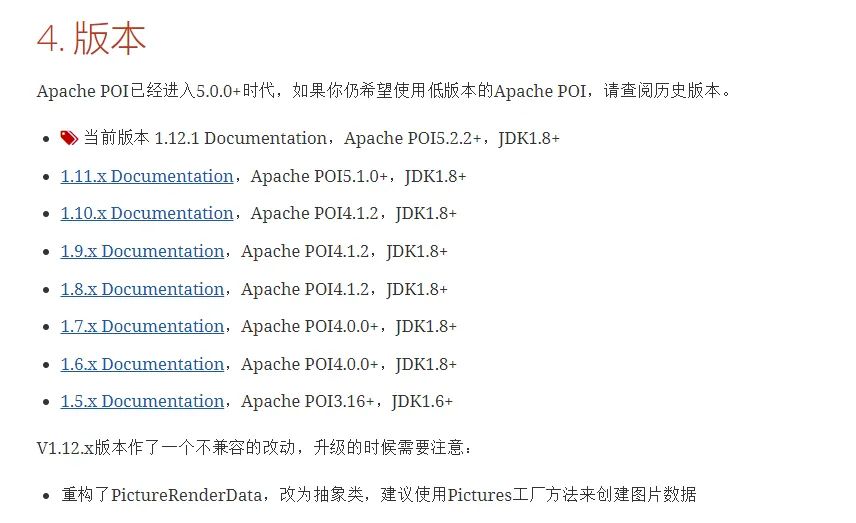
目前最新的版本是1.12.X,POI对应版本是5.2.2。
这里需要注意的是POI和POI-TL有一个对应的关系。
准备工作
我使用的POI-TL版本是1.10.0

< dependency >
            < groupId >com.deepoove< /groupId >
            < artifactId >poi-tl< /artifactId >
            < version >1.10.0< /version >
        < /dependency >
        < dependency >
            < groupId >org.apache.poi< /groupId >
            < artifactId >poi< /artifactId >
            < version >4.1.2< /version >
        < /dependency >
        < dependency >
            < groupId >org.apache.poi< /groupId >
            < artifactId >poi-ooxml< /artifactId >
            < version >4.1.2< /version >
        < /dependency >

        < dependency >
            < groupId >org.apache.poi< /groupId >
            < artifactId >poi-ooxml-schemas< /artifactId >
            < version >4.1.2< /version >
        < /dependency >

        < dependency >
            < groupId >commons-io< /groupId >
            < artifactId >commons-io< /artifactId >
            < version >2.7< /version >
        < /dependency >
快速开始
流程:制作模板->提供数据->渲染模板->下载word
注意:需要填充的数据需要使用{{}}来表示。
1. 导出固定内容和图片的word文档
准备模板

模板保存为docx格式,存放在resource目录下

提供数据
private Map< String, Object > assertMap() {
        Map< String, Object > params = new HashMap<  >();
        params.put("name", "努力的蚂蚁");
        params.put("age", "18");
        params.put("image", Pictures.ofUrl("http://deepoove.com/images/icecream.png").size(100, 100).create());
        return params;
    }
工具方法
/**
     * 将项目中的模板文件拷贝到根目录下
     * @return
     */
    private String copyTempFile(String templeFilePath) {
        InputStream inputStream = getClass().getClassLoader().getResourceAsStream(templeFilePath);
        String tempFileName = System.getProperty("user.home") + "/" + "1.docx";
        File tempFile = new File(tempFileName);
        try {
            FileUtils.copyInputStreamToFile(inputStream, tempFile);
        } catch (IOException e) {
            throw new RuntimeException(e);
        }
        return tempFile.getPath();
    }
private void down(HttpServletResponse response, String filePath, String realFileName) {
        String percentEncodedFileName = null;
        try {
            percentEncodedFileName = percentEncode(realFileName);
        } catch (UnsupportedEncodingException e) {
            throw new RuntimeException(e);
        }
        StringBuilder contentDispositionValue = new StringBuilder();
        contentDispositionValue.append("attachment; filename=").append(percentEncodedFileName).append(";").append("filename*=").append("utf-8''").append(percentEncodedFileName);

        response.addHeader("Access-Control-Allow-Origin", "*");
        response.addHeader("Access-Control-Expose-Headers", "Content-Disposition,download-filename");
        response.setHeader("Content-disposition", contentDispositionValue.toString());
        response.setHeader("download-filename", percentEncodedFileName);
        try (BufferedInputStream bis = new BufferedInputStream(new FileInputStream(filePath));
             // 输出流
             BufferedOutputStream bos = new BufferedOutputStream(response.getOutputStream());) {
            byte[] buff = new byte[1024];
            int len = 0;
            while ((len = bis.read(buff)) > 0) {
                bos.write(buff, 0, len);
            }
        } catch (Exception e) {
            e.printStackTrace();
        }
    }
/**
     * 百分号编码工具方法
     * @param s 需要百分号编码的字符串
     * @return 百分号编码后的字符串
     */
    public static String percentEncode(String s) throws UnsupportedEncodingException {
        String encode = URLEncoder.encode(s, StandardCharsets.UTF_8.toString());
        return encode.replaceAll("\\\\+", "%20");
    }
编写接口
@RequestMapping("genera")
    public void genera(HttpServletResponse response) {
        //1.组装数据
        Map< String, Object > params = assertMap();
        //2.获取根目录,创建模板文件
        String path = copyTempFile("word/1.docx");
        String fileName = System.currentTimeMillis() + ".docx";
        String tmpPath = "D:\\\" + fileName;
        try {
            //3.将模板文件写入到根目录
            //4.编译模板,渲染数据
            XWPFTemplate template = XWPFTemplate.compile(path).render(params);
            //5.写入到指定目录位置
            FileOutputStream fos = new FileOutputStream(tmpPath);
            template.write(fos);
            fos.flush();
            fos.close();
            template.close();
            //6.提供前端下载
            down(response, tmpPath, fileName);
        } catch (Exception e) {
            e.printStackTrace();
        } finally {
            //7.删除临时文件
            File file = new File(tmpPath);
            file.delete();
            File copyFile = new File(path);
            copyFile.delete();
        }
    }
对于图片的格式,POI-TL也提供了几种方式来提供支撑。

测试
效果如下:

2. 导出表格内容不固定的word文档
表格动态内容填充,POI-TL提供了3种方式。
- 表格行循环
- 表格列循环
- 动态表格。
第二种和第三种都可以实现表格填充,但我个人感觉第一种更方便一点,这里我只介绍【表格行循环】实现方式。
LoopRowTableRenderPolicy 是一个特定场景的插件,根据集合数据循环表格行。
注意:
- 模板中有两个list,这两个list需要置于循环行的上一行。
- 循环行设置要循环的标签和内容,注意此时的标签应该使用[]
准备模板

提供数据
学生实体类
public class Student {
    private String name;
    private String age;

    public String getName() {
        return name;
    }

    public void setName(String name) {
        this.name = name;
    }

    public String getAge() {
        return age;
    }

    public void setAge(String age) {
        this.age = age;
    }
}
学生word类
public class StudentTable {
    private String title;
    private List< Student > studentList;

    private List< Student > studentList1;

    public List< Student > getStudentList1() {
        return studentList1;
    }

    public void setStudentList1(List< Student > studentList1) {
        this.studentList1 = studentList1;
    }

    public String getTitle() {
        return title;
    }

    public void setTitle(String title) {
        this.title = title;
    }

    public List< Student > getStudentList() {
        return studentList;
    }

    public void setStudentList(List< Student > studentList) {
        this.studentList = studentList;
    }
}
表格数据
private StudentTable assertData() {
        StudentTable table = new StudentTable();
        table.setTitle("我是标题");
        List< Student > studentList = new ArrayList<  >();
        Student student = new Student();
        student.setName("张三");
        student.setAge("18");
        studentList.add(student);
        Student student1 = new Student();
        student1.setName("李四");
        student1.setAge("20");
        studentList.add(student1);
        Student student2 = new Student();
        student2.setName("王五");
        student2.setAge("21");
        studentList.add(student2);
        Student student3 = new Student();
        student3.setName("马六");
        student3.setAge("19");
        studentList.add(student3);
        table.setStudentList(studentList);
        table.setStudentList1(studentList);
        return table;
    }
编写接口
@RequestMapping("dynamicTable")
    public void dynamicTable(HttpServletResponse response) {
        //1.组装数据
        StudentTable table = assertData();
        //2.获取根目录,创建模板文件
        String path = copyTempFile("word/2.docx");
        //3.获取临时文件
        String fileName = System.currentTimeMillis() + ".docx";
        String tmpPath = "D:\\\" + fileName;
        try {
            //4.编译模板,渲染数据
            LoopRowTableRenderPolicy hackLoopTableRenderPolicy = new LoopRowTableRenderPolicy();
            Configure config =
                    Configure.builder().bind("studentList", hackLoopTableRenderPolicy).bind("studentList1", hackLoopTableRenderPolicy).build();
            XWPFTemplate template = XWPFTemplate.compile(path, config).render(table);
            //5.写入到指定目录位置
            FileOutputStream fos = new FileOutputStream(tmpPath);
            template.write(fos);
            fos.flush();
            fos.close();
            template.close();
            //6.提供下载
            down(response, tmpPath, fileName);
        } catch (Exception e) {
            e.printStackTrace();
        } finally {
            //7.删除临时文件
            File file = new File(tmpPath);
            file.delete();
            File copyFile = new File(path);
            copyFile.delete();
        }
    }
测试
效果如下:

声明:本文内容及配图由入驻作者撰写或者入驻合作网站授权转载。文章观点仅代表作者本人,不代表电子发烧友网立场。文章及其配图仅供工程师学习之用,如有内容侵权或者其他违规问题,请联系本站处理。
举报投诉
-
POI
+关注
关注
0文章
8浏览量
7199 -
API接口
+关注
关注
1文章
119浏览量
11492 -
SpringBoot
+关注
关注
0文章
180浏览量
876
发布评论请先 登录
相关推荐
热点推荐
如何实现图片转Word文档
在职场中,有些工作职员经常会受到一些照片,这是令人头疼,发照片很简单,但是要把照片里的信息转移到Word文档里面就很麻烦了,现在科技快速发展,难道你还使用手动输入吗?要是这样的话,说明你和世界已经
发表于 04-19 15:05
基于多种技术的Word设计文档自动生成平台
阐述Word设计文档自动生成平台的框架结构,提出了结合VBA、ADO和ASP等技术的设计思路,并详细介绍了文档自动生成平台软件的具体实现,包括建立文
发表于 05-11 20:20
•30次下载
一种基于Word文档的数字密写设计与实现
提出了一种新的基于 Word 文档的数字密写设计与实现方法,介绍了应用程序的实现方案,给出了系统组成方框图。实验结果表明,算法很好地实现了文
发表于 08-04 09:40
•20次下载
一种快速Word编程接口的设计与实现
本文在分析MS Word文档存储格式的基础上,研究了读取Word文档二进制数据流并将其恢复成可读信息的方法,设计实现了一种快速
发表于 02-21 15:58
•23次下载
一种快速Word编程接口的设计与实现
本文在分析MS Word文档存储格式的基础上,研究了读取Word文档二进制数据流并将其恢复成可读信息的方法,设计实现了一种快速
发表于 07-22 17:39
•16次下载
如何在Word文档中嵌入PROTEL原理图
如何在Word文档中嵌入PROTEL原理图
一、Protel 99文件管理器中导入Word文档:在Protel 99的Documents窗口,执行File/New菜单命令,选择Doc
发表于 04-15 00:18
•2191次阅读
word文档如何解密
word文档 如何解密,Kubernetes pod 启动时会拉取用户指定的镜像,一旦这个过程耗时太久就会导致 pod 长时间处于 pending 的状态,从而无法快速提供服务。
用于损坏的Microsoft Word文档的数据恢复软件
Recoveryfor Word 旨在从损坏的MicrosoftWord 文档中进行有效的数据恢复。使用Word恢复可以避免丢失重要信息。如今,MicrosoftWord 文本处理器是创建任何类型
求一种SpringBoot定时任务动态管理通用解决方案
SpringBoot的定时任务的加强工具,实现对SpringBoot原生的定时任务进行动态管理,完全兼容原生@Scheduled注解,无需对原本的定时任务进行修改
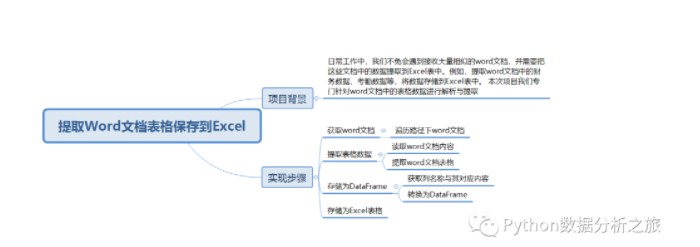
如何提取Word文档表格保存到Excel
据提取到Excel表中。例如,提取word文档中的财务数据、考勤数据等,将数据存储到
Excel表中,本次项目我们专门针对word文档中的表格数据进行解析与提取。
SpringBoot实现动态切换数据源
最近在做业务需求时,需要从不同的数据库中获取数据然后写入到当前数据库中,因此涉及到切换数据源问题。本来想着使用Mybatis-plus中提供的动态数据源SpringBoot的starter:dynamic-datasource-spring-boot-starter来

Spire.Cloud.Word云端Word文档处理SDK介绍
Spire.Cloud.Word 是一款专业的云端 Word 文档处理 SDK,开发人员使用它在云端创建、读取、编辑、转换和保存 Word 文档



评论