


 C语言表驱动详解

前段时间写了篇介绍命令行交互工具,不知道各位有没去看看源码,里边有个写法和前段时间介绍的链表使用很像,这就是等下介绍的表驱编程模式,表驱的核心就是“表格”,在多条件判断的时候会使用到多if嵌套,或者switch语法进行处理,但是这样写有时候也挺麻烦的,在这样的场景下就可以考虑使用表驱编程模式,把需要处理的事件或数据放到对应的表格中,最后就形成了一整个表,就可以进行查表然后进行对应操作,下面举个简单案例:
| 头文件
#include "stdio.h"
#include "stdint.h"


typedef struct
{
    void(*fp)(void);
} static_t;


extern static_t static_cmd[];


void shell_ls_cmd(void);
void shell_test_cmd(void);
void shell_test_fp(void);


void handle(void);
void push(void (*fp)(void));
void free(uint8_t select);
|定义一个表
static_tstatic_cmd[]=
{
  {shell_ls_cmd},
  {shell_test_cmd},
  {NULL}
};
| 定义回调函数
void shell_ls_cmd(void)
{
  printf("ls command
");
}


void shell_test_cmd(void)
{
  printf("test command
");
}


void shell_test_fp(void)
{
  printf("fp command
");
}
| 遍历表
void handle(void)
{
  for (uint8_t i = 0; static_cmd[i].fp != NULL; i++)
  {
    static_cmd[i].fp();
  }
}
| 添加表格
void push(void (*fp)(void))
{
    uint8_t i = 0;
// 写法1
    for(i = 0; static_cmd[i].fp != NULL; i++){};
// 写法2
/*
while(static_cmd[i].fp != NULL){
      i++;
    }
    */
    static_cmd[i].fp = fp;
    static_cmd[i+1].fp = NULL;
}
|删除表格
void free(uint8_t select)
{
  if(static_cmd[select].fp == NULL)
  {
    return;
  }
  for (uint8_t i = select; static_cmd[i].fp != NULL; i++)
  {
    static_cmd[i].fp = static_cmd[i+1].fp;
  }
}
|简单调用
int main()
{
    handle();
    printf("
");

    push(shell_test_fp);
    printf("
");

    handle();
    printf("
");

    free(1);
    printf("
");

    handle();
    while (1)
    {
        /* code */
    }
}
|查看结果
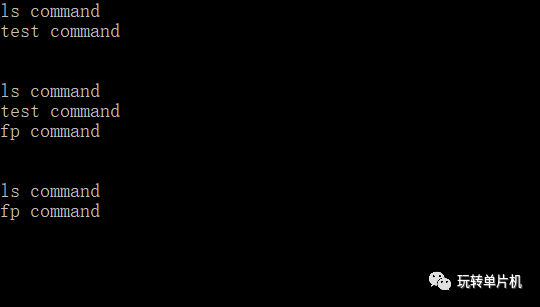
表驱在项目中很常见,适当使用能有效提高代码的可读性,也方便后期维护的迭代!
审核编辑:汤梓红
声明:本文内容及配图由入驻作者撰写或者入驻合作网站授权转载。文章观点仅代表作者本人,不代表电子发烧友网立场。文章及其配图仅供工程师学习之用,如有内容侵权或者其他违规问题,请联系本站处理。
举报投诉
-
驱动
+关注
关注
12文章
1990浏览量
88699 -
C语言
+关注
关注
183文章
7646浏览量
146134 -
编程
+关注
关注
90文章
3723浏览量
97434 -
源码
+关注
关注
8文章
689浏览量
31497 -
命令行
+关注
关注
0文章
83浏览量
10778
原文标题:C语言|表驱动
文章出处:【微信号:玩转单片机,微信公众号:玩转单片机】欢迎添加关注!文章转载请注明出处。
发布评论请先 登录
相关推荐
热点推荐
请问一下,用AVR studio 5如何用C语言表达attiny85的进入睡眠?
请问一下,用AVR studio 5如何用C语言表达attiny85的进入睡眠?同时用在tkstudio软件下,都用-sleep()也都不行的,怎么解决呢?
发表于 11-24 11:34
C语言指针详解
];//指针的类型是 int(*)[3] (5)int*(*ptr)[4];//指针的类型是int*(*)[4] 怎么样?找出指针的类型的方法是不是很简单? 完整的C语言指针详解pdf格式文档电子发烧友下载地址(共12
发表于 07-04 03:34
详解C语言中的短路现象
C语言一经出现,就以其功能丰富、表达能力强、灵活方便、应用面广等特点迅速在全世界普及和推广。C语言不但执行效率高,而且可移植性好,可以用来开发应用软件、

基于性别的暴力(GBV)的语言表达如何影响责任认知
不同的语言表达可以通过强调某些部分从不同的角度来概念化同一事件。该论文调查了一个具有社会后果的案例:基于性别的暴力(GBV)的语言表达如何影响责任认知。



评论