


 提高访问Github过慢的方法

GitHub
作为全球最大的同性交友网站,GitHub可谓是又爱又恨,爱的是太多非常棒的开源项目了,有很大的参考价值,也方便我们自己托管项目,恨的是这个网站的访问实在是太不给力了,基本是随缘了,不同城市不同网络都各不相同,用宽带,手机流量也各不相同,大部分是不怎么好的。 最近发现一个叫做Fetch Github Hosts的项目,也许能帮到大家,这里只针对网络不好的同学哈,fetch-github-hosts是主要为解决研究及学习人员访问Github过慢或其他问题而提供的免费的Github hosts同步服务,项目开源,有写具体的使用方法,有需要的同学可以前往学习一下。简单粗暴的方法
手动添加hosts 访问https://hosts.gitcdn.top/hosts.txt这个网站,将网页的全部内容粘贴到你的hosts文件中。
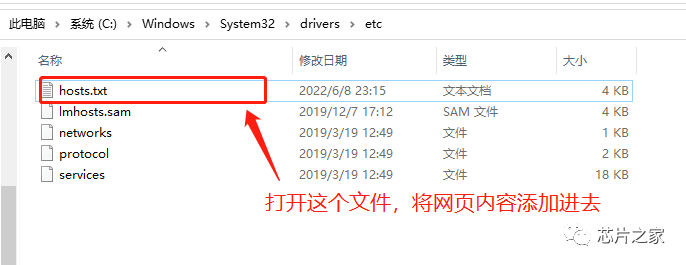
Linux / MacOS hosts路径:/etc/hostsWindows hosts路径:C:WindowsSystem32driversetchost
老宇哥这里也顺便贴出来,大家复制即可:
# fetch-github-hosts begin140.82.112.26 alive.github.com140.82.112.26 live.github.com185.199.108.154 github.githubassets.com140.82.112.21 central.github.com185.199.111.133 desktop.githubusercontent.com185.199.109.153 assets-cdn.github.com185.199.108.133 camo.githubusercontent.com185.199.108.133 github.map.fastly.net146.75.113.194 github.global.ssl.fastly.net52.192.72.89 gist.github.com185.199.108.153 github.io52.192.72.89 github.com192.0.66.2 github.blog52.69.239.207 api.github.com185.199.109.133 raw.githubusercontent.com185.199.109.133 user-images.githubusercontent.com185.199.111.133 favicons.githubusercontent.com185.199.109.133 avatars5.githubusercontent.com185.199.109.133 avatars4.githubusercontent.com185.199.109.133 avatars3.githubusercontent.com185.199.108.133 avatars2.githubusercontent.com185.199.109.133 avatars1.githubusercontent.com185.199.111.133 avatars0.githubusercontent.com185.199.111.133 avatars.githubusercontent.com52.193.111.178 codeload.github.com52.216.177.203 github-cloud.s3.amazonaws.com52.216.177.203 github-com.s3.amazonaws.com52.217.91.148 github-production-release-asset-2e65be.s3.amazonaws.com52.217.91.148 github-production-user-asset-6210df.s3.amazonaws.com52.217.91.148 github-production-repository-file-5c1aeb.s3.amazonaws.com185.199.109.153 githubstatus.com64.71.144.211 github.community52.237.112.130 github.dev140.82.112.21 collector.github.com13.107.42.16 pipelines.actions.githubusercontent.com185.199.108.133 media.githubusercontent.com185.199.108.133 cloud.githubusercontent.com185.199.108.133 objects.githubusercontent.com# last fetch time: 2022-06-11T2302+08:00# update url: https://hosts.gitcdn.top/hosts.txt# fetch-github-hosts end
特别注意,在windows中,大家修改完hosts之后,直接保存不了,保存的时候先另存在桌面,再拖进去覆盖即可!
刷新生效:
Linux: /etc/init.d/network restartWindows: ipconfig /flushdnsMacos: sudo killall -HUP mDNSResponder
试试访问效果
开源仓库:https://github.com/Licoy/fetch-github-hostsGitHub镜像站或者使用Github镜像站,国内可以加速访问GitHub的网站(GitHub加速),使用起来和官网没啥区别,只是域名不同而已。
-
https://hub.おうか.tw
-
https://hub.連接.台灣
-
https://hub.fastgit.xyz
-
https://cdn.githubjs.cf
-
https://gitclone.com
声明:本文内容及配图由入驻作者撰写或者入驻合作网站授权转载。文章观点仅代表作者本人,不代表电子发烧友网立场。文章及其配图仅供工程师学习之用,如有内容侵权或者其他违规问题,请联系本站处理。
举报投诉
-
开源
+关注
关注
3文章
4348浏览量
46446 -
GitHub
+关注
关注
3文章
489浏览量
18763
原文标题:提高访问GitHub速度方法
文章出处:【微信号:strongerHuang,微信公众号:strongerHuang】欢迎添加关注!文章转载请注明出处。
发布评论请先 登录
相关推荐
热点推荐
静态资源访问很慢的排查思路和处理方法
在日常运维工作中,前端开发人员经常向运维反馈“静态资源访问很慢”、“页面加载时间长”、“CDN 好像没生效”等问题。作为运维工程师,我们需要能够系统地排查这类问题,而不是简单地把责任推给前端或者 CDN 提供商。
MinGW-w64工具集压缩包的下载
KB/s,已下载14.6 MB,剩余69.6 MB,预计还需53分钟完成。
核心问题与建议
当前下载速度过慢的原因是该文件来自GitHub海外链接,国内网络访问此类链接通常稳定性差、速度低。建议
发表于 02-07 04:59
使用直接寻址方式提高速度
在嵌入式系统,特别是资源受限的环境中,尽量使用直接寻址方式来提高速度是一个有效的优化策略。以下是一些具体方法和示例,帮助你尽可能多地使用直接寻址的变量,从而提高系统性能。
直接寻址的优势
直接寻址
发表于 12-04 06:28
提高条件分支指令预测正确率的方法
“Gshare方法”。
BTB:
分支目标缓冲器(Branch Target Buffer,BTB)是一个用于存储分支指令地址和目标地址的高速缓存,其常见于超标量处理器中,主要用于提高分支预测器的性能,因为它可
发表于 10-22 08:22
提高RISC-V在Drystone测试中得分的方法
:编译器如何优化生成的机器代码也会影响Drystone的得分。优化的编译器能够生成更高效的机器代码,从而提高性能。
提高 RISC-V 在 Drystone 测试中得分的方法主要有:
优化
发表于 10-21 13:58
远程访问NAS不折腾,轻松获取固定访问地址!
对于自建NAS(如FreeNAS、TrueNAS、Unraid)或品牌NAS(群晖、铁威马、威联通、华芸、绿联、极空间等)用户而言,外出时如何快速、安全地远程访问存储数据,一直是大家的核心需求
【Banana Pi BPI-RV2开发板试用体验】配置WSL网络环境访问Github
因为openwrt编译的过程中需要下载各类工具,加上国内网络访问Github各种不稳定,一通操作下拉各种error,有的下载不下,有的下载不全…乘着周末单独整理下网络环境配置。
一、背景
我
发表于 07-19 18:14
远程访问内网MySQL数据库?这个方案更简单
各位开发者朋友们,是否还在为无法随时随地访问内网MySQL数据库而烦恼?今天分享一个超实用的方法,通过容器部署 MySQL 结合 ZeroNews 内网穿透,让你在任何地方都能安全访问和管理数据库

微软开源GitHub Copilot Chat,AI编程迎来新突破
GitHub Copilot + vscode的组合我已经用了很久,我的代码开发效率完全提升了一个level。帮我代码提示,代码不全,注释理解生成代码等等,这些我是我经常用到的功能。 在今天凌晨4点
提高SEA模型PBNR计算精度的方法及策略
方案即声学包对整车噪声传递的影响,同时克服了NR方法中由于声源特性、声源处麦克风安装位置等因素给测试带来的不利影响,PBNR已广泛用应用于整车SEA模型对标及声学包目标的设定及分解工作中,故而在数字开发阶段,提高整车SEA 模型的PBNR计算精度尤为重要。

FA模型访问Stage模型DataShareExtensionAbility说明
DataShareHelper的接口。但是这种方法需要开发者修改原客户端代码的URI,做不到无感知切换。
因此DataAbilityHelper不能仅依赖URI的前缀决定访问DataAbility还是
发表于 06-04 07:53
提高键合晶圆 TTV 质量的方法
)增大,影响器件性能与良品率。因此,探索提高键合晶圆 TTV 质量的方法,对推动半导体产业发展具有重要意义。 二、提高键合晶圆 TTV 质量的方法 2.1 键合前晶圆处理 键合前对晶圆
想通过I2C访问闪存来测试对cy7c6541的访问,但是访问结果好像与datasheet不一样,怎么解决这个问题?
我想通过I2C访问闪存来测试对cy7c6541的访问,但是访问结果好像与datasheet不一样。
是否有关于 cy7c6541 闪存或 eeprom 的数据表? 或者有其他方法可以帮
发表于 05-19 06:44
如何使用USB中断传输方法访问FPGA?
我目前正在设计一个可以通过 CY7C65216 从 Windows PC 访问 FPGA 的单元。
我正在考虑使用USB中断传输方法访问FPGA。
这可能吗?
如果有,是否有任何示例软件程序(驱动程序、应用程序)可供我参考?
我
发表于 05-19 06:04
Windows Arm64托管运行器正式支持GitHub Actions
过去一年,Arm 与 GitHub 持续紧密合作,致力于为基于 Arm 平台的开发者打造更便捷、更高效的开发体验。GitHub 推出的 Arm 托管运行器正在革新应用程序的开发与部署流程,而近期推出



评论