


 开发一个鸿蒙版仿苹果计算器教程.附代码

众所周知鸿蒙 JS 框架是非常轻量级的 MVVM 模式。通过使用和 Vue2 相似的属性劫持技术实现了响应式系统。
学习鸿蒙很长时间了,想写一个 demo 进行练练手,就选择开发这个仿苹果计算器程序。
先看效果图:
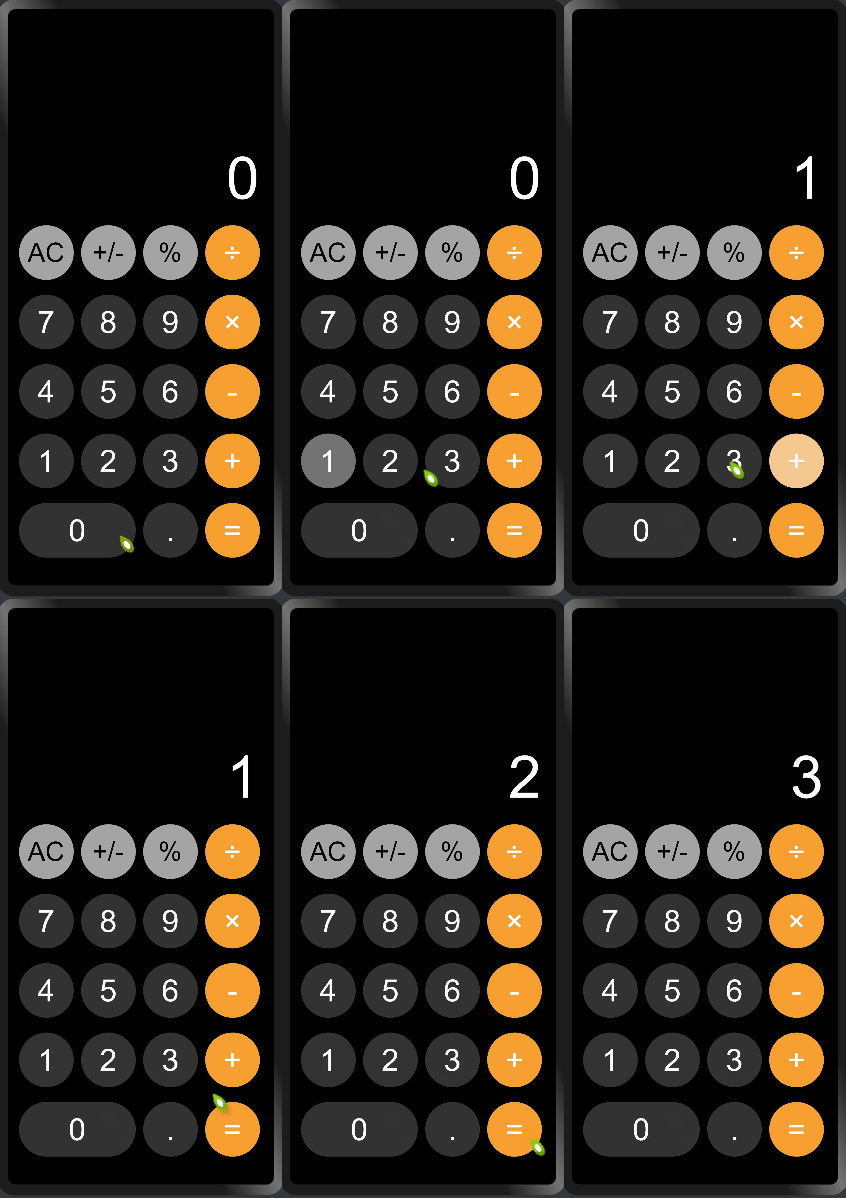
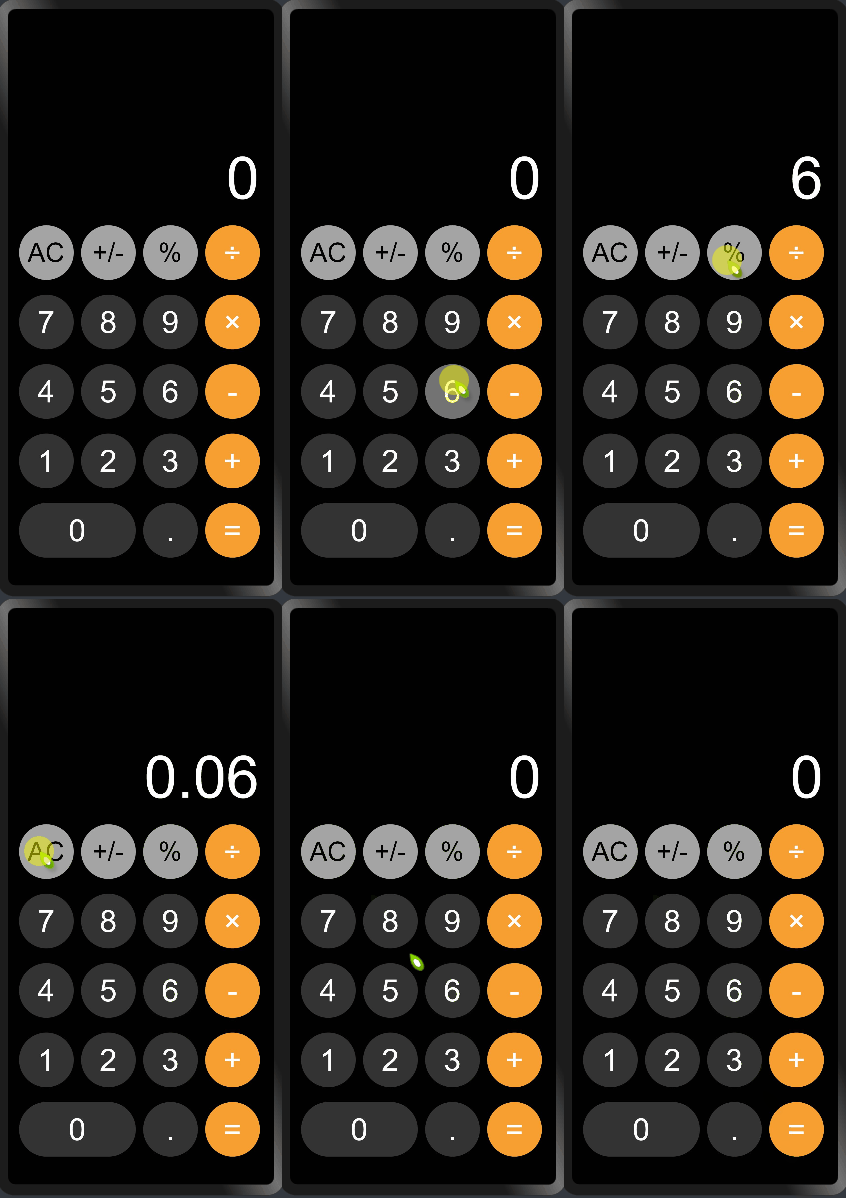
话不多说,上代码
hml:
<divclass="container">
<divclass="header">
<textclass="{{outputClassName}}">{{output}}text>
div>
<divclass="keyboard">
<blockfor="{{keyArr}}">
<divif="{{$item=='0'}}"class="zeroKeys"onclick="onclickNubmer({{$item}})">
<text>
{{$item}}
text>
div>
<divelif="{{$item=='AC'||$item=='+/-'||$item=='%'}}"class="operatorKeys-top"onclick="onclickOper({{$item}})">
<text>
{{$item}}
text>
div>
<divelif="{{$item=='÷'||$item=='×'||$item=='-'||$item=='+'||$item=='='}}"class="operatorKeys-right"onclick="onclickOper({{$item}})">
<text>
{{$item}}
text>
div>
<divelseclass="keyskeys-nubmer"onclick="onclickNubmer({{$item}})">
<text>
{{$item}}
text>
div>
block>
div>
div>
css:
.container{
flex-direction:column;
background-color:#010101;
height:100%;
width:100%;
}

.header{
height:36%;
width:100%;
align-items:flex-end;
padding:2px20px2px10px;
}
.keyboard{
height:64%;
width:100%;
padding:2px10px;
flex-wrap:wrap;
}
.outputText,.outputTextSmall{
width:100%;
height:100px;
color:#FFFFFF;
text-align:end;
}
.outputText{
font-size:80px;
}
.outputTextSmall{
font-size:58px;
}
.keys,.zeroKeys,.operatorKeys-top,.operatorKeys-right{
width:74px;
height:74px;
justify-content:center;
align-items:center;
border-radius:74px;
margin:10px5px;
}
.keys-nubmer,.zeroKeys{
background-color:#333333;
}
.zeroKeys{
width:158px;
}
.operatorKeys-top{
background-color:#a4a4a4;
}
.operatorKeys-right{
background-color:#f79f31;
}
.keys:active,.zeroKeys:active{
background-color:#737373;
}
.keystext,.zeroKeystext,.operatorKeys-righttext{
font-size:42px;
color:#FFFFFF;
}
.operatorKeys-toptext{
font-size:36px;
color:#010101;
}
.operatorKeys-top:active{
background-color:#d9d9d9;
}
.operatorKeys-right:active{
background-color:#f5c891;
}
js:
import{math}from"../../common/js/utils.js";
exportdefault{
data:{
output:"0",
outputClassName:"outputText",
cache:[],//记录输入内容
keyArr:["AC","+/-","%","÷","7","8","9","×","4","5","6","-","1","2","3","+","0",".","="],
reOper:"",//记录点击的运算符
reStr1:"",//记录第一次输入内容
reStr2:"",//记录点击运算符后的内容
bool:false//防止第二次输入内容时内容清空
},
onInit(){
this.$watch("output","watchOutPut")
},
onclickOper(item){
if(item=="AC"){
this.clearComput();
}elseif(item=="+"||item=="-"||item=="×"||item=="÷"){
this.reOper=item;
this.reStr1=this.output;
if(this.cache.length>0){
this.startCompute();
}
this.cache.push(this.reStr1);
}elseif(item=="+/-"){
this.output="-"+this.output;
}elseif(item=="%"){
this.output=math.accDiv(this.output,100);
}elseif(item=="="){
this.reStr2=this.output;
this.cache.push(this.reStr2);
this.startCompute();
}
},
onclickNubmer(item){
if(this.cache.length>0&&!this.bool){
this.output="0";
this.bool=true;
}
if(this.output=="0"&&item!="."){
this.output=item;
}elseif(item=="."){
if(this.output.indexOf(".")==-1){
if(this.output=="0"){
this.output="0."
}else{
this.output+=item;
}
}
}else{
if(this.output.length< 10){
this.output+=item;
}
}
},
watchOutPut(nVal){
if(nVal.length>7&&nVal.length< 10){
this.outputClassName="outputTextSmall";
}else{
this.outputClassName="outputText";
}
},
startCompute(){
switch(this.reOper){
case"+":
this.output=math.accAdd(this.reStr1,this.reStr2);
this.reStr1=this.output;
break;
case"-":
this.output=math.accSub(this.reStr1,this.reStr2);
this.reStr1=this.output;
break;
case"×":
this.output=math.accMul(this.reStr1,this.reStr2);
this.reStr1=this.output;
break;
case"÷":
this.output=math.accDiv(this.reStr1,this.reStr2);
this.reStr1=this.output;
break;
default:
break;
}
},
clearComput(){
this.output="0";
this.reOper="";
this.reStr1="";
this.reStr2="";
this.cache=[];
this.bool=false;
}
}
utils.js:
classMathCalss{
//js精准除法函数
accDiv(arg1,arg2){
lett1=0,
t2=0,
r1,
r2;
try{
t1=arg1.toString().split('.')[1].length;
}catch(e){}
try{
t2=arg2.toString().split('.')[1].length;
}catch(e){}
r1=Number(arg1.toString().replace('.',''));
r2=Number(arg2.toString().replace('.',''));
return(r1/r2)*Math.pow(10,t2-t1);
}

//js精准加法函数
accAdd(arg1,arg2){
varr1,r2,m,c;
try{
r1=arg1.toString().split(".")[1].length;
}
catch(e){
r1=0;
}
try{
r2=arg2.toString().split(".")[1].length;
}
catch(e){
r2=0;
}
c=Math.abs(r1-r2);
m=Math.pow(10,Math.max(r1,r2));
if(c>0){
varcm=Math.pow(10,c);
if(r1>r2){
arg1=Number(arg1.toString().replace(".",""));
arg2=Number(arg2.toString().replace(".",""))*cm;
}else{
arg1=Number(arg1.toString().replace(".",""))*cm;
arg2=Number(arg2.toString().replace(".",""));
}
}else{
arg1=Number(arg1.toString().replace(".",""));
arg2=Number(arg2.toString().replace(".",""));
}
return(arg1+arg2)/m;
}
//js精准减法函数
accSub(arg1,arg2){
letr1,r2,m,n;
try{
r1=arg1.toString().split('.')[1].length;
}catch(e){
r1=0;
}
try{
r2=arg2.toString().split('.')[1].length;
}catch(e){
r2=0;
}
m=Math.pow(10,Math.max(r1,r2));
//动态控制精度长度
n=r1>=r2?r1:r2;
return(arg1*m-arg2*m)/m;
}
//js精准乘法函数
accMul(arg1,arg2){
varm=0,s1=arg1.toString(),s2=arg2.toString();
try{
m+=s1.split(".")[1].length;
}
catch(e){
}
try{
m+=s2.split(".")[1].length;
}
catch(e){
}
returnNumber(s1.replace(".",""))*Number(s2.replace(".",""))/Math.pow(10,m);
}
}

exportvarmath=newMathCalss();
为了解决浮点数计算失准问题,我使用一些解决计算失准的函数可供大家参考。
声明:本文内容及配图由入驻作者撰写或者入驻合作网站授权转载。文章观点仅代表作者本人,不代表电子发烧友网立场。文章及其配图仅供工程师学习之用,如有内容侵权或者其他违规问题,请联系本站处理。
举报投诉
-
函数
+关注
关注
3文章
4423浏览量
68034 -
代码
+关注
关注
30文章
4983浏览量
74533 -
CSS
+关注
关注
0文章
113浏览量
15634 -
鸿蒙
+关注
关注
60文章
3058浏览量
46265
原文标题:开发一个鸿蒙版仿苹果计算器
文章出处:【微信号:gh_834c4b3d87fe,微信公众号:OpenHarmony技术社区】欢迎添加关注!文章转载请注明出处。
发布评论请先 登录
相关推荐
热点推荐
星光不负,码向未来:1024致敬每一位“以码为梦”的鸿蒙开发者
每一行代码,都是照亮数字世界的一颗星;每一个梦想,都值得被温柔以待。这不是一场简单的庆祝,而是一
Quartz Frequency 实战:热力图+计算器(6 篇)
AT-cut
面向对象:嵌入式/硬件/射频/物联网工程师
内容亮点:可视化图示 + 在线计算器 + 设计边界与案例
大家好!整理了一套石英定时(Quartz Timing)高原创度文章与工具
发表于 10-09 15:42
【汇思博SEEK100开发板试用体验】在开发板鸿蒙OS搭建QT开发环境
,为鸿蒙设备开发原生性能应用。Qt for HarmonyOS 的核心是一个 QPA 插件(Qt Platform Abstraction),其作用是将 Qt 的窗口系统与
发表于 08-24 18:34
【HarmonyOS 5】金融应用开发鸿蒙组件实践
【HarmonyOS 5】金融应用开发鸿蒙组件实践 ##鸿蒙开发能力 ##HarmonyOS SDK应用服务##鸿蒙金融类应用 (金融理财#

鸿蒙5开发宝藏案例分享---一多开发实例(音乐)
各位开发者小伙伴们好呀!今天咱们来点硬核干货!最近在鸿蒙文档中心挖到一座“金矿”——官方竟然暗藏了100+实战案例,从分布式架构到交互动效优化应有尽有!这些案例不仅藏着华为工程师的私房技巧,还直接
Qorvo全新设计计算器:晶振选型、能耗预算计算器和链路预算与覆盖范围计算器
款功能强大的PC端计算工具 。这些工具—— 晶振采购工具 、 能耗预算计算器 和 链路预算与覆盖范围计算器 ——让优化晶振选型、预测电池续航时间以及评估RF链路性能变得前所未有地简单。 接下来,让我们深入了解每
VirtualLab:衍射角计算器
介质的折射率、结构的周期和入射角。这种相关性在数学上被编码在光栅方程中。在这个用例中,我们介绍了VirtualLab Fusion的衍射角计算器,这是一个用于计算光栅方程的方便工具。
发表于 06-16 08:48
鸿蒙5开发宝藏案例分享---优化应用包体积大小问题
?** 鸿蒙包体积优化实战:藏在官方文档里的宝藏技巧!**
大家好呀~我是你们的鸿蒙开发小伙伴!今天在翻官方文档时,发现了一个超实用的「包体
发表于 06-13 10:09
鸿蒙5开发宝藏案例分享---Grid性能优化案例
发现鸿蒙宝藏:优化Grid组件性能的实战技巧!
大家好呀!最近在鸿蒙开发者社区挖到一个超实用的性能优化案例—— 解决Grid组件加载慢、滚动
发表于 06-12 17:47
鸿蒙5开发宝藏案例分享---瀑布流优化实战分享
鸿蒙瀑布流性能优化实战:告别卡顿的宝藏指南!
大家好!最近在鸿蒙文档里挖到一个 性能优化宝藏库 ,原来官方早就准备好了各种场景的最佳实践!今天重点分享「瀑布流加载慢丢帧」的解决方案,
发表于 06-12 17:41
鸿蒙5开发宝藏案例分享---一多开发实例(旅行订票)
把多端适配的黑科技玩出了花!赶紧带大家来挖宝,手把手解析如何用一套代码征服手机/折叠屏/平板/PC四大终端!
?** 一多开发核心揭秘**
鸿蒙的\"
发表于 06-03 16:16
鸿蒙5开发宝藏案例分享---一多开发实例(社区评论)
?【鸿蒙开发宝藏案例大放送!】一次搞定多端适配的实战经验分享**?**
大家好呀~今天在翻鸿蒙开发者文档时,突然挖到了
发表于 06-03 16:03



评论