


 Linux驱动中的platform总线详解

platform总线是学习linux驱动必须要掌握的一个知识点。
一、概念
嵌入式系统中有很多的物理总线:I2c、SPI、USB、uart、PCIE、APB、AHB
linux从2.6起就加入了一套新的驱动管理和注册的机制platform平台总线,是一条虚拟的总线,并不是一个物理的总线。
相比 PCI、USB,它主要用于描述SOC上的片上资源。platform 所描述的资源有一个共同点:在CPU 的总线上直接取址。
平台设备会分到一个名称(用在驱动绑定中)以及一系列诸如地址和中断请求号(IRQ)之类的资源。
设备用platform_device表示,驱动用platform_driver进行注册。
与传统的bus/device/driver机制相比,platform由内核进行统一管理,在驱动中使用资源,提高了代码的安全性和可移植性。
二、platform
1. platform总线两个最重要的结构体
platform维护的所有的驱动都必须要用该结构体定义:
platform_driver
struct platform_driver {
int (*probe)(struct platform_device *); //
int (*remove)(struct platform_device *);
void (*shutdown)(struct platform_device *);
int (*suspend)(struct platform_device *, pm_message_t state);
int (*resume)(struct platform_device *);
struct device_driver driver;
const struct platform_device_id *id_table;
bool prevent_deferred_probe;
};
该结构体,用于注册驱动到platform总线,
成员含义
probe当驱动和硬件信息匹配成功之后,就会调用probe函数,驱动所有的资源的注册和初始化全部放在probe函数中
remove硬件信息被移除了,或者驱动被卸载了,全部要释放,释放资源的操作就放在该函数中
struct device_driver driver内核维护的所有的驱动必须包含该成员,通常driver-》name用于和设备进行匹配
const struct platform_device_id *id_table往往一个驱动可能能同时支持多个硬件,这些硬件的名字都放在该结构体数组中
我们编写驱动的时候往往需要填充以上几个成员
platform_device
platform总线用于描述设备硬件信息的结构体,包括该硬件的所有资源(io,memory、中断、DMA等等)。
struct platform_device {
const char *name;
int id;
bool id_auto;
struct device dev;
u32 num_resources;
struct resource *resource;
const struct platform_device_id *id_entry;
/* MFD cell pointer */
struct mfd_cell *mfd_cell;
struct pdev_archdata archdata;
};
成员含义
const char*name设备的名字,用于和驱动进行匹配的
struct devicedev内核中维护的所有的设备必须包含该成员,
u32num_resources资源个数
struct resource*resource描述资源
struct devicedev-》release()必须实现,
其中描述硬件信息的成员struct resource
0x139d0000
struct resource {
resource_size_t start; //表示资源的起始值,
resource_size_t end; //表示资源的最后一个字节的地址, 如果是中断,end和satrt相同
const char *name; // 可不写
unsigned long flags; //资源的类型
struct resource *parent, *sibling, *child;
};
flags的类型说明
#define IORESOURCE_MEM 0x00000200 //内存
#define IORESOURCE_IRQ 0x00000400 //中断
内核管理的所有的驱动,都必须包含一个叫struct device_driver成员, //男性描述的硬件,必须包含struct device结构体成员。 //女性
struct device_driver {
const char *name;
struct bus_type *bus;
struct module *owner;
const char *mod_name; /* used for built-in modules */
bool suppress_bind_attrs; /* disables bind/unbind via sysfs */
const struct of_device_id *of_match_table;
const struct acpi_device_id *acpi_match_table;
int (*probe) (struct device *dev);
int (*remove) (struct device *dev);
void (*shutdown) (struct device *dev);
int (*suspend) (struct device *dev, pm_message_t state);
int (*resume) (struct device *dev);
const struct attribute_group **groups;
const struct dev_pm_ops *pm;
struct driver_private *p;
};
其中:
const char *name;
用于和硬件进行匹配。
内核描述硬件,必须包含struct device结构体成员:
struct device {
struct device *parent;
struct device_private *p;
struct kobject kobj;
const char *init_name; /* initial name of the device */
const struct device_type *type;
struct mutex mutex; /* mutex to synchronize calls to
* its driver.
*/
struct bus_type *bus; /* type of bus device is on */
struct device_driver *driver; /* which driver has allocated this
device */
void *platform_data; /* Platform specific data, device
core doesn‘t touch it */
struct dev_pm_info power;
struct dev_pm_domain *pm_domain;
#ifdef CONFIG_PINCTRL
struct dev_pin_info *pins;
#endif
#ifdef CONFIG_NUMA
int numa_node; /* NUMA node this device is close to */
#endif
u64 *dma_mask; /* dma mask (if dma’able device) */
u64 coherent_dma_mask;/* Like dma_mask, but for
alloc_coherent mappings as
not all hardware supports
64 bit addresses for consistent
allocations such descriptors. */
struct device_dma_parameters *dma_parms;
struct list_head dma_pools; /* dma pools (if dma‘ble) */
struct dma_coherent_mem *dma_mem; /* internal for coherent mem
override */
#ifdef CONFIG_DMA_CMA
struct cma *cma_area; /* contiguous memory area for dma
allocations */
#endif
/* arch specific additions */
struct dev_archdata archdata;
struct device_node *of_node; /* associated device tree node */
struct acpi_dev_node acpi_node; /* associated ACPI device node */
dev_t devt; /* dev_t, creates the sysfs “dev” */
u32 id; /* device instance */
spinlock_t devres_lock;
struct list_head devres_head;
struct klist_node knode_class;
struct class *class;
const struct attribute_group **groups; /* optional groups */
void (*release)(struct device *dev);
struct iommu_group *iommu_group;
bool offline_disabled:1;
bool offline:1;
};
其中:
void (*release)(struct device *dev);
不能为空。
2. 如何注册
要用注册一个platform驱动的步骤
1)注册驱动platform_device_register
/**
* platform_device_register - add a platform-level device
* @pdev: platform device we’re adding
*/
int platform_device_register(struct platform_device *pdev)
{
device_initialize(&pdev-》dev);
arch_setup_pdev_archdata(pdev);
return platform_device_add(pdev);
}
2) 注册设备platform_driver_register
#define platform_driver_register(drv)
__platform_driver_register(drv, THIS_MODULE)
三、举例
1. 开发步骤
platform 总线下驱动的开发步骤是:
设备
需要实现的结构体是:platform_device 。
1)初始化 resource 结构变量
2)初始化 platform_device 结构变量
3)向系统注册设备:platform_device_register。
以上三步,必须在设备驱动加载前完成,即执行platform_driver_register()之前,原因是驱动注册时需要匹配内核中所有已注册的设备名。
platform_driver_register()中添加device到内核最终还是调用的device_add函数。
Platform_device_add和device_add最主要的区别是多了一步insert_resource(p, r),即将platform资源(resource)添加进内核,由内核统一管理。
驱动
驱动注册中,需要实现的结构体是:platform_driver 。
在驱动程序的初始化函数中,调用了platform_driver_register()注册 platform_driver 。
需要注意的是:platform_driver 和 platform_device 中的 name 变量的值必须是相同的【在不考虑设备树情况下,关于设备树,后面会写新的文章详细讲述】 。
这样在 platform_driver_register() 注册时,会将当前注册的 platform_driver 中的 name 变量的值和已注册的所有 platform_device 中的 name 变量的值进行比较,只有找到具有相同名称的 platform_device 才能注册成功。
当注册成功时,会调用 platform_driver 结构元素 probe 函数指针。
实例1
本例比较简单,只用于测试platform_driver 和platform_device是否可以匹配成功。
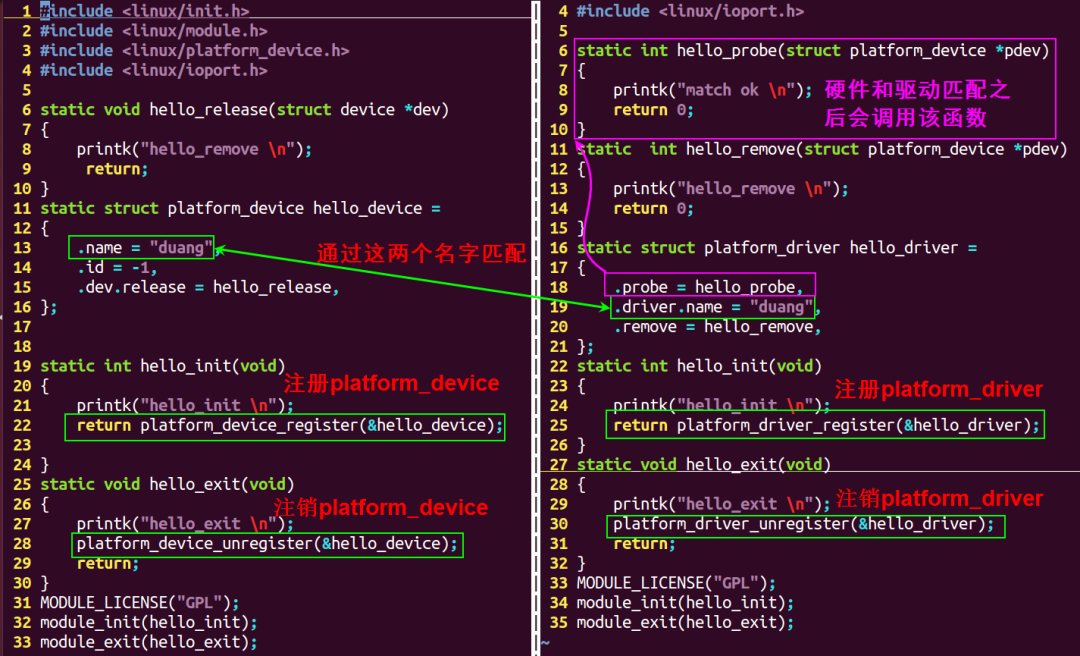
左边是platform_device结构体注册的代码,右边是platform_driver结构体注册的代码。
platform_driver 定义和注册:
1 #include 《linux/init.h》
2 #include 《linux/module.h》
3 #include 《linux/platform_device.h》
4 #include 《linux/ioport.h》
5
6 static int hello_probe(struct platform_device *pdev)
7 {
8 printk(“match ok
”);
9 return 0;
10 }
11 static int hello_remove(struct platform_device *pdev)
12 {
13 printk(“hello_remove
”);
14 return 0;
15 }
16 static struct platform_driver hello_driver =
17 {
18 .probe = hello_probe,
19 .driver.name = “duang”,
20 .remove = hello_remove,
21 };
22 static int hello_init(void)
23 {
24 printk(“hello_init
”);
25 return platform_driver_register(&hello_driver);
26 }
27 static void hello_exit(void)
28 {
29 printk(“hello_exit
”);
30 platform_driver_unregister(&hello_driver);
31 return;
32 }
33 MODULE_LICENSE(“GPL”);
34 module_init(hello_init);
35 module_exit(hello_exit);
platform_device定义和注册:
1 #include 《linux/init.h》
2 #include 《linux/module.h》
3 #include 《linux/platform_device.h》
4 #include 《linux/ioport.h》
5
6 static void hello_release(struct device *dev)
7 {
8 return;
9 }
10 static struct platform_device hello_device =
11 {
12 .name = “duang”,
13 .id = -1,
14 .dev.release = hello_release,
15 };
16
17
18 static int hello_init(void)
19 {
20 printk(“hello_init
”);
21 return platform_device_register(&hello_device);
22
23 }
24 static void hello_exit(void)
25 {
26 printk(“hello_exit
”);
27 platform_device_unregister(&hello_device);
28 return;
29 }
30 MODULE_LICENSE(“GPL”);
31 module_init(hello_init);
32 module_exit(hello_exit);
该程序只用于测试platform框架是否可以成功匹配,struct platform_device hello_device 并没有设置任何硬件信息。
Makfile
1 ifneq ($(KERNELRELEASE),)
2 obj-m:=device.o driver.o
3 else
4 KDIR :=/lib/modules/$(shell uname -r)/build
5 PWD :=$(shell pwd)
6 all:
7 make -C $(KDIR) M=$(PWD) modules
8 clean:
9 rm -f *.ko *.o *.mod.o *.symvers *.cmd *.mod.c *.order
10 endif
该makefile可以同时将两个C文件编译成ko文件。
编译:
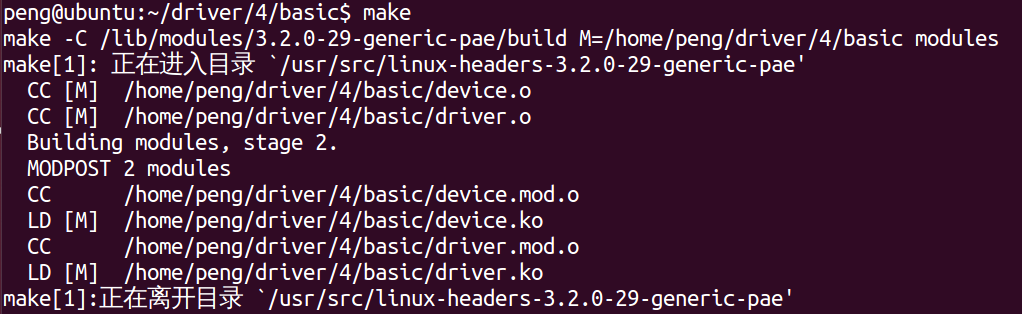
编译
编译生成的文件:

在这里插入图片描述
加载模块
清空log信息
sudo dmesg -c
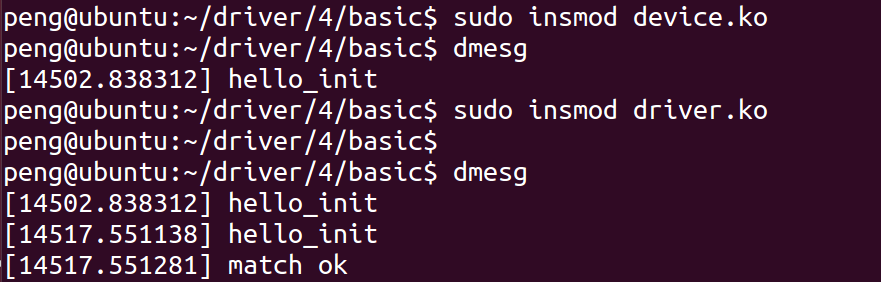
匹配成功
实例2
给结构体platform_device 增加硬件信息,并在内核中能够读取出来。本例向结构体hello_device 增加信息如下:
基址寄存器地址0x139d0000,该地址的空间是0x4
中断号199【注意】实际的内核中会把外设的中断号根据HW id(通常soc厂商设备soc的时候会给每一个中断源定义好唯一的ID)计算出一个新的中断号,该中断号会被cpu所识别。
device.c
struct resource res[]={
[0] ={
.start = 0x139d0000,
.end = 0x139d0000 + 0x3,
.flags = IORESOURCE_MEM,
},
[1] ={
.start = 199,
.end = 199,
.flags = IORESOURCE_IRQ,
},
};
static struct platform_device hello_device =
{
.name = “duang”,
.id = -1,
.dev.release = hello_release,
.num_resources = ARRAY_SIZE(res),
.resource = res,
};
driver.c
static int hello_probe(struct platform_device *pdev)
{
printk(“match ok
”);
printk(“mem = %x
”,pdev-》resource[0].start);
printk(“irq = %d
”,pdev-》resource[1].start);
//注册中断、申请内存
return 0;
}
重新编译,卸载第一个例子的模块,并清除log:
make
sudo rmmod device
sudo rmmod driver
sudo dmesg -c
执行
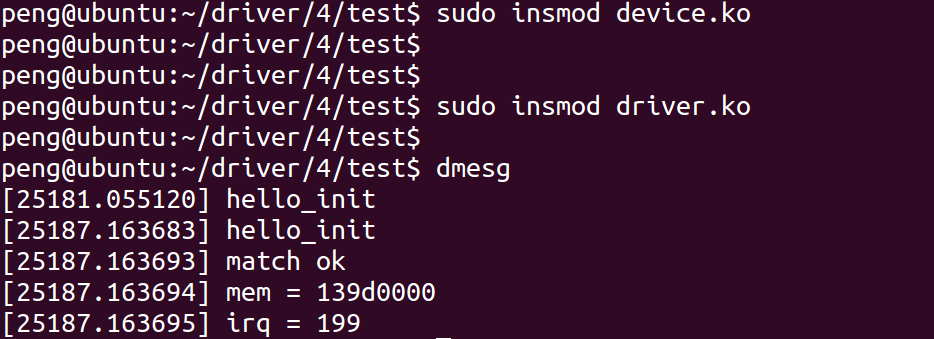
由结果可知,probe函数正确读取到了硬件信息。
四、platform_device是如何管理的?
1. 没有设备树
在没有设备树的时候,以三星Cortex-A8 s5pc100为例,硬件信息放在以下位置
archarmmach-s5pc100Mach-smdkc100.c
archarmplat-samsung
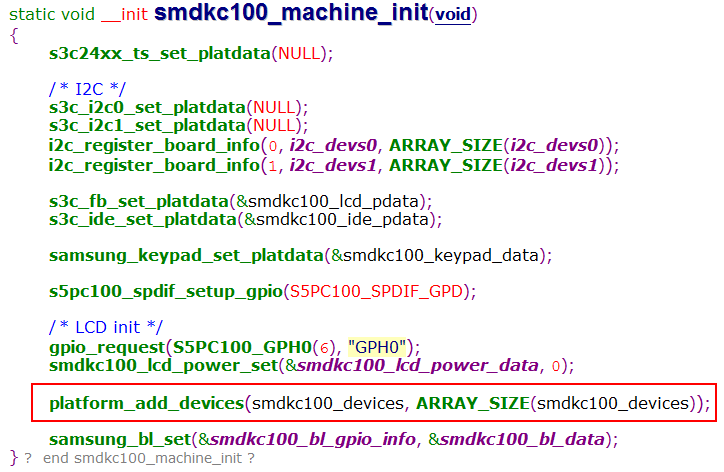
注册platform_device
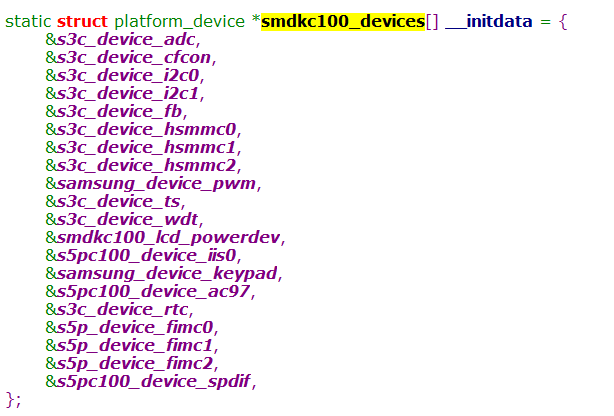
platform_device定义
该数组存放了,内核启动需要初始化的硬件的信息。
2. 如果有设备树
内核会有设备初始化的完整代码,会在内核启动的时候把设备树信息解析初始化,把硬件信息初始化到对应的链表中。在总线匹配成功后,会把硬件的信息传递给probe()函数。
四、总线相关的其他的知识点
1. 内核总线相关结构体变量
内核维护的所有的总线都需要用以下结构体注册一个变量。
struct bus_type {
const char *name;
const char *dev_name;
struct device *dev_root;
struct device_attribute *dev_attrs; /* use dev_groups instead */
const struct attribute_group **bus_groups;
const struct attribute_group **dev_groups;
const struct attribute_group **drv_groups;
int (*match)(struct device *dev, struct device_driver *drv);
int (*uevent)(struct device *dev, struct kobj_uevent_env *env);
int (*probe)(struct device *dev);
int (*remove)(struct device *dev);
void (*shutdown)(struct device *dev);
int (*online)(struct device *dev);
int (*offline)(struct device *dev);
int (*suspend)(struct device *dev, pm_message_t state);
int (*resume)(struct device *dev);
const struct dev_pm_ops *pm;
struct iommu_ops *iommu_ops;
struct subsys_private *p;
struct lock_class_key lock_key;
};
platform总线变量的定义struct bus_type platform_bus_type定义如下:
struct bus_type platform_bus_type = {
.name = “platform”,
.dev_groups = platform_dev_groups,
.match = platform_match,
.uevent = platform_uevent,
.pm = &platform_dev_pm_ops,
};
其中最重要的成员是**.match**。
当有设备的硬件信息注册到platform_bus_type 总线的时候,会遍历所有platform总线维护的驱动,通过名字来匹配,如果相同,就说明硬件信息和驱动匹配,就会调用驱动的platform_driver -》probe函数,初始化驱动的所有资源,让该驱动生效。
当有设备的驱动注册到platform_bus_type 总线的时候,会遍历所有platform总线维护的硬件信息,通过名字来匹配,如果相同,就说明硬件信息和驱动匹配,就会调用驱动的platform_driver -》probe函数,初始化驱动的所有资源,让该驱动生效。
注册位置
driversasePlatform.c
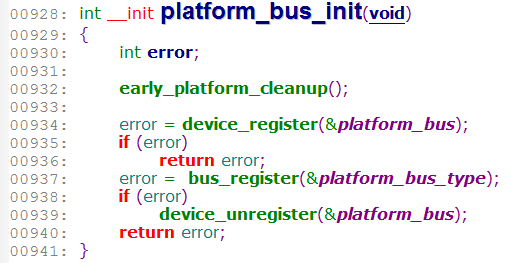
platform_bus_type的注册
五、注册代码流程详解
捋架构的好处,就是可以帮助我们定位问题
1. match函数何时被调用到?
2. probe函数何时被调用到
以下是上述两个问题代码的调用流程:
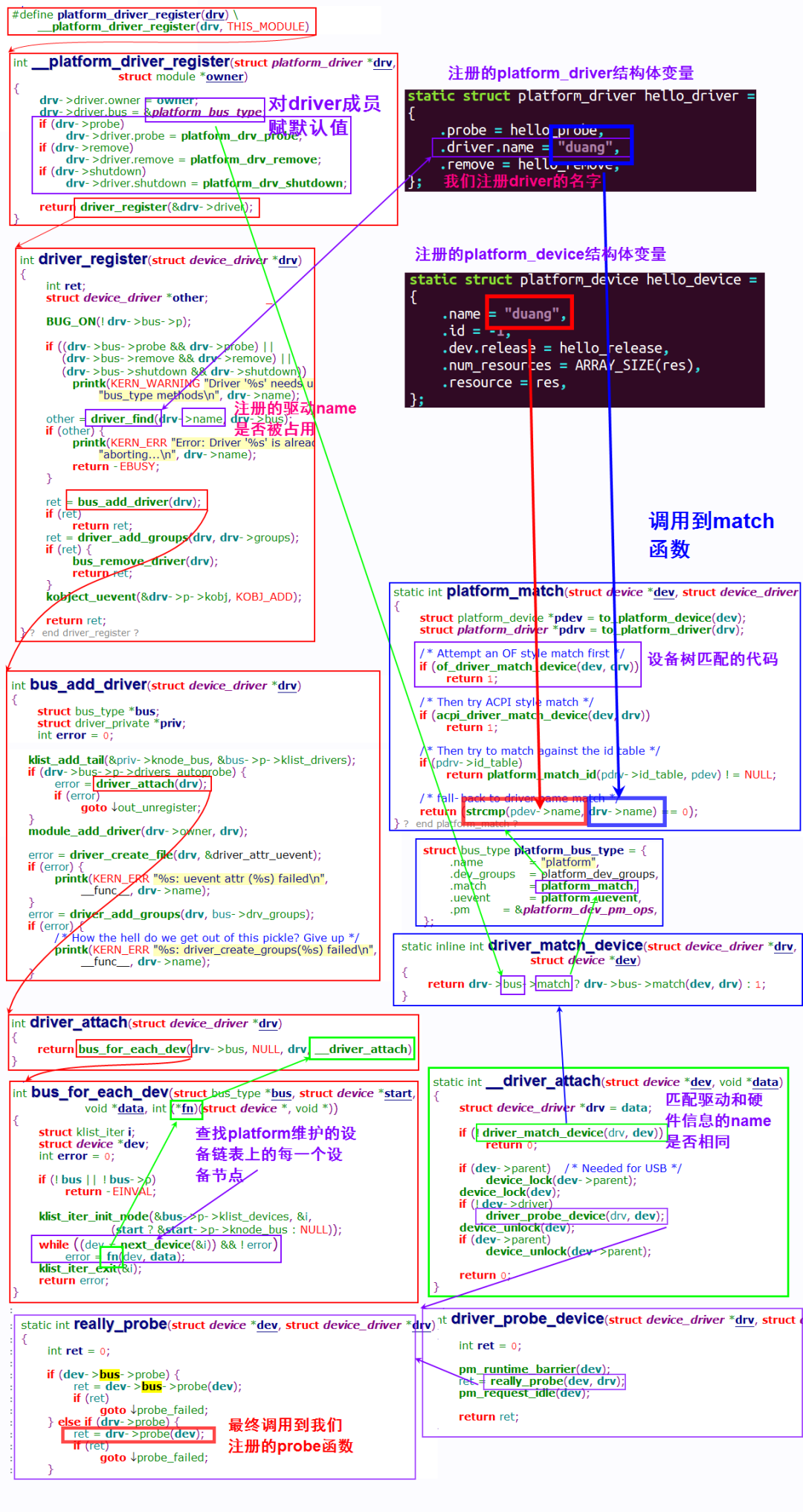
代码调用流程
原文标题:手把手教 Linux 驱动 10-platform 总线详解
文章出处:【微信公众号:Linux爱好者】欢迎添加关注!文章转载请注明出处。
责任编辑:haq
-
驱动
+关注
关注
12文章
2004浏览量
88848 -
Linux
+关注
关注
88文章
11875浏览量
220055
原文标题:手把手教 Linux 驱动 10-platform 总线详解
文章出处:【微信号:LinuxHub,微信公众号:Linux爱好者】欢迎添加关注!文章转载请注明出处。
发布评论请先 登录
RapID Platform DLR网络接口模块技术解析
探索Platform Manager Development Kit:开启电源管理设计之旅
如何创建独立于platform版本的应用
如何理解Linux内核中的PCIe驱动
Linux内核驱动开发的技术核心精要
RK平台Linux IOMMU开发:从原理到实战
【「Linux 设备驱动开发(第 2 版)」阅读体验】Linux内核平台抽线共和设备驱动程序
深度解析ES8389/ES8390/音频芯片Linux驱动(Linux6.1内核)
TDK Joystick Evaluation Platform:HAL 3900的全方位解析
【迅为工业RK3568稳定可靠】itop-3568开发板Linux驱动开发实战:RK3568内核模块符号导出详解

【免费送书】成为硬核Linux开发者:《Linux 设备驱动开发(第 2 版)》



评论