


 如何创建一个具有当前天气状况的气象站

概述
太高兴了
天气怎么样?
海龟,“高兴起来”
在此项目中,Adafruit Metro M4 Express Airlift和Tri-Color ePaper Shield可以愉快地共同创建一个具有当前天气状况的气象站
发布Metro M4 Express AirLift时发生了一件很棒的事情。它打开了Arduino草图到互联网,使它们摆脱了封闭环境的限制。现在,它正式成为物联网(IoT)世界中的“事物”。在此项目中,Metro M4 Express AirLift将从互联网上获取您当地的天气数据,并在易于阅读的ePaper显示屏上显示
与该项目一起使用的Adafruit三色ePaper Shield是一款2.7“ ePaper防护罩,显示黑色,白色和红色像素。由于接头已经在Metro和ePaper防护罩上组装好,因此无需焊接即可轻松连接到Metro。
功能
此DIY气象站显示您所在地区的天气信息ePaper显示屏上的摄氏度或华氏度单位。显示的信息包括:
当前日期
当前温度
当前天气状况
接下来的12小时的预报数据,以6小时为增量
天气图标以显示天气情况和天气预报
城市名称
显示当前和预测的高温红色
日出和日落时间
当前月相的描述和图标
零件
构建该项目无需焊接,仅使用两个零件:Adafruit Metro M4 Express AirLift Lite和Adafruit 2.7“ Tri-Color eInk/ePaper用SRAM屏蔽。要使该项目可移植,您可以添加USB电池组或Adafruit PowerBoost 500 Shield和一块Li-Po电池,然后将其插入Metro和ePaper屏蔽之间。
如果您对其他项目的ePaper显示器感兴趣,查看Adafruit的ePaper显示的整个行。
Adafruit Metro M4 Express AirLift(WiFi) -Lite
产品ID:4000
使用AirLift为您的下一个项目提供电梯-我们为这个Metro M4增添了ESP32协处理器的机智名称。您已经知道theAdafruit Metro 。..
$ 34.95
入库存
添加到购物车
Adafruit 2.7“三色电子墨水/ePaper带有Shield的SRAM
产品ID:4229
轻松的电子纸终于出现在微控制器上,这种突破的目的是使添加三色电子墨水显示器变得轻而易举。您是否看到过其中之一。..
$ 39.95
入库存
添加到购物车
USB电缆-USB A到Micro -B
产品ID:592
这是您的标准A到Micro-B USB电缆,用于USB 1.1或2.0。非常适合将PC连接到Metro,Feather, Raspberry Pi或其他开发板或。..
$ 2.95
入库存
添加到购物车
Metro M4 Express配备了AirLift协处理器板!好吧,至少对于此草图,它将获取您的本地天气并将其显示在ePaper防护板上。有许多具有天气API的站点可以获取您当地的当前状况和即将到来的预报。这些网站中有较少的网站出于非商业目的免费提供此数据。我们使用了OpenWeatherMap.com API,该API提供了有关当前状况和天气预报的免费天气数据。
对于天气和月亮图标,我们利用了Adafruit GFX库对自定义字体的支持。字体是此类显示的理想选择,因为我们需要简单,不同点大小的线形图标,这些图标在单色ePaper显示器上看起来不错。对于天气图标,我们选择了Meteocon字体集,这是一种包含40多个天气图标的免费字体。对于月相字体,我们使用了Curtis Clark的Moon Phases字体,该字体可免费用于非商业用途。字体文件需要进行转换才能与GFX库一起使用,但是请放心,我们已经以各种磅数完成了此操作,因此您可以在本项目和其他项目中使用这些字体。
月相,OpenWeatherMap在其API中不包含月相。但是,这不是问题,因为我们使用数学来计算当前的月相。我们知道,平均每29.5305882天就有一个新月。从OpenWeatherMap中获取当前日期和时间,如果我们知道新月发生的时间点,则可以计算当前日期的月相。
OpenWeatherMap中的天气数据包括当前未来天气预报的时间和时间,例如距现在3小时的天气预报。这次是UTC格式。我们需要将其转换为本地时间,这样才能准确显示时间。幸运的是,OpenWeatherMap最近将数据添加了本地时区偏移量(实际上,正如我们编写本指南一样!),因此现在可以通过采用UTC的当前时间并添加本地时区偏移量来轻松确定本地时间。
Meteoicon字体包含40多种与天气相关的字体。
下一步是将它们放在一起:获取天气数据并格式化显示。我们修改了Daniel Eichhorn出色的Weather Station项目中的部分代码,因此它并不是特定于微控制器的专有代码。这样,包括空运协处理器在内的其他处理器就可以从Internet检索天气数据。
Arduino设置
如果尚未安装,则需要在计算机上安装Arduino IDE才能将此草图上传到Metro M4 Express AirLift。在本学习指南中找到有关安装Arduino的信息。您还需要配置Metro M4 Express AirLift开发板以与Arduino IDE配合使用。 《 Adafruit学习指南》网站上有一篇很棒的文章,介绍了如何使用Arduino和其他环境设置此开发板。/span》
安装库
对于此草图,您将需要安装以下库:
Adafruit EPD(电子纸显示)库
Adafruit GFX库
Adafruit NeoPixel库
Arduino JSON库
Adafruit的变体WiFiNINA库
这些库应位于最新的Arduino IDE(1.8.7及更高版本)的Arduino库管理器中。
打开Arduino库管理器:
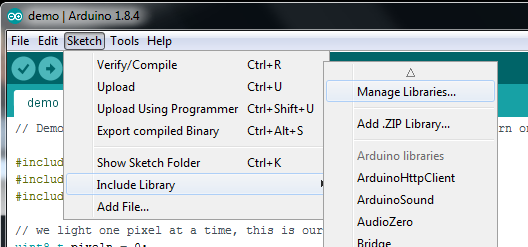
搜索 Adafruit EPD 库并安装

搜索 Adafruit GFX 库并安装它

搜索 Adafruit NeoPixel 库并安装

搜索 ArduinoJSON 库并安装

您必须通过下面的链接手动安装WiFiNina
下载Adafruit版本的WiFiNina
注册OpenWeatherMap API密钥
您需要OpenWeatherMap的API密钥才能下载来自其站点的天气数据。您可以在OpenWeatherMap.org上免费注册。免费帐户允许访问当前天气和5天/3小时天气API。
下载代码并修改secrets.h文件
此下载可在GitHub上获得。它包含天气和月相图标的代码和字体文件。
必须修改 secrets.h ,使其包括WiFi设置,OpenWeatherMap API密钥以及所在城市您需要天气数据。如果您的城市名称出现在多个国家(例如意大利威尼斯和佛罗里达州威尼斯),则可能需要包含2个字母的国家/地区代码。因此,例如,佛罗里达州的威尼斯将被输入为“美国威尼斯”。
此文件中的其他选项包括选择温度的公制或英语单位以及天气描述的语言。
下载:Project Zip 或 secrets.h | 在Github上查看
复制代码
#pragma once
// secrets.h
// Define your WIFI and OpenWeatherMap API key and location in this file
#define WIFI_SSID “{wifi ssid}”
#define WIFI_PASSWORD “{wifi password}”
#define OWM_KEY “{OpenWeatherMap.com key}”
#define OWM_LOCATION “Your City”
//example
//#define OWM_LOCATION “New York,US”
// update the weather at this interval, in minutes
#define UPDATE_INTERVAL 15
// Set to true to show temperatures in Celsius, false for Fahrenheit
#define OWM_METRIC false
// temperature will display in red at or above this temperature
// set to a high number (i.e. 》200) to not show temperatures in red
#define METRIC_HOT 32
#define ENGLISH_HOT 90
/*
Arabic - ar, Bulgarian - bg, Catalan - ca, Czech - cz, German - de, Greek - el,
English - en, Persian (Farsi) - fa, Finnish - fi, French - fr, Galician - gl,
Croatian - hr, Hungarian - hu, Italian - it, Japanese - ja, Korean - kr,
Latvian - la, Lithuanian - lt, Macedonian - mk, Dutch - nl, Polish - pl,
Portuguese - pt, Romanian - ro, Russian - ru, Swedish - se, Slovak - sk,
Slovenian - sl, Spanish - es, Turkish - tr, Ukrainian - ua, Vietnamese - vi,
Chinese Simplified - zh_cn, Chinese Traditional - zh_tw.
*/
#define OWM_LANGUAGE “en”
#pragma once
// secrets.h
// Define your WIFI and OpenWeatherMap API key and location in this file
#define WIFI_SSID “{wifi ssid}”
#define WIFI_PASSWORD “{wifi password}”
#define OWM_KEY “{OpenWeatherMap.com key}”
#define OWM_LOCATION “Your City”
//example
//#define OWM_LOCATION “New York,US”
// update the weather at this interval, in minutes
#define UPDATE_INTERVAL 15
// Set to true to show temperatures in Celsius, false for Fahrenheit
#define OWM_METRIC false
// temperature will display in red at or above this temperature
// set to a high number (i.e. 》200) to not show temperatures in red
#define METRIC_HOT 32
#define ENGLISH_HOT 90
/*
Arabic - ar, Bulgarian - bg, Catalan - ca, Czech - cz, German - de, Greek - el,
English - en, Persian (Farsi) - fa, Finnish - fi, French - fr, Galician - gl,
Croatian - hr, Hungarian - hu, Italian - it, Japanese - ja, Korean - kr,
Latvian - la, Lithuanian - lt, Macedonian - mk, Dutch - nl, Polish - pl,
Portuguese - pt, Romanian - ro, Russian - ru, Swedish - se, Slovak - sk,
Slovenian - sl, Spanish - es, Turkish - tr, Ukrainian - ua, Vietnamese - vi,
Chinese Simplified - zh_cn, Chinese Traditional - zh_tw.
*/
#define OWM_LANGUAGE “en”
下载:项目Zip 或 adafruit_epd_weather.ino | 在Github上查看
复制代码
#include
#include // Core graphics library
#include
#include
#include //https://github.com/bblanchon/ArduinoJson
#include
#include
#include “secrets.h”
#include “OpenWeatherMap.h”
#include “Fonts/meteocons48pt7b.h”
#include “Fonts/meteocons24pt7b.h”
#include “Fonts/meteocons20pt7b.h”
#include “Fonts/meteocons16pt7b.h”
#include “Fonts/moon_phases20pt7b.h”
#include “Fonts/moon_phases36pt7b.h”
#include
#include
#include
#include
#include
#define SRAM_CS 8
#define EPD_CS 10
#define EPD_DC 9
#define EPD_RESET -1
#define EPD_BUSY -1
#define NEOPIXELPIN 40
// This is for the 2.7“ tricolor EPD
Adafruit_IL91874 gfx(264, 176 ,EPD_DC, EPD_RESET, EPD_CS, SRAM_CS, EPD_BUSY);
AirliftOpenWeatherMap owclient(&Serial);
OpenWeatherMapCurrentData owcdata;
OpenWeatherMapForecastData owfdata[3];
Adafruit_NeoPixel neopixel = Adafruit_NeoPixel(1, NEOPIXELPIN, NEO_GRB + NEO_KHZ800);
const char *moonphasenames[29] = {
”New Moon“,
”Waxing Crescent“,
”Waxing Crescent“,
”Waxing Crescent“,
”Waxing Crescent“,
”Waxing Crescent“,
”Waxing Crescent“,
”Quarter“,
”Waxing Gibbous“,
”Waxing Gibbous“,
”Waxing Gibbous“,
”Waxing Gibbous“,
”Waxing Gibbous“,
”Waxing Gibbous“,
”Full Moon“,
”Waning Gibbous“,
”Waning Gibbous“,
”Waning Gibbous“,
”Waning Gibbous“,
”Waning Gibbous“,
”Waning Gibbous“,
”Last Quarter“,
”Waning Crescent“,
”Waning Crescent“,
”Waning Crescent“,
”Waning Crescent“,
”Waning Crescent“,
”Waning Crescent“,
”Waning Crescent“
};
int8_t readButtons(void) {
uint16_t reading = analogRead(A3);
//Serial.println(reading);
if (reading 》 600) {
return 0; // no buttons pressed
}
if (reading 》 400) {
return 4; // button D pressed
}
if (reading 》 250) {
return 3; // button C pressed
}
if (reading 》 125) {
return 2; // button B pressed
}
return 1; // Button A pressed
}
bool wifi_connect(){
Serial.print(”Connecting to WiFi.。. “);
WiFi.setPins(SPIWIFI_SS, SPIWIFI_ACK, ESP32_RESETN, ESP32_GPIO0, &SPIWIFI);
// check for the WiFi module:
if(WiFi.status() == WL_NO_MODULE) {
Serial.println(”Communication with WiFi module failed!“);
displayError(”Communication with WiFi module failed!“);
while(true);
}
String fv = WiFi.firmwareVersion();
if (fv 《 ”1.0.0“) {
Serial.println(”Please upgrade the firmware“);
}
neopixel.setPixelColor(0, neopixel.Color(0, 0, 255));
neopixel.show();
if(WiFi.begin(WIFI_SSID, WIFI_PASSWORD) == WL_CONNECT_FAILED)
{
Serial.println(”WiFi connection failed!“);
displayError(”WiFi connection failed!“);
return false;
}
int wifitimeout = 15;
int wifistatus;
while ((wifistatus = WiFi.status()) != WL_CONNECTED && wifitimeout 》 0) {
delay(1000);
Serial.print(”。“);
wifitimeout--;
}
if(wifitimeout == 0)
{
Serial.println(”WiFi connection timeout with error “ + String(wifistatus));
displayError(”WiFi connection timeout with error “ + String(wifistatus));
neopixel.setPixelColor(0, neopixel.Color(0, 0, 0));
neopixel.show();
return false;
}
neopixel.setPixelColor(0, neopixel.Color(0, 0, 0));
neopixel.show();
Serial.println(”Connected“);
return true;
}
void wget(String &url, int port, char *buff)
{
int pos1 = url.indexOf(”/“,0);
int pos2 = url.indexOf(”/“,8);
String host = url.substring(pos1+2,pos2);
String path = url.substring(pos2);
Serial.println(”to wget(“ + host + ”,“ + path + ”,“ + port + ”)“);
wget(host, path, port, buff);
}
void wget(String &host, String &path, int port, char *buff)
{
//WiFiSSLClient client;
WiFiClient client;
neopixel.setPixelColor(0, neopixel.Color(0, 0, 255));
neopixel.show();
client.stop();
if (client.connect(host.c_str(), port)) {
Serial.println(”connected to server“);
// Make a HTTP request:
client.println(String(”GET “) + path + String(” HTTP/1.0“));
client.println(”Host: “ + host);
client.println(”Connection: close“);
client.println();
uint32_t bytes = 0;
int capturepos = 0;
bool capture = false;
int linelength = 0;
char lastc = ‘’;
while(true)
{
while (client.available()) {
char c = client.read();
//Serial.print(c);
if((c == ‘ ’) && (lastc == ‘ ’))
{
if(linelength == 0)
{
capture = true;
}
linelength = 0;
}
else if(capture)
{
buff[capturepos++] = c;
//Serial.write(c);
}
else
{
if((c != ‘ ’) && (c != ‘ ’))
linelength++;
}
lastc = c;
bytes++;
}
// if the server‘s disconnected, stop the client:
if (!client.connected()) {
//Serial.println();
Serial.println(”disconnecting from server.“);
client.stop();
buff[capturepos] = ’‘;
Serial.println(”captured “ + String(capturepos) + ” bytes“);
break;
}
}
}
else
{
Serial.println(”problem connecting to “ + host + ”:“ + String(port));
buff[0] = ’‘;
}
neopixel.setPixelColor(0, neopixel.Color(0, 0, 0));
neopixel.show();
}
int getStringLength(String s)
{
int16_t x = 0, y = 0;
uint16_t w, h;
gfx.getTextBounds(s, 0, 0, &x, &y, &w, &h);
return w + x;
}
/*
return value is percent of moon cycle ( from 0.0 to 0.999999), i.e.:
0.0: New Moon
0.125: Waxing Crescent Moon
0.25: Quarter Moon
0.375: Waxing Gibbous Moon
0.5: Full Moon
0.625: Waning Gibbous Moon
0.75: Last Quarter Moon
0.875: Waning Crescent Moon
*/
float getMoonPhase(time_t tdate)
{
time_t newmoonref = 1263539460; //known new moon date (2010-01-15 07:11)
// moon phase is 29.5305882 days, which is 2551442.82048 seconds
float phase = abs( tdate - newmoonref) / (double)2551442.82048;
phase -= (int)phase; // leave only the remainder
if(newmoonref 》 tdate)
phase = 1 - phase;
return phase;
}
void displayError(String str)
{
// show error on display
neopixel.setPixelColor(0, neopixel.Color(255, 0, 0));
neopixel.show();
Serial.println(str);
gfx.setTextColor(EPD_BLACK);
gfx.powerUp();
gfx.clearBuffer();
gfx.setTextWrap(true);
gfx.setCursor(10,60);
gfx.setFont(&FreeSans12pt7b);
gfx.print(str);
gfx.display();
neopixel.setPixelColor(0, neopixel.Color(0, 0, 0));
neopixel.show();
}
void displayHeading(OpenWeatherMapCurrentData &owcdata)
{
time_t local = owcdata.observationTime + owcdata.timezone;
struct tm *timeinfo = gmtime(&local);
char datestr[80];
// date
//strftime(datestr,80,”%a, %d %b %Y“,timeinfo);
strftime(datestr,80,”%a, %b %d“,timeinfo);
gfx.setFont(&FreeSans18pt7b);
gfx.setCursor((gfx.width()-getStringLength(datestr))/2,30);
gfx.print(datestr);
// city
strftime(datestr,80,”%A“,timeinfo);
gfx.setFont(&FreeSansBold12pt7b);
gfx.setCursor((gfx.width()-getStringLength(owcdata.cityName))/2,60);
gfx.print(owcdata.cityName);
}
void displayForecastDays(OpenWeatherMapCurrentData &owcdata, OpenWeatherMapForecastData owfdata[], int count = 3)
{
for(int i=0; i 《 count; i++)
{
// day
time_t local = owfdata[i].observationTime + owcdata.timezone;
struct tm *timeinfo = gmtime(&local);
char strbuff[80];
strftime(strbuff,80,”%I“,timeinfo);
String datestr = String(atoi(strbuff));
strftime(strbuff,80,”%p“,timeinfo);
// convert AM/PM to lowercase
strbuff[0] = tolower(strbuff[0]);
strbuff[1] = tolower(strbuff[1]);
datestr = datestr + ” “ + String(strbuff);
gfx.setFont(&FreeSans9pt7b);
gfx.setCursor(i*gfx.width()/3 + (gfx.width()/3-getStringLength(datestr))/2,94);
gfx.print(datestr);
// weather icon
String wicon = owclient.getMeteoconIcon(owfdata[i].icon);
gfx.setFont(&meteocons20pt7b);
gfx.setCursor(i*gfx.width()/3 + (gfx.width()/3-getStringLength(wicon))/2,134);
gfx.print(wicon);
// weather main description
gfx.setFont(&FreeSans9pt7b);
gfx.setCursor(i*gfx.width()/3 + (gfx.width()/3-getStringLength(owfdata[i].main))/2,154);
gfx.print(owfdata[i].main);
// temperature
int itemp = (int)(owfdata[i].temp + .5);
int color = EPD_BLACK;
if((OWM_METRIC && itemp 》= METRIC_HOT)|| (!OWM_METRIC && itemp 》= ENGLISH_HOT))
color = EPD_RED;
gfx.setTextColor(color);
gfx.setFont(&FreeSans9pt7b);
gfx.setCursor(i*gfx.width()/3 + (gfx.width()/3-getStringLength(String(itemp)))/2,172);
gfx.print(itemp);
gfx.drawCircle(i*gfx.width()/3 + (gfx.width()/3-getStringLength(String(itemp)))/2 + getStringLength(String(itemp)) + 6,163,3,color);
gfx.drawCircle(i*gfx.width()/3 + (gfx.width()/3-getStringLength(String(itemp)))/2 + getStringLength(String(itemp)) + 6,163,2,color);
gfx.setTextColor(EPD_BLACK);
}
}
void displayForecast(OpenWeatherMapCurrentData &owcdata, OpenWeatherMapForecastData owfdata[], int count = 3)
{
gfx.powerUp();
gfx.clearBuffer();
neopixel.setPixelColor(0, neopixel.Color(0, 255, 0));
neopixel.show();
gfx.setTextColor(EPD_BLACK);
displayHeading(owcdata);
displayForecastDays(owcdata, owfdata, count);
gfx.display();
gfx.powerDown();
neopixel.setPixelColor(0, neopixel.Color(0, 0, 0));
neopixel.show();
}
void displayAllWeather(OpenWeatherMapCurrentData &owcdata, OpenWeatherMapForecastData owfdata[], int count = 3)
{
gfx.powerUp();
gfx.clearBuffer();
neopixel.setPixelColor(0, neopixel.Color(0, 255, 0));
neopixel.show();
gfx.setTextColor(EPD_BLACK);
// date string
time_t local = owcdata.observationTime + owcdata.timezone;
struct tm *timeinfo = gmtime(&local);
char datestr[80];
// date
//strftime(datestr,80,”%a, %d %b %Y“,timeinfo);
strftime(datestr,80,”%a, %b %d %Y“,timeinfo);
gfx.setFont(&FreeSans9pt7b);
gfx.setCursor((gfx.width()-getStringLength(datestr))/2,14);
gfx.print(datestr);
// weather icon
String wicon = owclient.getMeteoconIcon(owcdata.icon);
gfx.setFont(&meteocons24pt7b);
gfx.setCursor((gfx.width()/3-getStringLength(wicon))/2,56);
gfx.print(wicon);
// weather main description
gfx.setFont(&FreeSans9pt7b);
gfx.setCursor((gfx.width()/3-getStringLength(owcdata.main))/2,72);
gfx.print(owcdata.main);
// temperature
gfx.setFont(&FreeSansBold24pt7b);
int itemp = owcdata.temp + .5;
int color = EPD_BLACK;
if((OWM_METRIC && (int)itemp 》= METRIC_HOT)|| (!OWM_METRIC && (int)itemp 》= ENGLISH_HOT))
color = EPD_RED;
gfx.setTextColor(color);
gfx.setCursor(gfx.width()/3 + (gfx.width()/3-getStringLength(String(itemp)))/2,58);
gfx.print(itemp);
gfx.setTextColor(EPD_BLACK);
// draw temperature degree as a circle (not available as font character
gfx.drawCircle(gfx.width()/3 + (gfx.width()/3 + getStringLength(String(itemp)))/2 + 8, 58-30,4,color);
gfx.drawCircle(gfx.width()/3 + (gfx.width()/3 + getStringLength(String(itemp)))/2 + 8, 58-30,3,color);
// draw moon
// draw Moon Phase
float moonphase = getMoonPhase(owcdata.observationTime);
int moonage = 29.5305882 * moonphase;
//Serial.println(”moon age: “ + String(moonage));
// convert to appropriate icon
String moonstr = String((char)((int)’A‘ + (int)(moonage*25./30)));
gfx.setFont(&moon_phases20pt7b);
// font lines look a little thin at this size, drawing it a few times to thicken the lines
gfx.setCursor(2*gfx.width()/3 + (gfx.width()/3-getStringLength(moonstr))/2,56);
gfx.print(moonstr);
gfx.setCursor(2*gfx.width()/3 + (gfx.width()/3-getStringLength(moonstr))/2+1,56);
gfx.print(moonstr);
gfx.setCursor(2*gfx.width()/3 + (gfx.width()/3-getStringLength(moonstr))/2,56-1);
gfx.print(moonstr);
// draw moon phase name
int currentphase = moonphase * 28. + .5;
gfx.setFont(); // system font (smallest available)
gfx.setCursor(2*gfx.width()/3 + max(0,(gfx.width()/3 - getStringLength(moonphasenames[currentphase]))/2),62);
gfx.print(moonphasenames[currentphase]);
displayForecastDays(owcdata, owfdata, count);
gfx.display();
gfx.powerDown();
neopixel.setPixelColor(0, neopixel.Color(0, 0, 0));
neopixel.show();
}
void displayCurrentConditions(OpenWeatherMapCurrentData &owcdata)
{
gfx.powerUp();
gfx.clearBuffer();
neopixel.setPixelColor(0, neopixel.Color(0, 255, 0));
neopixel.show();
gfx.setTextColor(EPD_BLACK);
displayHeading(owcdata);
// weather icon
String wicon = owclient.getMeteoconIcon(owcdata.icon);
gfx.setFont(&meteocons48pt7b);
gfx.setCursor((gfx.width()/2-getStringLength(wicon))/2,156);
gfx.print(wicon);
// weather main description
gfx.setFont(&FreeSans9pt7b);
gfx.setCursor(gfx.width()/2 + (gfx.width()/2-getStringLength(owcdata.main))/2,160);
gfx.print(owcdata.main);
// temperature
gfx.setFont(&FreeSansBold24pt7b);
int itemp = owcdata.temp + .5;
int color = EPD_BLACK;
if((OWM_METRIC && (int)itemp 》= METRIC_HOT)|| (!OWM_METRIC && (int)itemp 》= ENGLISH_HOT))
color = EPD_RED;
gfx.setTextColor(color);
gfx.setCursor(gfx.width()/2 + (gfx.width()/2-getStringLength(String(itemp)))/2,130);
gfx.print(itemp);
gfx.setTextColor(EPD_BLACK);
// draw temperature degree as a circle (not available as font character
gfx.drawCircle(gfx.width()/2 + (gfx.width()/2 + getStringLength(String(itemp)))/2 + 10, 130-26,4,color);
gfx.drawCircle(gfx.width()/2 + (gfx.width()/2 + getStringLength(String(itemp)))/2 + 10, 130-26,3,color);
gfx.display();
gfx.powerDown();
neopixel.setPixelColor(0, neopixel.Color(0, 0, 0));
neopixel.show();
}
void displaySunMoon(OpenWeatherMapCurrentData &owcdata)
{
gfx.powerUp();
gfx.clearBuffer();
neopixel.setPixelColor(0, neopixel.Color(0, 255, 0));
neopixel.show();
gfx.setTextColor(EPD_BLACK);
displayHeading(owcdata);
// draw Moon Phase
float moonphase = getMoonPhase(owcdata.observationTime);
int moonage = 29.5305882 * moonphase;
// convert to appropriate icon
String moonstr = String((char)((int)’A‘ + (int)(moonage*25./30)));
gfx.setFont(&moon_phases36pt7b);
gfx.setCursor((gfx.width()/3-getStringLength(moonstr))/2,140);
gfx.print(moonstr);
// draw moon phase name
int currentphase = moonphase * 28. + .5;
gfx.setFont(&FreeSans9pt7b);
gfx.setCursor(gfx.width()/3 + max(0,(gfx.width()*2/3 - getStringLength(moonphasenames[currentphase]))/2),110);
gfx.print(moonphasenames[currentphase]);
// draw sunrise/sunset
// sunrise/sunset times
// sunrise
time_t local = owcdata.sunrise + owcdata.timezone + 30; // round to nearest minute
struct tm *timeinfo = gmtime(&local);
char strbuff[80];
strftime(strbuff,80,”%I“,timeinfo);
String datestr = String(atoi(strbuff));
strftime(strbuff,80,”:%M %p“,timeinfo);
datestr = datestr + String(strbuff) + ” - “;
// sunset
local = owcdata.sunset + owcdata.timezone + 30; // round to nearest minute
timeinfo = gmtime(&local);
strftime(strbuff,80,”%I“,timeinfo);
datestr = datestr + String(atoi(strbuff));
strftime(strbuff,80,”:%M %p“,timeinfo);
datestr = datestr + String(strbuff);
gfx.setFont(&FreeSans9pt7b);
int datestrlen = getStringLength(datestr);
int xpos = (gfx.width() - datestrlen)/2;
gfx.setCursor(xpos,166);
gfx.print(datestr);
// draw sunrise icon
// sun icon is ”B“
String wicon = ”B“;
gfx.setFont(&meteocons16pt7b);
gfx.setCursor(xpos - getStringLength(wicon) - 12,174);
gfx.print(wicon);
// draw sunset icon
// sunset icon is ”A“
wicon = ”A“;
gfx.setCursor(xpos + datestrlen + 12,174);
gfx.print(wicon);
gfx.display();
gfx.powerDown();
neopixel.setPixelColor(0, neopixel.Color(0, 0, 0));
neopixel.show();
}
void setup() {
neopixel.begin();
neopixel.show();
gfx.begin();
Serial.println(”ePaper display initialized“);
gfx.setRotation(2);
gfx.setTextWrap(false);
}
void loop() {
char data[4000];
static uint32_t timer = millis();
static uint8_t lastbutton = 1;
static bool firsttime = true;
int button = readButtons();
// update weather data at specified interval or when button 4 is pressed
if((millis() 》= (timer + 1000*60*UPDATE_INTERVAL)) || (button == 4) || firsttime)
{
Serial.println(”getting weather data“);
firsttime = false;
timer = millis();
int retry = 6;
while(!wifi_connect())
{
delay(5000);
retry--;
if(retry 《 0)
{
displayError(”Can not connect to WiFi, press reset to restart“);
while(1);
}
}
String urlc = owclient.buildUrlCurrent(OWM_KEY,OWM_LOCATION);
Serial.println(urlc);
retry = 6;
do
{
retry--;
wget(urlc,80,data);
if(strlen(data) == 0 && retry 《 0)
{
displayError(”Can not get weather data, press reset to restart“);
while(1);
}
}
while(strlen(data) == 0);
Serial.println(”data retrieved:“);
Serial.println(data);
retry = 6;
while(!owclient.updateCurrent(owcdata,data))
{
retry--;
if(retry 《 0)
{
displayError(owclient.getError());
while(1);
}
delay(5000);
}
String urlf = owclient.buildUrlForecast(OWM_KEY,OWM_LOCATION);
Serial.println(urlf);
wget(urlf,80,data);
Serial.println(”data retrieved:“);
Serial.println(data);
if(!owclient.updateForecast(owfdata[0],data,0))
{
displayError(owclient.getError());
while(1);
}
if(!owclient.updateForecast(owfdata[1],data,2))
{
displayError(owclient.getError());
while(1);
}
if(!owclient.updateForecast(owfdata[2],data,4))
{
displayError(owclient.getError());
while(1);
}
switch(lastbutton)
{
case 1:
displayAllWeather(owcdata,owfdata,3);
break;
case 2:
displayCurrentConditions(owcdata);
break;
case 3:
displaySunMoon(owcdata);
break;
}
}
if (button == 0) {
return;
}
Serial.print(”Button “); Serial.print(button); Serial.println(” pressed“);
if (button == 1) {
displayAllWeather(owcdata,owfdata,3);
lastbutton = button;
}
if (button == 2) {
//displayForecast(owcdata,owfdata,3);
displayCurrentConditions(owcdata);
lastbutton = button;
}
if (button == 3) {
displaySunMoon(owcdata);
lastbutton = button;
}
// wait until button is released
while (readButtons()) {
delay(10);
}
}
#include
#include // Core graphics library
#include
#include
#include //https://github.com/bblanchon/ArduinoJson
#include
#include
#include ”secrets.h“
#include ”OpenWeatherMap.h“
#include ”Fonts/meteocons48pt7b.h“
#include ”Fonts/meteocons24pt7b.h“
#include ”Fonts/meteocons20pt7b.h“
#include ”Fonts/meteocons16pt7b.h“
#include ”Fonts/moon_phases20pt7b.h“
#include ”Fonts/moon_phases36pt7b.h“
#include
#include
#include
#include
#include
#define SRAM_CS 8
#define EPD_CS 10
#define EPD_DC 9
#define EPD_RESET -1
#define EPD_BUSY -1
#define NEOPIXELPIN 40
// This is for the 2.7” tricolor EPD
Adafruit_IL91874 gfx(264, 176 ,EPD_DC, EPD_RESET, EPD_CS, SRAM_CS, EPD_BUSY);
AirliftOpenWeatherMap owclient(&Serial);
OpenWeatherMapCurrentData owcdata;
OpenWeatherMapForecastData owfdata[3];
Adafruit_NeoPixel neopixel = Adafruit_NeoPixel(1, NEOPIXELPIN, NEO_GRB + NEO_KHZ800);
const char *moonphasenames[29] = {
“New Moon”,
“Waxing Crescent”,
“Waxing Crescent”,
“Waxing Crescent”,
“Waxing Crescent”,
“Waxing Crescent”,
“Waxing Crescent”,
“Quarter”,
“Waxing Gibbous”,
“Waxing Gibbous”,
“Waxing Gibbous”,
“Waxing Gibbous”,
“Waxing Gibbous”,
“Waxing Gibbous”,
“Full Moon”,
“Waning Gibbous”,
“Waning Gibbous”,
“Waning Gibbous”,
“Waning Gibbous”,
“Waning Gibbous”,
“Waning Gibbous”,
“Last Quarter”,
“Waning Crescent”,
“Waning Crescent”,
“Waning Crescent”,
“Waning Crescent”,
“Waning Crescent”,
“Waning Crescent”,
“Waning Crescent”
};
int8_t readButtons(void) {
uint16_t reading = analogRead(A3);
//Serial.println(reading);
if (reading 》 600) {
return 0; // no buttons pressed
}
if (reading 》 400) {
return 4; // button D pressed
}
if (reading 》 250) {
return 3; // button C pressed
}
if (reading 》 125) {
return 2; // button B pressed
}
return 1; // Button A pressed
}
bool wifi_connect(){
Serial.print(“Connecting to WiFi.。. ”);
WiFi.setPins(SPIWIFI_SS, SPIWIFI_ACK, ESP32_RESETN, ESP32_GPIO0, &SPIWIFI);
// check for the WiFi module:
if(WiFi.status() == WL_NO_MODULE) {
Serial.println(“Communication with WiFi module failed!”);
displayError(“Communication with WiFi module failed!”);
while(true);
}
String fv = WiFi.firmwareVersion();
if (fv 《 “1.0.0”) {
Serial.println(“Please upgrade the firmware”);
}
neopixel.setPixelColor(0, neopixel.Color(0, 0, 255));
neopixel.show();
if(WiFi.begin(WIFI_SSID, WIFI_PASSWORD) == WL_CONNECT_FAILED)
{
Serial.println(“WiFi connection failed!”);
displayError(“WiFi connection failed!”);
return false;
}
int wifitimeout = 15;
int wifistatus;
while ((wifistatus = WiFi.status()) != WL_CONNECTED && wifitimeout 》 0) {
delay(1000);
Serial.print(“。”);
wifitimeout--;
}
if(wifitimeout == 0)
{
Serial.println(“WiFi connection timeout with error ” + String(wifistatus));
displayError(“WiFi connection timeout with error ” + String(wifistatus));
neopixel.setPixelColor(0, neopixel.Color(0, 0, 0));
neopixel.show();
return false;
}
neopixel.setPixelColor(0, neopixel.Color(0, 0, 0));
neopixel.show();
Serial.println(“Connected”);
return true;
}
void wget(String &url, int port, char *buff)
{
int pos1 = url.indexOf(“/”,0);
int pos2 = url.indexOf(“/”,8);
String host = url.substring(pos1+2,pos2);
String path = url.substring(pos2);
Serial.println(“to wget(” + host + “,” + path + “,” + port + “)”);
wget(host, path, port, buff);
}
void wget(String &host, String &path, int port, char *buff)
{
//WiFiSSLClient client;
WiFiClient client;
neopixel.setPixelColor(0, neopixel.Color(0, 0, 255));
neopixel.show();
client.stop();
if (client.connect(host.c_str(), port)) {
Serial.println(“connected to server”);
// Make a HTTP request:
client.println(String(“GET ”) + path + String(“ HTTP/1.0”));
client.println(“Host: ” + host);
client.println(“Connection: close”);
client.println();
uint32_t bytes = 0;
int capturepos = 0;
bool capture = false;
int linelength = 0;
char lastc = ’‘;
while(true)
{
while (client.available()) {
char c = client.read();
//Serial.print(c);
if((c == ’ ‘) && (lastc == ’ ‘))
{
if(linelength == 0)
{
capture = true;
}
linelength = 0;
}
else if(capture)
{
buff[capturepos++] = c;
//Serial.write(c);
}
else
{
if((c != ’ ‘) && (c != ’ ‘))
linelength++;
}
lastc = c;
bytes++;
}
// if the server’s disconnected, stop the client:
if (!client.connected()) {
//Serial.println();
Serial.println(“disconnecting from server.”);
client.stop();
buff[capturepos] = ‘’;
Serial.println(“captured ” + String(capturepos) + “ bytes”);
break;
}
}
}
else
{
Serial.println(“problem connecting to ” + host + “:” + String(port));
buff[0] = ‘’;
}
neopixel.setPixelColor(0, neopixel.Color(0, 0, 0));
neopixel.show();
}
int getStringLength(String s)
{
int16_t x = 0, y = 0;
uint16_t w, h;
gfx.getTextBounds(s, 0, 0, &x, &y, &w, &h);
return w + x;
}
/*
return value is percent of moon cycle ( from 0.0 to 0.999999), i.e.:
0.0: New Moon
0.125: Waxing Crescent Moon
0.25: Quarter Moon
0.375: Waxing Gibbous Moon
0.5: Full Moon
0.625: Waning Gibbous Moon
0.75: Last Quarter Moon
0.875: Waning Crescent Moon
*/
float getMoonPhase(time_t tdate)
{
time_t newmoonref = 1263539460; //known new moon date (2010-01-15 07:11)
// moon phase is 29.5305882 days, which is 2551442.82048 seconds
float phase = abs( tdate - newmoonref) / (double)2551442.82048;
phase -= (int)phase; // leave only the remainder
if(newmoonref 》 tdate)
phase = 1 - phase;
return phase;
}
void displayError(String str)
{
// show error on display
neopixel.setPixelColor(0, neopixel.Color(255, 0, 0));
neopixel.show();
Serial.println(str);
gfx.setTextColor(EPD_BLACK);
gfx.powerUp();
gfx.clearBuffer();
gfx.setTextWrap(true);
gfx.setCursor(10,60);
gfx.setFont(&FreeSans12pt7b);
gfx.print(str);
gfx.display();
neopixel.setPixelColor(0, neopixel.Color(0, 0, 0));
neopixel.show();
}
void displayHeading(OpenWeatherMapCurrentData &owcdata)
{
time_t local = owcdata.observationTime + owcdata.timezone;
struct tm *timeinfo = gmtime(&local);
char datestr[80];
// date
//strftime(datestr,80,“%a, %d %b %Y”,timeinfo);
strftime(datestr,80,“%a, %b %d”,timeinfo);
gfx.setFont(&FreeSans18pt7b);
gfx.setCursor((gfx.width()-getStringLength(datestr))/2,30);
gfx.print(datestr);
// city
strftime(datestr,80,“%A”,timeinfo);
gfx.setFont(&FreeSansBold12pt7b);
gfx.setCursor((gfx.width()-getStringLength(owcdata.cityName))/2,60);
gfx.print(owcdata.cityName);
}
void displayForecastDays(OpenWeatherMapCurrentData &owcdata, OpenWeatherMapForecastData owfdata[], int count = 3)
{
for(int i=0; i 《 count; i++)
{
// day
time_t local = owfdata[i].observationTime + owcdata.timezone;
struct tm *timeinfo = gmtime(&local);
char strbuff[80];
strftime(strbuff,80,“%I”,timeinfo);
String datestr = String(atoi(strbuff));
strftime(strbuff,80,“%p”,timeinfo);
// convert AM/PM to lowercase
strbuff[0] = tolower(strbuff[0]);
strbuff[1] = tolower(strbuff[1]);
datestr = datestr + “ ” + String(strbuff);
gfx.setFont(&FreeSans9pt7b);
gfx.setCursor(i*gfx.width()/3 + (gfx.width()/3-getStringLength(datestr))/2,94);
gfx.print(datestr);
// weather icon
String wicon = owclient.getMeteoconIcon(owfdata[i].icon);
gfx.setFont(&meteocons20pt7b);
gfx.setCursor(i*gfx.width()/3 + (gfx.width()/3-getStringLength(wicon))/2,134);
gfx.print(wicon);
// weather main description
gfx.setFont(&FreeSans9pt7b);
gfx.setCursor(i*gfx.width()/3 + (gfx.width()/3-getStringLength(owfdata[i].main))/2,154);
gfx.print(owfdata[i].main);
// temperature
int itemp = (int)(owfdata[i].temp + .5);
int color = EPD_BLACK;
if((OWM_METRIC && itemp 》= METRIC_HOT)|| (!OWM_METRIC && itemp 》= ENGLISH_HOT))
color = EPD_RED;
gfx.setTextColor(color);
gfx.setFont(&FreeSans9pt7b);
gfx.setCursor(i*gfx.width()/3 + (gfx.width()/3-getStringLength(String(itemp)))/2,172);
gfx.print(itemp);
gfx.drawCircle(i*gfx.width()/3 + (gfx.width()/3-getStringLength(String(itemp)))/2 + getStringLength(String(itemp)) + 6,163,3,color);
gfx.drawCircle(i*gfx.width()/3 + (gfx.width()/3-getStringLength(String(itemp)))/2 + getStringLength(String(itemp)) + 6,163,2,color);
gfx.setTextColor(EPD_BLACK);
}
}
void displayForecast(OpenWeatherMapCurrentData &owcdata, OpenWeatherMapForecastData owfdata[], int count = 3)
{
gfx.powerUp();
gfx.clearBuffer();
neopixel.setPixelColor(0, neopixel.Color(0, 255, 0));
neopixel.show();
gfx.setTextColor(EPD_BLACK);
displayHeading(owcdata);
displayForecastDays(owcdata, owfdata, count);
gfx.display();
gfx.powerDown();
neopixel.setPixelColor(0, neopixel.Color(0, 0, 0));
neopixel.show();
}
void displayAllWeather(OpenWeatherMapCurrentData &owcdata, OpenWeatherMapForecastData owfdata[], int count = 3)
{
gfx.powerUp();
gfx.clearBuffer();
neopixel.setPixelColor(0, neopixel.Color(0, 255, 0));
neopixel.show();
gfx.setTextColor(EPD_BLACK);
// date string
time_t local = owcdata.observationTime + owcdata.timezone;
struct tm *timeinfo = gmtime(&local);
char datestr[80];
// date
//strftime(datestr,80,“%a, %d %b %Y”,timeinfo);
strftime(datestr,80,“%a, %b %d %Y”,timeinfo);
gfx.setFont(&FreeSans9pt7b);
gfx.setCursor((gfx.width()-getStringLength(datestr))/2,14);
gfx.print(datestr);
// weather icon
String wicon = owclient.getMeteoconIcon(owcdata.icon);
gfx.setFont(&meteocons24pt7b);
gfx.setCursor((gfx.width()/3-getStringLength(wicon))/2,56);
gfx.print(wicon);
// weather main description
gfx.setFont(&FreeSans9pt7b);
gfx.setCursor((gfx.width()/3-getStringLength(owcdata.main))/2,72);
gfx.print(owcdata.main);
// temperature
gfx.setFont(&FreeSansBold24pt7b);
int itemp = owcdata.temp + .5;
int color = EPD_BLACK;
if((OWM_METRIC && (int)itemp 》= METRIC_HOT)|| (!OWM_METRIC && (int)itemp 》= ENGLISH_HOT))
color = EPD_RED;
gfx.setTextColor(color);
gfx.setCursor(gfx.width()/3 + (gfx.width()/3-getStringLength(String(itemp)))/2,58);
gfx.print(itemp);
gfx.setTextColor(EPD_BLACK);
// draw temperature degree as a circle (not available as font character
gfx.drawCircle(gfx.width()/3 + (gfx.width()/3 + getStringLength(String(itemp)))/2 + 8, 58-30,4,color);
gfx.drawCircle(gfx.width()/3 + (gfx.width()/3 + getStringLength(String(itemp)))/2 + 8, 58-30,3,color);
// draw moon
// draw Moon Phase
float moonphase = getMoonPhase(owcdata.observationTime);
int moonage = 29.5305882 * moonphase;
//Serial.println(“moon age: ” + String(moonage));
// convert to appropriate icon
String moonstr = String((char)((int)‘A’ + (int)(moonage*25./30)));
gfx.setFont(&moon_phases20pt7b);
// font lines look a little thin at this size, drawing it a few times to thicken the lines
gfx.setCursor(2*gfx.width()/3 + (gfx.width()/3-getStringLength(moonstr))/2,56);
gfx.print(moonstr);
gfx.setCursor(2*gfx.width()/3 + (gfx.width()/3-getStringLength(moonstr))/2+1,56);
gfx.print(moonstr);
gfx.setCursor(2*gfx.width()/3 + (gfx.width()/3-getStringLength(moonstr))/2,56-1);
gfx.print(moonstr);
// draw moon phase name
int currentphase = moonphase * 28. + .5;
gfx.setFont(); // system font (smallest available)
gfx.setCursor(2*gfx.width()/3 + max(0,(gfx.width()/3 - getStringLength(moonphasenames[currentphase]))/2),62);
gfx.print(moonphasenames[currentphase]);
displayForecastDays(owcdata, owfdata, count);
gfx.display();
gfx.powerDown();
neopixel.setPixelColor(0, neopixel.Color(0, 0, 0));
neopixel.show();
}
void displayCurrentConditions(OpenWeatherMapCurrentData &owcdata)
{
gfx.powerUp();
gfx.clearBuffer();
neopixel.setPixelColor(0, neopixel.Color(0, 255, 0));
neopixel.show();
gfx.setTextColor(EPD_BLACK);
displayHeading(owcdata);
// weather icon
String wicon = owclient.getMeteoconIcon(owcdata.icon);
gfx.setFont(&meteocons48pt7b);
gfx.setCursor((gfx.width()/2-getStringLength(wicon))/2,156);
gfx.print(wicon);
// weather main description
gfx.setFont(&FreeSans9pt7b);
gfx.setCursor(gfx.width()/2 + (gfx.width()/2-getStringLength(owcdata.main))/2,160);
gfx.print(owcdata.main);
// temperature
gfx.setFont(&FreeSansBold24pt7b);
int itemp = owcdata.temp + .5;
int color = EPD_BLACK;
if((OWM_METRIC && (int)itemp 》= METRIC_HOT)|| (!OWM_METRIC && (int)itemp 》= ENGLISH_HOT))
color = EPD_RED;
gfx.setTextColor(color);
gfx.setCursor(gfx.width()/2 + (gfx.width()/2-getStringLength(String(itemp)))/2,130);
gfx.print(itemp);
gfx.setTextColor(EPD_BLACK);
// draw temperature degree as a circle (not available as font character
gfx.drawCircle(gfx.width()/2 + (gfx.width()/2 + getStringLength(String(itemp)))/2 + 10, 130-26,4,color);
gfx.drawCircle(gfx.width()/2 + (gfx.width()/2 + getStringLength(String(itemp)))/2 + 10, 130-26,3,color);
gfx.display();
gfx.powerDown();
neopixel.setPixelColor(0, neopixel.Color(0, 0, 0));
neopixel.show();
}
void displaySunMoon(OpenWeatherMapCurrentData &owcdata)
{
gfx.powerUp();
gfx.clearBuffer();
neopixel.setPixelColor(0, neopixel.Color(0, 255, 0));
neopixel.show();
gfx.setTextColor(EPD_BLACK);
displayHeading(owcdata);
// draw Moon Phase
float moonphase = getMoonPhase(owcdata.observationTime);
int moonage = 29.5305882 * moonphase;
// convert to appropriate icon
String moonstr = String((char)((int)‘A’ + (int)(moonage*25./30)));
gfx.setFont(&moon_phases36pt7b);
gfx.setCursor((gfx.width()/3-getStringLength(moonstr))/2,140);
gfx.print(moonstr);
// draw moon phase name
int currentphase = moonphase * 28. + .5;
gfx.setFont(&FreeSans9pt7b);
gfx.setCursor(gfx.width()/3 + max(0,(gfx.width()*2/3 - getStringLength(moonphasenames[currentphase]))/2),110);
gfx.print(moonphasenames[currentphase]);
// draw sunrise/sunset
// sunrise/sunset times
// sunrise
time_t local = owcdata.sunrise + owcdata.timezone + 30; // round to nearest minute
struct tm *timeinfo = gmtime(&local);
char strbuff[80];
strftime(strbuff,80,“%I”,timeinfo);
String datestr = String(atoi(strbuff));
strftime(strbuff,80,“:%M %p”,timeinfo);
datestr = datestr + String(strbuff) + “ - ”;
// sunset
local = owcdata.sunset + owcdata.timezone + 30; // round to nearest minute
timeinfo = gmtime(&local);
strftime(strbuff,80,“%I”,timeinfo);
datestr = datestr + String(atoi(strbuff));
strftime(strbuff,80,“:%M %p”,timeinfo);
datestr = datestr + String(strbuff);
gfx.setFont(&FreeSans9pt7b);
int datestrlen = getStringLength(datestr);
int xpos = (gfx.width() - datestrlen)/2;
gfx.setCursor(xpos,166);
gfx.print(datestr);
// draw sunrise icon
// sun icon is “B”
String wicon = “B”;
gfx.setFont(&meteocons16pt7b);
gfx.setCursor(xpos - getStringLength(wicon) - 12,174);
gfx.print(wicon);
// draw sunset icon
// sunset icon is “A”
wicon = “A”;
gfx.setCursor(xpos + datestrlen + 12,174);
gfx.print(wicon);
gfx.display();
gfx.powerDown();
neopixel.setPixelColor(0, neopixel.Color(0, 0, 0));
neopixel.show();
}
void setup() {
neopixel.begin();
neopixel.show();
gfx.begin();
Serial.println(“ePaper display initialized”);
gfx.setRotation(2);
gfx.setTextWrap(false);
}
void loop() {
char data[4000];
static uint32_t timer = millis();
static uint8_t lastbutton = 1;
static bool firsttime = true;
int button = readButtons();
// update weather data at specified interval or when button 4 is pressed
if((millis() 》= (timer + 1000*60*UPDATE_INTERVAL)) || (button == 4) || firsttime)
{
Serial.println(“getting weather data”);
firsttime = false;
timer = millis();
int retry = 6;
while(!wifi_connect())
{
delay(5000);
retry--;
if(retry 《 0)
{
displayError(“Can not connect to WiFi, press reset to restart”);
while(1);
}
}
String urlc = owclient.buildUrlCurrent(OWM_KEY,OWM_LOCATION);
Serial.println(urlc);
retry = 6;
do
{
retry--;
wget(urlc,80,data);
if(strlen(data) == 0 && retry 《 0)
{
displayError(“Can not get weather data, press reset to restart”);
while(1);
}
}
while(strlen(data) == 0);
Serial.println(“data retrieved:”);
Serial.println(data);
retry = 6;
while(!owclient.updateCurrent(owcdata,data))
{
retry--;
if(retry 《 0)
{
displayError(owclient.getError());
while(1);
}
delay(5000);
}
String urlf = owclient.buildUrlForecast(OWM_KEY,OWM_LOCATION);
Serial.println(urlf);
wget(urlf,80,data);
Serial.println(“data retrieved:”);
Serial.println(data);
if(!owclient.updateForecast(owfdata[0],data,0))
{
displayError(owclient.getError());
while(1);
}
if(!owclient.updateForecast(owfdata[1],data,2))
{
displayError(owclient.getError());
while(1);
}
if(!owclient.updateForecast(owfdata[2],data,4))
{
displayError(owclient.getError());
while(1);
}
switch(lastbutton)
{
case 1:
displayAllWeather(owcdata,owfdata,3);
break;
case 2:
displayCurrentConditions(owcdata);
break;
case 3:
displaySunMoon(owcdata);
break;
}
}
if (button == 0) {
return;
}
Serial.print(“Button ”); Serial.print(button); Serial.println(“ pressed”);
if (button == 1) {
displayAllWeather(owcdata,owfdata,3);
lastbutton = button;
}
if (button == 2) {
//displayForecast(owcdata,owfdata,3);
displayCurrentConditions(owcdata);
lastbutton = button;
}
if (button == 3) {
displaySunMoon(owcdata);
lastbutton = button;
}
// wait until button is released
while (readButtons()) {
delay(10);
}
}
下载:Project Zip 或 OpenWeatherMap.h | 在Github上查看
复制代码
#pragma once
#include “secrets.h”
#include //https://github.com/bblanchon/ArduinoJson
typedef struct OpenWeatherMapCurrentData {
// “lon”: 8.54,
float lon;
// “lat”: 47.37
float lat;
// “id”: 521,
uint16_t weatherId;
// “main”: “Rain”,
String main;
// “description”: “shower rain”,
String description;
// “icon”: “09d”
String icon;
String iconMeteoCon;
// “temp”: 290.56,
float temp;
// “pressure”: 1013,
uint16_t pressure;
// “humidity”: 87,
uint8_t humidity;
// “temp_min”: 289.15,
float tempMin;
// “temp_max”: 292.15
float tempMax;
// visibility: 10000,
uint16_t visibility;
// “wind”: {“speed”: 1.5},
float windSpeed;
// “wind”: {deg: 226.505},
float windDeg;
// “clouds”: {“all”: 90},
uint8_t clouds;
// “dt”: 1527015000,
time_t observationTime;
// “country”: “CH”,
String country;
// “sunrise”: 1526960448,
time_t sunrise;
// “sunset”: 1527015901
time_t sunset;
// “name”: “Zurich”,
String cityName;
time_t timezone;
} OpenWeatherMapCurrentData;
typedef struct OpenWeatherMapForecastData {
// {“dt”:1527066000,
time_t observationTime;
// “main”:{
// “temp”:17.35,
float temp;
// “temp_min”:16.89,
float tempMin;
// “temp_max”:17.35,
float tempMax;
// “pressure”:970.8,
float pressure;
// “sea_level”:1030.62,
float pressureSeaLevel;
// “grnd_level”:970.8,
float pressureGroundLevel;
// “humidity”:97,
uint8_t humidity;
// “temp_kf”:0.46
// },“weather”:[{
// “id”:802,
uint16_t weatherId;
// “main”:“Clouds”,
String main;
// “description”:“scattered clouds”,
String description;
// “icon”:“03d”
String icon;
String iconMeteoCon;
// }],“clouds”:{“all”:44},
uint8_t clouds;
// “wind”:{
// “speed”:1.77,
float windSpeed;
// “deg”:207.501
float windDeg;
// rain: {3h: 0.055},
float rain;
// },“sys”:{“pod”:“d”}
// dt_txt: “2018-05-23 09:00:00”
String observationTimeText;
} OpenWeatherMapForecastData;
class AirliftOpenWeatherMap{
private:
Stream *Serial;
String currentKey;
String currentParent;
//OpenWeatherMapCurrentData *data;
uint8_t weatherItemCounter = 0;
bool metric = true;
String language;
String _error;
public:
AirliftOpenWeatherMap(Stream *serial){Serial = serial;};
String buildUrlCurrent(String appId, String locationParameter);
String buildUrlForecast(String appId, String locationParameter);
bool updateCurrent(OpenWeatherMapCurrentData &data,String json);
bool updateForecast(OpenWeatherMapForecastData &data,String json, int day = 0);
void setMetric(bool metric) {this-》metric = metric;}
bool isMetric() { return metric; }
void setLanguage(String language) { this-》language = language; }
String getLanguage() { return language; }
void setError(String error){_error = error;}
String getError(){return _error;}
String getMeteoconIcon(String icon);
};
#pragma once
#include “secrets.h”
#include //https://github.com/bblanchon/ArduinoJson
typedef struct OpenWeatherMapCurrentData {
// “lon”: 8.54,
float lon;
// “lat”: 47.37
float lat;
// “id”: 521,
uint16_t weatherId;
// “main”: “Rain”,
String main;
// “description”: “shower rain”,
String description;
// “icon”: “09d”
String icon;
String iconMeteoCon;
// “temp”: 290.56,
float temp;
// “pressure”: 1013,
uint16_t pressure;
// “humidity”: 87,
uint8_t humidity;
// “temp_min”: 289.15,
float tempMin;
// “temp_max”: 292.15
float tempMax;
// visibility: 10000,
uint16_t visibility;
// “wind”: {“speed”: 1.5},
float windSpeed;
// “wind”: {deg: 226.505},
float windDeg;
// “clouds”: {“all”: 90},
uint8_t clouds;
// “dt”: 1527015000,
time_t observationTime;
// “country”: “CH”,
String country;
// “sunrise”: 1526960448,
time_t sunrise;
// “sunset”: 1527015901
time_t sunset;
// “name”: “Zurich”,
String cityName;
time_t timezone;
} OpenWeatherMapCurrentData;
typedef struct OpenWeatherMapForecastData {
// {“dt”:1527066000,
time_t observationTime;
// “main”:{
// “temp”:17.35,
float temp;
// “temp_min”:16.89,
float tempMin;
// “temp_max”:17.35,
float tempMax;
// “pressure”:970.8,
float pressure;
// “sea_level”:1030.62,
float pressureSeaLevel;
// “grnd_level”:970.8,
float pressureGroundLevel;
// “humidity”:97,
uint8_t humidity;
// “temp_kf”:0.46
// },“weather”:[{
// “id”:802,
uint16_t weatherId;
// “main”:“Clouds”,
String main;
// “description”:“scattered clouds”,
String description;
// “icon”:“03d”
String icon;
String iconMeteoCon;
// }],“clouds”:{“all”:44},
uint8_t clouds;
// “wind”:{
// “speed”:1.77,
float windSpeed;
// “deg”:207.501
float windDeg;
// rain: {3h: 0.055},
float rain;
// },“sys”:{“pod”:“d”}
// dt_txt: “2018-05-23 09:00:00”
String observationTimeText;
} OpenWeatherMapForecastData;
class AirliftOpenWeatherMap{
private:
Stream *Serial;
String currentKey;
String currentParent;
//OpenWeatherMapCurrentData *data;
uint8_t weatherItemCounter = 0;
bool metric = true;
String language;
String _error;
public:
AirliftOpenWeatherMap(Stream *serial){Serial = serial;};
String buildUrlCurrent(String appId, String locationParameter);
String buildUrlForecast(String appId, String locationParameter);
bool updateCurrent(OpenWeatherMapCurrentData &data,String json);
bool updateForecast(OpenWeatherMapForecastData &data,String json, int day = 0);
void setMetric(bool metric) {this-》metric = metric;}
bool isMetric() { return metric; }
void setLanguage(String language) { this-》language = language; }
String getLanguage() { return language; }
void setError(String error){_error = error;}
String getError(){return _error;}
String getMeteoconIcon(String icon);
};
下载:项目Zip 或 OpenWeatherMap.cpp | 在Github上查看复制代码
#include “OpenWeatherMap.h”
String AirliftOpenWeatherMap::buildUrlCurrent(String appId, String location) {
String units = OWM_METRIC ? “metric” : “imperial”;
return “http://api.openweathermap.org/data/2.5/weather?q=” + location + “&appid=” + appId + “&units=” + units + “&lang=” + String(OWM_LANGUAGE);
}
String AirliftOpenWeatherMap::buildUrlForecast(String appId, String location) {
String units = OWM_METRIC ? “metric” : “imperial”;
return “http://api.openweathermap.org/data/2.5/forecast?q=” + location + “&cnt=6&appid=” + appId + “&units=” + units + “&lang=” + String(OWM_LANGUAGE);
}
String AirliftOpenWeatherMap::getMeteoconIcon(String icon) {
// clear sky
// 01d
if (icon == “01d”) {
return “B”;
}
// 01n
if (icon == “01n”) {
return “C”;
}
// few clouds
// 02d
if (icon == “02d”) {
return “H”;
}
// 02n
if (icon == “02n”) {
return “4”;
}
// scattered clouds
// 03d
if (icon == “03d”) {
return “N”;
}
// 03n
if (icon == “03n”) {
return “5”;
}
// broken clouds
// 04d
if (icon == “04d”) {
return “Y”;
}
// 04n
if (icon == “04n”) {
return “%”;
}
// shower rain
// 09d
if (icon == “09d”) {
return “R”;
}
// 09n
if (icon == “09n”) {
return “8”;
}
// rain
// 10d
if (icon == “10d”) {
return “Q”;
}
// 10n
if (icon == “10n”) {
return “7”;
}
// thunderstorm
// 11d
if (icon == “11d”) {
return “P”;
}
// 11n
if (icon == “11n”) {
return “6”;
}
// snow
// 13d
if (icon == “13d”) {
return “W”;
}
// 13n
if (icon == “13n”) {
return “#”;
}
// mist
// 50d
if (icon == “50d”) {
return “M”;
}
// 50n
if (icon == “50n”) {
return “M”;
}
// Nothing matched: N/A
return “)”;
}
bool AirliftOpenWeatherMap::updateCurrent(OpenWeatherMapCurrentData &data, String json)
{
Serial-》println(“updateCurrent()”);
DynamicJsonDocument doc(2000);
//StaticJsonDocument《2000》 doc;
DeserializationError error = deserializeJson(doc, json);
if (error) {
Serial-》println(String(“deserializeJson() failed: ”) + (const char *)error.c_str());
Serial-》println(json);
setError(String(“deserializeJson() failed: ”) + error.c_str());
return false;
}
int code = (int) doc[“cod”];
if(code != 200)
{
Serial-》println(String(“OpenWeatherMap error: ”) + (const char *)doc[“message”]);
setError(String(“OpenWeatherMap error: ”) + (const char *)doc[“message”]);
return false;
}
data.lat = (float) doc[“coord”][“lat”];
data.lon = (float) doc[“coord”][“lon”];
data.main = (const char*) doc[“weather”][0][“main”];
data.description = (const char*) doc[“weather”][0][“description”];
data.icon = (const char*) doc[“weather”][0][“icon”];
data.cityName = (const char*) doc[“name”];
data.visibility = (uint16_t) doc[“visibility”];
data.timezone = (time_t) doc[“timezone”];
data.country = (const char*) doc[“sys”][“country”];
data.observationTime = (time_t) doc[“dt”];
data.sunrise = (time_t) doc[“sys”][“sunrise”];
data.sunset = (time_t) doc[“sys”][“sunset”];
data.temp = (float) doc[“main”][“temp”];
data.pressure = (uint16_t) doc[“main”][“pressure”];
data.humidity = (uint8_t) doc[“main”][“humidity”];
data.tempMin = (float) doc[“main”][“temp_min”];
data.tempMax = (float) doc[“main”][“temp_max”];
data.windSpeed = (float) doc[“wind”][“speed”];
data.windDeg = (float) doc[“wind”][“deg”];
return true;
}
bool AirliftOpenWeatherMap::updateForecast(OpenWeatherMapForecastData &data, String json, int day)
{
Serial-》println(“updateForecast()”);
DynamicJsonDocument doc(5000);
//StaticJsonDocument《5000》 doc;
DeserializationError error = deserializeJson(doc, json);
if (error) {
Serial-》println(String(“deserializeJson() failed: ”) + (const char *)error.c_str());
Serial-》println(json);
setError(String(“deserializeJson() failed: ”) + error.c_str());
return false;
}
int code = (int) doc[“cod”];
if(code != 200)
{
Serial-》println(String(“OpenWeatherMap error: ”) + (const char *)doc[“message”]);
setError(String(“OpenWeatherMap error: ”) + (const char *)doc[“message”]);
return false;
}
data.observationTime = (time_t) doc[“list”][day][“dt”];
data.temp = (float) doc[“list”][day][“main”][“temp”];
data.pressure = (uint16_t) doc[“list”][day][“main”][“pressure”];
data.humidity = (uint8_t) doc[“list”][day][“main”][“humidity”];
data.tempMin = (float) doc[“list”][day][“main”][“temp_min”];
data.tempMax = (float) doc[“list”][day][“main”][“temp_max”];
data.main = (const char*) doc[“list”][day][“weather”][0][“main”];
data.description = (const char*) doc[“list”][day][“weather”][0][“description”];
data.icon = (const char*) doc[“list”][day][“weather”][0][“icon”];
return true;
}
#include “OpenWeatherMap.h”
String AirliftOpenWeatherMap::buildUrlCurrent(String appId, String location) {
String units = OWM_METRIC ? “metric” : “imperial”;
return “http://api.openweathermap.org/data/2.5/weather?q=” + location + “&appid=” + appId + “&units=” + units + “&lang=” + String(OWM_LANGUAGE);
}
String AirliftOpenWeatherMap::buildUrlForecast(String appId, String location) {
String units = OWM_METRIC ? “metric” : “imperial”;
return “http://api.openweathermap.org/data/2.5/forecast?q=” + location + “&cnt=6&appid=” + appId + “&units=” + units + “&lang=” + String(OWM_LANGUAGE);
}
String AirliftOpenWeatherMap::getMeteoconIcon(String icon) {
// clear sky
// 01d
if (icon == “01d”) {
return “B”;
}
// 01n
if (icon == “01n”) {
return “C”;
}
// few clouds
// 02d
if (icon == “02d”) {
return “H”;
}
// 02n
if (icon == “02n”) {
return “4”;
}
// scattered clouds
// 03d
if (icon == “03d”) {
return “N”;
}
// 03n
if (icon == “03n”) {
return “5”;
}
// broken clouds
// 04d
if (icon == “04d”) {
return “Y”;
}
// 04n
if (icon == “04n”) {
return “%”;
}
// shower rain
// 09d
if (icon == “09d”) {
return “R”;
}
// 09n
if (icon == “09n”) {
return “8”;
}
// rain
// 10d
if (icon == “10d”) {
return “Q”;
}
// 10n
if (icon == “10n”) {
return “7”;
}
// thunderstorm
// 11d
if (icon == “11d”) {
return “P”;
}
// 11n
if (icon == “11n”) {
return “6”;
}
// snow
// 13d
if (icon == “13d”) {
return “W”;
}
// 13n
if (icon == “13n”) {
return “#”;
}
// mist
// 50d
if (icon == “50d”) {
return “M”;
}
// 50n
if (icon == “50n”) {
return “M”;
}
// Nothing matched: N/A
return “)”;
}
bool AirliftOpenWeatherMap::updateCurrent(OpenWeatherMapCurrentData &data, String json)
{
Serial-》println(“updateCurrent()”);
DynamicJsonDocument doc(2000);
//StaticJsonDocument《2000》 doc;
DeserializationError error = deserializeJson(doc, json);
if (error) {
Serial-》println(String(“deserializeJson() failed: ”) + (const char *)error.c_str());
Serial-》println(json);
setError(String(“deserializeJson() failed: ”) + error.c_str());
return false;
}
int code = (int) doc[“cod”];
if(code != 200)
{
Serial-》println(String(“OpenWeatherMap error: ”) + (const char *)doc[“message”]);
setError(String(“OpenWeatherMap error: ”) + (const char *)doc[“message”]);
return false;
}
data.lat = (float) doc[“coord”][“lat”];
data.lon = (float) doc[“coord”][“lon”];
data.main = (const char*) doc[“weather”][0][“main”];
data.description = (const char*) doc[“weather”][0][“description”];
data.icon = (const char*) doc[“weather”][0][“icon”];
data.cityName = (const char*) doc[“name”];
data.visibility = (uint16_t) doc[“visibility”];
data.timezone = (time_t) doc[“timezone”];
data.country = (const char*) doc[“sys”][“country”];
data.observationTime = (time_t) doc[“dt”];
data.sunrise = (time_t) doc[“sys”][“sunrise”];
data.sunset = (time_t) doc[“sys”][“sunset”];
data.temp = (float) doc[“main”][“temp”];
data.pressure = (uint16_t) doc[“main”][“pressure”];
data.humidity = (uint8_t) doc[“main”][“humidity”];
data.tempMin = (float) doc[“main”][“temp_min”];
data.tempMax = (float) doc[“main”][“temp_max”];
data.windSpeed = (float) doc[“wind”][“speed”];
data.windDeg = (float) doc[“wind”][“deg”];
return true;
}
bool AirliftOpenWeatherMap::updateForecast(OpenWeatherMapForecastData &data, String json, int day)
{
Serial-》println(“updateForecast()”);
DynamicJsonDocument doc(5000);
//StaticJsonDocument《5000》 doc;
DeserializationError error = deserializeJson(doc, json);
if (error) {
Serial-》println(String(“deserializeJson() failed: ”) + (const char *)error.c_str());
Serial-》println(json);
setError(String(“deserializeJson() failed: ”) + error.c_str());
return false;
}
int code = (int) doc[“cod”];
if(code != 200)
{
Serial-》println(String(“OpenWeatherMap error: ”) + (const char *)doc[“message”]);
setError(String(“OpenWeatherMap error: ”) + (const char *)doc[“message”]);
return false;
}
data.observationTime = (time_t) doc[“list”][day][“dt”];
data.temp = (float) doc[“list”][day][“main”][“temp”];
data.pressure = (uint16_t) doc[“list”][day][“main”][“pressure”];
data.humidity = (uint8_t) doc[“list”][day][“main”][“humidity”];
data.tempMin = (float) doc[“list”][day][“main”][“temp_min”];
data.tempMax = (float) doc[“list”][day][“main”][“temp_max”];
data.main = (const char*) doc[“list”][day][“weather”][0][“main”];
data.description = (const char*) doc[“list”][day][“weather”][0][“description”];
data.icon = (const char*) doc[“list”][day][“weather”][0][“icon”];
return true;
}
字体文件可在此处的GitHub存储库中找到。
使用
防护罩包括4个可编程按钮(标有“ A”至“ D”)和一个复位按钮。这些按钮已被编程以显示不同的天气显示。首次启动设备时,显示屏将显示当前和天气预报。您也可以通过按“ A”或重置按钮查看此显示。按钮“ B”显示当前的天气状况,按钮“ C”显示当前的月相以及一天中的日出和日落时间。 “ D”按钮将从互联网上检索最新的天气数据,并使用最后的显示模式进行显示。如果更新间隔较长,并且想用最新的天气数据更新显示,则此功能特别有用。
使用按钮显示不同的天气视图。
状态LED
TheMetro M4 Express Airlift还配备了一个NeoPixel。此项目使用NeoPixel作为项目状态指示器。
A 蓝色 NeoPixel状态表示草图当前正在访问Internet,或者连接到WiFi热点或获取日期和时间。 。
A 绿色 NeoPixel状态表示草图当前正在更新显示,完成后将关闭。由于ePaper显示屏刷新屏幕的速度不是很快,因此可能要花费几秒钟。
A 红色 NeoPixel状态表示存在网络通信问题。如果NeoPixel显示这些状态颜色之一,则按按钮将无效。等待NeoPixel关闭,然后按其中一个按钮。
NeoPixel用作状态指示器。此处显示为绿色表示正在更新显示。
按下按钮A或启动设备会显示当前和天气预报。
按下按钮B显示当前的天气情况。
按下按钮C显示当前的月相以及日出和日落时间。
责任编辑:wv
-
气象站
+关注
关注
1文章
861浏览量
17134
发布评论请先 登录

湿度传感器模块HW2200用于气象站低湿度环境下的高精度精确监测
便携式气象站:移动场景下的气象“感知官”
超声波气象站:精准监测的技术新选择
小型自动气象站:精细化气象监测的技术革新与应用拓展
超声波自动气象站技术方案

光伏自动气象站技术架构与发电效率保障应用
华为推出鸿蒙智能交通气象站
北斗自动气象站: 护航无网区的 “气象信使”
数字传感器,如何通过小型气象站赋能农耕、生态与防灾?
农业气象站数据采集物联网解决方案
防爆工业气象站:工业场景的 “气象监测中枢”
智慧农业气象站技术方案
光伏实验气象站的技术架构与应用实践



评论