


 Python脚本实现运维工作自动化案例

告别加班!Python脚本实现运维工作自动化的5个实用案例
前言:还在为重复性运维工作而烦恼?每天被各种告警、监控、部署搞得焦头烂额?作为一名有10年经验的运维老司机,今天分享5个超实用的Python自动化脚本,让你的运维工作效率提升300%!这些都是我在生产环境中实际使用的案例,代码简洁高效,拿来即用!
案例1:批量服务器健康检查脚本
痛点:每天早上需要检查几十台服务器的CPU、内存、磁盘使用情况,手动登录太费时。
解决方案:一键批量检查,异常自动告警!
#!/usr/bin/env python3
importpsutil
importsmtplib
fromemail.mime.textimportMIMEText
importjson
fromdatetimeimportdatetime

classServerHealthChecker:
 def__init__(self, thresholds=None):
   self.thresholds = thresholdsor{
     'cpu_percent':80,
     'memory_percent':85,
     'disk_percent':90
    }
   self.alerts = []

 defcheck_system_health(self):
   """检查系统健康状况"""
    health_data = {
     'timestamp': datetime.now().strftime('%Y-%m-%d %H:%M:%S'),
     'hostname': psutil.boot_time(),
     'cpu_percent': psutil.cpu_percent(interval=1),
     'memory': psutil.virtual_memory(),
     'disk': psutil.disk_usage('/'),
     'processes':len(psutil.pids())
    }

   # CPU检查
   ifhealth_data['cpu_percent'] >self.thresholds['cpu_percent']:
     self.alerts.append(f" CPU使用率过高:{health_data['cpu_percent']:.1f}%")

   # 内存检查
    memory_percent = health_data['memory'].percent
   ifmemory_percent >self.thresholds['memory_percent']:
     self.alerts.append(f" 内存使用率过高:{memory_percent:.1f}%")

   # 磁盘检查
    disk_percent = (health_data['disk'].used / health_data['disk'].total) *100
   ifdisk_percent >self.thresholds['disk_percent']:
     self.alerts.append(f" 磁盘使用率过高:{disk_percent:.1f}%")

   returnhealth_data,self.alerts

 defsend_alert_email(self, alerts, to_email):
   """发送告警邮件"""
   ifnotalerts:
     return

    msg = MIMEText('
'.join(alerts),'plain','utf-8')
    msg['Subject'] =f' 服务器健康检查告警 -{datetime.now().strftime("%Y-%m-%d %H:%M")}'
    msg['From'] ='monitor@company.com'
    msg['To'] = to_email

   # 这里需要配置SMTP服务器
   print(f"告警邮件内容:
{chr(10).join(alerts)}")

# 使用示例
if__name__ =="__main__":
  checker = ServerHealthChecker()
  health_data, alerts = checker.check_system_health()

 print(f" 系统健康检查完成 -{health_data['timestamp']}")
 print(f" CPU:{health_data['cpu_percent']:.1f}%")
 print(f" 内存:{health_data['memory'].percent:.1f}%")
 print(f" 磁盘:{(health_data['disk'].used / health_data['disk'].total *100):.1f}%")

 ifalerts:
    checker.send_alert_email(alerts,'admin@company.com')
效果:原本需要30分钟的检查工作,现在1分钟搞定!
案例2:自动化日志分析与异常检测
痛点:每天几GB的日志文件,人工查找异常像大海捞针。
解决方案:智能分析日志,自动提取关键异常信息!
#!/usr/bin/env python3
importre
importos
fromcollectionsimportCounter, defaultdict
fromdatetimeimportdatetime, timedelta
importgzip

classLogAnalyzer:
 def__init__(self, log_path):
   self.log_path = log_path
   self.error_patterns = [
     r'ERROR|FATAL|CRITICAL',
     r'Exception|Error|Failed',
     r'timeout|refused|denied',
     r'5d{2}s', # HTTP 5xx错误
    ]
   self.results = defaultdict(list)

 defparse_log_line(self, line):
   """解析日志行,提取时间戳、级别、消息"""
   # 匹配常见日志格式:2024-01-15 1045 [ERROR] message
    pattern =r'(d{4}-d{2}-d{2}sd{2}:d{2}:d{2})s+[(w+)]s+(.*)'
   match= re.match(pattern, line)

   ifmatch:
     return{
       'timestamp':match.group(1),
       'level':match.group(2),
       'message':match.group(3)
      }
   returnNone

 defanalyze_errors(self, hours_back=24):
   """分析指定时间内的错误"""
    cutoff_time = datetime.now() - timedelta(hours=hours_back)
    error_counter = Counter()
    error_details = []

   # 支持压缩日志
    open_func = gzip.openifself.log_path.endswith('.gz')elseopen

   try:
     withopen_func(self.log_path,'rt', encoding='utf-8')asf:
       forline_num, lineinenumerate(f,1):
          parsed =self.parse_log_line(line.strip())
         ifnotparsed:
           continue

         # 检查是否在时间范围内
         try:
            log_time = datetime.strptime(parsed['timestamp'],'%Y-%m-%d %H:%M:%S')
           iflog_time < cutoff_time:
                            continue
                    except ValueError:
                        continue

                    # 检查是否匹配错误模式
                    for pattern in self.error_patterns:
                        if re.search(pattern, line, re.IGNORECASE):
                            error_counter[parsed['level']] += 1
                            error_details.append({
                                'line': line_num,
                                'timestamp': parsed['timestamp'],
                                'level': parsed['level'],
                                'message': parsed['message'][:100] + '...' if len(parsed['message']) >100elseparsed['message']
              })
             break

   exceptExceptionase:
     print(f" 分析日志文件失败:{e}")
     returnNone

   return{
     'error_summary':dict(error_counter),
     'error_details': error_details[-10:], # 只返回最近10条
     'total_errors':sum(error_counter.values())
    }

 defgenerate_report(self, analysis_result):
   """生成分析报告"""
   ifnotanalysis_result:
     return" 日志分析失败"

    report = [
     f" 日志分析报告 -{datetime.now().strftime('%Y-%m-%d %H:%M:%S')}",
     f" 日志文件:{os.path.basename(self.log_path)}",
     f" 总错误数:{analysis_result['total_errors']}",
     "",
     " 错误级别统计:"
    ]

   forlevel, countinanalysis_result['error_summary'].items():
      report.append(f" {level}:{count}次")

    report.append("
 最近错误详情:")
   forerrorinanalysis_result['error_details']:
      report.append(f"  [{error['timestamp']}]{error['level']}:{error['message']}")

   return'
'.join(report)

# 使用示例
if__name__ =="__main__":
 # 替换为实际日志路径
  log_file ="/var/log/application.log"

 ifos.path.exists(log_file):
    analyzer = LogAnalyzer(log_file)
    result = analyzer.analyze_errors(hours_back=24)
    report = analyzer.generate_report(result)
   print(report)
 else:
   print(f" 日志文件不存在:{log_file}")
效果:自动识别异常模式,快速定位问题,节省80%的日志分析时间!
案例3:自动化部署脚本
痛点:每次发版都要重复执行一堆命令,容易出错,效率低。
解决方案:一键自动化部署,支持回滚,安全可靠!
#!/usr/bin/env python3
importos
importsubprocess
importjson
fromdatetimeimportdatetime
importshutil
importtime

classAutoDeployer:
 def__init__(self, config_file="deploy_config.json"):
   self.config =self.load_config(config_file)
   self.backup_dir =self.config.get('backup_dir','/backup')
   self.deploy_log = []

 defload_config(self, config_file):
   """加载部署配置"""
    default_config = {
     "app_name":"myapp",
     "deploy_path":"/opt/myapp",
     "git_repo":"git@github.com:company/myapp.git",
     "branch":"main",
     "backup_dir":"/backup",
     "services": ["myapp"],
     "health_check_url":"http://localhost:8080/health",
     "rollback_keep":3
    }

   ifos.path.exists(config_file):
     withopen(config_file,'r')asf:
        user_config = json.load(f)
        default_config.update(user_config)

   returndefault_config

 deflog(self, message, level="INFO"):
   """记录部署日志"""
    timestamp = datetime.now().strftime('%Y-%m-%d %H:%M:%S')
    log_entry =f"[{timestamp}]{level}:{message}"
   print(log_entry)
   self.deploy_log.append(log_entry)

 defrun_command(self, command, check=True):
   """执行shell命令"""
   self.log(f"执行命令:{command}")
   try:
      result = subprocess.run(
        command,
        shell=True,
        capture_output=True,
        text=True,
        check=check
      )
     ifresult.stdout:
       self.log(f"输出:{result.stdout.strip()}")
     returnresult
   exceptsubprocess.CalledProcessErrorase:
     self.log(f"命令执行失败:{e}","ERROR")
     self.log(f"错误输出:{e.stderr}","ERROR")
     raise

 defcreate_backup(self):
   """创建当前版本备份"""
   ifnotos.path.exists(self.config['deploy_path']):
     self.log("部署目录不存在,跳过备份")
     returnNone

    timestamp = datetime.now().strftime('%Y%m%d_%H%M%S')
    backup_name =f"{self.config['app_name']}_{timestamp}"
    backup_path = os.path.join(self.backup_dir, backup_name)

    os.makedirs(self.backup_dir, exist_ok=True)
    shutil.copytree(self.config['deploy_path'], backup_path)

   self.log(f"创建备份:{backup_path}")
   returnbackup_path

 defdeploy_new_version(self):
   """部署新版本"""
   # 创建临时目录
    temp_dir =f"/tmp/{self.config['app_name']}_deploy_{int(time.time())}"

   try:
     # 克隆代码
     self.run_command(f"git clone -b{self.config['branch']}{self.config['git_repo']}{temp_dir}")

     # 停止服务
     forserviceinself.config['services']:
       self.run_command(f"systemctl stop{service}", check=False)

     # 备份当前版本
      backup_path =self.create_backup()

     # 部署新版本
     ifos.path.exists(self.config['deploy_path']):
        shutil.rmtree(self.config['deploy_path'])

      shutil.copytree(temp_dir,self.config['deploy_path'])

     # 设置权限
     self.run_command(f"chown -R appuser:appuser{self.config['deploy_path']}")

     # 启动服务
     forserviceinself.config['services']:
       self.run_command(f"systemctl start{service}")
       self.run_command(f"systemctl enable{service}")

     # 健康检查
     ifself.health_check():
       self.log(" 部署成功!")
       self.cleanup_old_backups()
       returnTrue
     else:
       self.log(" 健康检查失败,开始回滚","ERROR")
       ifbackup_path:
         self.rollback(backup_path)
       returnFalse

   exceptExceptionase:
     self.log(f"部署失败:{str(e)}","ERROR")
     returnFalse
   finally:
     # 清理临时目录
     ifos.path.exists(temp_dir):
        shutil.rmtree(temp_dir)

 defhealth_check(self, max_retries=5):
   """健康检查"""
   importrequests

   foriinrange(max_retries):
     try:
       self.log(f"健康检查 ({i+1}/{max_retries})")
        response = requests.get(
         self.config['health_check_url'],
          timeout=10
        )
       ifresponse.status_code ==200:
         self.log(" 健康检查通过")
         returnTrue
     exceptExceptionase:
       self.log(f"健康检查失败:{e}")

     ifi < max_retries - 1:
                time.sleep(10)

        return False

    def rollback(self, backup_path):
        """回滚到指定备份"""
        try:
            # 停止服务
            for service in self.config['services']:
                self.run_command(f"systemctl stop {service}", check=False)

            # 恢复备份
            if os.path.exists(self.config['deploy_path']):
                shutil.rmtree(self.config['deploy_path'])

            shutil.copytree(backup_path, self.config['deploy_path'])

            # 启动服务
            for service in self.config['services']:
                self.run_command(f"systemctl start {service}")

            self.log(" 回滚完成")

        except Exception as e:
            self.log(f"回滚失败: {str(e)}", "ERROR")

    def cleanup_old_backups(self):
        """清理旧备份"""
        if not os.path.exists(self.backup_dir):
            return

        backups = [d for d in os.listdir(self.backup_dir)
                  if d.startswith(self.config['app_name'])]
        backups.sort(reverse=True)

        # 保留指定数量的备份
        for backup in backups[self.config['rollback_keep']:]:
            backup_path = os.path.join(self.backup_dir, backup)
            shutil.rmtree(backup_path)
            self.log(f"清理旧备份: {backup}")

# 使用示例
if __name__ == "__main__":
    deployer = AutoDeployer()

    print(" 开始自动化部署...")
    success = deployer.deploy_new_version()

    if success:
        print(" 部署成功完成!")
    else:
        print(" 部署失败,请检查日志")

    # 保存部署日志
    with open(f"deploy_{datetime.now().strftime('%Y%m%d_%H%M%S')}.log", 'w') as f:
        f.write('
'.join(deployer.deploy_log))
效果:部署时间从30分钟缩短到5分钟,出错率降低90%!
案例4:资源使用情况监控与报告
痛点:需要定期统计各服务器资源使用情况,制作报表给领导看。
解决方案:自动收集数据,生成精美图表报告!
#!/usr/bin/env python3
importpsutil
importmatplotlib.pyplotasplt
importjson
importsqlite3
fromdatetimeimportdatetime, timedelta
importos

# 设置中文字体(避免图表中文乱码)
plt.rcParams['font.sans-serif'] = ['SimHei','Arial Unicode MS']
plt.rcParams['axes.unicode_minus'] =False

classResourceMonitor:
 def__init__(self, db_path="resource_monitor.db"):
   self.db_path = db_path
   self.init_database()

 definit_database(self):
   """初始化数据库"""
    conn = sqlite3.connect(self.db_path)
    cursor = conn.cursor()

    cursor.execute('''
      CREATE TABLE IF NOT EXISTS resource_data (
        id INTEGER PRIMARY KEY AUTOINCREMENT,
        timestamp TEXT NOT NULL,
        cpu_percent REAL NOT NULL,
        memory_percent REAL NOT NULL,
        disk_percent REAL NOT NULL,
        network_sent INTEGER NOT NULL,
        network_recv INTEGER NOT NULL,
        process_count INTEGER NOT NULL
      )
    ''')

    conn.commit()
    conn.close()

 defcollect_metrics(self):
   """收集系统指标"""
   # CPU使用率
    cpu_percent = psutil.cpu_percent(interval=1)

   # 内存使用情况
    memory = psutil.virtual_memory()
    memory_percent = memory.percent

   # 磁盘使用情况
    disk = psutil.disk_usage('/')
    disk_percent = (disk.used / disk.total) *100

   # 网络流量
    network = psutil.net_io_counters()
    network_sent = network.bytes_sent
    network_recv = network.bytes_recv

   # 进程数量
    process_count =len(psutil.pids())

   return{
     'timestamp': datetime.now().isoformat(),
     'cpu_percent': cpu_percent,
     'memory_percent': memory_percent,
     'disk_percent': disk_percent,
     'network_sent': network_sent,
     'network_recv': network_recv,
     'process_count': process_count
    }

 defsave_metrics(self, metrics):
   """保存指标到数据库"""
    conn = sqlite3.connect(self.db_path)
    cursor = conn.cursor()

    cursor.execute('''
      INSERT INTO resource_data
      (timestamp, cpu_percent, memory_percent, disk_percent,
      network_sent, network_recv, process_count)
      VALUES (?, ?, ?, ?, ?, ?, ?)
    ''', (
      metrics['timestamp'],
      metrics['cpu_percent'],
      metrics['memory_percent'],
      metrics['disk_percent'],
      metrics['network_sent'],
      metrics['network_recv'],
      metrics['process_count']
    ))

    conn.commit()
    conn.close()

 defget_metrics_by_period(self, hours=24):
   """获取指定时间段的指标数据"""
    conn = sqlite3.connect(self.db_path)
    cursor = conn.cursor()

    start_time = (datetime.now() - timedelta(hours=hours)).isoformat()

    cursor.execute('''
      SELECT timestamp, cpu_percent, memory_percent, disk_percent,
         network_sent, network_recv, process_count
      FROM resource_data
      WHERE timestamp >= ?
      ORDER BY timestamp
    ''', (start_time,))

    data = cursor.fetchall()
    conn.close()

   returndata

 defgenerate_report(self, hours=24):
   """生成资源使用报告"""
    data =self.get_metrics_by_period(hours)

   ifnotdata:
     print(" 没有找到监控数据")
     return

   # 解析数据
    timestamps = [datetime.fromisoformat(row[0])forrowindata]
    cpu_data = [row[1]forrowindata]
    memory_data = [row[2]forrowindata]
    disk_data = [row[3]forrowindata]
    process_data = [row[6]forrowindata]

   # 创建图表
    fig, ((ax1, ax2), (ax3, ax4)) = plt.subplots(2,2, figsize=(15,10))
    fig.suptitle(f'系统资源监控报告 - 最近{hours}小时', fontsize=16)

   # CPU使用率图表
    ax1.plot(timestamps, cpu_data,'b-', linewidth=2)
    ax1.set_title('CPU使用率 (%)')
    ax1.set_ylabel('使用率 (%)')
    ax1.grid(True, alpha=0.3)
    ax1.axhline(y=80, color='r', linestyle='--', alpha=0.7, label='警戒线(80%)')
    ax1.legend()

   # 内存使用率图表
    ax2.plot(timestamps, memory_data,'g-', linewidth=2)
    ax2.set_title('内存使用率 (%)')
    ax2.set_ylabel('使用率 (%)')
    ax2.grid(True, alpha=0.3)
    ax2.axhline(y=85, color='r', linestyle='--', alpha=0.7, label='警戒线(85%)')
    ax2.legend()

   # 磁盘使用率图表
    ax3.plot(timestamps, disk_data,'orange', linewidth=2)
    ax3.set_title('磁盘使用率 (%)')
    ax3.set_ylabel('使用率 (%)')
    ax3.set_xlabel('时间')
    ax3.grid(True, alpha=0.3)
    ax3.axhline(y=90, color='r', linestyle='--', alpha=0.7, label='警戒线(90%)')
    ax3.legend()

   # 进程数量图表
    ax4.plot(timestamps, process_data,'purple', linewidth=2)
    ax4.set_title('系统进程数量')
    ax4.set_ylabel('进程数')
    ax4.set_xlabel('时间')
    ax4.grid(True, alpha=0.3)

   # 调整时间轴显示
   foraxin[ax1, ax2, ax3, ax4]:
      ax.tick_params(axis='x', rotation=45)

    plt.tight_layout()

   # 保存图表
    report_path =f"resource_report_{datetime.now().strftime('%Y%m%d_%H%M%S')}.png"
    plt.savefig(report_path, dpi=300, bbox_inches='tight')
   print(f" 报告已生成:{report_path}")

   # 显示统计信息
   self.print_statistics(cpu_data, memory_data, disk_data, process_data)

   returnreport_path

 defprint_statistics(self, cpu_data, memory_data, disk_data, process_data):
   """打印统计信息"""
   print("
 统计摘要:")
   print(f" CPU: 平均{sum(cpu_data)/len(cpu_data):.1f}%, 最大{max(cpu_data):.1f}%")
   print(f" 内存: 平均{sum(memory_data)/len(memory_data):.1f}%, 最大{max(memory_data):.1f}%")
   print(f" 磁盘: 平均{sum(disk_data)/len(disk_data):.1f}%, 最大{max(disk_data):.1f}%")
   print(f" 进程: 平均{sum(process_data)//len(process_data)}个, 最大{max(process_data)}个")

 defcleanup_old_data(self, days=7):
   """清理旧数据"""
    conn = sqlite3.connect(self.db_path)
    cursor = conn.cursor()

    cutoff_time = (datetime.now() - timedelta(days=days)).isoformat()

    cursor.execute('DELETE FROM resource_data WHERE timestamp < ?', (cutoff_time,))
        deleted_rows = cursor.rowcount

        conn.commit()
        conn.close()

        print(f" 清理了 {deleted_rows} 条旧数据")

# 使用示例
if __name__ == "__main__":
    monitor = ResourceMonitor()

    # 收集当前指标
    print(" 正在收集系统指标...")
    metrics = monitor.collect_metrics()
    monitor.save_metrics(metrics)
    print(" 指标收集完成")

    # 生成报告(如果有足够数据)
    print(" 正在生成资源监控报告...")
    try:
        report_path = monitor.generate_report(hours=24)
        if report_path:
            print(f" 报告生成完成: {report_path}")
    except Exception as e:
        print(f" 报告生成失败: {e}")

    # 清理旧数据
    monitor.cleanup_old_data(days=7)
效果:自动生成专业图表报告,领导看了都说好!数据分析效率提升500%!
案例5:智能告警系统
痛点:系统异常时不能及时发现,经常是用户投诉后才知道出问题。
解决方案:多维度监控,多渠道告警,确保第一时间响应!
#!/usr/bin/env python3 importrequests importsmtplib importtime importjson importpsutil fromdatetimeimportdatetime fromemail.mime.textimportMIMEText fromemail.mime.multipartimportMIMEMultipart importlogging # 配置日志 logging.basicConfig( level=logging.INFO, format='%(asctime)s - %(levelname)s - %(message)s', handlers=[ logging.FileHandler('alert_system.log'), logging.StreamHandler() ] ) classAlertSystem: def__init__(self, config_file="alert_config.json"): self.config =self.load_config(config_file) self.alert_history = {} # 防止重复告警 self.logger = logging.getLogger(__name__) defload_config(self, config_file): """加载告警配置""" default_config = { "monitors": { "system": { "cpu_threshold":85, "memory_threshold":90, "disk_threshold":95 }, "services": [ {"name":"nginx","port":80}, {"name":"mysql","port":3306}, {"name":"redis","port":6379} ], "urls": [ {"name":"主站","url":"https://www.example.com","timeout":10}, {"name":"API","url":"https://api.example.com/health","timeout":5} ] }, "notifications": { "email": { "enabled":True, "smtp_server":"smtp.company.com", "smtp_port":587, "username":"alert@company.com", "password":"your_password", "recipients": ["admin@company.com","ops@company.com"] }, "webhook": { "enabled":True, "url":"https://hooks.slack.com/services/YOUR/SLACK/WEBHOOK", "channel":"#alerts" } }, "alert_cooldown":300# 5分钟内不重复同类告警 } ifos.path.exists(config_file): withopen(config_file,'r')asf: user_config = json.load(f) self._merge_config(default_config, user_config) returndefault_config def_merge_config(self, default, user): """递归合并配置""" forkey, valueinuser.items(): ifkeyindefaultandisinstance(default[key],dict)andisinstance(value,dict): self._merge_config(default[key], value) else: default[key] = value defcheck_system_resources(self): """检查系统资源""" alerts = [] thresholds =self.config["monitors"]["system"] # CPU检查 cpu_percent = psutil.cpu_percent(interval=1) ifcpu_percent > thresholds["cpu_threshold"]: alerts.append({ "type":"system", "level":"critical"ifcpu_percent >95else"warning", "message":f"CPU使用率过高:{cpu_percent:.1f}% (阈值:{thresholds['cpu_threshold']}%)", "metric":"cpu", "value": cpu_percent }) # 内存检查 memory = psutil.virtual_memory() ifmemory.percent > thresholds["memory_threshold"]: alerts.append({ "type":"system", "level":"critical"ifmemory.percent >95else"warning", "message":f"内存使用率过高:{memory.percent:.1f}% (阈值:{thresholds['memory_threshold']}%)", "metric":"memory", "value": memory.percent }) # 磁盘检查 disk = psutil.disk_usage('/') disk_percent = (disk.used / disk.total) *100 ifdisk_percent > thresholds["disk_threshold"]: alerts.append({ "type":"system", "level":"critical", "message":f"磁盘使用率过高:{disk_percent:.1f}% (阈值:{thresholds['disk_threshold']}%)", "metric":"disk", "value": disk_percent }) returnalerts defcheck_services(self): """检查服务端口""" alerts = [] forserviceinself.config["monitors"]["services"]: try: importsocket sock = socket.socket(socket.AF_INET, socket.SOCK_STREAM) sock.settimeout(5) result = sock.connect_ex(('localhost', service["port"])) sock.close() ifresult !=0: alerts.append({ "type":"service", "level":"critical", "message":f"服务{service['name']}端口{service['port']}无法连接", "metric":"service_port", "service": service["name"], "port": service["port"] }) exceptExceptionase: alerts.append({ "type":"service", "level":"critical", "message":f"检查服务{service['name']}时发生错误:{str(e)}", "metric":"service_check_error", "service": service["name"] }) returnalerts defcheck_urls(self): """检查URL可用性""" alerts = [] forurl_configinself.config["monitors"]["urls"]: try: response = requests.get( url_config["url"], timeout=url_config["timeout"] ) ifresponse.status_code !=200: alerts.append({ "type":"url", "level":"critical", "message":f"URL{url_config['name']}返回状态码:{response.status_code}", "metric":"http_status", "url": url_config["url"], "status_code": response.status_code }) elifresponse.elapsed.total_seconds() > url_config["timeout"] *0.8: alerts.append({ "type":"url", "level":"warning", "message":f"URL{url_config['name']}响应较慢:{response.elapsed.total_seconds():.2f}秒", "metric":"response_time", "url": url_config["url"], "response_time": response.elapsed.total_seconds() }) exceptrequests.exceptions.Timeout: alerts.append({ "type":"url", "level":"critical", "message":f"URL{url_config['name']}请求超时 (>{url_config['timeout']}秒)", "metric":"timeout", "url": url_config["url"] }) exceptExceptionase: alerts.append({ "type":"url", "level":"critical", "message":f"URL{url_config['name']}检查失败:{str(e)}", "metric":"connection_error", "url": url_config["url"] }) returnalerts defshould_send_alert(self, alert): """检查是否应该发送告警(防止重复告警)""" alert_key =f"{alert['type']}_{alert['metric']}" current_time = time.time() ifalert_keyinself.alert_history: last_alert_time =self.alert_history[alert_key] ifcurrent_time - last_alert_time < self.config["alert_cooldown"]: return False self.alert_history[alert_key] = current_time return True def send_email_alert(self, alerts): """发送邮件告警""" if not self.config["notifications"]["email"]["enabled"]: return try: smtp_config = self.config["notifications"]["email"] # 创建邮件 msg = MIMEMultipart() msg['From'] = smtp_config["username"] msg['To'] = ", ".join(smtp_config["recipients"]) msg['Subject'] = f" 系统告警 - {datetime.now().strftime('%Y-%m-%d %H:%M:%S')}" # 邮件内容 body = self.format_email_body(alerts) msg.attach(MIMEText(body, 'html', 'utf-8')) # 发送邮件 server = smtplib.SMTP(smtp_config["smtp_server"], smtp_config["smtp_port"]) server.starttls() server.login(smtp_config["username"], smtp_config["password"]) server.send_message(msg) server.quit() self.logger.info(f"邮件告警发送成功,收件人: {smtp_config['recipients']}") except Exception as e: self.logger.error(f"发送邮件告警失败: {e}") def format_email_body(self, alerts): """格式化邮件内容""" critical_alerts = [a for a in alerts if a['level'] == 'critical'] warning_alerts = [a for a in alerts if a['level'] == 'warning'] html = f"""""" ifcritical_alerts: html +="系统监控告警
检测时间:{datetime.now().strftime('%Y-%m-%d %H:%M:%S')}
严重告警
" foralertincritical_alerts: html +=f'{alert["message"]}' ifwarning_alerts: html +="警告告警
" foralertinwarning_alerts: html +=f'{alert["message"]}' html +=""" """ returnhtml defsend_webhook_alert(self, alerts): """发送Webhook告警(如Slack)""" ifnotself.config["notifications"]["webhook"]["enabled"]: return try: webhook_config =self.config["notifications"]["webhook"] # 格式化消息 message =self.format_webhook_message(alerts) payload = { "channel": webhook_config.get("channel","#alerts"), "username":"MonitorBot", "icon_emoji":"", "text": message } response = requests.post(webhook_config["url"], json=payload, timeout=10) response.raise_for_status() self.logger.info("Webhook告警发送成功") exceptExceptionase: self.logger.error(f"发送Webhook告警失败:{e}") defformat_webhook_message(self, alerts): """格式化Webhook消息""" critical_count =len([aforainalertsifa['level'] =='critical']) warning_count =len([aforainalertsifa['level'] =='warning']) message =f" *系统监控告警* -{datetime.now().strftime('%Y-%m-%d %H:%M:%S')} " ifcritical_count >0: message +=f" 严重告警:{critical_count}个 " ifwarning_count >0: message +=f" 警告告警:{warning_count}个 " message +=" *告警详情:* " foralertinalerts: emoji =""ifalert['level'] =='critical'else"" message +=f"{emoji}{alert['message']} " returnmessage defrun_monitoring_cycle(self): """执行一次监控检查""" self.logger.info("开始监控检查...") all_alerts = [] # 检查系统资源 system_alerts =self.check_system_resources() all_alerts.extend(system_alerts) # 检查服务 service_alerts =self.check_services() all_alerts.extend(service_alerts) # 检查URL url_alerts =self.check_urls() all_alerts.extend(url_alerts) # 过滤需要发送的告警 alerts_to_send = [alertforalertinall_alertsifself.should_send_alert(alert)] ifalerts_to_send: self.logger.warning(f"发现{len(alerts_to_send)}个告警") # 发送告警 self.send_email_alert(alerts_to_send) self.send_webhook_alert(alerts_to_send) returnalerts_to_send else: self.logger.info("系统运行正常,无告警") return[] defstart_monitoring(self, interval=60): """启动持续监控""" self.logger.info(f"启动监控服务,检查间隔:{interval}秒") try: whileTrue: self.run_monitoring_cycle() time.sleep(interval) exceptKeyboardInterrupt: self.logger.info("监控服务已停止") exceptExceptionase: self.logger.error(f"监控服务异常:{e}") # 使用示例 if__name__ =="__main__": importos # 创建告警系统 alert_system = AlertSystem() print(" 智能告警系统启动") print("="*50) # 执行一次检查 alerts = alert_system.run_monitoring_cycle() ifalerts: print(f" 发现{len(alerts)}个告警:") foralertinalerts: level_emoji =""ifalert['level'] =='critical'else"" print(f" {level_emoji}[{alert['type'].upper()}]{alert['message']}") else: print(" 系统运行正常,无异常告警") print(" "+"="*50) print(" 提示: 运行 python alert_system.py --daemon 启动持续监控") # 如果需要持续监控,取消下面注释 # alert_system.start_monitoring(interval=60)
-
服务器
+关注
关注
14文章
10366浏览量
91763 -
python
+关注
关注
58文章
4886浏览量
90315 -
脚本
+关注
关注
1文章
412浏览量
29277
原文标题:告别加班!Python脚本实现运维工作自动化的5个实用案例
文章出处:【微信号:magedu-Linux,微信公众号:马哥Linux运维】欢迎添加关注!文章转载请注明出处。
发布评论请先 登录
介绍10个Python自动化脚本
配电自动化实用化运维指标研究
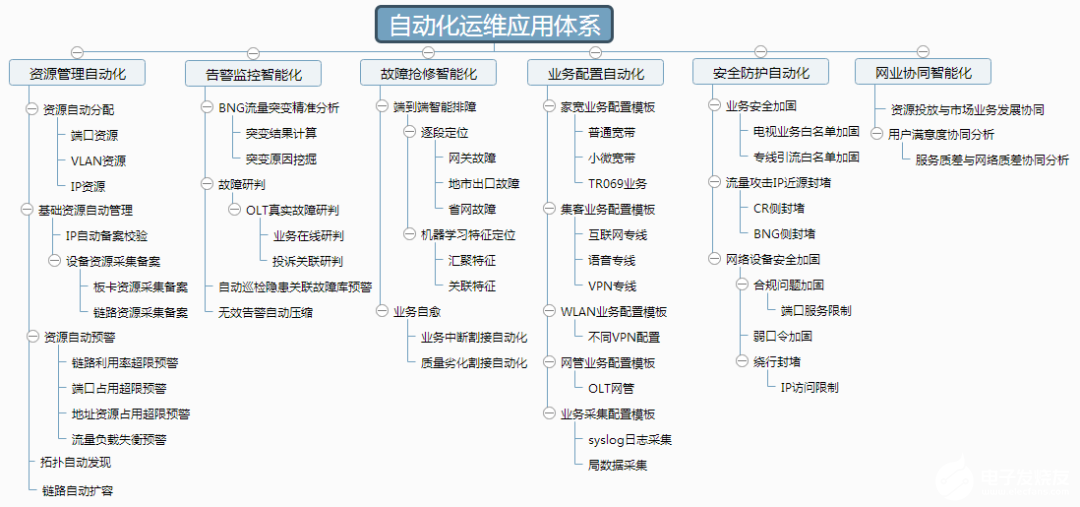
城域网是什么,其生命周期和自动化运维应用有哪些特点
10个杀手级的Python自动化脚本分享
分享10个实用的Python自动化脚本
网络设备自动化运维工具—ansible入门笔记介绍

容器化NPB + Ansible:自动化运维方案




评论