


 【LPC55S69】使用FAL分区管理与easyflash变量管理(下集)

上期带大家了解了FAL组件和DFS文件系统的功能特点和使用方法,本期将继续解读如何将EasyFlsh移植到FAL分区。
简述EasyFlash
关于EasyFlash的来源我们已经讲过,EasyFlash是一款开源的轻量级嵌入式Flash存储器库,方便开发者更加轻松的实现基于Flash存储器的常见应用开发。非常适合智能家居、可穿戴、工控、医疗、物联网等需要断电存储功能的产品,资源占用极低,支持各种 MCU 片上存储器。EasyFlash不仅能够实现对产品的设定参数或运行日志等信息的掉电保存功能,还封装了简洁的增加、删除、修改及查询方法,降低了开发者对产品参数的处理难度,也保证了产品在后期升级时拥有更好的扩展性。让Flash变为NoSQL(非关系型数据库)模型的小型键值(Key-Value)存储数据库。
EasyFlash软件包使用
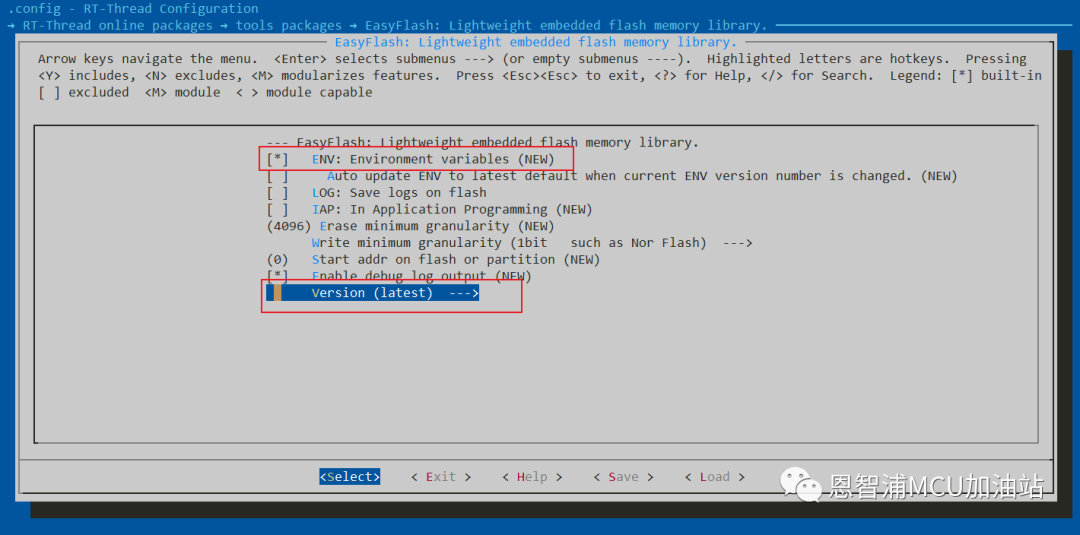
打开ENV进入路径:RT-Thread online packages → tools packages → EasyFlash: Lightweight embedded flash memory library.,选择软件包版本为最新版。配置后退出ENV,同时使用pkgs --update下载软件包,然后再使用scons-target=mdk5重新生成MDK5文件。
移植EasyFlash
下载完easyflash软件包后,我们复制. t-threadsplpc55sxxlpc55s69_nxp_evkpackagesEasyFlash-latestportsef_fal_port.c到目录. t-threadsplpc55sxxlpc55s69_nxp_evkoardportseasyflashef_fal_port.c,双击打开该文件,完成以下修改:
// 修改 FAL_EF_PART_NAME 为 easyflash
#define FAL_EF_PART_NAME               "easyflash"
编写EasyFlash测试用例
/*
  * Copyright (c) 2006-2023, RT-Thread Development Team
  *
  * SPDX-License-Identifier: Apache-2.0
  *
  * Change Logs:
  * Date           Author       Notes
  * 2023-04-21     Wangyuqiang  the first version
  */


#include "rtthread.h"
#include "rtdevice.h"
#include "board.h"
#include "fal.h"


#include


#include "easyflash.h"
#include


#define FS_PARTITION_NAME  "filesystem"


#define BUF_SIZE 1024


static int fal_test(const char *partiton_name)
{
int ret;
int i, j, len;
uint8_t buf[BUF_SIZE];
const struct fal_flash_dev *flash_dev = RT_NULL;
const struct fal_partition *partition = RT_NULL;


if (!partiton_name)
     {
         rt_kprintf("Input param partition name is null!
");
return -1;
     }


     partition = fal_partition_find(partiton_name);
if (partition == RT_NULL)
     {
         rt_kprintf("Find partition (%s) failed!
", partiton_name);
         ret = -1;
return ret;
     }


     flash_dev = fal_flash_device_find(partition->flash_name);
if (flash_dev == RT_NULL)
     {
         rt_kprintf("Find flash device (%s) failed!
", partition->flash_name);
         ret = -1;
return ret;
     }


     rt_kprintf("Flash device : %s   "
"Flash size : %dK
"
"Partition : %s   "
"Partition size: %dK
",
                 partition->flash_name,
                 flash_dev->len/1024,
                 partition->name,
                 partition->len/1024);


/* erase all partition */
     ret = fal_partition_erase_all(partition);
if (ret < 0)
     {
         rt_kprintf("Partition (%s) erase failed!
", partition->name);
         ret = -1;
return ret;
     }
     rt_kprintf("Erase (%s) partition finish!
", partiton_name);


/* read the specified partition and check data */
for (i = 0; i < partition->len;)
     {
         rt_memset(buf, 0x00, BUF_SIZE);


         len = (partition->len - i) > BUF_SIZE ? BUF_SIZE : (partition->len - i);


         ret = fal_partition_read(partition, i, buf, len);
if (ret < 0)
         {
             rt_kprintf("Partition (%s) read failed!
", partition->name);
             ret = -1;
return ret;
         }


for(j = 0; j < len; j++)
         {
if (buf[j] != 0xFF)
             {
                 rt_kprintf("The erase operation did not really succeed!
");
                 ret = -1;
return ret;
             }
         }
         i += len;
     }


/* write 0x00 to the specified partition */
for (i = 0; i < partition->len;)
     {
         rt_memset(buf, 0x00, BUF_SIZE);


         len = (partition->len - i) > BUF_SIZE ? BUF_SIZE : (partition->len - i);


         ret = fal_partition_write(partition, i, buf, len);
if (ret < 0)
         {
             rt_kprintf("Partition (%s) write failed!
", partition->name);
             ret = -1;
return ret;
         }


         i += len;
     }
     rt_kprintf("Write (%s) partition finish! Write size %d(%dK).
", partiton_name, i, i/1024);


/* read the specified partition and check data */
for (i = 0; i < partition->len;)
     {
         rt_memset(buf, 0xFF, BUF_SIZE);


         len = (partition->len - i) > BUF_SIZE ? BUF_SIZE : (partition->len - i);


         ret = fal_partition_read(partition, i, buf, len);
if (ret < 0)
         {
             rt_kprintf("Partition (%s) read failed!
", partition->name);
             ret = -1;
return ret;
         }


for(j = 0; j < len; j++)
         {
if (buf[j] != 0x00)
             {
                 rt_kprintf("The write operation did not really succeed!
");
                 ret = -1;
return ret;
             }
         }


         i += len;
     }


     ret = 0;
return ret;
}


static void fal_sample(void)
{
/* 1- init */
     fal_init();


if (fal_test("font") == 0)
     {
         rt_kprintf("Fal partition (%s) test success!
", "font");
     }
else
     {
         rt_kprintf("Fal partition (%s) test failed!
", "font");
     }


if (fal_test("download") == 0)
     {
         rt_kprintf("Fal partition (%s) test success!
", "download");
     }
else
     {
         rt_kprintf("Fal partition (%s) test failed!
", "download");
     }
}
MSH_CMD_EXPORT(fal_sample, fal sample);


static void fal_elmfat_sample(void)
{
int fd, size;
struct statfs elm_stat;
struct fal_blk_device *blk_dev;
char str[] = "elmfat mount to W25Q flash.", buf[80];


/* fal init */
     fal_init();


/* create block device */
     blk_dev = (struct fal_blk_device *)fal_blk_device_create(FS_PARTITION_NAME);
if(blk_dev == RT_NULL)
         rt_kprintf("Can't create a block device on '%s' partition.
", FS_PARTITION_NAME);
else
         rt_kprintf("Create a block device on the %s partition of flash successful.
", FS_PARTITION_NAME);


/* make a elmfat format filesystem */
if(dfs_mkfs("elm", FS_PARTITION_NAME) == 0)
         rt_kprintf("make elmfat filesystem success.
");


/* mount elmfat file system to FS_PARTITION_NAME */
if(dfs_mount(FS_PARTITION_NAME, "/", "elm", 0, 0) == 0)
         rt_kprintf("elmfat filesystem mount success.
");


/* Get elmfat file system statistics */
if(statfs("/", &elm_stat) == 0)
         rt_kprintf("elmfat filesystem block size: %d, total blocks: %d, free blocks: %d.
",
                     elm_stat.f_bsize, elm_stat.f_blocks, elm_stat.f_bfree);


if(mkdir("/user", 0x777) == 0)
         rt_kprintf("make a directory: '/user'.
");


     rt_kprintf("Write string '%s' to /user/test.txt.
", str);


/* Open the file in create and read-write mode, create the file if it does not exist*/
     fd = open("/user/test.txt", O_WRONLY | O_CREAT);
if (fd >= 0)
     {
if(write(fd, str, sizeof(str)) == sizeof(str))
             rt_kprintf("Write data done.
");


         close(fd);
     }


/* Open file in read-only mode */
     fd = open("/user/test.txt", O_RDONLY);
if (fd >= 0)
     {
         size = read(fd, buf, sizeof(buf));


         close(fd);


if(size == sizeof(str))
             rt_kprintf("Read data from file test.txt(size: %d): %s
", size, buf);
     }
}
MSH_CMD_EXPORT_ALIAS(fal_elmfat_sample, fal_elmfat,fal elmfat sample);


static void easyflash_sample(void)
{
/* fal init */
     fal_init();


/* easyflash init */
if(easyflash_init() == EF_NO_ERR)
     {
uint32_t i_boot_times = NULL;
char *c_old_boot_times, c_new_boot_times[11] = {0};


/* get the boot count number from Env */
         c_old_boot_times = ef_get_env("boot_times");
/* get the boot count number failed */
if (c_old_boot_times == RT_NULL)
             c_old_boot_times[0] = '0';


         i_boot_times = atol(c_old_boot_times);
/* boot count +1 */
         i_boot_times ++;
         rt_kprintf("===============================================
");
         rt_kprintf("The system now boot %d times
", i_boot_times);
         rt_kprintf("===============================================
");
/* interger to string */
sprintf(c_new_boot_times, "%d", i_boot_times);
/* set and store the boot count number to Env */
         ef_set_env("boot_times", c_new_boot_times);
         ef_save_env();
     }
}
MSH_CMD_EXPORT(easyflash_sample, easyflash sample);
EasyFlash测试结果
打开串口助手,输入命令:-
msh />easyflash_sample
复制代码
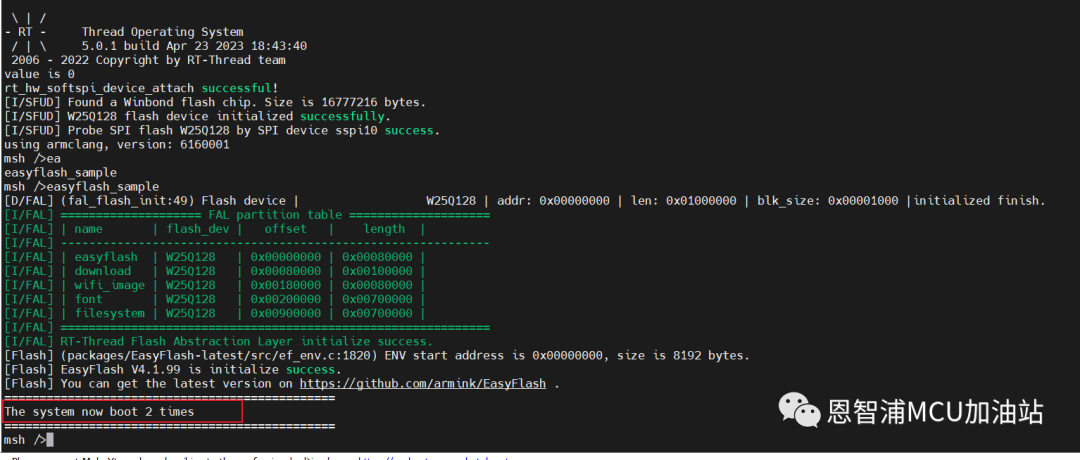
第一次命令调用: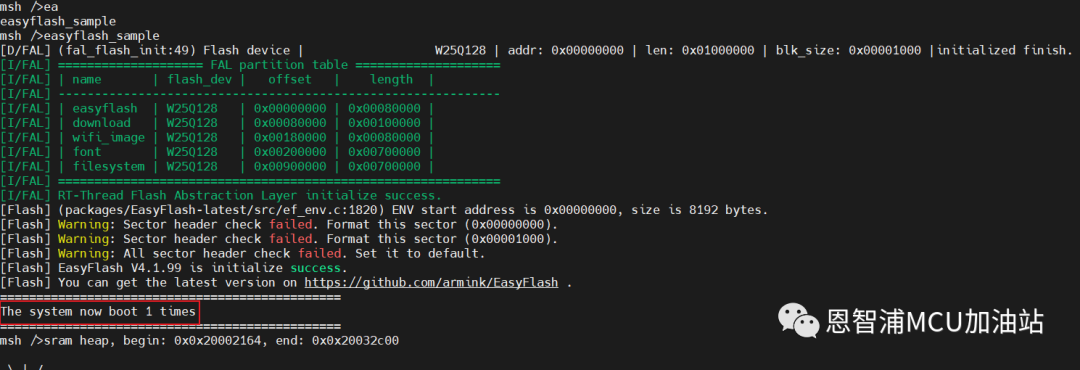 第二次RESET开发板后调用:
结语
至此,FAL分区管理EasyFlash变量管理已经全部介绍完毕了,经历从移植软件模拟SPI框架到LPC55S69,到移植过程中不断遇到的问题,解决问题并提供应用示例,并完成开发日记、开发笔记及应用教学,作者坦言整个过程还是受益良多的。希望大家怀揣着一颗求知及授学之心,共同建设好这个领域!参考资料:
本文转载自:END
更多恩智浦AI-IoT市场和产品信息,邀您同时关注“NXP客栈”微信公众号

NXP客栈
恩智浦致力于打造安全的连接和基础设施解决方案,为智慧生活保驾护航。
长按二维码,关注我们
恩智浦MCU加油站
这是由恩智浦官方运营的公众号,着重为您推荐恩智浦MCU的产品信息、开发技巧、教程文档、培训课程等内容。

长按二维码,关注我们
原文标题:【LPC55S69】使用FAL分区管理与easyflash变量管理(下集)
文章出处:【微信公众号:恩智浦MCU加油站】欢迎添加关注!文章转载请注明出处。
-
mcu
+关注
关注
147文章
19257浏览量
405239 -
恩智浦
+关注
关注
14文章
6144浏览量
155290
原文标题:【LPC55S69】使用FAL分区管理与easyflash变量管理(下集)
文章出处:【微信号:NXP_SMART_HARDWARE,微信公众号:恩智浦MCU加油站】欢迎添加关注!文章转载请注明出处。
发布评论请先 登录
NXP KW45B41Z-EVK 板将 J-Link/CMSIS-DAP 固件刷新到板上的问题求解
有关 keyboard2mouse 示例的问题求解
从 FRAM 读取数据期间 I2C 通信卡住了,怎么解决?
为什么无法在 LPC55S36 上使用 BLHost 转储代码(两块板上的 USB 连接问题)?
使用 LPC55S69 和 MCUX 驱动程序的 CDC 应该实现什么样的吞吐量?
无法获得在 StarFive 上运行的 StarFive Linux 映像的 55 或 69 版本,怎么解决?
Linux磁盘管理指令合集:从查看、分区到修复

城市用水分区计量管理系统方案

【PCA9958HN-ARD】GUI工具的使用
Linux系统中磁盘分区与挂载详解




评论