




 Spring Boot 3.1 中如何整合Spring Security和Keycloak

在今年2月14日的时候,Keycloak 团队宣布他们正在弃用大多数 Keycloak 适配器。其中包括Spring Security和Spring Boot的适配器,这意味着今后Keycloak团队将不再提供针对Spring Security和Spring Boot的集成方案。

但是,如此强大的Keycloak,还要用怎么办呢?本文就来聊聊,在最新的Spring Boot 3.1版本之下,如何将Keycloak和Spring Security一起跑起来。
准备工作
这里所采用的框架与工具版本信息如下:
- Spring Boot 3.1.0
- Keycloak 21.1.1
如果您采用的是其他版本,本文内容不一定有效,但可以作为参考。
基于 Spring Boot + MyBatis Plus + Vue & Element 实现的后台管理系统 + 用户小程序,支持 RBAC 动态权限、多租户、数据权限、工作流、三方登录、支付、短信、商城等功能
- 项目地址:https://github.com/YunaiV/ruoyi-vue-pro
- 视频教程:https://doc.iocoder.cn/video/
配置Keycloak
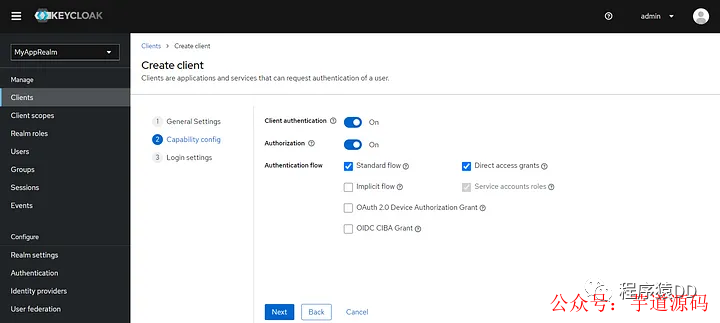
第一步:为Spring Boot应用创建Realm,并在下面创建一个Client
第二步:创建一个SYS_ADMIN角色,并创建一个用户赋予SYS_ADMIN角色
第三步:调用Keycloak接口生成Access Token,可以用下面的curl命令或者其他任何发请求的工具,比如:Postman等。
curl--location'http://localhost:9090/realms/MyAppRealm/protocol/openid-connect/token'
--header'Content-Type:application/x-www-form-urlencoded'
--data-urlencode'username='
--data-urlencode'password='
--data-urlencode'grant_type=password'
--data-urlencode'client_id=My-Awesome-App'
--data-urlencode'client_secret='
--data-urlencode'scope=openid'
记住获得到Access Token,后续验证时候要用。
基于 Spring Cloud Alibaba + Gateway + Nacos + RocketMQ + Vue & Element 实现的后台管理系统 + 用户小程序,支持 RBAC 动态权限、多租户、数据权限、工作流、三方登录、支付、短信、商城等功能
- 项目地址:https://github.com/YunaiV/yudao-cloud
- 视频教程:https://doc.iocoder.cn/video/
配置Spring Boot应用
第一步:创建一个Spring Boot应用,这个很简单,这里不赘述了。
第二步:在pom.xml中添加依赖:
<dependency>
<groupId>org.springframework.securitygroupId>
<artifactId>spring-security-oauth2-joseartifactId>
dependency>
第三步:修改配置文件
spring:
security:
oauth2:
resourceserver:
jwt:
issuer-uri:http://localhost:9090/realms/MyAppRealm
jwk-set-uri:http://localhost:9090/realms/MyAppRealm/protocol/openid-connect/certs
第四步:创建一个需要鉴权的测试接口
@RequestMapping("/test")
@RestController
publicclassMySuperSecuredController{

@GetMapping("/hello")
publicStringhello(){
return"hello";
}

}
第五步:创建SecurityFilterChain,用来告知Spring Security在JWT令牌中查找角色信息的位置。
@Configuration
@EnableWebSecurity
publicclassWebSecurityConfig{


@Bean
publicSecurityFilterChainsecurityFilterChain(HttpSecurityhttpSecurity)throwsException{
httpSecurity
.authorizeHttpRequests(registry->registry
.requestMatchers("/test/**").hasRole("SYS_ADMIN")
.anyRequest().authenticated()
)
.oauth2ResourceServer(oauth2Configurer->oauth2Configurer.jwt(jwtConfigurer->jwtConfigurer.jwtAuthenticationConverter(jwt->{
Map>realmAccess=jwt.getClaim("realm_access");
Collectionroles=realmAccess.get("roles");
vargrantedAuthorities=roles.stream()
.map(role->newSimpleGrantedAuthority("ROLE_"+role))
.toList();
returnnewJwtAuthenticationToken(jwt,grantedAuthorities);
})))
;

returnhttpSecurity.build();
}
}
验证一下
在完成了上面配置所有之后之后,启动Spring Boot应用,同时保证Keycloak也在运行中。
尝试请求/test/hello接口:
-
当不包含
Authorization头信息的时候,将返回401错误 -
当包含
Authorization头信息(前文用调接口获取的Access Token)的时候,才能正确访问到。
小结
虽然Keycloak 团队宣布了不再对Spring Security提供适配,但Spring Security长期以来一直为OAuth和OIDC提供强大的内置支持。所以,只要我们理解Spring Security是如何处理OAuth和OIDC的,那么与Keyloak的集成依然不复杂。
-
适配器
+关注
关注
9文章
2119浏览量
70977 -
框架
+关注
关注
0文章
404浏览量
18318 -
spring
+关注
关注
0文章
341浏览量
15776
原文标题:Spring Boot 3.1 中如何整合Spring Security和Keycloak
文章出处:【微信号:芋道源码,微信公众号:芋道源码】欢迎添加关注!文章转载请注明出处。
发布评论请先 登录
Mybatis整合spring的思路和步骤
启动Spring Boot项目应用的三种方法
Spring Boot嵌入式Web容器原理是什么
Spring Boot从零入门1 详述
「Spring认证」什么是Spring GraphQL?
Spring Boot特有的实践
强大的Spring Boot 3.0要来了
Spring Boot中整合两种定时任务的方法
Spring Boot Actuator快速入门
Spring Boot启动 Eureka流程
Spring Boot的启动原理










 工商网监
工商网监
评论