


 【HarmonyOS HiSpark Wi-Fi IoT 套件试用连载】驱动AHT20并显示温湿度

本文来源电子发烧友社区,作者:华仔stm32, 帖子地址:https://bbs.elecfans.com/jishu_2299452_1_1.html
在前面驱动OLED的前提下,驱动AHT20并显示到显示屏,是监测温湿度常用的手法。
1、在app目录下新建i2caht20文件夹,把oled_ssd1306.c以及oled_ssd1306.h拷贝到该目录下。
2、新建aht20.c、aht20.h,以及aht20.test.c,以及BUILD.gn三个文件。
3、aht20.c内容如下:
/*
 * Copyright (C) 2021 HiHope Open Source Organization .
 * Licensed under the Apache License, Version 2.0 (the "License");
 * you may not use this file except in compliance with the License.
 * You may obtain a copy of the License at
 *
 *     http://www.apache.org/licenses/LICENSE-2.0
 *
 * Unless required by applicable law or agreed to in writing, software
 * distributed under the License is distributed on an "AS IS" BASIS,
 * WITHOUT WARRANTIES OR CONDITIONS OF ANY KIND, either express or implied.
 * See the License for the specific language governing permissions and
 *
 * limitations under the License.
 */

#include "aht20.h"

#include
#include
#include

#include "hi_i2c.h"
#include "hi_errno.h"

#define AHT20_I2C_IDX HI_I2C_IDX_0

#define AHT20_STARTUP_TIME     20*1000 // 上电启动时间
#define AHT20_CALIBRATION_TIME 40*1000 // 初始化(校准)时间
#define AHT20_MEASURE_TIME     75*1000 // 测量时间

#define AHT20_DEVICE_ADDR   0x38
#define AHT20_READ_ADDR     ((0x38<<1)|0x1)
#define AHT20_WRITE_ADDR    ((0x38<<1)|0x0)

#define AHT20_CMD_CALIBRATION       0xBE // 初始化(校准)命令
#define AHT20_CMD_CALIBRATION_ARG0  0x08
#define AHT20_CMD_CALIBRATION_ARG1  0x00

/**
 * 传感器在采集时需要时间,主机发出测量指令(0xAC)后,延时75毫秒以上再读取转换后的数据并判断返回的状态位是否正常。
 * 若状态比特位[Bit7]为0代表数据可正常读取,为1时传感器为忙状态,主机需要等待数据处理完成。
 **/
#define AHT20_CMD_TRIGGER       0xAC // 触发测量命令
#define AHT20_CMD_TRIGGER_ARG0  0x33
#define AHT20_CMD_TRIGGER_ARG1  0x00

// 用于在无需关闭和再次打开电源的情况下,重新启动传感器系统,软复位所需时间不超过20 毫秒
#define AHT20_CMD_RESET      0xBA // 软复位命令

#define AHT20_CMD_STATUS     0x71 // 获取状态命令

/**
 * STATUS 命令回复:
 * 1. 初始化后触发测量之前,STATUS 只回复 1B 状态值;
 * 2. 触发测量之后,STATUS 回复6B: 1B 状态值 + 2B 湿度 + 4b湿度 + 4b温度 + 2B 温度
 *      RH = Srh / 2^20 * 100%
 *      T  = St  / 2^20 * 200 - 50
 **/
#define AHT20_STATUS_BUSY_SHIFT 7       // bit[7] Busy indication
#define AHT20_STATUS_BUSY_MASK  (0x1<#define AHT20_STATUS_BUSY(status) ((status & AHT20_STATUS_BUSY_MASK) >> AHT20_STATUS_BUSY_SHIFT)

#define AHT20_STATUS_MODE_SHIFT 5       // bit[6:5] Mode Status
#define AHT20_STATUS_MODE_MASK  (0x3<#define AHT20_STATUS_MODE(status) ((status & AHT20_STATUS_MODE_MASK) >> AHT20_STATUS_MODE_SHIFT)

                                        // bit[4] Reserved
#define AHT20_STATUS_CALI_SHIFT 3       // bit[3] CAL Enable
#define AHT20_STATUS_CALI_MASK  (0x1<#define AHT20_STATUS_CALI(status) ((status & AHT20_STATUS_CALI_MASK) >> AHT20_STATUS_CALI_SHIFT)
                                        // bit[2:0] Reserved

#define AHT20_STATUS_RESPONSE_MAX 6

#define AHT20_RESOLUTION            (1<<20)  // 2^20

#define AHT20_MAX_RETRY 10

static uint32_t AHT20_Read(uint8_t* buffer, uint32_t buffLen)
{
    hi_i2c_data data = { 0 };
    data.receive_buf = buffer;
    data.receive_len = buffLen;
    uint32_t retval = hi_i2c_read(AHT20_I2C_IDX, AHT20_READ_ADDR, &data);
    if (retval != HI_ERR_SUCCESS) {
        printf("I2cRead() failed, %0X!n", retval);
        return retval;
    }
    return HI_ERR_SUCCESS;
}

static uint32_t AHT20_Write(uint8_t* buffer, uint32_t buffLen)
{
    hi_i2c_data data = { 0 };
    data.send_buf = buffer;
    data.send_len = buffLen;
    uint32_t retval = hi_i2c_write(AHT20_I2C_IDX, AHT20_WRITE_ADDR, &data);
    if (retval != HI_ERR_SUCCESS) {
        printf("I2cWrite(%02X) failed, %0X!n", buffer[0], retval);
        return retval;
    }
    return HI_ERR_SUCCESS;
}

// 发送获取状态命令
static uint32_t AHT20_StatusCommand(void)
{
    uint8_t statusCmd[] = { AHT20_CMD_STATUS };
    return AHT20_Write(statusCmd, sizeof(statusCmd));
}

// 发送软复位命令
static uint32_t AHT20_ResetCommand(void)
{
    uint8_t resetCmd[] = {AHT20_CMD_RESET};
    return AHT20_Write(resetCmd, sizeof(resetCmd));
}

// 发送初始化校准命令
static uint32_t AHT20_CalibrateCommand(void)
{
    uint8_t clibrateCmd[] = {AHT20_CMD_CALIBRATION, AHT20_CMD_CALIBRATION_ARG0, AHT20_CMD_CALIBRATION_ARG1};
    return AHT20_Write(clibrateCmd, sizeof(clibrateCmd));
}

// 读取温湿度值之前, 首先要看状态字的校准使能位Bit[3]是否为 1(通过发送0x71可以获取一个字节的状态字),
// 如果不为1,要发送0xBE命令(初始化),此命令参数有两个字节, 第一个字节为0x08,第二个字节为0x00。
uint32_t AHT20_Calibrate(void)
{
    uint32_t retval = 0;
    uint8_t buffer[AHT20_STATUS_RESPONSE_MAX];
    memset(&buffer, 0x0, sizeof(buffer));

    retval = AHT20_StatusCommand();
    if (retval != HI_ERR_SUCCESS) {
        return retval;
    }

    retval = AHT20_Read(buffer, sizeof(buffer));
    if (retval != HI_ERR_SUCCESS) {
        return retval;
    }

    if (AHT20_STATUS_BUSY(buffer[0]) || !AHT20_STATUS_CALI(buffer[0])) {
        retval = AHT20_ResetCommand();
        if (retval != HI_ERR_SUCCESS) {
            return retval;
        }
        usleep(AHT20_STARTUP_TIME);
        retval = AHT20_CalibrateCommand();
        usleep(AHT20_CALIBRATION_TIME);
        return retval;
    }

    return HI_ERR_SUCCESS;
}

// 发送 触发测量 命令,开始测量
uint32_t AHT20_StartMeasure(void)
{
    uint8_t triggerCmd[] = {AHT20_CMD_TRIGGER, AHT20_CMD_TRIGGER_ARG0, AHT20_CMD_TRIGGER_ARG1};
    return AHT20_Write(triggerCmd, sizeof(triggerCmd));
}

// 接收测量结果,拼接转换为标准值
uint32_t AHT20_GetMeasureResult(float* temp, float* humi)
{
    uint32_t retval = 0, i = 0;
    if (temp == NULL || humi == NULL) {
        return HI_ERR_FAILURE;
    }

    uint8_t buffer[AHT20_STATUS_RESPONSE_MAX];
    memset(&buffer, 0x0, sizeof(buffer));
    retval = AHT20_Read(buffer, sizeof(buffer));  // recv status command result
    if (retval != HI_ERR_SUCCESS) {
        return retval;
    }

    for (i = 0; AHT20_STATUS_BUSY(buffer[0]) && i < AHT20_MAX_RETRY; i++) {
        // printf("AHT20 device busy, retry %d/%d!rn", i, AHT20_MAX_RETRY);
        usleep(AHT20_MEASURE_TIME);
        retval = AHT20_Read(buffer, sizeof(buffer));  // recv status command result
        if (retval != HI_ERR_SUCCESS) {
            return retval;
        }
    }
    if (i >= AHT20_MAX_RETRY) {
        printf("AHT20 device always busy!rn");
        return HI_ERR_SUCCESS;
    }

    uint32_t humiRaw = buffer[1];
    humiRaw = (humiRaw << 8) | buffer[2];
    humiRaw = (humiRaw << 4) | ((buffer[3] & 0xF0) >> 4);
    *humi = humiRaw / (float)AHT20_RESOLUTION * 100;

    uint32_t tempRaw = buffer[3] & 0x0F;
    tempRaw = (tempRaw << 8) | buffer[4];
    tempRaw = (tempRaw << 8) | buffer[5];
    *temp = tempRaw / (float)AHT20_RESOLUTION * 200 - 50;
    // printf("humi = %05X, %f, temp= %05X, %frn", humiRaw, *humi, tempRaw, *temp);
    return HI_ERR_SUCCESS;
}
)<>)<>)<>
4、aht20.h内容如下:
/*
 * Copyright (C) 2021 HiHope Open Source Organization .
 * Licensed under the Apache License, Version 2.0 (the "License");
 * you may not use this file except in compliance with the License.
 * You may obtain a copy of the License at
 *
 *     http://www.apache.org/licenses/LICENSE-2.0
 *
 * Unless required by applicable law or agreed to in writing, software
 * distributed under the License is distributed on an "AS IS" BASIS,
 * WITHOUT WARRANTIES OR CONDITIONS OF ANY KIND, either express or implied.
 * See the License for the specific language governing permissions and
 *
 * limitations under the License.
 */

#ifndef AHT20_H
#define AHT20_H

#include

uint32_t AHT20_Calibrate(void);

uint32_t AHT20_StartMeasure(void);

uint32_t AHT20_GetMeasureResult(float* temp, float* humi);

#endif  // AHT20_H
5、aht20_test.c内容如下:
/*
 * Copyright (C) 2021 HiHope Open Source Organization .
 * Licensed under the Apache License, Version 2.0 (the "License");
 * you may not use this file except in compliance with the License.
 * You may obtain a copy of the License at
 *
 *     http://www.apache.org/licenses/LICENSE-2.0
 *
 * Unless required by applicable law or agreed to in writing, software
 * distributed under the License is distributed on an "AS IS" BASIS,
 * WITHOUT WARRANTIES OR CONDITIONS OF ANY KIND, either express or implied.
 * See the License for the specific language governing permissions and
 *
 * limitations under the License.
 */

#include "aht20.h"

#include
#include

#include "ohos_init.h"
#include "cmsis_os2.h"
#include "hi_gpio.h"
#include "hi_io.h"
#include "hi_i2c.h"
#include "oled_ssd1306.h"

void Aht20TestTask(void* arg)
{
    (void) arg;
    uint32_t retval = 0;
    char str_temp[12];
    char str_Humi[12];
    hi_io_set_func(HI_IO_NAME_GPIO_13, HI_IO_FUNC_GPIO_13_I2C0_SDA);
    hi_io_set_func(HI_IO_NAME_GPIO_14, HI_IO_FUNC_GPIO_14_I2C0_SCL);

    hi_i2c_init(HI_I2C_IDX_0, 400*1000);
    OledInit();

    OledFillScreen(0x00);
    OledShowString(26, 0, "AHT20-TEST!", FONT8x16);
    retval = AHT20_Calibrate();
    printf("AHT20_Calibrate: %drn", retval);

    while (1) {
        float temp = 0.0, humi = 0.0;

        retval = AHT20_StartMeasure();
        printf("AHT20_StartMeasure: %drn", retval);

        retval = AHT20_GetMeasureResult(&temp, &humi);
        sprintf(str_temp,"TEMP:%.2f",temp);
        sprintf(str_Humi,"HUMI:%.2f",humi);
        printf("AHT20_GetMeasureResult: %d, temp = %.2f, humi = %.2frn", retval, temp, humi);
        OledShowString(26,2,str_temp,FONT8x16);
        OledShowString(26,4,str_Humi,FONT8x16);
        sleep(1);
    }
}

void Aht20Test(void)
{
    osThreadAttr_t attr;

    attr.name = "Aht20Task";
    attr.attr_bits = 0U;
    attr.cb_mem = NULL;
    attr.cb_size = 0U;
    attr.stack_mem = NULL;
    attr.stack_size = 4096;
    attr.priority = osPriorityNormal;

    if (osThreadNew(Aht20TestTask, NULL, &attr) == NULL) {
        printf("[Aht20Test] Failed to create Aht20TestTask!n");
    }
}

APP_FEATURE_INIT(Aht20Test);
7、BUILD.gn:
#Copyright (C) 2021 HiHope Open Source Organization .
#Licensed under the Apache License, Version 2.0 (the "License");
#you may not use this file except in compliance with the License.
#You may obtain a copy of the License at
#
#    http://www.apache.org/licenses/LICENSE-2.0
#
#Unless required by applicable law or agreed to in writing, software
#distributed under the License is distributed on an "AS IS" BASIS,
#WITHOUT WARRANTIES OR CONDITIONS OF ANY KIND, either express or implied.
#See the License for the specific language governing permissions and
#
#limitations under the License.

static_library("i2cd_emo") {
    sources = [
        "aht20_test.c",
        "aht20.c",
        "oled_ssd1306.c"
    ]

    include_dirs = [
        "//utils/native/lite/include",
        "//kernel/liteos_m/components/cmsis/2.0",
        "//base/iot_hardware/peripheral/interfaces/kits",
        "//device/hisilicon/hispark_pegasus/sdk_liteos/include"
    ]
}
8、修改app/BUILD.gn如下:
import("//build/lite/config/component/lite_component.gni")

lite_component("app") {
    features = [
        "i2caht20:i2cd_emo",
    ]
}
然后就可以编译下载了。
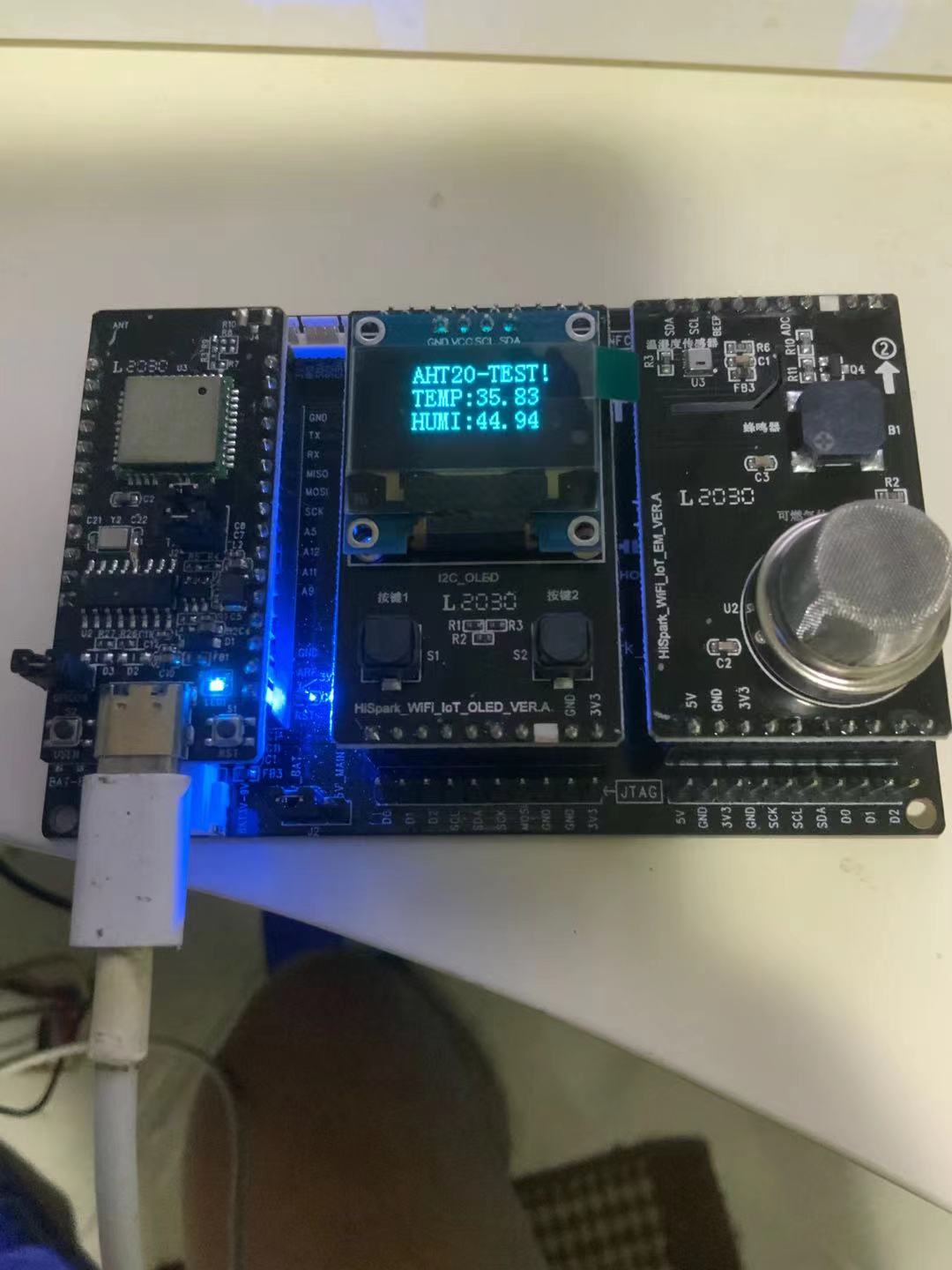
运行效果如下图:
声明:本文内容及配图由入驻作者撰写或者入驻合作网站授权转载。文章观点仅代表作者本人,不代表电子发烧友网立场。文章及其配图仅供工程师学习之用,如有内容侵权或者其他违规问题,请联系本站处理。
举报投诉
-
wi-fi
+关注
关注
15文章
2462浏览量
130008 -
HarmonyOS
+关注
关注
80文章
2157浏览量
36283 -
HiSpark
+关注
关注
1文章
156浏览量
7799
发布评论请先 登录
相关推荐
热点推荐
【RA-Eco-RA4M2开发板评测】AHT20与LabVIEW数据采集
;
点击 Generate Project Content 按钮,生成工程代码。
工程代码
添加 AHT20 温湿度传感器驱动代码。
aht20.h
新建 ./src/
发表于 04-15 16:22
技术资讯 I Wi-Fi 模块设计
本文要点Wi-Fi模块设计旨在打造一套紧凑且高效的硬件和软件解决方案,使设备能够通过Wi-Fi网络实现通信。Wi-Fi模块设计是一个复杂的过程,要求研发人员兼具硬件与软件工程方面的专业知识

Wi-Fi:无线连接的全球通用语
一、什么是Wi-Fi?Wi-Fi是Wi-Fi联盟制造商的商标认证,是基于IEEE 802.11标准的无线局域网技术。它允许电子设备在特定范围内无线接入网络,实现高速数据交换与互联网访问,已成为
发表于 01-07 09:49
Nordic发布nRF7002 EBII 开发板, 支持Wi-Fi 6, 解锁nRF54L新玩法
了 Wi-Fi 6 功能,帮助开发人员创建高性能、高能效的Wi-Fi 6 物联网解决方案。
基于 Nordic 的 nRF7002 Wi-Fi 协同 IC,nRF7002 EBII帮助 采用
发表于 12-10 11:58
浅谈Wi-Fi 6E与Wi-Fi 7的关键器件——BAW滤波器新技术
作者: Qorvo 亚太区无线连接事业部高级行销经理林健富 2020年1月,Wi-Fi联盟正式宣布开放6GHz频段(5925MHz-7125MHz),并将其命名为Wi-Fi 6E。2020年4月
发表于 09-19 18:29
•2450次阅读
基于 SSID 的 Wi-Fi 定位:与其他定位服务的性能比较
,我们将使用 nRF9160 DK、nRF7002 EK和 PPK2 执行并展示实际功耗和准确性测量,以比较 nRF Cloud 提供的不同定位服务的性能。
背景知识
Wi-Fi 定位服务
Wi-Fi
发表于 08-31 21:01
【上海晶珩睿莓1开发板试用体验】Home Assistant 物联网温湿度计
AHT10 传感器;
环境配置:安装 Python 工具库,包括 i2c-tools 和 smbus2 ;
AHT10 驱动:驱动 AHT
发表于 08-18 13:55
功耗创新低!涂鸦产品级Zigbee 3.0温湿度计开发包,开箱即用、完全开源
低功耗类设备,采用Zigbee3.0协议,待机电流低至几个微安(uA),一节纽扣电池可持续工作长达1~2年,远超Wi-Fi版续航时长(仅能维持2个月),是温湿度类设

有没有什么修复方法可以确保 AP 模式下的 Wi-Fi 和 BLE 连接同时正常工作?
我正在使用 CYBSYSKIT DEV 01 套件。我尝试在 AP 模式下打开 Wi-Fi 并宣传 BLE。我可以宣传 SoftAP 和 BLE。但是,我无法从中央设备连接到 BLE。它可以立即连接
发表于 07-17 06:13
STM32+esp8266连接机智云,上传温湿度数据并控制继电器开关(平台配置、代码生成、代码移植)
代码,并通过手机APP进行设备控制。元器件准备在开始之前,您需要准备以下硬件元器件:1.STM32开发板2.ESP8266Wi-Fi模块3.温湿度传感器(如DHT1

Wi-Fi 8:开启极高可靠性 (UHR) 连接的新纪元——1
英国作家狄更斯在《双城记》的开头写道:“这是最好的时代,也是最坏的时代。”
这句话若套用在现今Wi-Fi 的市场现状,何尝不是惊人的相似?
怎么说呢?Wi-Fi 从被发明至今已经经过了20多年的迭代
发表于 06-13 11:09
Fluke 972温湿度测量仪的使用体验
作为药厂的设备工艺工程师,我的主要职责是维护制药设备的稳定运行和监测生产区域、连接走廊的温湿度,要严格符合企业规范(温度20-25℃,湿度40%~60%RH)。在日常的巡检工作中,我需要每日三次定点检查
温湿度变送器功能有哪些?一文详细解析
,也能通过电脑、手机等设备实时查看温湿度数据。对于一些需要实时监控的场所,如机房、医院的药品仓库等,远程监控功能能够让管理人员及时发现异常情况并采取措施。
三、报警功能
为了确保环境温湿度处于合适的范围
发表于 06-03 10:56
智能仓储:温湿度监控方案应用
随着仓储环境要求提高,温湿度监控对保障货物品质至关重要。本文介绍一个工厂仓库温湿度监控方案,利用温湿度变送器、LoRa技术和智能监测平台,为仓库业主提供高效、可靠的监测解决方案。仓库温湿度




评论