




 OpenCV中的直线拟合

直线拟合原理
给出多个点,然后根据这些点拟合出一条直线,这个最常见的算法是多约束方程的最小二乘拟合,如下图所示:
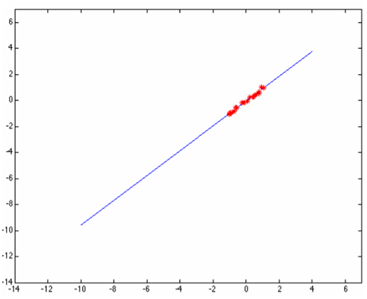
但是当这些点当中有一个或者几个离群点(outlier)时候,最小二乘拟合出来的直线就直接翻车成这样了:
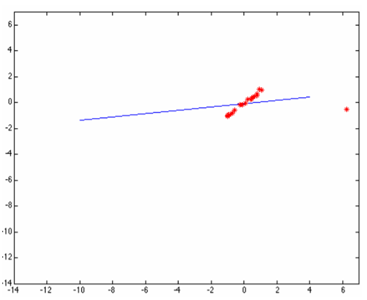
原因是最小二乘无法在估算拟合的时候剔除或者降低离群点的影响,于是一个聪明的家伙出现了,提出了基于权重的最小二乘拟合估算方法,这样就避免了翻车。根据高斯分布,离群点权重应该尽可能的小,这样就可以降低它的影响,OpenCV中的直线拟合就是就权重最小二乘完成的,在生成权重时候OpenCV支持几种不同的距离计算方法,分别如下:
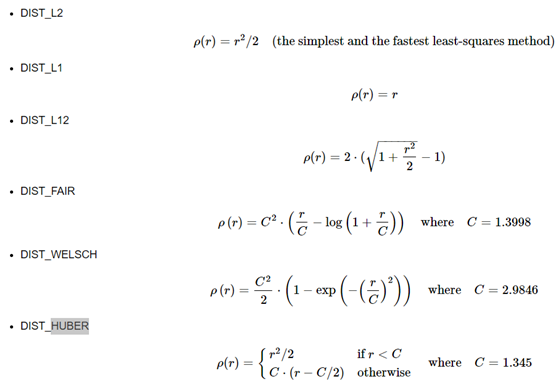
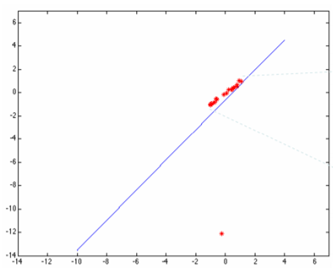
其中DIST_L2是最原始的最小二乘,最容易翻车的一种拟合方式,虽然速度快点。然后用基于权重的最小二乘估算拟合结果如下:
函数与实现源码分析
OpenCV中直线拟合函数支持上述六种距离计算方式,函数与参数解释如下:
void cv::fitLine( InputArray points, OutputArray line, int distType, double param, double reps, double aeps)
points是输入点集合
line是输出的拟合参数,支持2D与3D
distType是选择距离计算方式
param 是某些距离计算时生成权重需要的参数
reps 是前后两次原点到直线的距离差值,可以看成拟合精度高低
aeps是前后两次角度差值,表示的是拟合精度
六种权重的计算更新实现如下:
staticvoidweightL1(float*d,intcount,float*w)
{
inti;


for(i=0;i< count; i++ )
    {
        double t = fabs( (double) d[i] );
        w[i] = (float)(1. / MAX(t, eps));
    }
}


static void weightL12( float *d, int count, float *w )
{
    int i;


    for( i = 0; i < count; i++ )
    {
        w[i] = 1.0f / (float) std::sqrt( 1 + (double) (d[i] * d[i] * 0.5) );
    }
}


static void weightHuber( float *d, int count, float *w, float _c )
{
    int i;
    const float c = _c <= 0 ? 1.345f : _c;


    for( i = 0; i < count; i++ )
    {
        if( d[i] < c )
            w[i] = 1.0f;
        else
            w[i] = c/d[i];
    }
}


static void weightFair( float *d, int count, float *w, float _c )
{
    int i;
    const float c = _c == 0 ? 1 / 1.3998f : 1 / _c;


    for( i = 0; i < count; i++ )
    {
        w[i] = 1 / (1 + d[i] * c);
    }
}


static void weightWelsch( float *d, int count, float *w, float _c )
{
    int i;
    const float c = _c == 0 ? 1 / 2.9846f : 1 / _c;


    for( i = 0; i < count; i++ )
    {
        w[i] = (float) std::exp( -d[i] * d[i] * c * c );
    }
}
拟合计算的代码实现:
staticvoidfitLine2D_wods(constPoint2f*points,intcount,float*weights,float*line)
{
CV_Assert(count>0);
doublex=0,y=0,x2=0,y2=0,xy=0,w=0;
doubledx2,dy2,dxy;
inti;
floatt;

//Calculatingtheaverageofxandy...
if(weights==0)
{
for(i=0;i< count; i += 1 )
        {
            x += points[i].x;
            y += points[i].y;
            x2 += points[i].x * points[i].x;
            y2 += points[i].y * points[i].y;
            xy += points[i].x * points[i].y;
        }
        w = (float) count;
    }
    else
    {
        for( i = 0; i < count; i += 1 )
        {
            x += weights[i] * points[i].x;
            y += weights[i] * points[i].y;
            x2 += weights[i] * points[i].x * points[i].x;
            y2 += weights[i] * points[i].y * points[i].y;
            xy += weights[i] * points[i].x * points[i].y;
            w += weights[i];
        }
    }

    x /= w;
    y /= w;
    x2 /= w;
    y2 /= w;
    xy /= w;

    dx2 = x2 - x * x;
    dy2 = y2 - y * y;
    dxy = xy - x * y;

    t = (float) atan2( 2 * dxy, dx2 - dy2 ) / 2;
    line[0] = (float) cos( t );
    line[1] = (float) sin( t );

    line[2] = (float) x;
    line[3] = (float) y;
}
案例:直线拟合
有如下的原图:
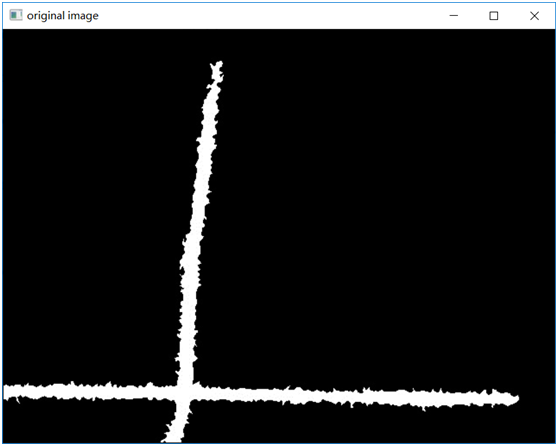
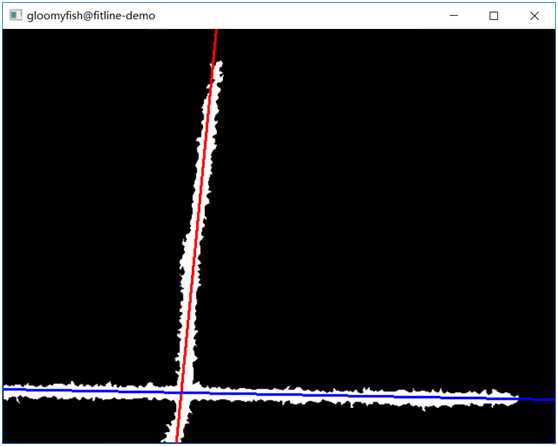
通过OpenCV的距离变换,骨架提取,然后再直线拟合,使用DIST_L1得到的结果如下:
审核编辑:彭静
声明:本文内容及配图由入驻作者撰写或者入驻合作网站授权转载。文章观点仅代表作者本人,不代表电子发烧友网立场。文章及其配图仅供工程师学习之用,如有内容侵权或者其他违规问题,请联系本站处理。
举报投诉
-
源码
+关注
关注
8文章
682浏览量
31082 -
函数
+关注
关注
3文章
4406浏览量
66812 -
OpenCV
+关注
关注
33文章
651浏览量
44393
原文标题:OpenCV中直线拟合方法解密
文章出处:【微信号:CVSCHOOL,微信公众号:OpenCV学堂】欢迎添加关注!文章转载请注明出处。
发布评论请先 登录
相关推荐
热点推荐
【每周一练】拟合公式
使用方法:根据data.xlsx中X与Y求出最佳直线,仅限于直线。用途:比如PT100传感器,气压传感器,位移传感器等线性传感器,测出电压或电阻与真实值的关系,写入data.xlsx中
发表于 12-24 00:17
Labview线性拟合时如何指定最终拟合直线的斜率?
如题,使用线性拟合VI时为何设定的斜率上下限没有起到作用?我想用一组已知数据拟合一条斜率固定的直线,该如何实现?求大神指点?也可用Matlab程式实现。以下是我自己写的一个程序,指定斜率为90°,可是
发表于 04-03 20:09
求教三维离散点的直线拟合,请问拟合三维的数据xyz成一条空间直线?
本帖最后由 一只耳朵怪 于 2018-6-4 09:09 编辑
怎么像图片那样拟合三维的数据xyz成一条空间直线希望数据是给定的额 就通过控件输入求大神帮帮忙啊 万分感谢!!!
发表于 06-04 08:51
直线拟合求解的推导过程
(1)求解的推导过程:最小二乘拟合直线的推导过程如下:假设直线方程为:设有n对观测值(xi,yi),则列出如下方程:整理得:其中A、EA、L的表达式如下:最后解算直线
发表于 08-18 08:04
对于形状近似矩形但边缘有规则起伏的情况,可以使用OpenCV库中的approxPolyDP函数进行多边形拟合和矩形检测。
对于形状近似矩形但边缘有规则起伏的情况,可以使用OpenCV库中的approxPolyDP函数进行多边形拟合和矩形检测。
approxPolyDP函数通过在给定的点集上使用动态规划算法,计算出近似
发表于 11-01 09:23










 工商网监
工商网监
评论