




 虚拟机:Linux设置core dump文件名的格式

可以在/etc/sysctl.conf里设置。
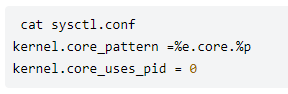
%e: 可执行文件名
%p: 进程的PID
%u: real uid of the process
%g: real gid of the process
%t: the time when the core is dumped
%h: host name
%c: the max size of the core dump file
在上面的设置下,如果一个名为 test的程序产生了core dump, 则他的名字为 test.core.123 (这里假设其pid为 123)
如果在 sysctl.conf里改变了设置,之后要执行 sysctl -p 使之生效。
设置生成压缩的 core文件
首先,创建文件 core_helper:
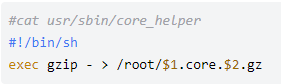
修改 sysctl.conf文件内容:
#cat etc/sysctl.conf
kernel.core_pattern = |/usr/sbin/core_helper %e %p
kernel.core_uses_pid = 0
#cat /proc/sys/kernel/core_pattern
|/usr/sbin/core_helper %e %p
重新执行 sysctl -p 之后,就会生成 test.core.1234.gz 这样的文件。
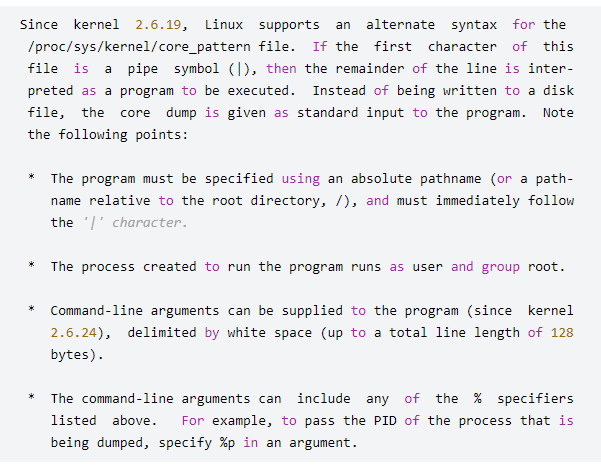
man core 里有对于这个管道符号的解释:
声明:本文内容及配图由入驻作者撰写或者入驻合作网站授权转载。文章观点仅代表作者本人,不代表电子发烧友网立场。文章及其配图仅供工程师学习之用,如有内容侵权或者其他违规问题,请联系本站处理。
举报投诉
-
Linux
+关注
关注
88文章
11628浏览量
217983 -
文件
+关注
关注
1文章
587浏览量
25917 -
虚拟机
+关注
关注
1文章
968浏览量
30178
发布评论请先 登录
相关推荐
热点推荐
如何共享文件给虚拟机中的Linux系统
软件开发时,很多时候会用到 Linux 虚拟机,而办公环境,又离不开 Windows ,导致有些文件需要在两个环境之间来回切换,为了方便文件传输,可以为
发表于 08-22 15:40
•4876次阅读
使用VMware给虚拟机安装linux系统
更改光驱设置,使用ISO映像文件来安装linux系统。3. 开启该虚拟机,相当于打开电脑的电源启动电脑。开启虚拟机的同时,按 Ctrl+G
发表于 07-05 06:09

VMware虚拟机和主机传输文件
open-vm-tools-desktop 重启系统: reboot 此时可以使用 Ctrl+C 、 Ctrl+V 的方式在主机和Linux虚拟机之间传输文件。 虚拟机为Window
linux虚拟机使用教程
。我们会从以下几个方面展开讲述:1. 安装虚拟化软件;2. 创建虚拟机;3. 安装Linux操作系统;4. 配置网络与共享文件夹;5. 基本操作与常用命令。希望通过本文,你能够轻松上手
虚拟机linux怎么编写程序
虚拟机Linux上编写程序,包括设置虚拟机、选择编程工具、创建和编辑代码、编译和运行程序等等。让我们开始吧! 第一部分:设置
怎么安装linux虚拟机
在计算机领域,虚拟机是一种软件程序,它允许在主操作系统上运行多个虚拟操作系统。Linux虚拟机在开发、测试和学习等环境中得到广泛应用。本文将详细介绍如何安装
虚拟机数据恢复—EXT4文件系统下KVM虚拟机数据恢复案例
发行版本中。KVM使用Linux自身的调度器进行管理。
本案例中的服务器操作系统为Linux,文件系统为EXT4。操作系统上的部署的几台KVM虚拟机被删除,每台KVM
服务器数据恢复—KVM虚拟机raw格式磁盘文件数据恢复案例
服务器数据恢复环境:
一台服务器安装Linux操作系统+EXT4文件系统。服务器上运行数台KVM虚拟机,每台虚拟机包含一个qcow2格式的
虚拟机数据恢复—KVM虚拟机被误删除的数据恢复案例
虚拟机数据恢复环境:
Linux操作系统服务器,EXT4文件系统。服务器中有数台KVM虚拟机。
虚拟机1:主数据库服务器










 工商网监
工商网监
评论